
اہم حفاظتی معلومات
Please read all safety and operating instructions carefully before using this VCR. Retain this manual for future reference.
- طاقت کا منبع: Connect the VCR only to the power supply indicated on the label.
- وینٹیلیشن: مناسب وینٹیلیشن کو یقینی بنائیں۔ وینٹیلیشن کے سوراخوں کو مسدود نہ کریں۔
- پانی اور نمی: Do not expose the VCR to rain or moisture. Do not place objects filled with liquids on the VCR.
- صفائی: Unplug the VCR from the wall outlet before cleaning. Use a dry cloth.
- سروسنگ: اس پروڈکٹ کو خود پیش کرنے کی کوشش نہ کریں۔ تمام سروسز کو اہل سروس اہلکاروں کے حوالے کریں۔
پروڈکٹ ختمview
The Sharp VC-A422 is a 4-head VCR designed for reliable playback and recording of VHS tapes. It features a user-friendly interface for easy operation.
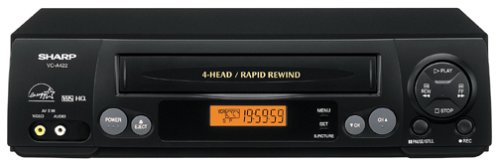
تصویر: سامنے view of the Sharp VC-A422 4-Head VCR, showing the tape slot, display, and control buttons.
سیٹ اپ
1. پیک کھولنا اور جگہ کا تعین کرنا
- Carefully remove the VCR from its packaging.
- Place the VCR on a stable, level surface. Ensure there is adequate space around the unit for ventilation.
- Avoid placing the VCR near heat sources, direct sunlight, or areas with high humidity.
2 ٹیلی ویژن سے جڑنا
To connect your VCR to a television, you will typically use RCA audio/video cables (red, white, yellow) or a coaxial cable.
- RCA Connection (Recommended for best quality):
- Connect the yellow video output jack on the VCR to the yellow video input jack on your TV.
- Connect the white audio output jack on the VCR to the white audio input jack on your TV.
- Connect the red audio output jack on the VCR to the red audio input jack on your TV.
- Select the corresponding AV input on your television (e.g., Video 1, AV1, Input 1).
- سماکشی کنکشن:
- Connect a coaxial cable from the "RF Out" or "Antenna Out" jack on the VCR to the "Antenna In" or "RF In" jack on your TV.
- Connect your antenna or cable TV signal to the "RF In" or "Antenna In" jack on the VCR.
- Tune your television to channel 3 or 4 (depending on the VCR's output setting) to receive the VCR signal.
3. پاور کنکشن
- وی سی آر کی پاور کورڈ کو ایک معیاری الیکٹریکل آؤٹ لیٹ میں لگائیں۔
- The VCR should enter standby mode, indicated by a clock display or power light.
آپریٹنگ ہدایات
1. بنیادی پلے بیک
- Ensure the VCR is powered on and your TV is set to the correct input.
- Insert a VHS tape into the tape slot. The VCR will automatically load the tape.
- دبائیں کھیلیں VCR یا ریموٹ کنٹرول پر بٹن۔
- پلے بیک کو روکنے کے لئے ، دبائیں سٹاپ بٹن
- پلے بیک کو روکنے کے لیے، دبائیں۔ روکیں۔ بٹن دوبارہ شروع کرنے کے لیے دوبارہ دبائیں۔
- تیزی سے آگے یا پیچھے کرنے کے لیے، دبائیں۔ FF (Fast Forward) or REW (Rewind) button. Press کھیلیں عام پلے بیک کو دوبارہ شروع کرنے کے لیے۔
- ٹیپ کو نکالنے کے لیے، دبائیں۔ EJECT بٹن
2. ریکارڈنگ پروگرام
The Sharp VC-A422 allows for recording television programs. Ensure a blank or recordable VHS tape is inserted and its safety tab is intact.
- Tune the VCR to the desired channel using the VCR's tuner.
- دبائیں ریکارڈ بٹن وی سی آر ریکارڈنگ شروع کر دے گا۔
- ریکارڈنگ روکنے کے لیے ، دبائیں۔ سٹاپ بٹن
- For timed recordings, refer to the VCR's on-screen programming guide (if available) or consult the full manual for detailed timer recording instructions.
دیکھ بھال
Proper maintenance ensures the longevity and optimal performance of your VCR.
- بیرونی صفائی: وی سی آر کے بیرونی حصے کو نرم، خشک کپڑے سے صاف کریں۔ مائع کلینر یا کھرچنے والے مواد کا استعمال نہ کریں۔
- سر کی صفائی: If picture quality degrades (e.g., snowy picture, lines), the video heads may be dirty. Use a dry-type VCR head cleaning cassette sparingly. Excessive use can wear down the heads.
- ٹیپ کی دیکھ بھال: Store VHS tapes in their cases, away from dust, direct sunlight, and strong magnetic fields. Avoid exposing tapes to extreme temperatures.
- وینٹیلیشن: Keep the VCR's ventilation slots clear of obstructions to prevent overheating.
خرابی کا سراغ لگانا
If you encounter issues with your Sharp VC-A422 VCR, refer to the following common problems and solutions:
| مسئلہ | ممکنہ وجہ | حل |
|---|---|---|
| کوئی طاقت نہیں۔ | بجلی کی تار ان پلگ پاور آؤٹ لیٹ فعال نہیں ہے۔ | بجلی کی ہڈی کا کنکشن چیک کریں۔ دوسرے آلے کے ساتھ آؤٹ لیٹ کی جانچ کریں۔ |
| کوئی تصویر یا آواز نہیں۔ | غلط ٹی وی ان پٹ کا انتخاب A/V کیبلز ڈھیلی یا غلط طریقے سے جڑی ہوئی ہیں۔ | Select correct TV input (e.g., AV1, Video 1). Ensure A/V cables are securely connected to matching color ports. |
| Snowy or distorted picture | Dirty video heads; poor tape quality; incorrect channel for coaxial connection. | Use a VCR head cleaning cassette. Try a different tape. If using coaxial, ensure TV is on channel 3 or 4. |
| Tape will not eject | Power failure; mechanical issue. | Ensure VCR is powered on. If problem persists, seek professional service. |
| ریکارڈ نہیں کیا جاسکتا | Tape's safety tab removed; VCR not tuned to a channel. | Check if the safety tab on the VHS tape is intact (cover the notch with tape if removed). Ensure VCR tuner is set to the desired channel. |
وضاحتیں
- برانڈ: تیز
- ماڈل: VC-A422
- سربراہان: 4-Head (Video)
- آئٹم کا وزن: 6 پاؤنڈ
- پیکیج کے طول و عرض: 15.55 x 11.02 x 5.24 انچ
- ASIN: B00005LABU
- تاریخ پہلی دستیابی: 4 ستمبر 1999
نوٹ: وضاحتیں بغیر اطلاع کے تبدیل کی جاسکتی ہیں۔
وارنٹی کی معلومات
This Sharp product is covered by a limited warranty. For specific details regarding warranty coverage, duration, and terms, please refer to the warranty card included with your purchase or visit the official Sharp webسائٹ وارنٹی کے دعووں کے لیے اپنی خریداری کا ثبوت رکھیں۔
کسٹمر سپورٹ
For further assistance, technical support, or service inquiries, please contact Sharp customer support. You can find contact information on the official Sharp webسائٹ یا آپ کی مصنوعات کے ساتھ فراہم کردہ دستاویزات میں۔
Visit the official Sharp store for more information: Sharp Official Store
قانونی دستبرداری
کنزیومر الرٹ: اس ٹیلی ویژن ریسیور کے پاس صرف ایک اینالاگ براڈکاسٹ ٹیونر ہے اور اسے 17 فروری 2009 کے بعد ایک کنورٹر باکس کی ضرورت ہوگی تاکہ امریکہ کی ڈیجیٹل براڈکاسٹنگ میں منتقلی کی وجہ سے اینٹینا کے ساتھ اوور دی ایئر نشریات حاصل کی جا سکیں۔ اینالاگ صرف ٹی وی کو کیبل اور سیٹلائٹ ٹی وی سروسز، گیمنگ کنسولز، وی سی آر، ڈی وی ڈی پلیئرز اور اسی طرح کی مصنوعات کے ساتھ پہلے کی طرح کام کرنا جاری رکھنا چاہیے۔ مزید معلومات کے لیے، فیڈرل کمیونیکیشن کمیشن کو 1-888-225-5322 (TTY: 1-888-835-5322) پر کال کریں، یا کمیشن کے ڈیجیٹل ٹیلی ویژن پر جائیں۔ Web سائٹ پر: www.dtv.gov.