
تعارف
This manual provides instructions for the StarTech.com 16 ft USB 2.0 Active Extension Cable (model USB2FAAEXT15). This active USB extension cable is designed to extend the reach of your USB 2.0 devices by an additional 16.4 feet (5 meters), ensuring reliable data transfer and power delivery over longer distances. It features a male USB Type-A connector on one end and a female USB Type-A connector on the other, facilitating easy connection between your host computer and USB peripherals.
مصنوعات کی خصوصیات
- Reliably extends the distance of a USB 2.0 device by an additional 15ft (4.5m).
- Connects printers, scanners, or other USB devices that are beyond the reach of standard USB cables.
- Powered directly from the USB port, eliminating the need for an external power adapter.
- Supports cascading up to 5 active repeater cables to extend the connection distance up to 75ft (22.5m) without loss in transfer speed.
- Maintains signal integrity along the entire cable length, ensuring data transfer rates of up to 480 Mbits/sec.
- Plug-and-play compatible for easy setup.
- Backwards compatible with USB 1.1 devices.
- Works with both PCs and Macs.
پیکیج کے مشمولات
- 1 x StarTech.com 16 ft USB 2.0 Active Extension Cable (USB2FAAEXT15)
سیٹ اپ اور انسٹالیشن
- کنیکٹرز کی شناخت کریں: Locate the male USB Type-A connector and the female USB Type-A connector on the extension cable.
- میزبان سے جڑیں: Plug the male USB Type-A connector of the active extension cable into an available USB port on your computer or host device.
- ڈیوائس کو جوڑیں: Plug the USB Type-A connector of your peripheral device (e.g., printer, scanner, webcam) into the female USB Type-A port of the active extension cable.
- کنکشن کی تصدیق کریں: Your operating system should automatically detect the connected device. No additional drivers are typically required for standard USB devices.
- Cascading (Optional): For extended distances beyond 16.4 feet, you can connect up to five (5) StarTech.com active extension cables in a series. Connect the male end of one cable to the female end of another, and so on, ensuring the final female end connects to your USB device.

Figure 1: StarTech.com 16 ft USB 2.0 Active Extension Cable, coiled, showing both male and female connectors.

Figure 2: Close-up of the male USB Type-A connector of the extension cable, which connects to the host device.
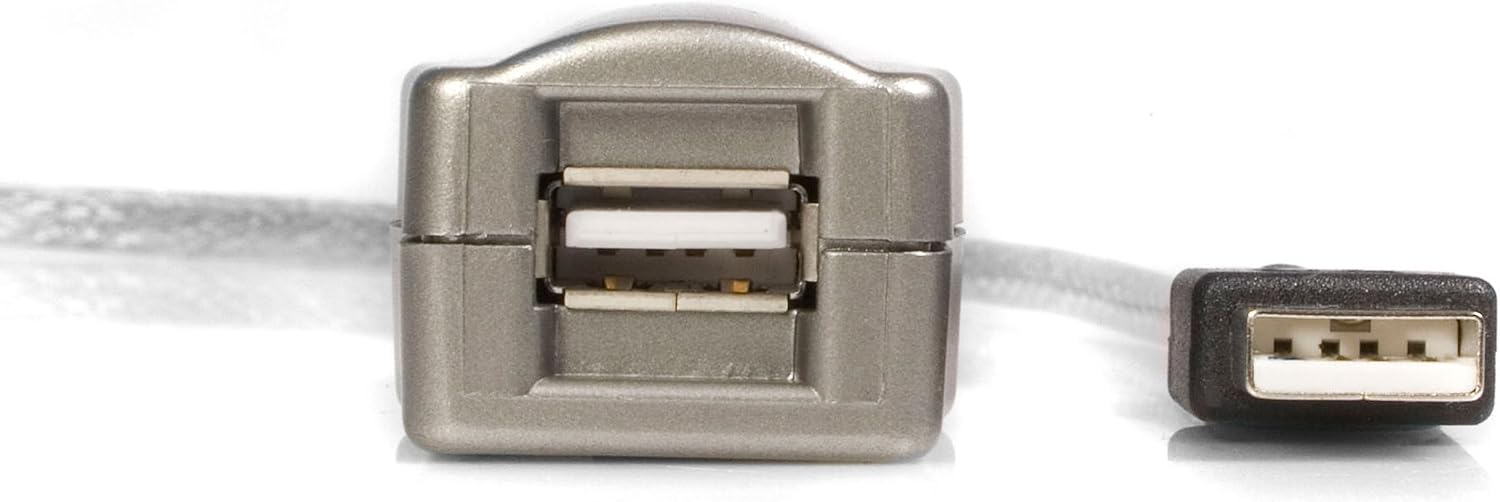
Figure 3: Close-up of the female USB Type-A connector of the extension cable, where the peripheral device connects.
آپریٹنگ ہدایات
Once the cable is properly connected, the active extension cable functions transparently. Your connected USB 2.0 device will operate as if it were directly connected to your computer's USB port. Data transfer and power delivery will be managed by the active circuitry within the cable to maintain signal integrity over the extended distance.
- Ensure all connections are secure to prevent intermittent disconnections.
- The cable is bus-powered, drawing power directly from the host USB port. No external power source is typically required for most USB 2.0 devices.
- The maximum data transfer rate supported is 480 Mbps (USB 2.0 Hi-Speed).
دیکھ بھال
To ensure the longevity and optimal performance of your StarTech.com USB 2.0 Active Extension Cable, follow these simple maintenance guidelines:
- ذخیرہ: When not in use, coil the cable loosely to prevent kinks or damage. Avoid sharp bends.
- صفائی: Use a soft, dry cloth to clean the cable and connectors. Do not use liquid cleaners or solvents.
- ہینڈلنگ: Always grasp the connector ends when plugging or unplugging the cable. Avoid pulling on the cable itself, as this can damage internal wiring.
- ماحولیات: Store and use the cable in a dry environment, away from extreme temperatures and direct sunlight. The cable is rated for both indoor and outdoor usage, but prolonged exposure to harsh outdoor elements should be avoided.
خرابی کا سراغ لگانا
If you encounter issues with your USB 2.0 Active Extension Cable, consider the following troubleshooting steps:
- ڈیوائس کی شناخت نہیں ہوئی:
- Ensure both ends of the extension cable are securely connected.
- Try connecting the USB device directly to the computer's USB port to confirm the device itself is functional.
- Test the extension cable with a different USB device.
- If using multiple cascaded cables, try reducing the number of cables to isolate the issue.
- Connect the male end of the extension cable to a different USB port on your computer.
- سست ڈیٹا کی منتقلی:
- Verify that both the host port and the connected device support USB 2.0 speeds.
- Ensure no other high-bandwidth USB devices are connected to the same USB hub or controller.
- If cascading cables, ensure you are within the recommended limit of 5 cables. Exceeding this limit may degrade performance.
- وقفے وقفے سے رابطہ:
- چیک کریں کہ کیبل یا کنیکٹر کو کوئی جسمانی نقصان پہنچا ہے۔
- Ensure the cable is not excessively bent or strained.
- Avoid electromagnetic interference (EMI) by keeping the cable away from power cords, fluorescent lights, and other sources of electrical noise.
وضاحتیں
| وصف | قدر |
|---|---|
| برانڈ | اسٹار ٹیک ڈاٹ کام |
| ماڈل کا نام | 15 ft USB 2.0 Active Extension Cable - M/F (USB2FAAEXT15) |
| کنیکٹر کی قسم | USB Type A (Male) to USB Type A (Female) |
| کیبل کی قسم | USB 2.0 ایکٹو ایکسٹینشن کیبل |
| کیبل کی لمبائی | 16.4 فٹ (5 میٹر) |
| ڈیٹا کی منتقلی کی شرح | Up to 480 Megabits Per Second (USB 2.0 Hi-Speed) |
| طاقت کا منبع | Bus Powered (no external power adapter required) |
| Cascading Limit | Up to 5 active cables for a total of 75ft (22.5m) |
| ہم آہنگ آلات | Camera, Printer, Scanner, Storage Device, and other USB 2.0 peripherals |
| مطابقت | Backwards compatible with USB 1.1 devices; Works with PCs and Macs |
| رنگ | خلائی گرے |
| بیرونی مواد | پولی وینائل کلورائیڈ |
| مصنوعات کے طول و عرض | 180 x 1.2 x 0.9 انچ |
| شے کا وزن | 5.4 اونس |
| انڈور / آؤٹ ڈور استعمال | انڈور، آؤٹ ڈور |
| یو پی سی | 065030810500 |
وارنٹی اور سپورٹ
This StarTech.com product is backed by a زندگی بھر وارنٹی. For technical support, product information, or warranty claims, please visit the official StarTech.com webسائٹ یا ان کی کسٹمر سروس سے براہ راست رابطہ کریں۔ وارنٹی کی توثیق کے لیے اپنی خریداری کی رسید اپنے پاس رکھیں۔
For additional resources and product details, you may visit the ایمیزون پروڈکٹ پیج.