
1. ختمview
The Canon PowerShot SD450 Digital ELPH camera is a compact digital camera designed for ease of use and high-quality imaging. It features a 5.0-megapixel sensor, a 3x optical zoom lens, and a 2.5-inch LCD display. The camera incorporates Canon's DIGIC II processor for efficient image processing and offers various shooting modes to suit different photographic situations.

شکل 1.1: سامنے view of the Canon PowerShot SD450 Digital ELPH camera with its lens retracted.
2. باکس میں کیا ہے۔
تصدیق کریں کہ درج ذیل تمام اشیاء آپ کے پیکج میں شامل ہیں:
- PowerShot SD450 body
- Lithium battery pack NB-4L
- Battery charger CB-2LV
- 16 MB SD memory card SDC-16M
- Wrist strap WS-600
- ڈیجیٹل کیمرہ حل CD-ROM
- USB interface cable IFC-400PCU
- Audio-video cable AVC-DC300
3. سیٹ اپ
3.1. بیٹری چارج کرنا
- Insert the Lithium battery pack NB-4L into the battery charger CB-2LV.
- چارجر کو پاور آؤٹ لیٹ میں لگائیں۔ چارجنگ انڈیکیٹر لائٹ روشن ہو جائے گی۔
- Once charging is complete, the indicator light will change or turn off. Remove the battery.
3.2. Inserting the Battery and SD Card
- کیمرے کے نچلے حصے میں موجود بیٹری/کارڈ کے کمپارٹمنٹ کور کو کھولیں۔
- Insert the charged battery pack into the compartment, ensuring correct orientation.
- Insert the SD memory card into the card slot until it clicks into place.
- کمپارٹمنٹ کور کو محفوظ طریقے سے بند کریں۔
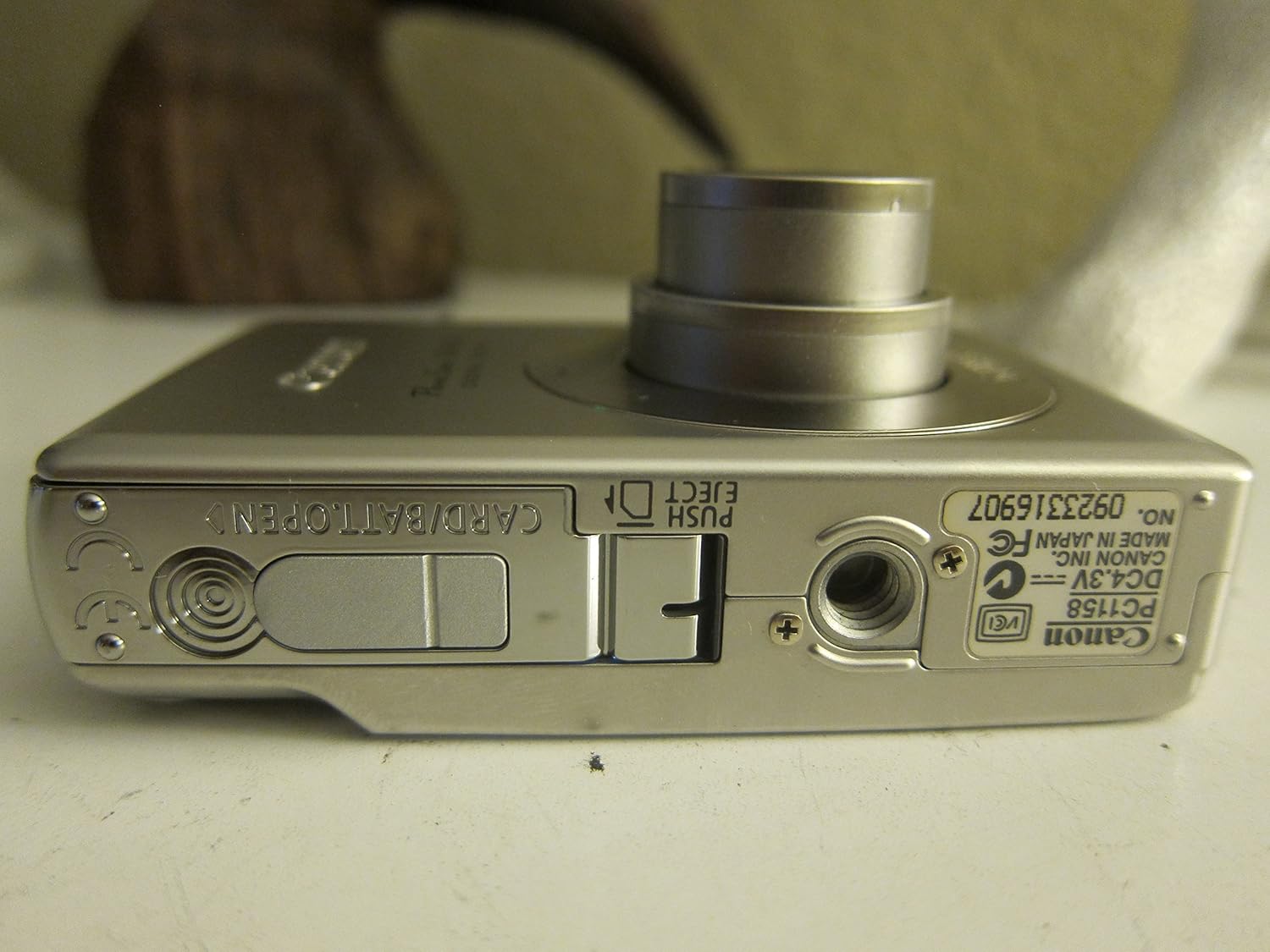
شکل 3.1: نیچے view of the camera, illustrating the battery and SD card compartment.
3.3. ابتدائی پاور آن اور بنیادی سیٹنگز
- دبائیں آن/آف کیمرے پر پاور بٹن۔
- تاریخ، وقت اور زبان سیٹ کرنے کے لیے آن اسکرین پرامپٹس پر عمل کریں۔

تصویر 3.2: اوپر view of the camera, highlighting the power button and shutter release.
4. کیمرہ چلانا
4.1. بنیادی فوٹوگرافی۔
- پاور آن/آف: دبائیں آن/آف بٹن
- تصویر لینا: Press the shutter button halfway to focus, then press fully to capture the image.
- زوم: Use the zoom lever around the shutter button to adjust the 3x optical zoom.

شکل 4.1: سامنے view of the camera with the optical zoom lens extended.
4.2. شوٹنگ کے طریقے
The PowerShot SD450 offers various shooting modes to optimize settings for different scenes. Rotate the mode dial to select:
- آٹو: Camera automatically sets optimal exposure and focus.
- دستی: Allows for more control over settings like white balance and color tones (black and white, sepia, vivid, neutral).
- پورٹریٹ: Blurs the background to emphasize the subject.
- لینڈ سکیپ: Ensures sharp focus on distant subjects.
- Night Snapshot: کم روشنی والے حالات میں شوٹنگ کے لیے۔
- منظر کے طریقوں: Includes specific settings for Kids & Pets, Foliage, Fireworks, Snow, Underwater, Beach, and Indoor.
- میرے رنگ: Apply special effects like Color Swap or Custom Color directly in-camera.
4.3. Focusing and Exposure
- AiAF: The 9-point Artificial Intelligence Auto Focus system automatically focuses on subjects, even if off-center.
- نمائش کنٹرول: Select from Evaluative, Center-weighted, or Spot metering.
- آئی ایس او حساسیت: Adjustable to Auto, 50, 100, 200, or 400 to control light sensitivity.
4.4. ویڈیو ریکارڈنگ۔
The camera can record high-quality movies:
- قراردادیں: VGA (640x480) or QVGA (320x240) at 30 or 15 frames per second.
- Fast Frame Rate Movie Mode: Records at 60 frames per second for slow-motion playback.
- Compact Movie Mode (QQVGA): 160x120 at 15 frames per second, suitable for email sharing.
- Continuous filming is available until the file size reaches 1 GB or 60 minutes.
4.5 پلے بیک اور ریview
دوبارہ کرنا۔view آپ کی تصاویر اور ویڈیوز:
- دبائیں پلے بیک بٹن
- Use the directional pad to navigate through images and videos.
- Intelligent Orientation Sensor: Automatically rotates stored images for correct playback when the camera is rotated.
- Slideshow Functions: Create impressive slideshows with transition effects directly on the camera.

شکل 4.2: پیچھے view of the camera, showing the LCD display during image playback.
4.6. پرنٹنگ امیجز
The PowerShot SD450 supports direct printing:
- PictBridge: Connect directly to PictBridge-compatible printers (e.g., Canon PIXMA printers) for printing without a PC.
- پرنٹ/شیئر بٹن: Simplifies direct printing and image uploading to Windows XP or Mac OS X.
5 دیکھ بھال
5.1. کیمرے کی صفائی
- کیمرے کی باڈی کو صاف کرنے کے لیے نرم، خشک کپڑا استعمال کریں۔
- For the lens and LCD screen, use a lens cleaning cloth and specialized cleaning solution if necessary. Avoid harsh chemicals.
5.2. بیٹری کی دیکھ بھال
- جب استعمال میں نہ ہوں تو بیٹریوں کو ٹھنڈی، خشک جگہ پر اسٹور کریں۔
- بیٹری کی عمر کو طول دینے کے لیے اسے بار بار مکمل طور پر ڈسچارج کرنے سے گریز کریں۔
- Recharge the battery using only the provided Canon charger.
5.3. ذخیرہ
- When storing the camera for extended periods, remove the battery.
- Store the camera in a protective case to prevent dust and scratches.
6 خرابیوں کا سراغ لگانا
| مسئلہ | حل |
|---|---|
| "Memory Error" message appears. |
|
| تصاویر دھندلی ہیں۔ |
|
| Flash is too strong or washes out subjects. |
|
| بیٹری تیزی سے ختم ہو جاتی ہے۔ |
|
| کیمرہ آن نہیں ہوتا ہے۔ |
|
7. وضاحتیں
| برانڈ | کینن |
| ماڈل کا نام | کینن پاور شاٹ SD450 |
| موثر پھر بھی قرارداد | 5 میگا پکسلز |
| آپٹیکل زوم | 3x |
| اسکرین کا سائز | 2.5 انچ |
| تصویری استحکام | ڈیجیٹل، آپٹیکل |
| ISO رینج | آٹو ، 50 ، 100 ، 200 ، 400۔ |
| کم سے کم شٹر سپیڈ | 15 سیکنڈ |
| زیادہ سے زیادہ شٹر سپیڈ | 1/1500 سیکنڈز |
| ویڈیو کیپچر ریزولوشن | SD VGA 480p |
| ویڈیو کیپچر فارمیٹ | AVI |
| File فارمیٹ | جے پی ای جی ، را |
| طول و عرض (L x W x H) | 3.39 x 0.87 x 2.13 انچ |
| شے کا وزن | 5.44 اونس |
| رنگ | چاندی |
| سیلف ٹائمر ہے۔ | جی ہاں |
| پانی کی مزاحمت کی سطح | پانی مزاحم نہیں |
8. وارنٹی اور سپورٹ
For detailed warranty information, please refer to the warranty card included with your product or visit the official Canon website. The camera comes bundled with Canon software (ZoomBrowser EX 5.5, PhotoRecord 2.2, ImageBrowser 5.5, PhotoStitch 3.1, Movie Edit Task) for image management and editing. Purchasers are also eligible for membership to Canon iMAGE Gateway for additional support and services.
For technical support, driver downloads, or service inquiries, please visit the official Canon support website or contact Canon customer service.