
1. تعارف
This manual provides essential instructions for the safe and efficient operation, setup, and maintenance of your Ohaus ES50R ES Industrial Bench Scale. The Ohaus ES50R is designed for industrial weighing applications, offering a capacity of 50 kg (110 lb) with a readability of 20 g (0.05 lb). Please read this manual thoroughly before using the scale to ensure proper functionality and to prevent damage.
2. حفاظتی معلومات
ہمیشہ درج ذیل حفاظتی تدابیر پر عمل کریں:
- اسکیل کو اس کی زیادہ سے زیادہ صلاحیت 50 کلوگرام (110 lb) سے زیادہ اوورلوڈ نہ کریں۔
- Ensure the scale is placed on a stable, level surface to achieve accurate readings.
- Operate the scale only with the specified 120 V power supply.
- پیمانے کو انتہائی درجہ حرارت، نمی، یا براہ راست سورج کی روشنی کے سامنے لانے سے گریز کریں۔
- اسکیل کو پانی یا دیگر مائعات میں نہ ڈوبیں۔
- پیمانے کو صاف اور دھول اور ملبے سے پاک رکھیں۔
- Only qualified personnel should perform repairs or maintenance beyond routine cleaning.
3. پیکیج کے مشمولات
تصدیق کریں کہ پیک کھولنے پر تمام اجزاء موجود ہیں:
- Ohaus ES50R ES Industrial Bench Scale unit
- Power Adapter (for 120 V operation)
- صارف دستی (یہ دستاویز)
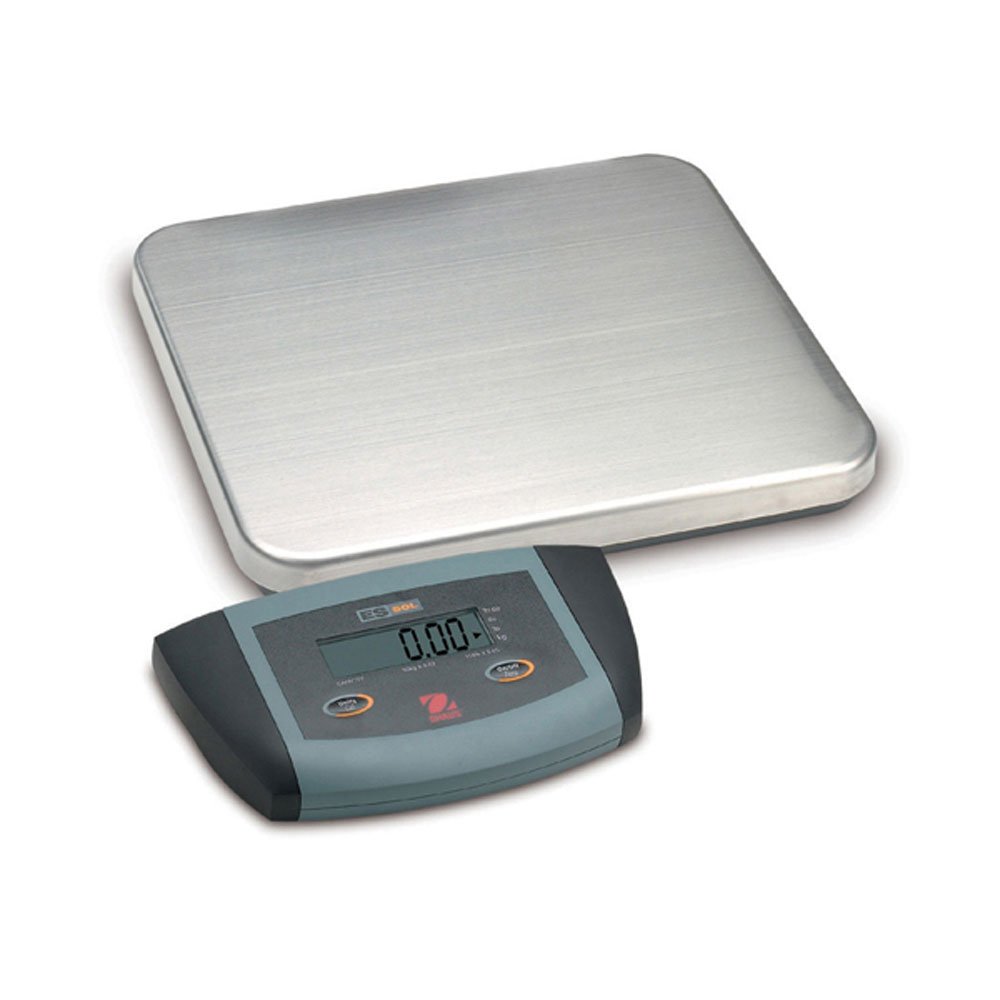
تصویر 1: Ohaus ES50R ES Industrial Bench Scale. This image shows the complete bench scale unit, including the weighing platform and the display unit.
4. سیٹ اپ
- پیک کھولنا: پیکیجنگ سے تمام اجزاء کو احتیاط سے ہٹا دیں۔ مستقبل کی نقل و حمل یا اسٹوریج کے لیے پیکیجنگ کو برقرار رکھیں۔
- جگہ کا تعین: Place the scale on a firm, level, and stable surface, free from vibrations, drafts, and rapid temperature changes. Ensure adequate space around the scale for safe operation.
- پاور کنکشن: Connect the power adapter to the scale's power input port. Plug the adapter into a standard 120 V AC power outlet.
- ابتدائی پاور آن: دبائیں آن/آف button to power on the scale. The display will perform a self-test and then show "0.00" or "0.0".
- لیولنگ: If your scale includes adjustable feet, rotate them until the bubble in the spirit level (if present) is centered.
5. آپریٹنگ ہدایات
5.1 بنیادی وزن
- Ensure the scale is powered on and the display shows "0.00" or "0.0".
- Place the item to be weighed gently in the center of the weighing platform.
- Wait for the display to stabilize. The stable weight reading will be shown on the large LCD display.
- پلیٹ فارم سے آئٹم کو ہٹا دیں۔ ڈسپلے صفر پر واپس آنا چاہیے۔
5.2 ٹیر فنکشن
The tare function allows you to subtract the weight of a container, so only the net weight of the contents is displayed.
- وزنی پلیٹ فارم پر ایک خالی کنٹینر رکھیں۔
- دبائیں پھاڑ دیں button. The display will reset to "0.00" or "0.0", indicating the container's weight has been tared.
- Add the material to be weighed into the container. The display will show the net weight of the material.
- To clear the tare, remove the container from the platform and press the پھاڑ دیں دوبارہ بٹن.
5.3 خصوصی خصوصیات
- آٹو شٹ آف: The scale is equipped with an auto shut-off feature to conserve power. If no activity is detected for a set period, the scale will automatically turn off.
- بڑا ڈسپلے: The LCD display provides clear and easy-to-read weight indications.
- دستی بندش: To manually turn off the scale, press and hold the آن/آف بٹن جب تک ڈسپلے آف نہ ہو جائے۔
6 دیکھ بھال
6.1 صفائی
To maintain accuracy and prolong the life of your scale:
- صفائی سے پہلے اسکیل کو بجلی کی فراہمی سے منقطع کریں۔
- Wipe the scale surfaces with a damp کپڑا اور ایک ہلکا صابن۔
- کھرچنے والے کلینر، سالوینٹس یا سخت کیمیکل استعمال نہ کریں۔
- Ensure no liquid enters the scale's internal components.
- صفائی کے بعد اسکیل کو اچھی طرح خشک کریں۔
6.2 انشانکن
Regular calibration ensures the accuracy of your scale. Refer to the full technical manual or contact Ohaus customer support for detailed calibration procedures. Calibration typically requires certified weights.
7 خرابیوں کا سراغ لگانا
| مسئلہ | ممکنہ وجہ | حل |
|---|---|---|
| اسکیل آن نہیں ہوتا ہے۔ | بجلی کی فراہمی نہیں؛ ناقص پاور اڈاپٹر۔ | Check power connection and outlet. Ensure power adapter is functioning correctly. |
| غلط ریڈنگ۔ | Scale not level; unstable surface; overload; calibration required. | Ensure scale is level and on a stable surface. Do not exceed capacity. Perform calibration if necessary. |
| ڈسپلے "Err" یا ایرر کوڈ دکھاتا ہے۔ | اوورلوڈ اندرونی خرابی. | Remove weight from platform. If error persists, power cycle the scale. If still present, contact customer support. |
| Auto shut-off too soon/not at all. | Auto shut-off settings. | Refer to the full technical manual for adjusting auto shut-off settings, if available. |
8. وضاحتیں
| فیچر | تفصیل |
|---|---|
| ماڈل | ES50R |
| برانڈ | اوہاؤس |
| صلاحیت | 50 کلوگرام / 110 پونڈ |
| پڑھنے کی اہلیت | 20 گرام / 0.05 پونڈ |
| ڈسپلے کی قسم | LCD (Large Display) |
| خصوصی خصوصیات | Auto Shut Off, Manual Shutdown |
| فارم فیکٹر | بینچ اسکیل |
| بجلی کی فراہمی | 120 V AC (via adapter) |
| مصنوعات کے طول و عرض | 15 x 13 x 5.5 انچ |
| شے کا وزن | 9.64 پاؤنڈ |
| کارخانہ دار | کول-پارمر |
9. وارنٹی
The Ohaus ES50R ES Industrial Bench Scale comes with a 1 سال کی وارنٹی from the date of purchase. This warranty covers defects in materials and workmanship under normal use. It does not cover damage resulting from misuse, accident, unauthorized modification, or operation outside the specified environmental and electrical limits. For warranty claims, please retain your proof of purchase and contact Ohaus customer support.
10. کسٹمر سپورٹ
For technical assistance, service, or to inquire about replacement parts, please contact Ohaus customer support. Visit the official Ohaus website for the most up-to-date contact information and additional resources.
نوٹ: Always provide your product model number (ES50R) and serial number (if applicable) when contacting support.