
1. تعارف
This manual provides essential information for the safe and efficient operation of your Sharp Aquos LC42D64U 42-Inch 1080p LCD HDTV. Please read these instructions thoroughly before using your television and retain them for future reference. The Sharp Aquos D64 series offers a slim design, Full HD 1080p resolution, and advanced features for an enhanced viewتجربہ ہے.
2. اہم حفاظتی معلومات
آگ، برقی جھٹکا، اور چوٹ کے خطرے کو کم کرنے کے لیے اس ٹیلی ویژن کا استعمال کرتے وقت ہمیشہ بنیادی حفاظتی احتیاطی تدابیر پر عمل کریں۔
- طاقت کا منبع: Connect the TV only to the power supply indicated on the label.
- وینٹیلیشن: مناسب وینٹیلیشن کو یقینی بنائیں۔ وینٹیلیشن کے سوراخوں کو مسدود نہ کریں۔
- پانی اور نمی: ٹی وی کو بارش یا نمی کے سامنے نہ رکھیں۔ ٹی وی پر مائعات سے بھری اشیاء نہ رکھیں۔
- صفائی: Unplug the TV from the wall outlet before cleaning. Use a soft, dry cloth.
- سروسنگ: اس پروڈکٹ کو خود پیش کرنے کی کوشش نہ کریں۔ تمام سروسز کو اہل سروس اہلکاروں کے حوالے کریں۔
- چڑھنا: If wall-mounting, ensure the mount is compatible and installed by qualified personnel.
- بچے: بچوں کو ٹی وی پر چڑھنے یا اس کے ساتھ کھیلنے سے روکنے کے لیے ان کی نگرانی کریں۔
3. باکس میں کیا ہے۔
سیٹ اپ کے ساتھ آگے بڑھنے سے پہلے تصدیق کریں کہ تمام اجزاء موجود ہیں۔
- Sharp Aquos LC42D64U 42-Inch LCD HDTV
- ریموٹ کنٹرول
- ٹیبل اسٹینڈ
- پاور کی ہڈی
- صارف دستی (یہ دستاویز)
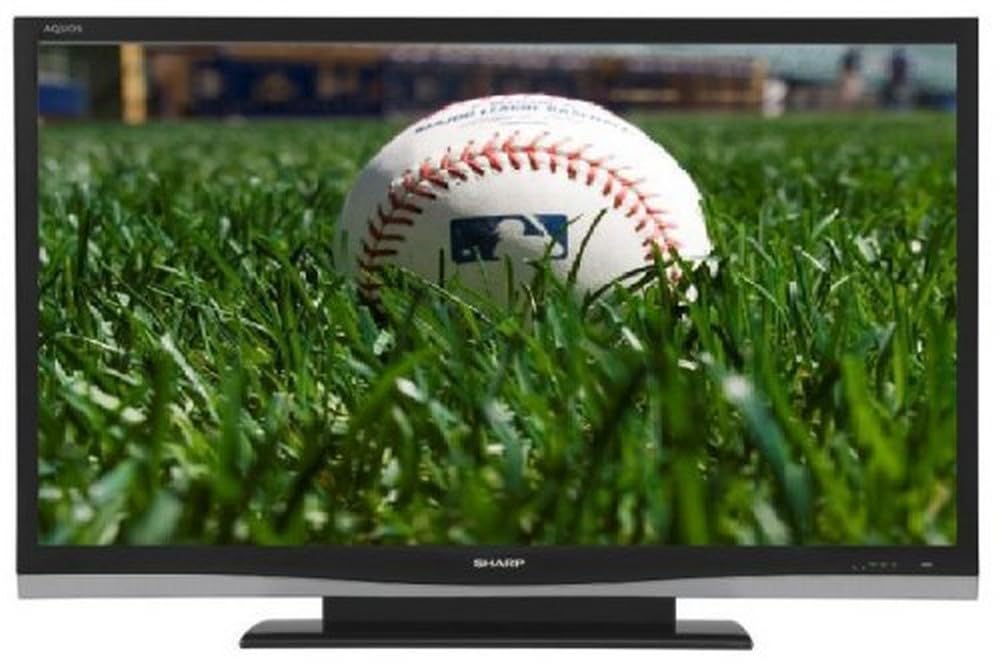
تصویر: سامنے view of the Sharp Aquos LC42D64U 42-Inch LCD HDTV with its included table stand.
4. سیٹ اپ
4.1 ٹیبل اسٹینڈ کو جوڑنا
If you are not wall-mounting the television, attach the included table stand. Refer to the separate assembly guide for detailed instructions on securing the stand to the TV. Ensure all screws are tightened securely.
4.2 بیرونی آلات کو جوڑنا
Connect your external devices (e.g., cable box, Blu-ray player, game console) to the appropriate input terminals on the rear or side of the TV.
- HDMI: For high-definition digital video and audio. The TV features three HDMI 1.3 inputs (two rear, one side).
- Component Video (Y, Pb, Pr): For high-definition analog video. Two inputs are available.
- Composite Video (A/V): For standard-definition analog video and audio. One side and one rear input.
- S-ویڈیو: For standard-definition video. One side and one rear input.
- PC Input (D-Sub 15-pin): مانیٹر کے طور پر استعمال کے لیے کمپیوٹر کو جوڑیں۔
- RF Antenna Inputs: Two inputs for connecting an antenna or cable TV.
- ایتھرنیٹ پورٹ: For network connectivity (DLNA).
4.3 پاور کنکشن
After connecting all desired devices, plug the power cord into the TV's power inlet and then into a wall outlet. The TV will enter standby mode.
5. آپریٹنگ ہدایات
5.1 ابتدائی پاور آن اور چینل سیٹ اپ
- دبائیں پاور button on the remote control or the TV to turn it on.
- The first time you power on, the TV will guide you through the initial setup process, including language selection and channel scanning.
- Select your preferred language (English, Spanish, or French).
- Perform an "Easy Setup" or "Channel Setup" scan to detect available digital (ATSC, QAM) and analog (NTSC) channels.
5.2 Basic Remote Control Functions
- طاقت: Turns the TV on or off (standby).
- ان پٹ: Cycles through available input sources (HDMI, Component, PC, etc.).
- CH +/-: چینلز بدلتے ہیں۔
- VOL +/-: حجم کو ایڈجسٹ کرتا ہے۔
- مینو: Accesses the on-screen menu for settings adjustments.
- تیر کے بٹن: مینو کے اختیارات کے ذریعے تشریف لے جائیں۔
- داخل کریں: انتخاب کی تصدیق کرتا ہے۔
- EXIT/RETURN: مینو سے باہر نکلتا ہے یا پچھلی اسکرین پر واپس آتا ہے۔
5.3 مینو نیویگیشن اور سیٹنگز
دبائیں مینو مختلف ترتیبات کے زمرے تک رسائی کے لیے بٹن:
- تصویر: Adjust brightness, contrast, color, tint, sharpness, and backlight. The OPC function automatically adjusts brightness based on room conditions.
- آڈیو: Control volume, bass, treble, balance, and select audio modes.
- چینل: Rescan channels, add/delete channels, and set up favorite channels.
- سیٹ اپ: General settings like language, time, sleep timer, and parental controls (V-Chip).
- اعلی درجے کی خصوصیات: Access settings for DLNA, Picture-in-Picture, and AQUOS LINK.
6. اعلی درجے کی خصوصیات
6.1 AQUOS LINK (HDMI-CEC)
AQUOS LINK allows convenient control of compatible Sharp devices connected via HDMI using just your AQUOS TV remote. Ensure connected devices also support HDMI-CEC (Consumer Electronics Control) and are enabled in their respective settings.
6.2 DLNA Compatibility
The TV is DLNA-compatible, enabling interoperability with other DLNA-certified electronics, computers, and mobile devices. Connect the TV to your home network via the Ethernet port to access and share digital content (photos, videos, music) from compatible devices on your network.
6.3 تصویر میں تصویر (PIP)
The Picture-in-Picture function allows simultaneous viewing of a TV program and a video or PC source. Consult the on-screen menu for PIP activation and source selection.
6.4 V-Chip System
The V-Chip system allows you to block TV and movie programs based on their rating, providing parental control over objectionable content. Access V-Chip settings through the TV's setup menu.
7 دیکھ بھال
7.1 اسکرین کی صفائی
نرم، لنٹ فری کپڑے سے اسکرین کو آہستہ سے صاف کریں۔ ضدی نشانات کے لیے، ہلکے سے ڈیampur پانی یا ایک خصوصی سکرین کلینر کے ساتھ کپڑے. مت کرو use harsh chemicals, abrasive cleaners, or spray liquids directly onto the screen.
7.2 کابینہ کی صفائی
Wipe the TV cabinet with a soft, dry cloth. Avoid using solvents or abrasive materials.
7.3 عمومی نگہداشت
- بجلی کے طوفان کے دوران یا طویل عرصے تک غیر استعمال ہونے پر ٹی وی کو ان پلگ کریں۔
- ٹی وی کو براہ راست سورج کی روشنی، گرمی کے ذرائع اور ضرورت سے زیادہ دھول سے دور رکھیں۔
- Ensure adequate space around the TV for proper ventilation.
8 خرابیوں کا سراغ لگانا
کسٹمر سپورٹ سے رابطہ کرنے سے پہلے، عام مسائل کے لیے درج ذیل حل آزمائیں:
| مسئلہ | ممکنہ حل |
|---|---|
| کوئی طاقت نہیں۔ | چیک کریں کہ آیا بجلی کی ہڈی محفوظ طریقے سے TV اور وال آؤٹ لیٹ میں لگی ہوئی ہے۔ یقینی بنائیں کہ آؤٹ لیٹ میں طاقت ہے۔ |
| کوئی تصویر نہیں، لیکن آواز موجود ہے۔ | تصدیق کریں کہ صحیح ان پٹ ذریعہ منتخب کیا گیا ہے۔ بیرونی آلات سے کیبل کنکشن چیک کریں۔ |
| کوئی آواز نہیں لیکن تصویر موجود ہے۔ | Check the volume level and mute setting. Ensure audio cables are correctly connected. |
| ریموٹ کنٹرول کام نہیں کر رہا ہے۔ | بیٹریاں تبدیل کریں۔ یقینی بنائیں کہ ریموٹ اور ٹی وی کے IR سینسر کے درمیان کوئی رکاوٹ نہیں ہے۔ |
| "Hotel Mode" issue (as per customer review) | If the TV is stuck in a limited functionality mode, contact Sharp customer support for assistance in disabling "Hotel Mode." This typically requires a specific service menu sequence. |
9. وضاحتیں
| فیچر | تفصیل |
|---|---|
| ماڈل نمبر | LC42D64U |
| اسکرین کا سائز | 42 انچ |
| ڈسپلے ٹیکنالوجی | LCD |
| قرارداد | 1080p (مکمل HD) |
| کنٹراسٹ ریشو | 10,000:1 Dynamic |
| رسپانس ٹائم | 4 ملی سیکنڈز |
| HDMI پورٹس | 3 (2 پیچھے ، 1 رخ) |
| Component Video Inputs | 2 |
| جامع ویڈیو ان پٹس | 3 (1 طرف، 2 پیچھے) |
| S-Video Inputs | 2 (1 طرف، 1 پیچھے) |
| پی سی ان پٹ | 1 (D-Sub 15-pin) |
| ایتھرنیٹ پورٹ | جی ہاں |
| ٹونر کی قسم | ATSC, QAM, NTSC |
| والدین کا کنٹرول | وی چپ |
| وزن | 70.2 پاؤنڈز (تقریباً) |
| ماڈل سال | 2008 |
10. وارنٹی اور سپورٹ
10.1 محدود وارنٹی
This Sharp Aquos LC42D64U television comes with a 1 Year Parts and 1 Year Labor Warranty from the date of original purchase. This warranty covers manufacturing defects in materials and workmanship under normal use. It does not cover damage caused by misuse, accident, modification, or unauthorized repair.
وارنٹی کے دعووں کے لیے براہ کرم اپنی خریداری کا ثبوت اپنے پاس رکھیں۔
10.2 کسٹمر سپورٹ
For technical assistance, troubleshooting beyond this manual, or warranty service, please contact Sharp Customer Support. Refer to the contact information provided with your product documentation or visit the official Sharp webتازہ ترین معاونت کی تفصیلات کے لیے سائٹ۔
When contacting support, please have your model number (LC42D64U) and serial number ready.