
Technics SL-PD807
Technics SL-PD807 MASH 5 Disc CD Player User Manual
Model: SL-PD807
تعارف
خریداری کے لیے آپ کا شکریہasing the Technics SL-PD807 MASH 5 Disc CD Player. This manual provides detailed instructions for the proper setup, operation, and maintenance of your new audio component. Please read this manual thoroughly before using the unit to ensure optimal performance and longevity.
The SL-PD807 features a 5-disc carousel changer, allowing for extended playback without interruption, and incorporates MASH (Multi-stage Noise Shaping) D/A conversion for high-quality audio reproduction.
اہم حفاظتی معلومات
- طاقت کا منبع: Ensure the unit is connected to an AC 120V, 60Hz power supply.
- وینٹیلیشن: وینٹیلیشن کے سوراخوں کو مسدود نہ کریں۔ زیادہ گرمی کو روکنے کے لیے یونٹ کے ارد گرد مناسب ہوا کے بہاؤ کے لیے مناسب جگہ دیں۔
- نمی: یونٹ کو بارش یا نمی کے سامنے نہ رکھیں۔ یونٹ پر مائعات سے بھری اشیاء، جیسے گلدانوں کو نہ رکھیں۔
- صفائی: صفائی سے پہلے یونٹ کو وال آؤٹ لیٹ سے ان پلگ کریں۔ صفائی کے لیے خشک کپڑا استعمال کریں۔
- سروسنگ: خود اس یونٹ کی خدمت کرنے کی کوشش نہ کریں۔ تمام سروسنگ کو اہل سروس اہلکاروں سے رجوع کریں۔
پیکیج کے مشمولات
براہ کرم چیک کریں کہ تمام اشیاء پیکیج میں موجود ہیں:
- Technics SL-PD807 MASH 5 Disc CD Player
- پاور کی ہڈی
- آر سی اے آڈیو کیبلز
Note: A remote control is not included with this unit.
سیٹ اپ
1 پیک کھولنا
Carefully remove the CD player and all accessories from the packaging. Retain the packaging materials for future transport or storage.
2. مقام
Place the CD player on a stable, level surface away from direct sunlight, heat sources, and excessive dust or vibrations. Ensure there is sufficient space around the unit for proper ventilation.

تصویر 1: سامنے والا view of the Technics SL-PD807 CD Player with included RCA cables.
3. رابطے
Connect the CD player to your amplifier or receiver using the supplied RCA audio cables.
- Connect one end of the RCA audio cables (red and white plugs) to the 'LINE OUT' jacks on the rear of the SL-PD807.
- Connect the other end of the RCA audio cables to an available 'CD IN' or 'AUX IN' input on your amplifier/receiver. Match the red plug to the 'R' (right) input and the white plug to the 'L' (left) input.
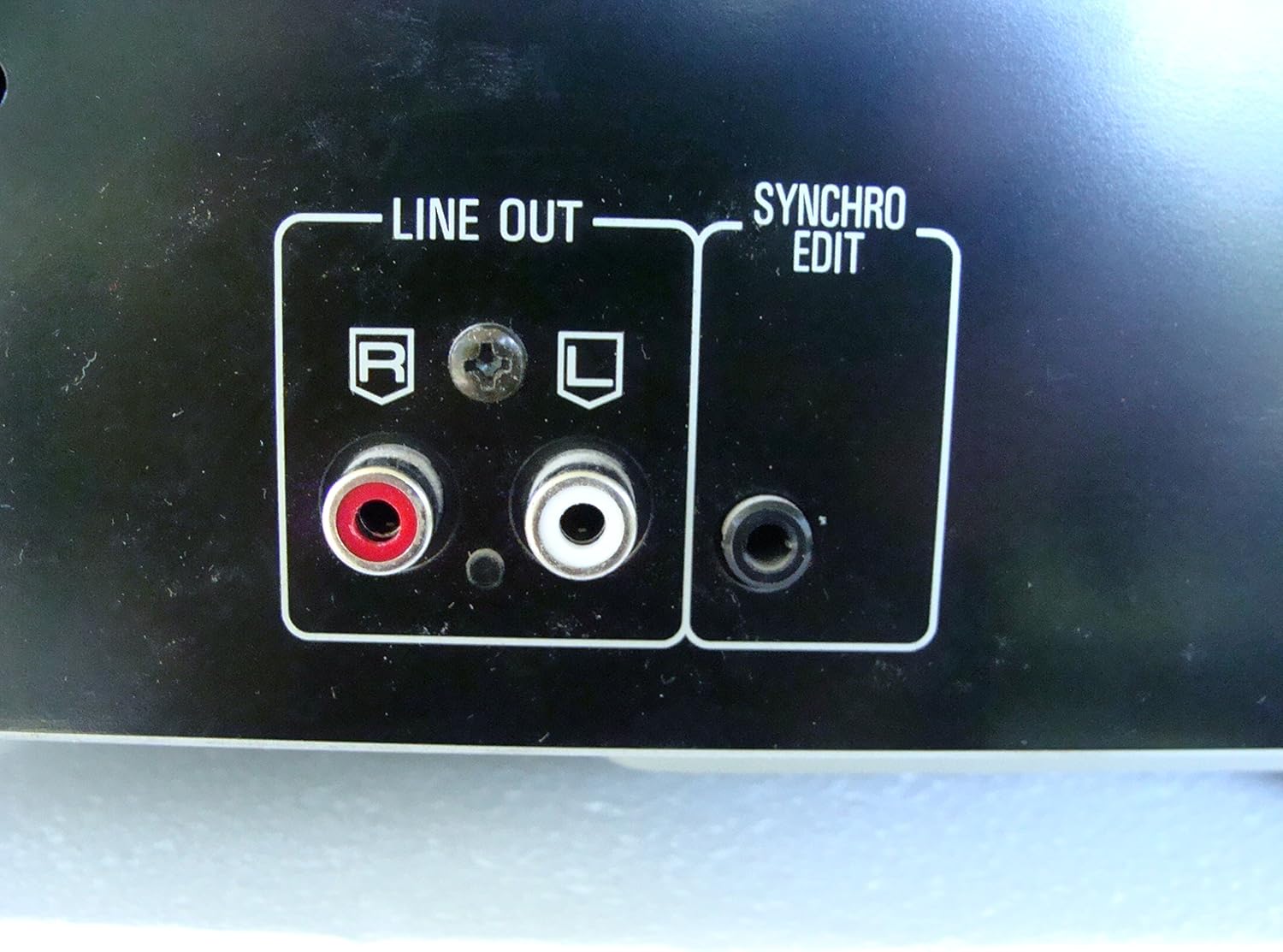
تصویر 2: Rear panel connections, highlighting the 'LINE OUT' (RCA) and 'SYNCHRO EDIT' ports.
- Plug the power cord into the AC inlet on the rear of the CD player, then plug the other end into a standard AC wall outlet.
آپریٹنگ ہدایات
1. پاور آن/آف
دبائیں پاور button located on the front left of the unit to turn the CD player on or off.
2. ڈسکس لوڈ ہو رہی ہے۔
The SL-PD807 features a 5-disc carousel. Press the کھولیں/بند کریں۔ button to open the disc tray. Place up to five CDs onto the numbered disc slots with the label side facing up. Press کھولیں/بند کریں۔ ٹرے کو دوبارہ بند کرنے کے لیے۔

تصویر 3: Front panel controls including disc tray, display, and playback buttons.
3. بنیادی پلے بیک
- کھیلیں: دبائیں کھیلیں پلے بیک شروع کرنے کے لیے بٹن (►)۔
- توقف: دبائیں روکیں۔ button (⏸) to temporarily stop playback. Press again to resume.
- رک: دبائیں سٹاپ پلے بیک کو روکنے کے لیے بٹن (■)۔
- پٹریوں کو چھوڑ دیں: دبائیں SKIP buttons (⏭︎ / ⏮︎) to skip to the next or previous track.
- تلاش کریں: کو دبا کر رکھیں تلاش کریں۔ buttons (⏪︎ / ⏩︎) to fast forward or rewind within a track.
4. Disc Exchange
You can exchange discs while another disc is playing. Press the DISC SKIP button to rotate the carousel to an empty slot or a disc you wish to remove/replace. The currently playing disc will continue to play until you select a new disc to play.
5. پلے بیک موڈز
- بے ترتیب کھیل: دبائیں بے ترتیب button to play tracks on the current disc or all loaded discs in a random order.
- پروگرام پلے: استعمال کریں۔ پروگرام button to create a custom playback sequence of tracks from the loaded discs. Refer to the on-screen display for programming steps.
- دوبارہ کھیلیں: دبائیں دہرائیں۔ button to repeat the current track, current disc, or all discs.
دیکھ بھال
1. یونٹ کی صفائی
یونٹ کے بیرونی حصے کو نرم، خشک کپڑے سے صاف کریں۔ ضدی داغ کے لیے، قدرے ڈیampen the cloth with water and a mild detergent, then wipe dry. Do not use abrasive cleaners, benzene, thinner, or alcohol, as these can damage the finish.

تصویر 4: Top surface of the unit, illustrating areas that may require cleaning or show wear.
2. ڈسک کی دیکھ بھال
- کھیل کی سطح پر فنگر پرنٹس سے بچنے کے لیے ڈسکس کو ان کے کناروں سے ہینڈل کریں۔
- Keep discs clean. Wipe from the center outwards with a soft, lint-free cloth if necessary.
- ڈسکس کو ان کے کیسز میں رکھیں تاکہ انہیں دھول اور خروںچ سے بچایا جا سکے۔
خرابی کا سراغ لگانا
If you experience problems with your CD player, please consult the following table before seeking service.
| مسئلہ | ممکنہ وجہ | حل |
|---|---|---|
| کوئی طاقت نہیں۔ | پاور کی ہڈی محفوظ طریقے سے منسلک نہیں ہے۔ | یونٹ اور وال آؤٹ لیٹ سے بجلی کی ہڈی کا کنکشن چیک کریں۔ |
| کوئی آواز نہیں۔ | RCA audio cables not connected correctly. Amplifier/receiver input not selected. | Ensure RCA cables are securely connected to both the CD player and ampزندہ کرنے والا اپنے پر صحیح ان پٹ کو منتخب کریں۔ ampوصول کنندہ / وصول کنندہ۔ |
| Disc does not play / Skipping | Disc is dirty or scratched. Disc is inserted incorrectly. | Clean the disc with a soft, lint-free cloth. Ensure the disc is placed label-side up in the tray. Try another disc. |
| Carousel does not rotate | Obstruction in the disc tray. | Ensure no foreign objects are obstructing the carousel mechanism. |
وضاحتیں
The following are the technical specifications for the Technics SL-PD807 MASH 5 Disc CD Player:
| فیچر | تفصیلات |
|---|---|
| ماڈل کا نام | SL-PD807 |
| کارخانہ دار | ٹیکنیکس |
| ڈسک کی صلاحیت | 5 ڈسکس |
| بجلی کے تقاضے | AC 120V، 60Hz، 13W |
| پیکیج کے طول و عرض | 17 x 17 x 5 انچ |
| شے کا وزن | 15.02 پاؤنڈ |
| کنیکٹوٹی ٹیکنالوجی | معاون، اورکت |
| خصوصی خصوصیت | اینٹی اسکپ پروٹیکشن |

تصویر 5: Product label displaying model number and power specifications.
وارنٹی اور سپورٹ
For information regarding warranty coverage and customer support for your Technics SL-PD807 CD Player, please refer to the warranty card included with your purchase or visit the official Technics website. If you require further assistance, please contact Technics customer service.
Ask a question about this manual
Ask about setup, troubleshooting, compatibility, parts, safety, or missing instructions. Manuals+ will review the question and use this page’s manual context to help answer it.