
تعارف
The Nokia Bluetooth Stereo Headset BH-905 is designed to provide a superior audio experience with active noise cancellation and wide compatibility. This manual provides instructions for setting up, operating, and maintaining your headset to ensure optimal performance.
The headset features 10 microphones: 8 dedicated to capturing ambient noise for cancellation and 2 for capturing speech in noisy environments. It offers versatile connectivity, supporting both wireless Bluetooth and wired connections with various devices.
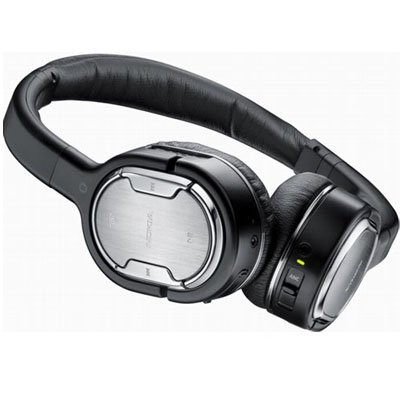
Image: The Nokia Bluetooth Stereo Headset BH-905, showcasing اس کا چیکنا ڈیزائن اور کانوں سے زیادہ کپ۔
کلیدی خصوصیات
- فعال شور منسوخی (ANC): Significantly reduces ambient noise for an immersive listening experience.
- 10 Microphones: Utilizes 8 microphones for noise capture and 2 for clear speech transmission in loud surroundings.
- وسیع مطابقت: Connects wirelessly via Bluetooth or wired to a variety of mobile phones, music players, and other audio devices.
- Seamless Control: Intuitive controls allow for easy switching between music and calls without needing to look at the device.
سیٹ اپ
بلوٹوت جوڑی بنانا
- یقینی بنائیں کہ آپ کا ہیڈسیٹ چارج اور پاور آف ہے۔
- اپنے موبائل ڈیوائس پر بلوٹوتھ کو چالو کریں۔
- Press and hold the power button on the headset until the indicator light flashes blue rapidly, indicating pairing mode.
- On your device, search for Bluetooth devices and select "Nokia BH-905" from the list.
- If prompted, enter the passcode (usually "0000").
- Once paired, the indicator light will turn solid blue or flash slowly.
وائرڈ کنکشن
For devices without Bluetooth or when battery is low, use the provided audio cables. The headset includes plugs for standard audio jacks and airplane adapters for versatile use.
- Connect one end of the audio cable to the headset's audio input port.
- Connect the other end to your audio source (e.g., mobile phone, MP3 player, airplane entertainment system).
آپریٹنگ ہدایات
پاور آن/آف
- پاور آن کرنے کے لیے، پاور بٹن کو دبائیں اور تھامیں جب تک کہ اشارے کی روشنی روشن نہ ہو جائے۔
- پاور آف کرنے کے لیے، پاور بٹن کو دبائے رکھیں جب تک کہ اشارے کی روشنی بند نہ ہوجائے۔
فعال شور منسوخ کرنا (این این سی)
The BH-905 features advanced Active Noise Cancellation technology. With 8 dedicated microphones, it captures ambient low-frequency noise and generates an inverse sound wave, effectively canceling out unwanted sounds. This allows for a clearer audio experience, especially in noisy environments like airplanes or busy streets.
- To activate ANC, locate the ANC switch on the headset and slide it to the 'On' position. A green indicator light will confirm activation.
- To deactivate ANC, slide the switch to the 'Off' position.
کال مینجمنٹ
The headset is equipped with 2 microphones specifically designed for speech. These microphones not only capture your voice clearly but also work to cancel out ambient noise, ensuring that the person you are speaking with hears you, not your surroundings.
- جوابات / اختتامی کالز: Use the dedicated call button on the headset.
- Switching between Music and Calls: The headset allows for seamless transitions between listening to music and taking calls. When a call comes in, your music will pause, and you can answer the call directly from the headset.
میوزک پلے بیک
Control your music directly from the headset using the intuitive buttons. The design supports "blind usage," meaning you can operate the controls by feel without needing to look at them.
- چلائیں/روکیں: Use the play/pause button.
- پٹریوں کو چھوڑ دیں: Use the forward/backward track buttons.
- حجم کنٹرول: وقف شدہ والیوم بٹنوں کا استعمال کرتے ہوئے والیوم کو ایڈجسٹ کریں۔
Video: An official Nokia video demonstrating the features and technology behind the BH-905 headset, including its active noise cancellation and multi-microphone system for clear audio and calls.
دیکھ بھال
- ہیڈسیٹ کو نرم، خشک کپڑے سے باقاعدگی سے صاف کریں۔
- ہیڈسیٹ کو انتہائی درجہ حرارت، نمی یا براہ راست سورج کی روشنی کے سامنے لانے سے گریز کریں۔
- Store the headset in its protective case when not in use to prevent damage.
- ہیڈسیٹ کو الگ کرنے یا اس میں ترمیم کرنے کی کوشش نہ کریں، کیونکہ اس سے وارنٹی ختم ہو جائے گی۔
خرابی کا سراغ لگانا
- کوئی طاقت نہیں: یقینی بنائیں کہ ہیڈسیٹ پوری طرح سے چارج ہے۔
- جوڑا نہیں بن سکتا: Make sure the headset is in pairing mode and within range of your device. Try restarting both devices.
- کوئی آواز نہیں ہے/ آواز کا ناقص معیار: Check volume levels on both the headset and your connected device. For wired connections, ensure cables are securely plugged in. For Bluetooth, ensure a stable connection.
- ANC مؤثر طریقے سے کام نہیں کر رہا: یقینی بنائیں کہ ANC سوئچ 'آن' پوزیشن میں ہے۔
- Callers Cannot Hear Me Clearly: Ensure the headset's microphones are not obstructed.
If issues persist, refer to the Nokia support webمزید مدد کے لیے سائٹ یا کسٹمر سروس سے رابطہ کریں۔
وضاحتیں
| فیچر | تفصیلات |
|---|---|
| برانڈ | نوکیا |
| ماڈل نمبر | 02716J5 |
| فارم فیکٹر | Over-ear (two_ear) |
| شور کنٹرول | فعال شور منسوخی |
| کنیکٹوٹی ٹیکنالوجی | بلوٹوتھ، وائرڈ |
| وائرلیس کمیونیکیشن ٹیکنالوجی | بلوٹوتھ |
| اضافی خصوصیات | Microphone; Stereo |
| کنٹرول کی قسم | میڈیا کنٹرول |
| شے کا وزن | 0.32 پاؤنڈز |
| یو پی سی | 758478021477 |
| جی ٹی آئی این | 758478021477 |
وارنٹی اور سپورٹ
The Nokia Bluetooth Stereo Headset BH-905 comes with a 12 ماہ کی وارنٹی خریداری کی تاریخ سے. یہ وارنٹی عام استعمال کے تحت مینوفیکچرنگ نقائص کا احاطہ کرتی ہے۔ وارنٹی کے دعووں کے لیے براہ کرم اپنی خریداری کا ثبوت اپنے پاس رکھیں۔
For technical support, warranty service, or additional information, please visit the official Nokia support website or contact your local Nokia customer service center.