
تعارف
This manual provides essential information for the safe and efficient operation of your Brookstone iDesign Tower Stereo System. Please read this manual thoroughly before using the product and retain it for future reference.
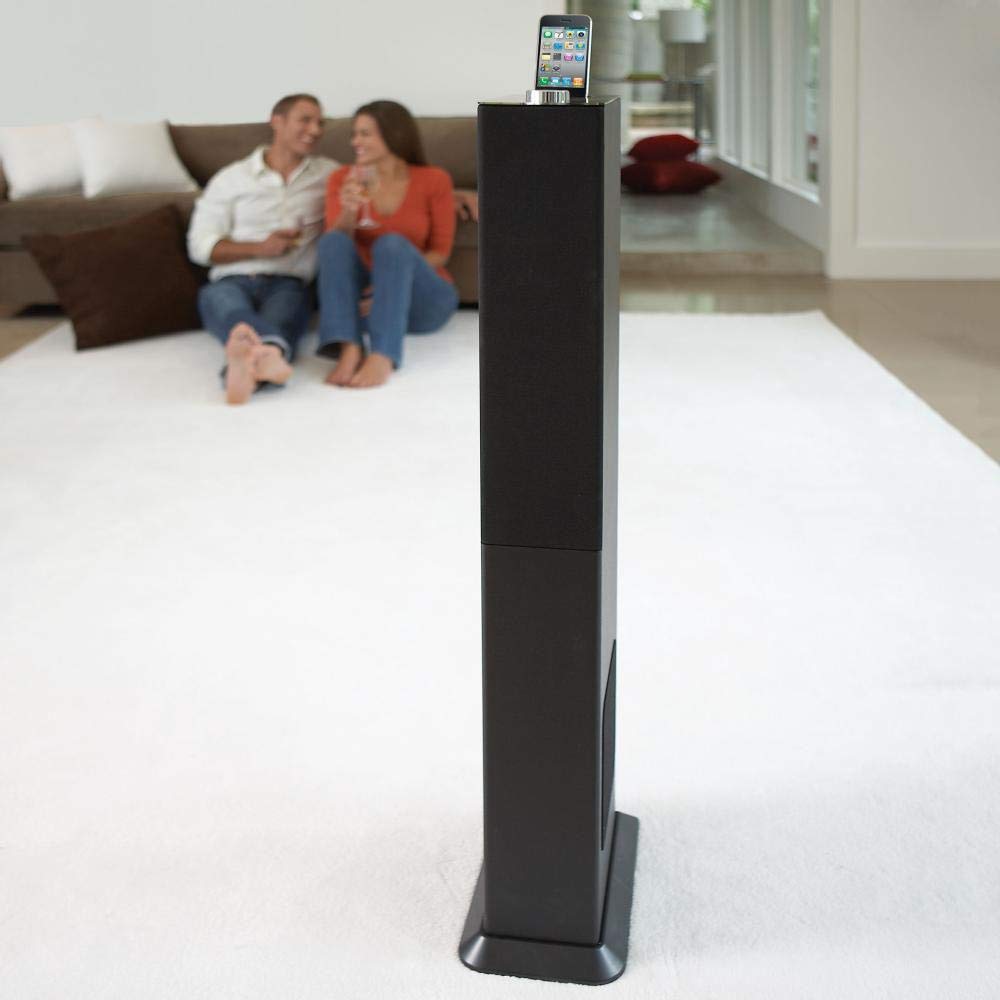
Image: The Brookstone iDesign Tower Stereo System, a tall, slender speaker unit designed for audio playback and device charging.
حفاظتی معلومات
- طاقت کا منبع: صرف مخصوص پاور اڈاپٹر استعمال کریں۔ والیوم کو یقینی بنائیںtage آپ کی مقامی بجلی کی فراہمی سے میل کھاتا ہے۔
- وینٹیلیشن: وینٹیلیشن کے کسی بھی سوراخ کو مسدود نہ کریں۔ کارخانہ دار کی ہدایات کے مطابق انسٹال کریں۔
- پانی اور نمی: اس آلے کو بارش یا نمی سے بے نقاب نہ کریں۔ مائعات سے بھری ہوئی اشیاء، جیسے گلدانوں کو آلات پر نہ رکھیں۔
- حرارت: گرمی کے کسی بھی ذرائع جیسے ریڈی ایٹرز، ہیٹ رجسٹر، چولہے، یا دیگر آلات (بشمول amplifiers) جو گرمی پیدا کرتی ہے۔
- صفائی: صرف خشک کپڑے سے صاف کریں۔
- سروسنگ: تمام سروسز کو اہل سروس اہلکاروں کے حوالے کریں۔ سروس کی ضرورت ہوتی ہے جب آلات کو کسی بھی طرح سے نقصان پہنچا ہو۔
پیکیج کے مشمولات
براہ کرم چیک کریں کہ تمام اشیاء پیکیج میں موجود ہیں:
- iDesign Tower Stereo System
- ریموٹ کنٹرول
- پاور اڈاپٹر
- صارف دستی (یہ دستاویز)
- Note: iPod/iPhone devices are not included.
پروڈکٹ ختمview
The iDesign Tower Stereo System features a sleek design with integrated speakers and a docking station for compatible Apple devices. It includes a backlit on/volume knob and a remote control for convenient operation, delivering full, deep bass, crisp, clear highs, and warm middle tones.
اہم اجزاء:
- سپیکر گرلز: Multi-angled speakers for room-filling sound.
- Docking Port: For iPod and iPhone devices (1st and 2nd generation iPod touch, iPod classic, 4th and 5th generation iPod nano, iPhone 3GS, iPhone 3G, iPhone).
- On/Volume Knob: Backlit control for power and volume adjustment.
- معاون ان پٹ: For connecting other audio devices (cable not included).
- پاور ان پٹ: پاور اڈاپٹر کو جوڑنے کے لیے۔
- ریموٹ کنٹرول سینسر: ریموٹ کنٹرول سے سگنل وصول کرتا ہے۔
سیٹ اپ
1. مقام
Place the iDesign Tower Stereo System on a stable, flat surface. Ensure there is adequate space around the unit for proper ventilation. Avoid placing it in direct sunlight or near heat sources.
2. پاور کنکشن
- Connect the power adapter cable to the Power Input port on the back of the iDesign Tower Stereo System.
- پاور اڈاپٹر کو ایک معیاری وال آؤٹ لیٹ میں لگائیں۔
3. Device Docking (iPod/iPhone)
The system is designed for specific iPod and iPhone models:
- iPod touch (1st and 2nd generation)
- آئی پوڈ کلاسک
- iPod nano (4th and 5th generation)
- آئی فون 3GS
- آئی فون 3G
- آئی فون
Carefully align your compatible iPod or iPhone device with the docking port and gently push it down until it is securely seated. The device will begin charging automatically when docked and the system is powered on.
4. Auxiliary Input (Optional)
To connect other audio devices (e.g., MP3 players, CD players) that are not compatible with the docking port, use a 3.5mm audio cable (not included) to connect the device's headphone output to the Auxiliary Input port on the iDesign Tower Stereo System.
آپریٹنگ ہدایات
1. پاور آن/آف
Press the On/Volume knob to turn the system on or off. The knob will illuminate when the system is powered on.
2. والیوم کنٹرول
Rotate the On/Volume knob clockwise to increase the volume and counter-clockwise to decrease it. You can also adjust the volume using the remote control.
3. ماخذ کا انتخاب
The system automatically detects a docked iPod or iPhone. If an auxiliary device is connected, you may need to select the input source using the remote control (if available) or by cycling through inputs with a dedicated button (refer to remote control section for details).
4. ریموٹ کنٹرول کا استعمال
The included remote control allows you to manage playback functions (play, pause, skip tracks) and volume for your docked iPod or iPhone from a distance. Point the remote control towards the sensor on the front of the tower system.
5. چارجنگ ڈیوائسز
When a compatible iPod or iPhone is docked and the system is powered on, the device will charge automatically.
دیکھ بھال
صفائی
Wipe the exterior of the system with a soft, dry cloth. Do not use liquid cleaners or aerosol sprays, as these may damage the finish or internal components. Ensure the system is unplugged before cleaning.
ذخیرہ
If storing the system for an extended period, unplug it from the power outlet and store it in a cool, dry place, away from direct sunlight and extreme temperatures.
خرابی کا سراغ لگانا
| مسئلہ | ممکنہ وجہ | حل |
|---|---|---|
| کوئی طاقت نہیں۔ | پاور اڈاپٹر منسلک نہیں ہے یا آؤٹ لیٹ کام نہیں کر رہا ہے۔ | Ensure power adapter is securely connected to the system and a working wall outlet. |
| ڈاک شدہ ڈیوائس سے کوئی آواز نہیں ہے۔ | Device not properly docked; volume too low; device not playing. | Re-seat the device in the dock. Increase system volume and device volume. Ensure music is playing on the device. |
| No sound from auxiliary input | Auxiliary cable not connected; incorrect source selected; volume too low. | Ensure auxiliary cable is securely connected. Select auxiliary input. Increase system and source device volume. |
| ریموٹ کنٹرول کام نہیں کر رہا ہے۔ | Batteries dead; remote not pointed at sensor; obstruction. | Replace remote control batteries. Point remote directly at the sensor. Remove any obstructions between remote and system. |
| ڈیوائس چارج نہیں ہو رہی ہے۔ | Device not compatible; system not powered on; device not properly docked. | Verify device compatibility (see Setup section). Ensure system is powered on. Re-seat the device in the dock. |
وضاحتیں
- ماڈل: B003YB9T2C
- برانڈ: بروک اسٹون
- پیکیج کے طول و عرض: 42.6 x 14 x 8.6 انچ
- آئٹم کا وزن: 28.3 پاؤنڈ
- سب سے پہلے دستیاب: 10 مارچ 2010
- مطابقت: iPod touch (1st/2nd gen), iPod classic, iPod nano (4th/5th gen), iPhone 3GS, iPhone 3G, iPhone.
وارنٹی اور سپورٹ
For warranty information and customer support, please refer to the documentation included with your purchase or visit the official Brookstone webسائٹ وارنٹی کے دعووں کے لیے اپنی خریداری کا ثبوت رکھیں۔
"Made for iPod" and "Made for iPhone" mean that an electronic accessory has been designed to connect specifically to iPod or iPhone, respectively, and has been certified by the developer to meet Apple performance standards. Apple is not responsible for the operation of this device or its compliance with safety and regulatory standards. Please note that the use of this accessory with iPod or iPhone may affect wireless performance.