
1. تعارف
This manual provides essential instructions for the safe and efficient operation of your Sharp CD-DH950P 240W Mini-Component System. This system features a 5-disc CD changer, a cassette deck, an iPod/iPhone docking station, a USB host for digital audio playback, and an AM/FM tuner. Please read this manual thoroughly before using the system and retain it for future reference.
2. حفاظتی معلومات
- طاقت کا منبع: یونٹ کو صرف مخصوص والیوم کے AC آؤٹ لیٹ سے جوڑیں۔tage.
- وینٹیلیشن: مناسب وینٹیلیشن کو یقینی بنائیں۔ وینٹیلیشن کے سوراخوں کو مسدود نہ کریں۔
- پانی اور نمی: یونٹ کو بارش، نمی، یا ٹپکنے / چھڑکنے والے مائعات کے سامنے نہ رکھیں۔
- حرارت: یونٹ کو گرمی کے ذرائع جیسے ریڈی ایٹرز، ہیٹ رجسٹر، چولہے، یا گرمی پیدا کرنے والے دیگر آلات سے دور رکھیں۔
- صفائی: Unplug the unit from the wall outlet before cleaning. Use a soft, dry cloth.
- سروسنگ: اس پروڈکٹ کو خود پیش کرنے کی کوشش نہ کریں۔ تمام سروسز کو اہل سروس اہلکاروں کے حوالے کریں۔
3. پیکیج کے مشمولات
تصدیق کریں کہ آپ کے پیکیج میں درج ذیل آئٹمز ہیں:
- Main Unit (CD-DH950P)
- بائیں اسپیکر
- درست اسپیکر
- بیٹریوں کے ساتھ ریموٹ کنٹرول
- AM لوپ اینٹینا
- ایف ایم وائر اینٹینا
- پاور کی ہڈی
4. سیٹ اپ
4.1 اسپیکرز کو جوڑنا
Connect the speaker wires from the main unit to the corresponding terminals on the back of each speaker. Ensure correct polarity (red to red, black to black) for optimal sound quality. The left speaker connects to the left speaker output, and the right speaker to the right speaker output.
4.2 Connecting the Antennas
- ایف ایم اینٹینا: Connect the supplied FM wire antenna to the FM antenna terminal on the rear of the main unit. Extend the wire for better reception.
- AM اینٹینا: Connect the supplied AM loop antenna to the AM antenna terminals on the rear of the main unit. Position the antenna for best reception.
4.3 پاور کنکشن
Plug the power cord into the AC IN jack on the rear of the main unit, then plug the other end into a standard AC wall outlet.
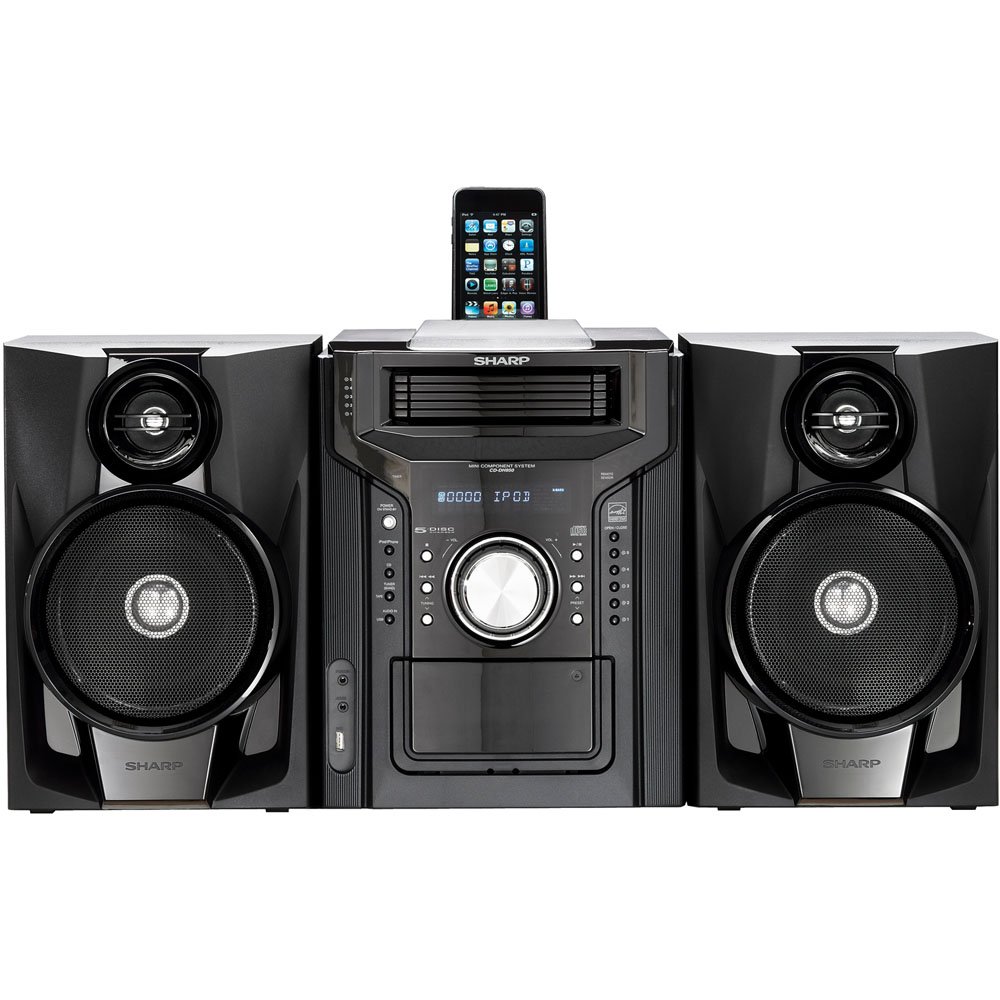
شکل 4.3.1: مجموعی طور پر view of the Sharp CD-DH950P Mini-Component System, showing the main unit flanked by two speakers, with an iPhone docked on top of the main unit.
5. آپریٹنگ ہدایات
5.1 پاور آن/آف اور والیوم کنٹرول
- دبائیں پاور یونٹ کو آن یا آف کرنے کے لیے فرنٹ پینل یا ریموٹ کنٹرول پر بٹن۔
- گھمائیں۔ حجم سامنے والے پینل پر دستک دیں یا استعمال کریں۔ VOL +/- آواز کی سطح کو ایڈجسٹ کرنے کے لیے ریموٹ کنٹرول پر بٹن۔
5.2 سی ڈی پلے بیک
This system features a 5-disc CD changer.
- دبائیں کھولیں/بند کریں۔ سی ڈی ٹرے کھولنے کے لیے بٹن۔
- Place up to five CDs on the disc trays, label side up.
- دبائیں کھولیں/بند کریں۔ ٹرے کو دوبارہ بند کرنے کے لیے۔
- دبائیں CD سی ڈی فنکشن کو منتخب کرنے کے لیے بٹن۔
- دبائیں چلائیں/روکیں۔ پلے بیک شروع کرنے کے لئے بٹن.
- استعمال کریں۔ SKIP buttons to navigate between tracks or discs.
5.3 کیسٹ ڈیک آپریشن
- دبائیں TAPE OPEN/CLOSE button to open the cassette deck.
- ایک کیسٹ ٹیپ ڈالیں۔
- دبائیں ٹیپ button to select the cassette function.
- دبائیں کھیلیں پلے بیک شروع کرنے کے لیے۔
- To record, ensure the source is selected (e.g., CD, Tuner) and press the ریکارڈ کیسٹ ڈیک پر بٹن.
5.4 iPod/iPhone Docking
The system includes a top-mounted docking slot for compatible iPod and iPhone devices (30-pin connector).
- Carefully place your iPod or iPhone into the docking slot.
- The system will automatically switch to iPod/iPhone mode or you may need to press the آئی پوڈ / آئی فون بٹن
- Use the system's controls or your device's controls to play music. The device will also charge while docked.
5.5 USB Host Playback
Connect a USB storage device containing MP3 or WMA audio files to the USB port on the front panel.
- USB آلہ کو USB پورٹ میں داخل کریں۔
- دبائیں یو ایس بی USB فنکشن کو منتخب کرنے کے لیے بٹن۔
- Use the playback controls to navigate and play files.
5.6 AM/FM ٹونر
- دبائیں سواری بنائیں AM یا FM ریڈیو کو منتخب کرنے کے لیے بٹن۔
- استعمال کریں۔ ٹیوننگ +/- اسٹیشن پر دستی طور پر ٹیون کرنے کے لیے بٹن۔
- To auto-scan, press and hold the ٹیوننگ +/- بٹن
- To store a preset, tune to the desired station, then press یادداشت ایک پیش سیٹ نمبر کے بعد.
5.7 آڈیو ان پٹ
Connect an external audio device (e.g., MP3 player, smartphone) to the AUDIO IN jack on the front panel using a 3.5mm stereo cable.
- Connect your device to the AUDIO IN jack.
- دبائیں آڈیو میں اس ذریعہ کو منتخب کرنے کے لئے بٹن.
- اپنے منسلک آلہ سے پلے بیک کو کنٹرول کریں۔
6 دیکھ بھال
6.1 یونٹ کی صفائی
Wipe the exterior of the unit with a soft, dry cloth. Do not use abrasive cleaners, waxes, or solvents. Ensure the unit is unplugged before cleaning.
6.2 سی ڈی اور کیسٹ کیئر
- Handle CDs by their edges to avoid fingerprints and scratches. Clean discs with a soft, lint-free cloth from the center outwards.
- Store cassette tapes away from strong magnetic fields and direct sunlight.
7 خرابیوں کا سراغ لگانا
| مسئلہ | ممکنہ وجہ | حل |
|---|---|---|
| کوئی طاقت نہیں۔ | پاور کی ہڈی منسلک نہیں ہے؛ پاور آؤٹ لیٹ ناقص | یقینی بنائیں کہ بجلی کی تار محفوظ طریقے سے لگائی گئی ہے۔ ایک مختلف آؤٹ لیٹ آزمائیں۔ |
| کوئی آواز نہیں۔ | حجم بہت کم؛ اسپیکر منسلک نہیں ہیں؛ غلط ذریعہ منتخب کیا گیا۔ | حجم میں اضافہ؛ اسپیکر کنکشن چیک کریں؛ صحیح ان پٹ سورس کا انتخاب کریں۔ |
| سی ڈی نہیں چل رہی | Disc inserted incorrectly; Disc is dirty or scratched | Insert disc correctly (label side up); Clean or replace disc |
| ریڈیو کا ناقص استقبال | Antenna not positioned correctly; Weak signal | Adjust position of AM/FM antennas; Try auto-tuning or manual fine-tuning |
| iPod/iPhone not charging/playing | Device not properly docked; Device not compatible (e.g., newer connector) | Re-dock the device; Note that this system uses a 30-pin connector, newer devices may require an adapter (not included) |
8. وضاحتیں
- برانڈ: تیز
- ماڈل: CD-DH950P
- کل آؤٹ پٹ پاور: 240 Watts RMS (85W/ch FTC)
- اسپیکر کی ترتیب: 2.1 چینل
- معاون آڈیو فارمیٹس: CD، MP3، WMA
- اشارے سے شور کا تناسب: 100 ڈی بی
- ہم آہنگ آلات: MP3 Player, Smartphone (via 30-pin dock or USB/Audio In)
- طول و عرض (L x W x H): 27.6 x 13.6 x 13.5 انچ
- آئٹم کا وزن: 24.4 پاؤنڈز
- UPC: 074000369863، 074000369290
9. وارنٹی کی معلومات
This product is covered by a 1-year limited warranty from the date of purchase. Please refer to the warranty card included with your product for full terms and conditions, or contact Sharp customer service for details.
10. سپورٹ
For further assistance, technical support, or service inquiries, please contact Sharp customer service. Contact information can typically be found on the Sharp official webسائٹ یا آپ کی مصنوعات کے ساتھ فراہم کردہ دستاویزات میں۔