
1. تعارف
This manual provides essential information for the safe and efficient operation of your InFocus IN112 Portable DLP Projector. Please read these instructions thoroughly before using the projector and retain them for future reference.
The InFocus IN112 is designed for versatile use, offering high brightness and a strong contrast ratio. It incorporates BrilliantColor technology for clear image reproduction and is 3D-ready. Its compact and lightweight design facilitates easy portability and installation.
2. باکس میں کیا ہے۔
تصدیق کریں کہ نیچے دی گئی تمام اشیاء آپ کے پروڈکٹ کی پیکیجنگ میں شامل ہیں:
- InFocus IN112 پروجیکٹر
- بجلی کی ہڈی
- RGB cable (VGA cable)
- A/V cable (Composite Video cable)
- حفاظتی ہدایات
- صارف دستی (یہ دستاویز)
- ریموٹ کنٹرول
3. پروجیکٹر اوورview

تصویر 1: اوپر View - Displays the control panel with buttons for power, source selection, menu navigation, and keystone adjustment, along with the focus ring for the lens.

شکل 2: طرف View - Shows the ventilation grilles essential for heat dissipation during operation. Ensure these are not obstructed.
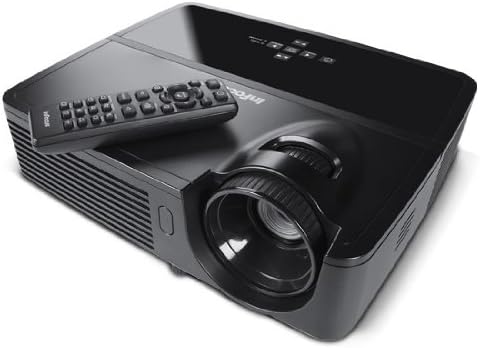
شکل 3: زاویہ دار View ریموٹ کے ساتھ - Illustrates the projector from an angle, highlighting the lens and the included remote control for convenient operation.

شکل 4: پیچھے View - Details the various input and output ports, including power, audio in/out, video, computer (VGA), RS232, and Mini USB.
4. سیٹ اپ
4.1 جگہ کا تعین
Position the projector on a stable, flat surface or mount it securely. Ensure adequate ventilation around the projector to prevent overheating. The distance from the screen will determine the image size. Adjust the projector's position to achieve the desired image size and clarity.
4.2 پاور کنکشن
- Connect the supplied power cord to the projector's power inlet.
- پاور کورڈ کے دوسرے سرے کو گراؤنڈڈ برقی آؤٹ لیٹ میں لگائیں۔
4.3 ان پٹ ذرائع کو جوڑنا
The IN112 projector offers multiple input options:
- VGA (Computer In 1 & 2): Use the RGB cable to connect to a computer's VGA output.
- جامع ویڈیو: Use the A/V cable to connect to devices with composite video output.
- S-ویڈیو: Connect to devices with S-Video output.
- آڈیو میں: 3.5 ملی میٹر سٹیریو کیبل کا استعمال کرتے ہوئے بیرونی آڈیو ذرائع کو مربوط کریں۔
- RS232C: For control and automation systems.
- USB B Mini: For control and firmware updates.
Ensure all cables are securely connected before powering on the projector.
5. آپریٹنگ ہدایات
5.1 پاور آن/آف
- پاور آن کرنے کے لیے، دبائیں۔ طاقت button on the control panel or remote control. The power indicator light will illuminate.
- پاور آف کرنے کے لیے، دبائیں۔ طاقت button again. Confirm shutdown if prompted. Allow the projector to cool down before unplugging.
5.2 تصویری ایڈجسٹمنٹ
- فوکس: فوکس رِنگ کو پروجیکٹر لینس پر گھمائیں جب تک کہ تصویر تیز اور واضح نہ ہو۔
- کلیدی پتھر: استعمال کریں۔ کلیدی پتھر buttons on the control panel or remote to correct trapezoidal image distortion if the projector is not perfectly perpendicular to the screen.
5.3 ماخذ کا انتخاب
دبائیں ماخذ button on the control panel or remote control to cycle through available input sources (VGA1, VGA2, Video, S-Video).
5.4 مینو نیویگیشن
دبائیں مینو/باہر نکلیں۔ button to access the on-screen display (OSD) menu. Use the arrow buttons to navigate and the منتخب کریں۔ or داخل کریں۔ انتخاب کی تصدیق کے لیے بٹن۔ دبائیں مینو/باہر نکلیں۔ again to close the menu.
5.5 اکو موڈ
Activate Eco Mode to extend lamp life and reduce power consumption. This mode is suitable for environments with lower ambient light. The lamp life is approximately 6,000 hours in Eco Mode compared to 5,000 hours in normal mode.
5.6 3D Content Projection
The IN112 is 3D-ready. To project 3D content, you will need compatible 3D source material, a 3D-capable player, and active 3D glasses (sold separately). Refer to your 3D source device's manual for specific setup instructions.
6 دیکھ بھال
6.1 ایلamp متبادل
پروجیکٹر ایل۔amp ایک محدود عمر ہے. جب ایلamp اشارے (Temp/Lamp) illuminates or the image brightness significantly decreases, the lamp may need replacement. The lamp door is conveniently located on the top of the projector for easy access, even when installed.
احتیاط: Ensure the projector is powered off and completely cooled before attempting lamp replacement. Refer to the detailed lamp replacement instructions in the full service manual for safety and proper procedure.
6.2 صفائی
The IN112 projector is designed without filters, eliminating the need for filter cleaning or replacement. Periodically wipe the exterior casing with a soft, dry cloth. For the lens, use a specialized lens cleaning cloth and solution to avoid scratches.
7 خرابیوں کا سراغ لگانا
| مسئلہ | ممکنہ وجہ | حل |
|---|---|---|
| کوئی تصویر نہیں دکھائی گئی۔ | پاور کیبل منقطع، غلط ان پٹ سورس منتخب، سورس ڈیوائس آن نہیں ہے۔ | Check power connections. Press the ماخذ button to select the correct input. Ensure the source device is on. |
| تصویر دھندلی ہے | لینس فوکس سے باہر ہے۔ | پروجیکٹر لینس پر فوکس رنگ کو ایڈجسٹ کریں۔ |
| تصویر trapezoidal ہے۔ | پروجیکٹر اسکرین پر کھڑا نہیں ہے۔ | استعمال کریں۔ کلیدی پتھر buttons to correct the image shape. |
| Colors appear incorrect or dull | Color settings require adjustment. | Access the OSD menu and navigate to image settings to adjust color, brightness, and contrast. |
| پروجیکٹر زیادہ گرم اور بند ہو جاتا ہے۔ | Ventilation obstructed, high ambient temperature. | Ensure clear airflow around the projector. Operate in a well-ventilated area. |
8. وضاحتیں
| فیچر | تفصیل |
|---|---|
| ماڈل نمبر | IN112 |
| ڈسپلے ٹیکنالوجی | DLP with BrilliantColor |
| مقامی قرارداد | ایس وی جی اے (800 x 600) |
| چمک (ANSI Lumens) | 2700 (2200 in Eco Mode) |
| کنٹراسٹ ریشو | 3000:1 |
| Lamp Life (Average) | 5,000 hours (Normal), 6,000 hours (Eco Mode) |
| 3D تیار | جی ہاں |
| کنیکٹوٹی | 2x VGA In, Composite Video, S-Video, 3.5mm Stereo In, RS232C, USB B Mini |
| مصنوعات کے طول و عرض | 13 x 5.5 x 12.5 انچ |
| شے کا وزن | 4.78 پاؤنڈ (2.17 کلوگرام) |
| آپریٹنگ زبان | انگریزی |
9. وارنٹی اور سپورٹ
9.1 پروڈکٹ وارنٹی
The InFocus IN112 projector is backed by a comprehensive warranty:
- 5 سال کی محدود وارنٹی پروجیکٹر پر.
- 2 سال کی مکمل وارنٹی حصوں اور لیبر کو ڈھانپنا۔
- 6 ماہ کی وارنٹی ایل پرamp.
Please retain your proof of purchase for warranty claims. For detailed terms and conditions, refer to the official InFocus warranty documentation or visit the InFocus webسائٹ
9.2 تکنیکی معاونت
For technical assistance, troubleshooting, or service inquiries, please contact InFocus customer support. Contact information can typically be found on the InFocus official webسائٹ یا شامل دستاویزات میں۔
10. Related Product Information (IN130 Series)
The following video provides an overview of features found in the InFocus IN130 Series projectors. While specific models may vary, many core functionalities and design principles are shared across InFocus projector lines, offering general insight into InFocus projector capabilities.
Video: InFocus IN130 Series Overview - This video highlights features such as HDMI + Power for streaming sticks, high brightness, vivid colors, long lamp life, 3D readiness, and various connectivity options. Note: This video is for the IN130 series, but demonstrates general InFocus projector features.