BlackBerry BB 9900 Bold Touch Smartphone User Manual
Model: BB 9900
1. تعارف
This manual provides essential instructions for setting up, operating, and maintaining your BlackBerry BB 9900 Bold Touch smartphone. Please read this guide thoroughly to ensure proper use and to maximize the device's capabilities. The BlackBerry BB 9900 Bold Touch combines a capacitive touchscreen with a full QWERTY keyboard, running on BlackBerry OS 7.
2. پیکیج کے مشمولات
تصدیق کریں کہ آپ کے پیکیج میں درج ذیل آئٹمز ہیں:
BlackBerry BB 9900 Bold Touch Smartphone
ریچارج ایبل بیٹری
وال چارجر
USB کیبل
صارف دستی (یہ دستاویز)
3. آلہ ختمview
Familiarize yourself with the physical features of your BlackBerry BB 9900 Bold Touch.
3.1 محاذ View
تصویر: سامنے view of the BlackBerry BB 9900 Bold Touch, highlighting the 2.8-inch touchscreen and the physical QWERTY keyboard below it. The device also features a trackpad and call/end buttons.
ٹچ اسکرین ڈسپلے: 2.8-inch capacitive display for interactive navigation.
QWERTY کی بورڈ: Full physical keyboard for efficient typing.
Optical Trackpad: For precise navigation and selection.
کال/اینڈ بٹن: Standard telephony controls.
3.2 پیچھے View
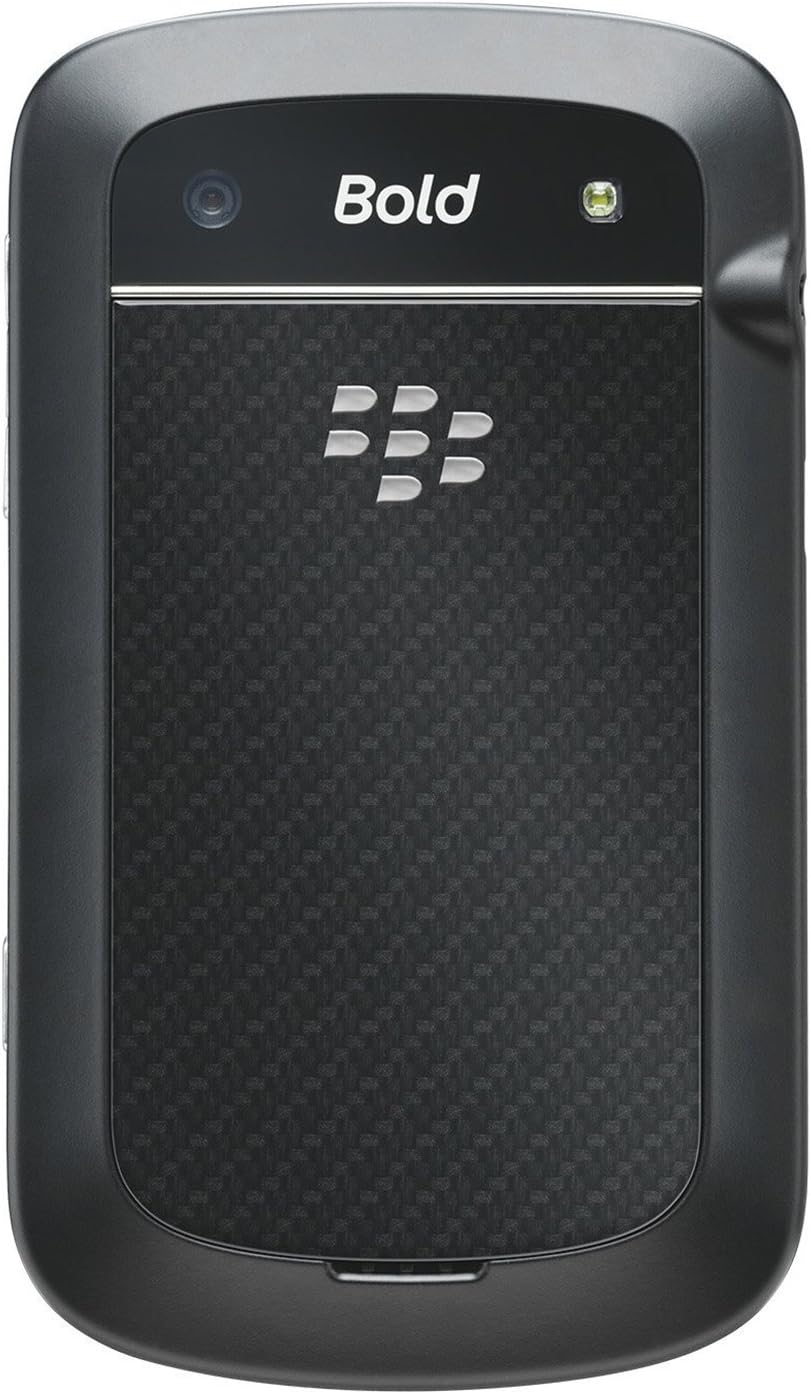
تصویر: پیچھے view of the BlackBerry BB 9900 Bold Touch, featuring the 5-megapixel camera lens, LED flash, and the BlackBerry logo.
5MP کیمرہ: Primary camera with autofocus and LED flash.
بیٹری کور: Removable cover for battery and SIM card access.
3.3 طرف View
تصویر: سائیڈ view of the BlackBerry BB 9900 Bold Touch, illustrating the placement of the volume control buttons and a customizable convenience key.
والیوم بٹن: آڈیو کی سطح کو ایڈجسٹ کریں۔
Convenience Key: Customizable shortcut button.
4. سیٹ اپ
4.1 سم کارڈ داخل کرنا
Remove the battery cover from the back of the device.
سم کارڈ سلاٹ تلاش کریں۔
Insert the SIM card with the gold contacts facing down and the cut corner aligned with the slot.
Ensure the SIM card is securely in place.
4.2 بیٹری ڈالنا
After inserting the SIM card, align the battery's gold contacts with the contacts in the battery compartment.
آہستہ سے بیٹری کو اپنی جگہ پر دبائیں جب تک کہ یہ کلک نہ کرے۔
بیٹری کور کو تبدیل کریں۔
4.3 ڈیوائس کو چارج کرنا
Connect the USB cable to the charging port on your device.
Plug the other end of the USB cable into the wall charger, then into a power outlet.
پہلے استعمال سے پہلے آلہ کو مکمل چارج ہونے دیں۔ اسکرین پر بیٹری کا اشارے چارج ہونے کی حالت دکھائے گا۔
4.4 پاور آن/آف۔
پاور آن کرنے کے لیے: Press and hold the Power/Lock button (usually located on the top edge) until the BlackBerry logo appears.
پاور آف کرنا: Press and hold the Power/Lock button until the 'Power Off' option appears on the screen. Tap 'Power Off' to confirm.
5. آپریٹنگ ہدایات
5.1 ٹچ اسکرین نیویگیشن
تھپتھپائیں: Touch the screen briefly to open applications, select items, or activate buttons.
سوائپ: Drag your finger across the screen to scroll through lists or switch between home screen panels.
چوٹکی سے زوم: Use two fingers to zoom in or out on photos, web pages, or maps.
5.2 Using the QWERTY Keyboard
The physical QWERTY keyboard allows for fast and accurate text entry. Each key corresponds to a letter, number, or symbol. Use the 'Alt' key for alternate characters and the 'Shift' key for capitalization.
5.3 کال کرنا
From the home screen, tap the Phone icon or press the green Call button.
Enter the phone number using the keyboard.
کال شروع کرنے کے لیے سبز کال بٹن دبائیں۔
To end a call, press the red End Call button.
5.4 پیغامات بھیجنا
Tap the Messages icon from the home screen.
Select 'Compose New' or similar option.
وصول کنندہ کا نمبر درج کریں یا رابطوں میں سے منتخب کریں۔
QWERTY کی بورڈ کا استعمال کرتے ہوئے اپنا پیغام ٹائپ کریں۔
Tap 'Send'.
5.5 کیمرہ استعمال کرنا
کیمرہ ایپلیکیشن کھولنے کے لیے کیمرہ آئیکن کو تھپتھپائیں۔
اسکرین کو بطور a کے استعمال کرتے ہوئے اپنے شاٹ کو فریم کریں۔ viewتلاش کرنے والا۔
Tap the screen or press the convenience key (if configured) to take a photo.
The 5MP camera features autofocus and an LED flash for improved image quality.
5.6 وائی فائی سے جڑنا
Go to 'Options' > 'Networks and Connections' > 'Wi-Fi'.
Turn Wi-Fi on. The device will scan for available networks.
اپنے مطلوبہ نیٹ ورک کو منتخب کریں اور اگر اشارہ کیا جائے تو پاس ورڈ درج کریں۔
Once connected, the Wi-Fi indicator will appear in the status bar.
5.7 Using NFC (Near Field Communication)
The BlackBerry BB 9900 Bold Touch supports NFC for short-range wireless communication. This allows for quick pairing with compatible accessories or sharing data with other NFC-enabled devices by tapping them together.
یقینی بنائیں کہ آپ کے آلے کی ترتیبات میں NFC فعال ہے۔
Hold your device close to another NFC-enabled device or tag.
Follow on-screen prompts to complete the desired action (e.g., pairing, data transfer).
6 دیکھ بھال
6.1 اپنے آلے کو صاف کرنا
آلے کی سکرین اور باڈی کو صاف کرنے کے لیے نرم، لنٹ سے پاک کپڑا استعمال کریں۔
سخت کیمیکلز، کھرچنے والے کلینر، یا ایروسول سپرے استعمال کرنے سے گریز کریں۔
آلہ کو ضرورت سے زیادہ نمی کے سامنے نہ رکھیں۔
6.2 بیٹری کی دیکھ بھال
انتہائی درجہ حرارت سے بچیں، جو بیٹری کی کارکردگی کو کم کر سکتا ہے۔
Use only the original or approved charger.
بیٹری کو پنکچر یا نقصان نہ پہنچائیں۔
6.3 سافٹ ویئر اپ ڈیٹس
Periodically check for software updates to ensure your device has the latest features and security enhancements. Updates can typically be found in the device's 'Options' or 'Settings' menu under 'Software Updates'.
7 خرابیوں کا سراغ لگانا
7.1 ڈیوائس آن نہیں ہو رہی ہے۔
یقینی بنائیں کہ بیٹری مناسب طریقے سے داخل اور چارج کی گئی ہے۔
Connect the device to the charger and wait a few minutes before attempting to power on again.
If the issue persists, try removing and reinserting the battery.
7.2 نیٹ ورک کنیکٹیویٹی کے مسائل
Check if your SIM card is correctly inserted and activated with your carrier.
Verify that cellular data or Wi-Fi is enabled in your device settings.
ڈیوائس کو دوبارہ شروع کریں۔
If using Wi-Fi, ensure your router is working and you have entered the correct password.
7.3 ٹچ اسکرین غیر جوابدہ
ڈیوائس کو دوبارہ شروع کریں۔
یقینی بنائیں کہ اسکرین صاف اور ملبے یا نمی سے پاک ہے۔
If the issue is intermittent, check for any recent software installations that might be causing conflicts.
8. وضاحتیں
فیچر
تفصیل
ماڈل کا نام
بی بی 9900
آپریٹنگ سسٹم
بلیک بیری OS 7
ڈسپلے
2.8-inch Capacitive Touchscreen, 640 x 480 Resolution
پروسیسر
Not specified (typically 1.2 GHz for this model)
رام
768 MB
اندرونی اسٹوریج
8 جی بی
پیچھے والا کیمرہ
5 MP, Autofocus, LED Flash
کنیکٹوٹی
Wi-Fi 802.11 b/g/n, NFC, Bluetooth, GPS
نیٹ ورک سپورٹ
Quad-band GSM/GPRS/EDGE, Tri-band HSPA+
طول و عرض
4.53 x 2.6 x 0.41 انچ (115 x 66 x 10.5 ملی میٹر)
وزن
4.6 اونس (130 گرام)
آڈیو جیک
3.5 ملی میٹر
9. سپورٹ اور وارنٹی۔
9.1 کسٹمر سپورٹ
For technical assistance, troubleshooting beyond this manual, or service inquiries, please visit the official BlackBerry support website or contact your local service provider. Refer to the packaging or official webمخصوص رابطے کی تفصیلات کے لیے سائٹ۔
9.2 وارنٹی کی معلومات
Your BlackBerry BB 9900 Bold Touch is covered by a limited warranty. Please refer to the warranty card included in your product packaging or visit the official BlackBerry webتفصیلی شرائط و ضوابط کے لیے سائٹ، بشمول وارنٹی مدت اور کوریج کی تفصیلات۔ وارنٹی کے دعووں کے لیے اپنی خریداری کا ثبوت رکھیں۔
Ask a question about this manual
Ask about setup, troubleshooting, compatibility, parts, safety, or missing instructions. Manuals+ will review the question and use this page’s manual context to help answer it.