
1. تعارف
This manual provides essential information for the safe and efficient operation of your Datalogic PowerScan M8300-AR910RB Handheld Laser Bar Code Reader. Please read this manual thoroughly before using the device to ensure proper setup, operation, and maintenance. Keep this manual for future reference.
2. حفاظتی معلومات
آلے کو چوٹ یا نقصان سے بچنے کے لیے ہمیشہ درج ذیل حفاظتی تدابیر پر عمل کریں:
- لیزر سیفٹی: This device emits a laser beam. Do not stare directly into the laser beam or point it at others. Avoid direct eye exposure.
- بیٹری کی حفاظت: Use only Datalogic-approved batteries and charging accessories. Do not expose batteries to extreme temperatures, puncture, or disassemble them. Dispose of batteries according to local regulations.
- ماحولیاتی حالات: Do not operate the device in explosive atmospheres or near flammable materials. Keep the device dry and away from extreme temperatures.
- دیکھ بھال: Refer all servicing to qualified service personnel. Do not attempt to open or modify the device.
3. پیکیج کے مشمولات
تصدیق کریں کہ تمام اشیاء پیکیج میں موجود ہیں:
- Datalogic PowerScan M8300-AR910RB Handheld Laser Bar Code Reader
- ہٹنے والی بیٹری
- Charging/Communication Cradle (may be sold separately depending on configuration)
- USB or Serial Cable (for cradle connection, may be sold separately)
- Power Supply (for cradle, may be sold separately)
- کوئیک اسٹارٹ گائیڈ
4. پروڈکٹ ختمview
The Datalogic PowerScan M8300 is a robust, cordless handheld laser bar code reader designed for industrial applications. It features a durable casing and a 910MHz radio for reliable wireless communication.
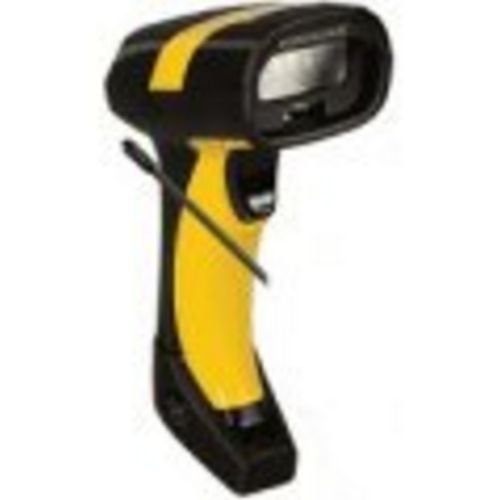
تصویر 1: Datalogic PowerScan M8300 Handheld Laser Bar Code Reader. This image displays the front view of the scanner, highlighting its ergonomic design, scan window, and trigger button.
کلیدی اجزاء:
- اسکین ونڈو: Located at the front, where the laser beam exits to read barcodes.
- محرک: Activates the laser for scanning.
- اشارے کی روشنی: Provide feedback on scan status, battery level, and communication.
- بیٹری ٹوکری: Located at the base of the handle, housing the removable battery.
- مواصلاتی انٹرفیس: For wireless data transmission via the 910MHz radio.
5. سیٹ اپ
5.1. بیٹری کی تنصیب
- یقینی بنائیں کہ سکینر بند ہے۔
- Locate the battery compartment cover at the bottom of the handle.
- Open the cover and insert the removable battery, ensuring correct polarity.
- بیٹری کے کمپارٹمنٹ کور کو محفوظ طریقے سے بند کریں۔
5.2. بیٹری چارج کرنا
- Place the scanner into its charging cradle. Ensure the contacts on the scanner align with those on the cradle.
- Connect the power supply to the charging cradle and plug it into an electrical outlet.
- The scanner's indicator light will show charging status (typically amber for charging, green for fully charged).
- Allow the battery to fully charge before first use (approximately 4 hours).
5.3. Connecting to a Host System
The PowerScan M8300 uses a 910MHz radio for wireless communication. It typically connects to a host system (e.g., PC, laptop) via a base station or cradle connected by a USB or serial cable.
- Connect the communication cable (USB or serial) from the charging/communication cradle to your host system.
- Connect the power supply to the cradle and plug it in.
- Place the scanner in the cradle. The scanner and cradle will automatically establish a wireless link.
- Install any necessary drivers or software on your host system as prompted or as instructed by Datalogic documentation for your specific cradle model.
6. آپریٹنگ ہدایات
6.1. پر / آف پاور
- پاور آن کرنے کے لیے: The scanner typically powers on automatically when removed from the cradle or when the trigger is pressed.
- پاور آف کرنا: The scanner will enter a low-power sleep mode after a period of inactivity. To fully power off, remove the battery.
6.2. بارکوڈز کو اسکین کرنا
- Aim the scan window at the barcode you wish to read.
- Press and hold the trigger button. A laser line will appear.
- Position the laser line across the entire barcode.
- Once the barcode is successfully read, the scanner will emit an audible beep and/or an indicator light will illuminate.
- Release the trigger. The scanned data will be transmitted to the connected host system.
6.3. ڈیٹا ٹرانسمیشن
The PowerScan M8300 transmits scanned data wirelessly to its paired base station/cradle. Ensure the scanner is within range of its base station for successful data transfer. Out-of-range scanning capabilities may vary by configuration; refer to advanced programming guides for details.
7 دیکھ بھال
7.1. آلہ صاف کرنا
- نرم، صاف کپڑا استعمال کریں۔ampپانی یا ہلکے صفائی کے حل کے ساتھ ختم کریں۔
- کھرچنے والے کلینر، سالوینٹس یا سخت کیمیکل استعمال نہ کریں۔
- اسکین ونڈو اور اسکینر کے بیرونی حصے کو آہستہ سے صاف کریں۔
- اس بات کو یقینی بنائیں کہ آلہ کے سوراخوں میں کوئی مائع داخل نہ ہو۔
7.2. بیٹری کی دیکھ بھال
- بیٹری کو باقاعدگی سے چارج کریں۔
- بیٹری کو بار بار مکمل طور پر خارج کرنے سے گریز کریں۔
- Store the scanner and spare batteries in a cool, dry place when not in use.
7.3. ذخیرہ
When storing the scanner for extended periods, ensure the battery is partially charged (around 50%) and remove it from the device if possible. Store in a temperature-controlled environment.
8 خرابیوں کا سراغ لگانا
If you encounter issues with your PowerScan M8300, refer to the following common problems and solutions:
| مسئلہ | ممکنہ وجہ | حل |
|---|---|---|
| سکینر آن نہیں ہوتا ہے۔ | مردہ یا غلط طریقے سے نصب بیٹری۔ | Check battery installation. Charge the battery. Replace battery if necessary. |
| سکینر بارکوڈ نہیں پڑھتا۔ | Barcode damaged or poorly printed; scan window dirty; incorrect symbology enabled. | Try scanning a different barcode. Clean the scan window. Refer to the programming guide to enable/disable symbologies. |
| میزبان کو کوئی ڈیٹا منتقل نہیں کیا گیا۔ | Scanner out of range; base station not connected; communication issue. | Move scanner closer to the base station. Verify base station connection to host. Check base station power. |
| بیٹری کی زندگی مختصر ہے۔ | Battery nearing end of life; frequent use; improper charging. | Replace battery. Ensure full charges. Reduce backlight/power settings if configurable. |
If the problem persists, contact Datalogic technical support.
9. وضاحتیں
The following specifications apply to the Datalogic PowerScan M8300-AR910RB model:
- ماڈل نمبر: PM8300-AR910RB
- مصنوعات کے طول و عرض: 2.72 x 4.49 x 8.15 انچ
- آئٹم کا وزن: 13.9 اونس
- مینوفیکچرر: Datalogic ADC
- طاقت کا منبع: بیٹری سے چلنے والا
- کنیکٹوٹی ٹیکنالوجی: وائرلیس (910MHz)
- ہم آہنگ آلات: ڈیسک ٹاپ، لیپ ٹاپ
- UPC: 053926383351
10. وارنٹی کی معلومات
Datalogic products are covered by a limited warranty against defects in materials and workmanship. The specific terms and duration of the warranty may vary by region and product. Please refer to the warranty card included with your product or visit the official Datalogic webتفصیلی وارنٹی معلومات اور رجسٹریشن کے طریقہ کار کے لیے سائٹ۔
11. سپورٹ
For technical assistance, product inquiries, or to report issues, please contact Datalogic customer support:
- Webسائٹ: Visit the official Datalogic webمعاون وسائل، عمومی سوالنامہ، اور ڈرائیور ڈاؤن لوڈز کے لیے سائٹ۔
- رابطہ: Refer to the 'Contact Us' section on the Datalogic webآپ کے علاقے کے لیے مخصوص فون نمبرز اور ای میل پتوں کے لیے سائٹ۔
When contacting support, please have your product model number (PM8300-AR910RB) and serial number ready.