
1. اہم حفاظتی معلومات
Please read this entire manual before assembling or operating your ZIPRO One S exercise bike. Retain this manual for future reference. Failure to follow these instructions can result in injury or damage to the product.
- ورزش کا کوئی بھی پروگرام شروع کرنے سے پہلے اپنے معالج سے مشورہ کریں، خاص طور پر اگر آپ کی صحت کے پہلے سے موجود حالات ہوں۔
- The maximum user weight for this device is 110 kg (242 lbs).
- Ensure all bolts, nuts, and connections are securely tightened before each use.
- ورزش کی موٹر سائیکل کو فلیٹ، مستحکم سطح پر رکھیں۔ اگر ضروری ہو تو حفاظتی چٹائی کا استعمال کریں۔
- آپریشن کے دوران بچوں اور پالتو جانوروں کو آلات سے دور رکھیں۔
- مناسب ورزشی لباس اور جوتے پہنیں۔ ڈھیلے لباس سے پرہیز کریں جو حرکت پذیر حصوں میں پھنس سکتے ہیں۔
- اگر آپ بیہوش، چکر آتے ہیں یا درد محسوس کرتے ہیں تو فوری طور پر ورزش کرنا بند کریں۔
- یہ پروڈکٹ صرف اندرونی استعمال کے لیے ڈیزائن کیا گیا ہے۔
2. پروڈکٹ ختمview
The ZIPRO One S is a compact exercise bike designed for home cardio training. It features 8 levels of magnetic resistance, an LCD display for tracking workout metrics, and an adjustable saddle for user comfort.

تصویر 2.1: سامنے view of the ZIPRO One S Exercise Bike.

Image 2.2: The ZIPRO One S Exercise Bike highlighting its compact dimensions (897mm length, 435mm width, 1100mm height) and key features such as modern design, silent operation, practical adjustment, and compact size.
3. اسمبلی کی ہدایات
Assembly typically takes 30-40 minutes. All necessary tools are included. Follow these steps carefully.
- ان پیک اجزاء: Carefully remove all parts from the packaging and lay them out. Check against the parts list (refer to included diagram in the box) to ensure all components are present.
- سٹیبلائزر منسلک کریں: Secure the front and rear stabilizer bars to the main frame using the provided bolts and washers. Ensure they are firmly attached for stability.
- پیڈل انسٹال کریں: Identify the left (L) and right (R) pedals. Thread the left pedal counter-clockwise and the right pedal clockwise into their respective crank arms. Tighten securely with a wrench. Ensure the pedal straps are correctly oriented.

تصویر 3.1: کلوز اپ view of the pedal with an adjustable strap, ensuring proper foot positioning during exercise.
- Assemble Seat Post and Saddle: Insert the seat post into the main frame. Adjust the height to your preference and secure it with the adjustment knob. Attach the saddle to the seat post.

تصویر 3.2: تفصیلی view of the saddle and its adjustment mechanism, allowing users to customize seat height for optimal comfort.
- Install Handlebars and Console: Attach the handlebar post to the main frame. Connect any necessary sensor cables from the main frame to the console. Mount the console onto the handlebar post and secure it. Insert 2 AAA batteries (included) into the console.
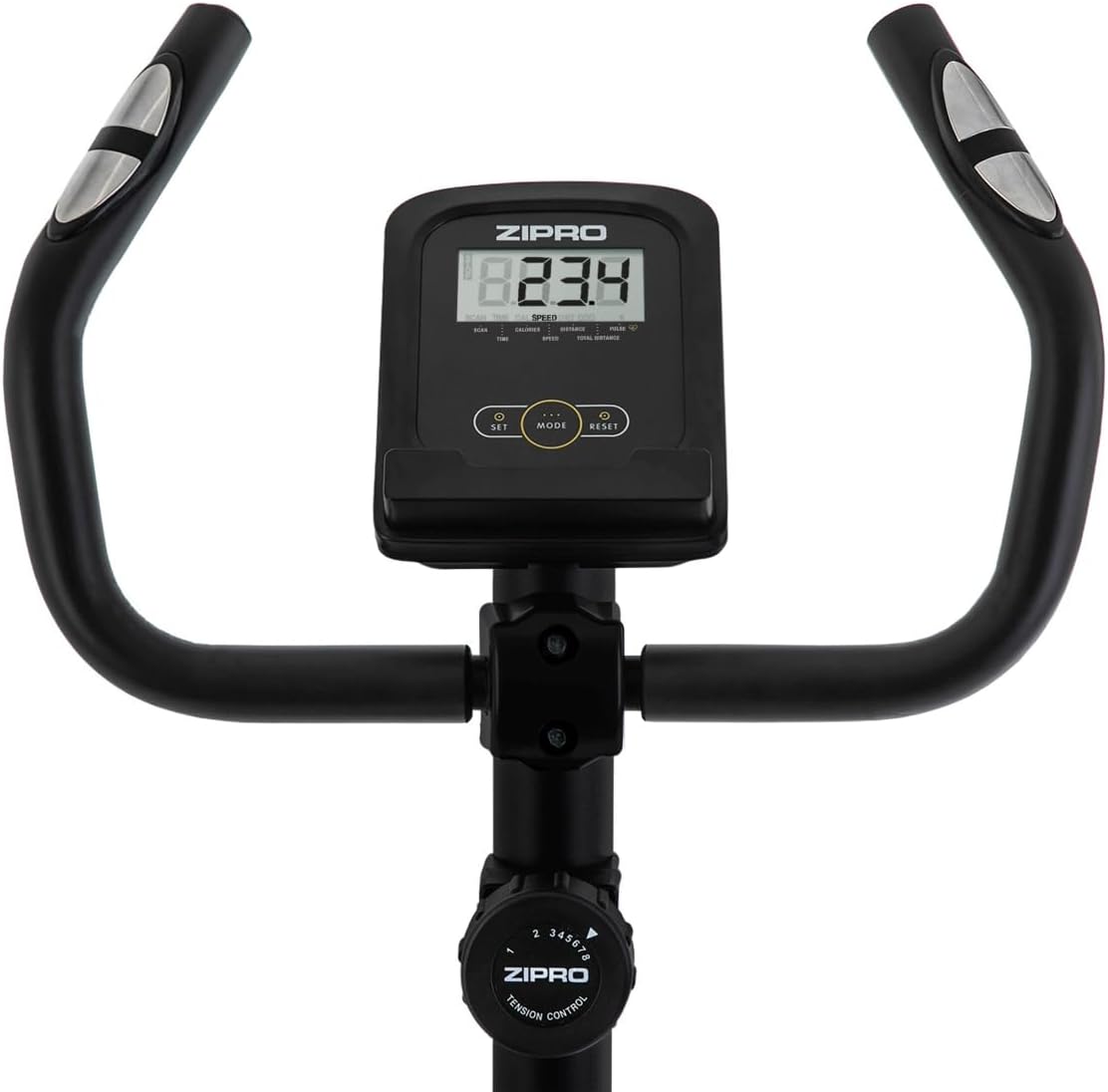
تصویر 3.3: View of the handlebars, integrated LCD display, and the manual resistance control knob, showing the primary user interface.
- فائنل چیک: Before first use, double-check all connections and ensure the bike is stable.
4. آپریٹنگ ہدایات
4.1 موٹر سائیکل کو ایڈجسٹ کرنا
- Saddle Height: Loosen the adjustment knob on the seat post, raise or lower the saddle to a comfortable height (recommended: 65-80 cm from the ground, 55-75 cm from pedals), and re-tighten the knob. Your leg should have a slight bend at the knee when the pedal is at its lowest point.
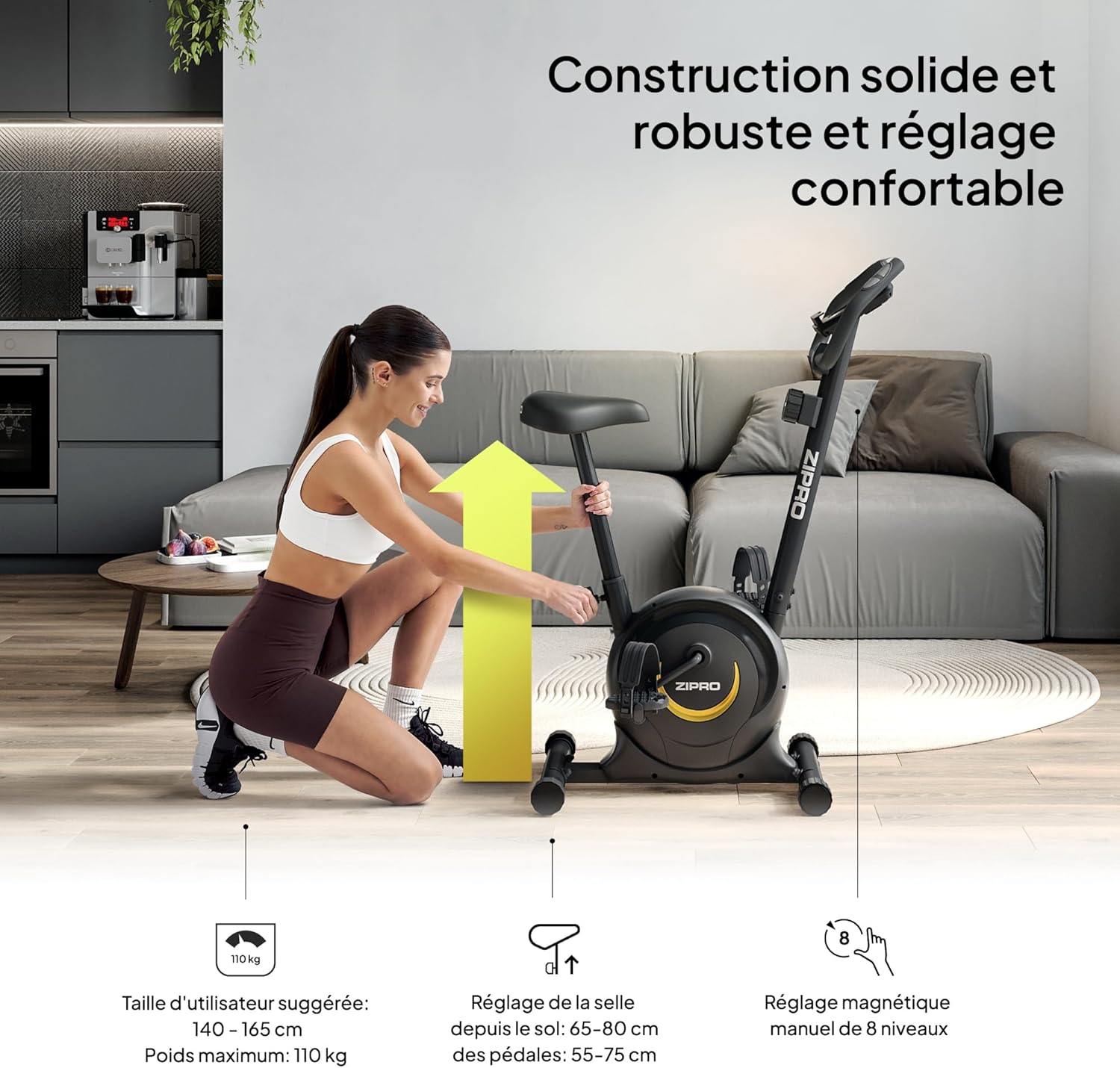
Image 4.1: A user demonstrating the saddle height adjustment, which is crucial for ergonomic and effective training. The image also indicates suggested user height (140-165 cm) and maximum weight (110 kg).
4.2 Using the Console
The LCD console tracks your workout data. It is powered by 2 AAA batteries.

تصویر 4.2: تفصیلی view of the LCD display, showing various metrics, and the integrated pulse sensors on the handlebars for heart rate monitoring.
- ڈسپلے افعال: The console displays Time, Distance, Calories, and Pulse. It also features a SCAN function that cycles through these parameters automatically.
- نبض کی پیمائش: Grip the pulse sensors on the handlebars to measure your heart rate.
- اسمارٹ فون ہولڈر: Use the integrated holder to place your smartphone or tablet for entertainment or tracking during your workout.

Image 4.3: A smartphone securely placed in the integrated holder on the handlebars, allowing for easy access to media or fitness apps during a workout.
4.3 مزاحمت کو ایڈجسٹ کرنا
The ZIPRO One S offers 8 levels of magnetic resistance.
- مزاحمتی نوب: Turn the resistance knob located below the console clockwise to increase resistance (harder pedaling) and counter-clockwise to decrease resistance (easier pedaling).
- Choose a resistance level that challenges you without causing excessive strain.

Image 4.4: This image illustrates the manual resistance adjustment knob, pedal straps, and saddle height adjustment, highlighting the bike's customizable features.
5 دیکھ بھال
باقاعدگی سے دیکھ بھال آپ کی ورزش کی موٹر سائیکل کی لمبی عمر اور محفوظ آپریشن کو یقینی بناتی ہے۔
- صفائی: اشتہار کے ساتھ موٹر سائیکل کو صاف کریں۔amp پسینے اور دھول کو دور کرنے کے لیے ہر استعمال کے بعد کپڑا۔ کھرچنے والے کلینر یا سالوینٹس سے پرہیز کریں۔
- معائنہ: وقتاً فوقتاً تمام بولٹ، گری دار میوے، اور حرکت پذیر حصوں کو سختی اور پہننے کے لیے چیک کریں۔ کسی بھی ڈھیلے بندھن کو سخت کریں۔
- چکنا: The magnetic resistance system is generally maintenance-free. Do not attempt to lubricate internal components unless specifically instructed by customer support.
- ذخیرہ: When not in use, store the bike in a dry, cool place away from direct sunlight and moisture. The integrated transport wheels allow for easy relocation.

Image 5.1: A user easily moving the ZIPRO One S exercise bike, demonstrating its portability thanks to integrated transport wheels.
6 خرابیوں کا سراغ لگانا
If you encounter any issues, refer to the following common troubleshooting steps:
- Console Not Displaying: Check if the 2 AAA batteries are correctly installed and not depleted. Replace if necessary.
- Inaccurate Pulse Reading: Ensure your hands are firmly gripping both pulse sensors. Dry hands or excessive movement can affect accuracy.
- غیر معمولی آوازیں: Check all visible bolts and nuts for tightness. Ensure no parts are rubbing against each other. If the noise persists, discontinue use and contact customer support.
- مزاحمت تبدیل نہیں ہوتی: Verify that the resistance knob is turning freely and engaging with the internal mechanism. If it feels stuck or unresponsive, contact customer support.
7. وضاحتیں
Detailed technical specifications for the ZIPRO One S Exercise Bike.
| فیچر | تفصیلات |
|---|---|
| ماڈل کا نام | ایک ایس |
| ماڈل نمبر | 5941659 |
| برانڈ | ZIPRO |
| مزاحمت کا طریقہ کار | مقناطیسی |
| مزاحمت کی سطح | 8 (Manual Adjustment) |
| ڈسپلے کی قسم | LCD |
| ڈسپلے میٹرکس | Time, Distance, Calories, Pulse, Scan |
| پاور سورس (کنسول) | 2 x AAA بیٹریاں (شامل) |
| زیادہ سے زیادہ صارف کا وزن | 110 کلوگرام (242 پونڈ) |
| تجویز کردہ صارف کی اونچائی | 140 - 165 سینٹی میٹر |
| Saddle Height Adjustment (from ground) | 65 - 80 سینٹی میٹر |
| Saddle Height Adjustment (from pedals) | 55 - 75 سینٹی میٹر |
| پروڈکٹ کے طول و عرض (L x W x H) | 89.7 x 43.5 x 110 سینٹی میٹر |
| پروڈکٹ کا وزن | 15.5 کلوگرام |
| اہم مواد | کاربن اسٹیل |
| خصوصی خصوصیات | Compact design, Adjustable saddle, Smartphone holder, Transport wheels |
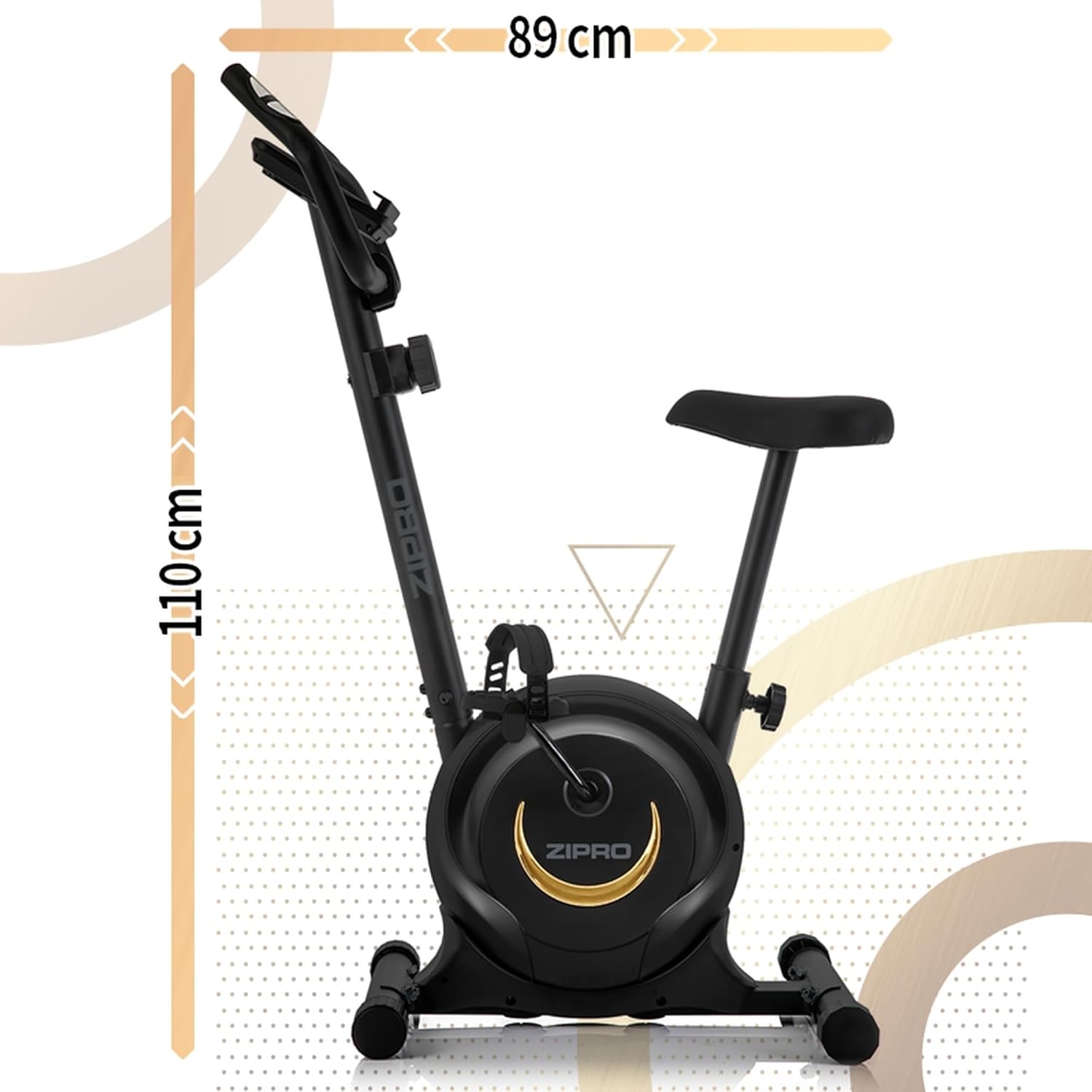
تصویر 7.1: سائیڈ view of the ZIPRO One S Exercise Bike, illustrating its overall dimensions of approximately 110 cm in height and 89 cm in length.
8. وارنٹی اور سپورٹ
For warranty information, product support, or to order replacement parts, please contact ZIPRO customer service. Refer to your purchase documentation for specific warranty terms and contact details.
- Keep your proof of purchase (receipt or order confirmation) for warranty claims.
- Do not attempt to repair the product yourself if it is under warranty, as this may void the warranty.