
1. تعارف
This manual provides essential information for the safe and efficient operation of your Alto Professional TMX160 DFX 16-Channel Powered Mixer. The TMX160 DFX is a versatile audio mixing console featuring 16 input channels, a built-in Alesis digital effects processor, and an integrated power amplifier capable of delivering 750W stereo output at 4Ω or 1500W mono output at 8Ω. It includes 12 XLR microphone inputs with phantom power, 16 line inputs, and stereo RCA inputs, along with a 3-band equalizer on each mono and stereo channel.
Please read this manual thoroughly before using the product to ensure proper setup and operation. Keep this manual for future reference.
2. حفاظتی معلومات
آگ، بجلی کے جھٹکے، اور لوگوں کو چوٹ لگنے کے خطرے کو کم کرنے کے لیے اس پروڈکٹ کا استعمال کرتے وقت ہمیشہ بنیادی حفاظتی احتیاطی تدابیر پر عمل کریں۔
- طاقت کا منبع: یونٹ کو صرف مخصوص والیوم کے AC پاور آؤٹ لیٹ سے جوڑیں۔tage.
- گراؤنڈنگ: Ensure the unit is properly grounded. Do not defeat the safety purpose of the polarized or grounding-type plug.
- پانی اور نمی: Do not expose this equipment to rain or moisture. Do not use near water.
- وینٹیلیشن: مناسب وینٹیلیشن کو یقینی بنائیں۔ وینٹیلیشن کے سوراخوں کو مسدود نہ کریں۔
- حرارت: گرمی کے کسی بھی ذرائع جیسے ریڈی ایٹرز، ہیٹ رجسٹر، چولہے، یا دیگر آلات (بشمول amplifiers) جو گرمی پیدا کرتی ہے۔
- کیبلز: بجلی کی تاروں کو چلنے یا چوٹکی ہونے سے بچائیں۔
- سروسنگ: تمام خدمات کا حوالہ اہل سروس اہلکاروں کو دیں۔ اس پروڈکٹ کو خود پیش کرنے کی کوشش نہ کریں۔
3. سیٹ اپ
3.1 پیک کھولنا اور معائنہ کرنا
Carefully unpack the TMX160 DFX mixer and inspect it for any signs of damage that may have occurred during transit. If any damage is found, contact your dealer immediately.
3.2 کنیکٹنگ پاور
Connect the supplied AC power cord to the mixer's power input and then to a suitable grounded AC power outlet. Ensure the mixer's power switch is in the OFF position before connecting to power.
3.3 کنیکٹنگ ان پٹس
The TMX160 DFX offers a variety of input options:
- Microphone Inputs (MIC 1-12): Use XLR cables to connect microphones to the 12 XLR inputs. Phantom power (+48V) can be activated for condenser microphones.
- لائن ان پٹ (چینلز 1-16): Use 1/4-inch TRS or TS cables for line-level instruments or devices. Channels 13/14 and 15/16 are stereo line inputs, also accepting RCA for 2-Track In.
- 2-Track In: Connect external audio sources like CD players or media players using RCA cables.
3.4 کنیکٹنگ آؤٹ پٹ
Connect your speakers or monitoring system to the appropriate outputs:
- اسپیکر آؤٹ پٹ: Connect passive speakers to the power amplifier outputs. Ensure the impedance of your speakers matches the mixer's output capabilities (e.g., 4Ω for 750W stereo, 8Ω for 1500W mono).
- Monitor/Aux Outputs: Use these outputs to send signals to stage monitors or external effects processors.
- Stereo Out/Mono Out: These outputs provide the main mix signal for recording or connecting to additional sound systems.
3.5 ابتدائی پاور آن
After all connections are made, ensure all channel faders and the main mix fader are at their lowest settings. Turn on any connected devices (e.g., microphones, instruments) first, then power on the TMX160 DFX mixer. Finally, turn on your power ampلائفائر یا فعال اسپیکر۔
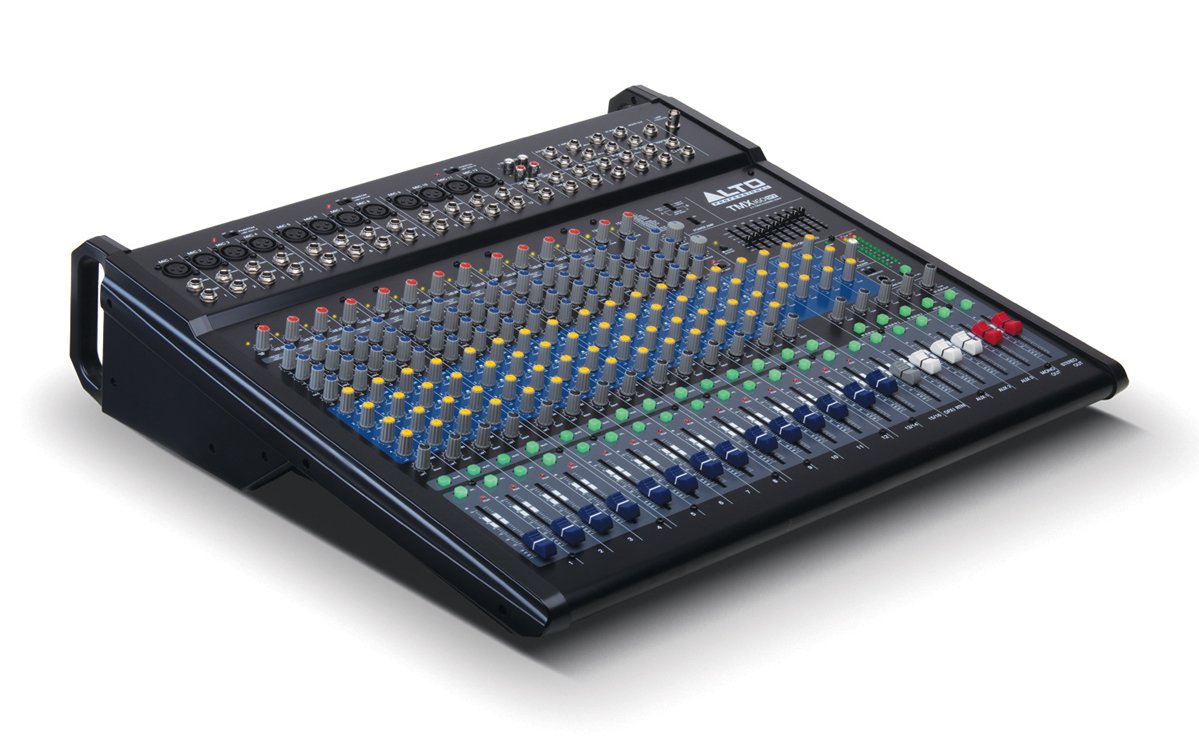
شکل 1: سامنے کا پینل ختمview of the Alto Professional TMX160 DFX mixer. This image shows the comprehensive layout including microphone and line inputs at the top, channel controls in the middle, and faders at the bottom.
4. آپریشن
4.1 چینل کنٹرولز
Each input channel (1-16) features a set of controls to shape its sound:
- حاصل کرنا: Adjusts the input sensitivity for the connected microphone or line-level device. Set this to achieve a strong signal without clipping (distortion).
- EQ (ہائی ، مڈ ، لو): A 3-band equalizer allows you to boost or cut frequencies (treble, midrange, bass) for each channel.
- AUX بھیجتا ہے: Controls the amount of signal sent from the channel to the auxiliary outputs (e.g., for monitors or external effects).
- پین: Positions the channel's signal within the stereo field (left to right).
- LEVEL Fader: Controls the overall volume of the channel in the main mix.
4.2 ماسٹر سیکشن
The master section controls the overall output of the mixer:
- مین مکس فیڈرز: Control the overall volume of the stereo output.
- DFX (Digital Effects) Controls: Select and adjust parameters for the built-in Alesis digital effects.
- Stereo Graphic EQ: A 7-band graphic equalizer allows for fine-tuning the overall frequency response of the main mix.
- طاقت Amp کنٹرولز: Adjust the output level and mode (Stereo/Mono) for the integrated power ampزندگی
4.3 Built-in Alesis Digital Effects
The TMX160 DFX features a high-quality Alesis digital effects processor. Use the DFX controls in the master section to browse and select from various effects such as reverb, delay, chorus, and more. Adjust the effect send levels on individual channels and the overall effect return level in the master section to blend the effects into your mix.
شکل 2: تفصیلی view of the input channels, showing individual GAIN, EQ, AUX, PAN, and LEVEL controls for precise audio shaping.
5 دیکھ بھال
Proper maintenance ensures the longevity and optimal performance of your TMX160 DFX mixer.
- صفائی: مکسر کے بیرونی حصے کو صاف کرنے کے لیے نرم، خشک کپڑا استعمال کریں۔ کھرچنے والے کلینر، سالوینٹس یا ویکس کے استعمال سے پرہیز کریں۔
- دھول: Regularly remove dust from the ventilation openings to prevent overheating.
- ذخیرہ: جب لمبے عرصے تک استعمال نہ ہو، تو مکسر کو براہ راست سورج کی روشنی اور انتہائی درجہ حرارت سے دور کسی ٹھنڈی، خشک جگہ پر محفوظ کریں۔
- Faders and Knobs: Avoid applying excessive force to faders and knobs. Keep them free from dust and debris.
6 خرابیوں کا سراغ لگانا
If you encounter issues with your TMX160 DFX, refer to the following common problems and solutions:
- کوئی طاقت نہیں:
- Check if the power cord is securely connected to both the mixer and the AC outlet.
- Verify the AC outlet is functional.
- یقینی بنائیں کہ مکسر پر پاور سوئچ آن پوزیشن میں ہے۔
- کوئی آواز آؤٹ پٹ نہیں:
- تمام ان پٹ اور آؤٹ پٹ کیبل کنکشن چیک کریں۔
- Ensure channel GAIN and LEVEL faders are appropriately set.
- Verify the Main Mix faders are raised.
- Check if connected speakers or power amplifiers are turned on and functioning.
- طاقت کو یقینی بنائیں Amp controls are set correctly for your speaker configuration.
- مسخ شدہ آواز:
- Reduce the GAIN setting for the input channel.
- Lower the channel LEVEL fader or Main Mix faders.
- خراب شدہ کیبلز کی جانچ کریں۔
- اثرات جو نہیں سنے گئے:
- Ensure the DFX send controls on the channels are turned up.
- Verify the DFX return level in the master section is raised.
- Check the selected effect program.
If the problem persists after trying these steps, contact Alto Professional customer support.
7. وضاحتیں
| فیچر | تفصیلات |
|---|---|
| برانڈ | آلٹو پروفیشنل |
| ماڈل | TMX160 DFX |
| چینلز کی تعداد | 16 |
| شے کا وزن | 12.5 کلوگرام |
| کنیکٹوٹی ٹیکنالوجی | معاون |
| آڈیو ان پٹ | XLR, RCA, Line, AUX, 2-Track |
| کارخانہ دار | موسیقی میں |
| ASIN | B007T1VZ52 |
| پاور آؤٹ پٹ (سٹیریو) | 750 ڈبلیو @ 4 Ω |
| Power Output (Mono) | 1500 ڈبلیو @ 8 Ω |
| برابر کرنے والا | 3-band EQ per channel, Stereo Graphic EQ |
| اثرات | Built-in Alesis Digital Effector (24-bit A/D and D/A converters) |
| طول و عرض (W x D x H) | تقریبا. 21.9 x 22.2 x 5.7 انچ (555 x 565 x 145 ملی میٹر) |
8. وارنٹی اور سپورٹ
For warranty information and technical support, please refer to the documentation included with your product or visit the official Alto Professional webسائٹ وارنٹی دعووں کے لیے خریداری کے ثبوت کے طور پر اپنی خریداری کی رسید رکھیں۔
For further assistance, you may contact Alto Professional customer service directly.