
MXL 2008PF001
MXL2008 PF001 Bundle User Manual
Professional Condenser Microphone System
تعارف
Thank you for choosing the MXL2008 PF001 Bundle. This professional condenser microphone system is designed to deliver high-quality audio capture for a variety of applications, including studio recording, broadcasting, and live sound. This manual provides essential information for the proper setup, operation, and maintenance of your microphone to ensure optimal performance and longevity.
براہ کرم پروڈکٹ استعمال کرنے سے پہلے اس دستی کو اچھی طرح پڑھیں اور اسے مستقبل کے حوالے کے لیے اپنے پاس رکھیں۔
اہم حفاظتی معلومات
To prevent electric shock, fire, or damage to the unit, please observe the following precautions:
- Do not expose the microphone to rain or moisture.
- Avoid extreme temperatures or high humidity.
- Do not attempt to disassemble or modify the microphone. Refer all servicing to qualified personnel.
- Ensure proper phantom power (48V) is supplied by your audio interface or mixer, if required.
- جسمانی نقصان سے بچنے کے لیے مائکروفون کو احتیاط سے ہینڈل کریں۔
باکس میں کیا ہے۔
The MXL2008 PF001 Bundle typically includes:
- MXL 2008 کنڈینسر مائکروفون
- Shock Mount (PF001 component)
- Hard Mount Adapter
- صاف کرنے والا کپڑا
- صارف دستی (یہ دستاویز)
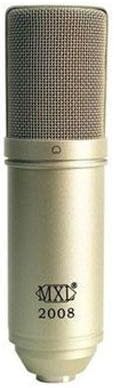
Image: The MXL 2008 condenser microphone, a cylindrical microphone with a metallic mesh grille at the top and the MXL 2008 logo on its body. This is the primary component of the bundle.
سیٹ اپ گائیڈ
Follow these steps to set up your MXL2008 PF001 Bundle:
- مائیکروفون لگانا:
- Attach the shock mount (PF001) to a standard microphone stand.
- Carefully insert the MXL 2008 microphone into the shock mount. Ensure it is securely held by the elastic bands. The shock mount helps to isolate the microphone from vibrations and handling noise.
- آڈیو انٹرفیس/مکسر سے جڑنا:
- Connect one end of an XLR cable (not included) to the XLR output at the base of the MXL 2008 microphone.
- Connect the other end of the XLR cable to an available XLR input on your audio interface, mixer, or preampزندگی
- Applying Phantom Power:
- The MXL 2008 is a condenser microphone and requires 48V phantom power to operate.
- Activate the +48V phantom power switch on your audio interface or mixer for the input channel connected to the microphone.
- احتیاط: Ensure the microphone is connected before activating phantom power to avoid potential pops or damage.
- ان پٹ گین سیٹ کرنا:
- With phantom power active, gradually increase the input gain (preamp level) on your audio interface or mixer.
- Speak or sing into the microphone at your typical performance level and adjust the gain until you achieve a strong signal without clipping (distortion). Most interfaces have a peak indicator light to help with this.
آپریٹنگ ہدایات
The MXL 2008 is a versatile microphone suitable for various recording scenarios. Here are general guidelines for operation:
- مائیکروفون کی جگہ کا تعین:
- Position the microphone approximately 6-12 inches (15-30 cm) from the sound source for vocals or acoustic instruments. Adjust distance based on desired proximity effect and room acoustics.
- The MXL 2008 has a cardioid polar pattern, meaning it picks up sound primarily from the front and rejects sound from the sides and rear. Point the front of the microphone (where the MXL logo is) directly at the sound source.
- پاپ فلٹر کا استعمال:
- For vocal recordings, it is highly recommended to use an external pop filter (not included) placed between the vocalist and the microphone. This helps to reduce plosive sounds (P's and B's) and protect the microphone capsule from moisture.
- نگرانی:
- Monitor your audio through headphones or studio monitors connected to your audio interface/mixer. This allows you to hear the microphone's output and make necessary adjustments to gain and placement.
- ریکارڈنگ سافٹ ویئر:
- Ensure your Digital Audio Workstation (DAW) software is configured to recognize your audio interface and the correct input channel.
- Arm the track for recording and begin capturing your audio.
دیکھ بھال اور دیکھ بھال
Proper care will extend the life and maintain the performance of your MXL 2008 microphone:
- صفائی: Use a soft, dry, lint-free cloth to wipe the microphone body. Do not use liquid cleaners or solvents, as they may damage the finish or internal components.
- ذخیرہ: When not in use, store the microphone in its original packaging or a protective case to shield it from dust, moisture, and physical impact.
- ماحولیاتی حالات: مائیکروفون کو انتہائی درجہ حرارت، زیادہ نمی، یا لمبے عرصے تک براہ راست سورج کی روشنی کے سامنے لانے سے گریز کریں۔
- ہینڈلنگ: Always handle the microphone by its body, not by the cable or grille.
خرابی کا سراغ لگانا
If you encounter issues with your MXL 2008 microphone, refer to the following common problems and solutions:
| مسئلہ | ممکنہ وجہ | حل |
|---|---|---|
| کوئی ساؤنڈ آؤٹ پٹ نہیں۔ |
|
|
| مسخ شدہ آواز |
|
|
| ہم یا بز شور |
|
|
If the problem persists after trying these solutions, please contact MXL customer support.
وضاحتیں
| فیچر | تفصیل |
|---|---|
| کارخانہ دار | ایم ایکس ایل |
| ماڈل نمبر | 2008PF001 |
| شے کا وزن | 5.05 پاؤنڈ (تقریباً 2.29 کلوگرام) |
| ASIN | B009TT7AO2 |
| پہلی تاریخ دستیاب ہے۔ | 14 اپریل 2012 |
| شامل اجزاء | Microphone (MXL 2008), PF001 (Shock Mount) |
نوٹ: مصنوعات کی بہتری کے لیے تصریحات بغیر اطلاع کے تبدیل کی جا سکتی ہیں۔
وارنٹی اور سپورٹ
MXL products are manufactured to the highest quality standards. For information regarding warranty coverage, please refer to the warranty card included with your product or visit the official MXL webسائٹ
For technical support, troubleshooting assistance beyond this manual, or service inquiries, please contact MXL customer support through their official channels. Always provide your product model number (MXL2008 PF001) and ASIN (B009TT7AO2) when seeking support.
آپ پر جا کر مزید معلومات اور معاون وسائل حاصل کر سکتے ہیں۔ MXL Store on Amazon.
متعلقہ دستاویزات - 2008PF001
 |
MXL AC-44 چھوٹے USB C موبائل مائیکروفون صارف دستی User manual for the MXL AC-44 Miniature USB C Mobile Microphone, detailing its features, technical specifications, and warranty. This compact microphone offers high-quality audio capture for web conferencing, telemedicine, and other applications. |
 |
Marshall MXL2006 Studio Recording Microphone User Guide and Specifications Detailed information and specifications for the Marshall MXL2006 studio recording microphone, including setup, care, and warranty details. |
 |
آڈیو-ٹیکنیکا AT898 ذیلی کارڈیوڈ کنڈینسر مائکروفون صارف دستی Audio-Technica AT898 subminiature cardioid condenser microphone کے لیے جامع صارف دستی۔ پیشہ ورانہ آڈیو ایپلی کیشنز کے لیے اس کی خصوصیات، وضاحتیں، استعمال کے رہنما خطوط، حفاظتی احتیاطی تدابیر اور کنکشن کے طریقہ کار کے بارے میں جانیں۔ |
 |
Audio-Technica AT2035 Cardioid Condenser Microphone User Manual Audio-Technica AT2035 کارڈیوڈ کنڈینسر مائیکروفون کے لیے یوزر مینوئل، حفاظتی احتیاطی تدابیر، استعمال کے نوٹس، وضاحتیں، اور لوازماتی معلومات فراہم کرتا ہے۔ |
 |
MXL 770 Condenser Microphone - User Manual & Specifications Comprehensive user manual and technical specifications for the MXL 770 condenser microphone by MXL (Marshall Electronics). Learn about its features, setup, care, and warranty. |
 |
آڈیو اری AM-C1 USB کنڈینسر مائیکروفون ہدایت نامہ آڈیو اری AM-C1 USB کنڈینسر مائیکروفون کے لیے ہدایت نامہ، پروڈکٹ ڈایاگرام، تنصیب کے مراحل، وضاحتیں، اور پیکیج کے مواد کی تفصیل۔ اپنے مائیکروفون کو ترتیب دینے اور استعمال کرنے کا طریقہ جانیں۔ |
Ask a question about this manual
Ask about setup, troubleshooting, compatibility, parts, safety, or missing instructions. Manuals+ will review the question and use this page’s manual context to help answer it.