
1. تعارف اور اوورview
This manual provides comprehensive instructions for the setup, operation, maintenance, and troubleshooting of your InFocus IN3124 Projector. Designed for clarity and ease of use, this guide will help you maximize your projector's performance and longevity.
The InFocus IN3124 is a high-performance projector featuring XGA (1024 x 868) native resolution, 4800 lumens of brightness, and a 3000:1 contrast ratio, making it suitable for various presentation environments. Its portable design allows for flexible placement and usage.
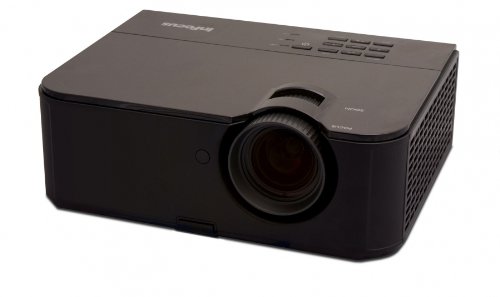
تصویر 1: سامنے کی طرف view of the InFocus IN3124 Projector, highlighting the main lens and the top-mounted control panel.
2. سیٹ اپ
2.1 پیک کھولنا
Carefully remove the projector and all accessories from the packaging. Verify that all components listed in the packing list are present. Retain the original packaging for future transport or storage.
2.2 جگہ کا تعین
Position the projector on a stable, level surface. Ensure adequate ventilation around the unit to prevent overheating. Maintain a clear path between the projector lens and the projection screen or surface. The optimal projection distance will vary based on the desired screen size.
2.3 کنیکٹنگ پاور
- پاور کی ہڈی کو پروجیکٹر کے پاور ان پٹ سے جوڑیں۔
- پاور کورڈ کے دوسرے سرے کو گراؤنڈڈ برقی آؤٹ لیٹ میں لگائیں۔
2.4 ان پٹ ذرائع کو جوڑنا
The IN3124 projector supports various input sources. Connect your video source (e.g., computer, DVD player) to the appropriate input port on the projector. Common ports include VGA and HDMI (if available on your specific model).
- وی جی اے: Use a VGA cable to connect to a computer's video output.
- HDMI: Use an HDMI cable for digital video and audio (check projector for HDMI port availability).
3. آپریٹنگ ہدایات
3.1 پاور آن/آف۔
- پاور آن کرنے کے لیے: Press the power button on the projector's control panel or the remote control. The power indicator light will illuminate.
- پاور آف کرنا: Press the power button twice. The projector will enter a cooling cycle before shutting down completely. Do not unplug the projector during the cooling cycle.
3.2 فوکس اور زوم کو ایڈجسٹ کرنا
Rotate the focus ring on the projector lens until the image appears sharp and clear. Use the zoom ring (if present) to adjust the image size to fit your screen.
3.3 ان پٹ ذرائع کا انتخاب کرنا
Press the "Source" or "Input" button on the projector's control panel or remote control to cycle through available input sources (e.g., VGA, HDMI). Select the input corresponding to your connected device.
3.4 Menu Navigation and Keystone Correction
Use the menu buttons on the projector or remote to access the On-Screen Display (OSD). Navigate through the menu options to adjust settings such as brightness, contrast, color, and keystone correction. Keystone correction helps to square the image if the projector is not perfectly perpendicular to the screen.
4 دیکھ بھال
4.1 لینز کی صفائی
Gently wipe the projector lens with a soft, lint-free cloth specifically designed for optical surfaces. Do not use abrasive cleaners or excessive force, as this can scratch the lens.
4.2 ایئر فلٹرز کی صفائی
Regularly check and clean the projector's air filters to ensure proper airflow and prevent overheating. Refer to the projector's specific filter access instructions. Use a soft brush or vacuum cleaner to remove dust accumulation.
4.3 ایلamp متبادل
پروجیکٹر ایل۔amp ایک محدود عمر ہے. جب ایلamp life indicator appears or the image becomes dim, the lamp may need replacement. Consult the full service manual or manufacturer's website for detailed lamp replacement procedures and compatible lamp models. Always allow the projector to cool down completely before attempting lamp متبادل
4.4 اسٹوریج
جب لمبے عرصے تک استعمال نہ ہو تو، پروجیکٹر کو براہ راست سورج کی روشنی اور انتہائی درجہ حرارت سے دور، ٹھنڈی، خشک جگہ پر محفوظ کریں۔ دھول اور نقصان کو روکنے کے لیے اصل پیکیجنگ یا حفاظتی کیس استعمال کریں۔
5 خرابیوں کا سراغ لگانا
This section addresses common issues you might encounter with your InFocus IN3124 Projector. For more complex problems, contact customer support.
- کوئی تصویر نہیں دکھائی گئی:
- یقینی بنائیں کہ پروجیکٹر آن ہے اور پاور انڈیکیٹر ٹھوس ہے۔
- Verify that the input source cable (VGA, HDMI) is securely connected to both the projector and the source device.
- Select the correct input source using the "Source" button.
- چیک کریں کہ آیا سورس ڈیوائس سگنل آؤٹ پٹ کر رہا ہے۔
- Dim or Faded Image:
- Adjust brightness and contrast settings in the OSD menu.
- ایل کو یقینی بنائیںamp is not nearing the end of its lifespan.
- Clean the projector lens and air filters.
- Check the projection mode (e.g., Eco mode might reduce brightness).
- تصویر دھندلی ہے:
- پروجیکٹر لینس پر فوکس رنگ کو ایڈجسٹ کریں۔
- یقینی بنائیں کہ پروجیکشن کی سطح فلیٹ ہے اور پروجیکٹر مستحکم ہے۔
- Check the resolution settings of your source device to match the projector's native resolution.
- ریموٹ کنٹرول کام نہیں کر رہا:
- ریموٹ کنٹرول میں بیٹریاں تبدیل کریں۔
- یقینی بنائیں کہ ریموٹ اور پروجیکٹر کے IR ریسیور کے درمیان کوئی رکاوٹ نہیں ہے۔
- ریموٹ کو براہ راست پروجیکٹر کی طرف رکھیں۔
6. وضاحتیں
The following table outlines the key technical specifications for the InFocus IN3124 Projector:
| فیچر | تفصیلات |
|---|---|
| ماڈل نمبر | IN3124 |
| ڈسپلے ریزولوشن (آبائی) | XGA (1024 x 868) |
| چمک | 4800 لیمن |
| کنٹراسٹ ریشو | 3000:1 |
| ڈسپلے کی قسم | LCD, LCoS |
| شے کا وزن | 8.16 پاؤنڈ (3.7 کلوگرام) |
| پروڈکٹ کے طول و عرض (L x W x H) | 12.83 x 10.43 x 4.8 انچ (32.59 x 26.49 x 12.19 سینٹی میٹر) |
| خصوصی خصوصیت | پورٹیبل |
7. وارنٹی اور سپورٹ
For detailed warranty information, please refer to the warranty card included with your product packaging or visit the official InFocus webسائٹ وارنٹی عام طور پر خریداری کی تاریخ سے ایک مخصوص مدت کے لیے مینوفیکچرنگ کے نقائص کا احاطہ کرتی ہے۔
If you encounter issues that cannot be resolved using the troubleshooting guide, or require technical assistance, please contact InFocus customer support. Contact details can usually be found on the manufacturer's webسائٹ یا آپ کی مصنوعات کی دستاویزات میں۔