
1. تعارف
This manual provides essential instructions for the safe and efficient operation of your ICOM BC-152 charger. Please read this manual thoroughly before using the charger to ensure proper setup, operation, and maintenance. Keep this manual for future reference.
2. حفاظتی معلومات
Always observe the following safety precautions to prevent injury, damage to the charger, or damage to the device being charged.
- Use only with compatible ICOM battery packs. Using incompatible batteries may cause fire, explosion, or injury.
- چارجر کو بارش، نمی، یا انتہائی درجہ حرارت کے سامنے نہ رکھیں۔
- چارجر کو جدا یا تبدیل نہ کریں۔ تمام خدمات کو اہل اہلکاروں سے رجوع کریں۔
- پاور آؤٹ لیٹ والیوم کو یقینی بنائیںtagای چارجر کی تصریحات سے میل کھاتا ہے۔
- چارجر کو گرمی کے ذرائع اور براہ راست سورج کی روشنی سے دور رکھیں۔
- استعمال میں نہ ہونے پر یا صفائی سے پہلے چارجر کو پاور آؤٹ لیٹ سے ان پلگ کریں۔
3. سیٹ اپ
3.1 پیک کھولنا
Carefully remove the ICOM BC-152 charger from its packaging. Verify that all components are present:
- ICOM BC-152 Charger Unit
- AC Adapter (if included)
- ہدایات دستی (یہ دستاویز)
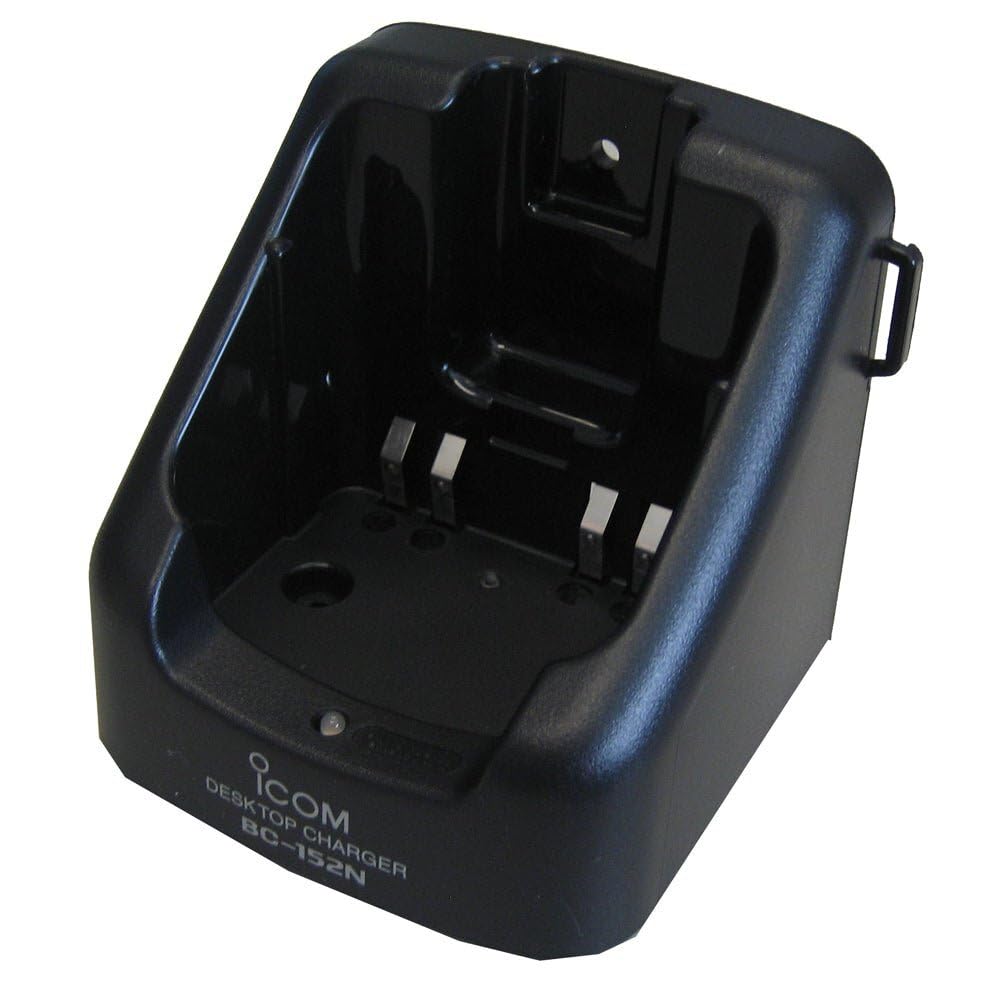
Figure 1: The ICOM BC-152 charger unit. This image shows the compact black charger with a single slot for a battery pack.
3.2 کنیکٹنگ پاور
- Connect the AC adapter cable to the DC input jack on the rear of the BC-152 charger unit.
- AC اڈاپٹر کو ایک معیاری وال آؤٹ لیٹ میں لگائیں۔
- چارجر اب استعمال کے لیے تیار ہے۔
4. آپریٹنگ ہدایات
4.1 بیٹری پیک چارج کرنا
Follow these steps to charge a compatible ICOM battery pack:
- یقینی بنائیں کہ چارجر پاور سورس سے جڑا ہوا ہے جیسا کہ سیکشن 3.2 میں بیان کیا گیا ہے۔
- Carefully insert the battery pack into the charging slot of the BC-152 charger. Ensure it is seated firmly.
- Observe the charging indicator light.
4.2 انڈیکیٹر لائٹس
The BC-152 charger features an LED indicator to show the charging status:
- سرخ (ٹھوس): بیٹری فی الحال چارج ہو رہی ہے۔
- سبز (ٹھوس): Charging is complete. The battery pack is fully charged.
- چمکتا سرخ: Charging error or battery fault. Remove the battery and re-insert. If the error persists, consult the troubleshooting section.
- روشنی نہیں: Charger is not connected to power, or no battery is inserted.
Charging time may vary depending on the battery's capacity and its current charge level. Typically, a fully depleted battery will take approximately 2-4 hours to charge.
5 دیکھ بھال
5.1 صفائی
بہترین کارکردگی اور ظاہری شکل کو برقرار رکھنے کے لیے:
- Always unplug the charger from the power outlet before cleaning.
- چارجر کے بیرونی حصے کو صاف کرنے کے لیے نرم، خشک کپڑا استعمال کریں۔
- کھرچنے والے کلینر، سالوینٹس یا سخت کیمیکل استعمال نہ کریں۔
- Ensure no moisture enters the charging slot or power input.
5.2 اسٹوریج
When not in use for extended periods, store the charger in a cool, dry place, away from direct sunlight and extreme temperatures. Disconnect it from the power supply.
6 خرابیوں کا سراغ لگانا
If you encounter issues with your BC-152 charger, refer to the table below for common problems and solutions.
| مسئلہ | ممکنہ وجہ | حل |
|---|---|---|
| Charger indicator light is off. | No power supply or battery not inserted. | Check AC adapter connection. Ensure battery is correctly inserted. |
| Indicator light flashes red. | بیٹری کی خرابی یا چارجنگ کی خرابی۔ | Remove and re-insert the battery. Try a different compatible battery if available. |
| بیٹری چارج نہیں ہوتی ہے۔ | Faulty battery, charger, or power supply. | Verify power connection. Test with a known good battery. If problem persists, contact support. |
7. وضاحتیں
| برانڈ | ICOM |
| ماڈل | BC- 152 |
| ان پٹ جلدtage | 12-16V DC (via AC adapter) |
| آؤٹ پٹ والیمtage | 8.4V DC |
| چارج کرنٹ | تقریبا. 450 ایم اے |
| طول و عرض (W×H×D) | Approx. 80 × 50 × 90 mm (3.1 × 2.0 × 3.5 inches) |
| وزن | 0.18 پاؤنڈز (تقریباً 82 گرام) |
| رنگ | سیاہ |
نوٹ: نردجیکرن بہتری کے لیے بغیر اطلاع کے تبدیل کیے جا سکتے ہیں۔
8. وارنٹی کی معلومات
ICOM products are manufactured with high-quality components and are subject to rigorous quality control. This product is covered by a limited warranty against defects in materials and workmanship. The specific terms and duration of the warranty may vary by region. Please refer to the warranty card included with your purchase or visit the official ICOM webتفصیلی وارنٹی معلومات کے لیے سائٹ۔
This warranty does not cover damage caused by misuse, accident, unauthorized modification, or improper installation.
9. کسٹمر سپورٹ
If you have any questions, require technical assistance, or need to report a problem that cannot be resolved using the troubleshooting guide, please contact ICOM customer support.
ICOM America Inc.
Visit ICOM America's Contact Page
Please have your product model (BC-152) and serial number ready when contacting support.