
1. تعارف
The Cooler Master CM Storm QuickFire Rapid-i is a mechanical gaming keyboard designed for performance and durability. It features full LED backlighting with ActivLite Technology, allowing for dynamic lighting effects and per-key customization. This keyboard is equipped with a 32-bit ARM processor for advanced lighting control without the need for software. Its tenkeyless form factor provides a compact design, ideal for gaming setups and travel.
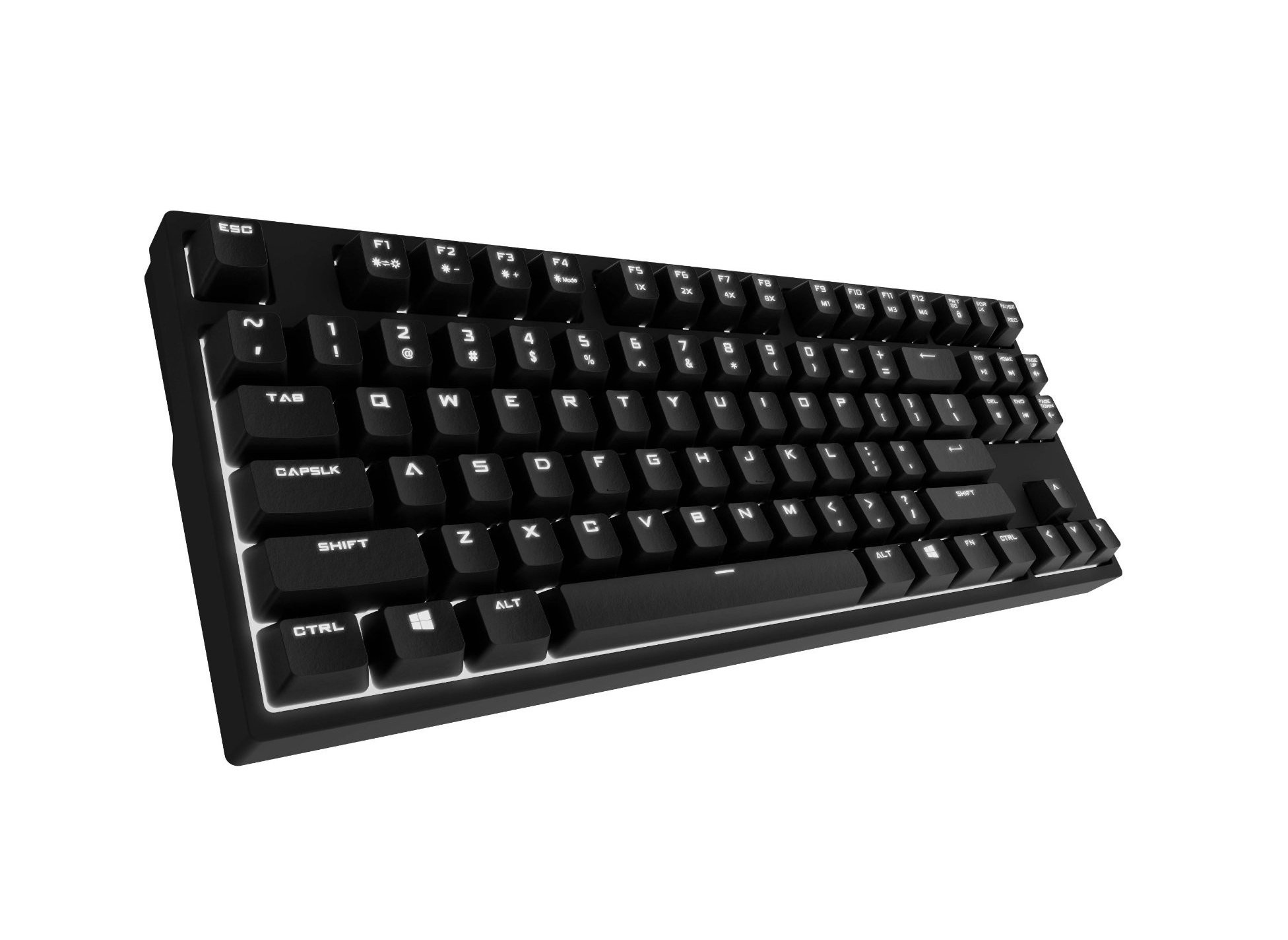
Image 1.1: Cooler Master CM Storm QuickFire Rapid-i Mechanical Gaming Keyboard.
2. پیکیج کے مشمولات
تصدیق کریں کہ تمام اشیاء آپ کے پیکیج میں موجود ہیں:
- Cooler Master CM Storm QuickFire Rapid-i Keyboard
- 1.8m Detachable Braided USB Cable
- صارف دستی (یہ دستاویز)
3. مصنوعات کی خصوصیات
- Fully Mechanical CHERRY MX Brown Keyswitches: Provides tactile feedback with low noise, optimized for gaming.
- Tenkeyless Form Factor: Compact and ergonomic design for portability and improved mouse positioning.
- Fully White LED Backlit: Ensures visibility in low-light environments.
- ActivLite Technology: Features instant response and trailing light effects, powered by a 32-bit ARM processor.
- Individual Key Lighting: Allows saving up to 4 different lighting profiles for various applications or games.
- 1.8m Detachable Braided Cable: Durable and convenient for transport.
- N-Key رول اوور: Registers an unlimited number of simultaneous keypresses, preventing ghosting.
4. سیٹ اپ
4.1 کی بورڈ کو جوڑنا
- Locate the detachable 1.8m braided USB cable.
- Connect the micro-USB end of the cable to the port on the back of the QuickFire Rapid-i keyboard.
- کیبل کے معیاری USB-A اختتام کو اپنے کمپیوٹر پر دستیاب USB پورٹ سے مربوط کریں۔
- The keyboard is plug-and-play compatible with Windows operating systems and should be recognized automatically.

Image 4.1: Connecting the detachable USB cable to the keyboard.
5. آپریٹنگ ہدایات
5.1 کی بورڈ کے بنیادی افعال
The QuickFire Rapid-i functions as a standard QWERTY keyboard. All keys perform their labeled actions. Special functions are typically accessed via the Function (Fn) key combined with other keys.
5.2 ActivLite Technology and LED Backlighting
The keyboard features fully white LED backlighting with ActivLite Technology, offering various lighting modes and effects. These effects are controlled directly from the keyboard using key combinations, without requiring software.
- فوری جواب: Keys light up immediately upon press.
- Trailing Effect: Keys remain lit for a short duration after being pressed, creating a trailing light effect.
- چمک ایڈجسٹمنٹ: استعمال کریں۔ Fn + F1 (decrease brightness) and Fn + F2 (increase brightness) to adjust the LED intensity.
- روشنی کے طریقے: Cycle through various pre-programmed lighting modes using Fn + F3 کو Fn + F8. Refer to the keyboard's keycap legends for specific mode indicators.

تصویر 5.1: مثال کے طور پرample of LED backlighting on the QuickFire Rapid-i.
5.3 Per-Key Lighting and Profiles
The QuickFire Rapid-i allows users to customize individual key lighting and save up to 4 different profiles directly on the keyboard's onboard memory.
- Entering Customization Mode: دبائیں Fn + F9 to enter the per-key lighting customization mode. The keyboard LEDs may flash to indicate this mode.
- Selecting Keys: Press any key you wish to toggle its LED on or off.
- Saving a Profile: Once your desired lighting pattern is set, press Fn + F10, Fn + F11, Fn + F12، یا Fn + Print Screen to save the current lighting pattern to one of the four available profiles. The keyboard will confirm the save.
- ایک پرو لوڈ ہو رہا ہےfile: To load a saved profile، صرف دبائیں Fn + F10, Fn + F11, Fn + F12، یا Fn + Print Screen corresponding to the desired profile.
- Exiting Customization Mode: دبائیں Fn + F9 again to exit customization mode.

Image 5.2: Customizing individual key lighting for a personalized profile.
5.4 N-Key رول اوور (NKRO)
The QuickFire Rapid-i supports N-Key Rollover, meaning every single keypress is registered accurately, regardless of how many keys are pressed simultaneously. This feature is crucial for fast-paced gaming where multiple commands might be executed at once.
6 دیکھ بھال
6.1 کی بورڈ کی صفائی
- صاف کرنے سے پہلے کی بورڈ کو اپنے کمپیوٹر سے منقطع کریں۔
- تھوڑا سا نرم، لنٹ سے پاک کپڑا استعمال کریں۔ampکی کیپس اور چیسس کو مسح کرنے کے لیے پانی یا ہلکے صفائی کے محلول سے بند کریں۔
- کی بورڈ پر براہ راست مائع چھڑکنے سے گریز کریں۔
- چابیاں کے درمیان دھول اور ملبے کے لیے، کمپریسڈ ہوا استعمال کریں۔
- Do not use harsh chemicals, abrasives, or solvents as they may damage the keyboard's finish or keycap legends.
6.2 کیبل کیئر
- Avoid sharp bends or kinks in the detachable braided cable.
- When disconnecting, pull from the connector head, not the cable itself.
7 خرابیوں کا سراغ لگانا
7.1 کی بورڈ جواب نہیں دے رہا ہے۔
- یقینی بنائیں کہ USB کیبل کی بورڈ اور کمپیوٹر دونوں سے محفوظ طریقے سے جڑی ہوئی ہے۔
- اپنے کمپیوٹر پر کی بورڈ کو کسی دوسرے USB پورٹ سے جوڑنے کی کوشش کریں۔
- سسٹم کے لیے مخصوص مسئلے کو مسترد کرنے کے لیے دوسرے کمپیوٹر پر کی بورڈ کی جانچ کریں۔
- اپنے کمپیوٹر کو دوبارہ شروع کریں۔
7.2 LED Backlighting Not Working or Flickering
- Check if the brightness is set to minimum using Fn + F1. Increase brightness with Fn + F2.
- استعمال کرتے ہوئے روشنی کے طریقوں کے ذریعے سائیکل Fn + F3 کو Fn + F8 to see if other modes function.
- Ensure you are not in a custom profile with all LEDs turned off. Try loading a different profile or resetting the lighting.
- کی بورڈ کو منقطع اور دوبارہ جوڑیں۔
7.3 Keys Not Registering Correctly (Ghosting)
- The QuickFire Rapid-i features N-Key Rollover, which should prevent ghosting. If you experience this, ensure the keyboard is connected directly to a USB port on your computer, not through a hub.
- Clean the affected keys as described in the Maintenance section.
- If the issue persists, contact Cooler Master support.
8. وضاحتیں
| برانڈ | کولر ماسٹر |
| ماڈل کا نام | SGK-4040-GKCB1 (CHERRY MX Brown switch) |
| ماڈل نمبر | SGK-4040-GKCM1-US |
| سوئچ کی قسم | چیری ایم ایکس براؤن (ٹچائل) |
| کنیکٹوٹی ٹیکنالوجی | Wired (Detachable USB Cable) |
| کی بورڈ لے آؤٹ | QWERTY, Tenkeyless Form Factor |
| بیک لائٹنگ | Fully White LED, ActivLite Technology, Per-Key Lighting |
| پروسیسر | 32-bit ARM Processor |
| N-Key رول اوور | حمایت کی |
| کیبل کی لمبائی | 1.8 meters (Braided, Detachable) |
| ہم آہنگ آپریٹنگ سسٹم | ونڈوز |
| پروڈکٹ کے طول و عرض (L x W x H) | 14.13" x 5.43" x 1.54" (35.89cm x 13.79cm x 3.91cm) |
| شے کا وزن | 2.05 پاؤنڈ (0.93 کلوگرام) |
| انکلوژر میٹریل | پلاسٹک |
9. وارنٹی اور سپورٹ
9.1 وارنٹی کی معلومات
The Cooler Master CM Storm QuickFire Rapid-i Mechanical Gaming Keyboard comes with a 12 ماہ کی وارنٹی خریداری کی تاریخ سے. یہ وارنٹی مینوفیکچرنگ کے نقائص اور عام استعمال سے پیدا ہونے والے مسائل کا احاطہ کرتی ہے۔ یہ غلط استعمال، حادثات، غیر مجاز ترمیم، یا غلط دیکھ بھال کی وجہ سے ہونے والے نقصان کا احاطہ نہیں کرتا ہے۔
وارنٹی کے دعووں کے لیے براہ کرم اپنی خریداری کا ثبوت اپنے پاس رکھیں۔
9.2 تکنیکی معاونت
تکنیکی مدد کے لیے، اس دستی سے آگے ٹربل شوٹنگ، یا وارنٹی پوچھ گچھ کے لیے، براہ کرم آفیشل کولر ماسٹر سپورٹ دیکھیں website or contact their customer service department. Contact information can typically be found on the Cooler Master official webسائٹ
Note: Product specifications and warranty terms are subject to change without prior notice.