
تعارف
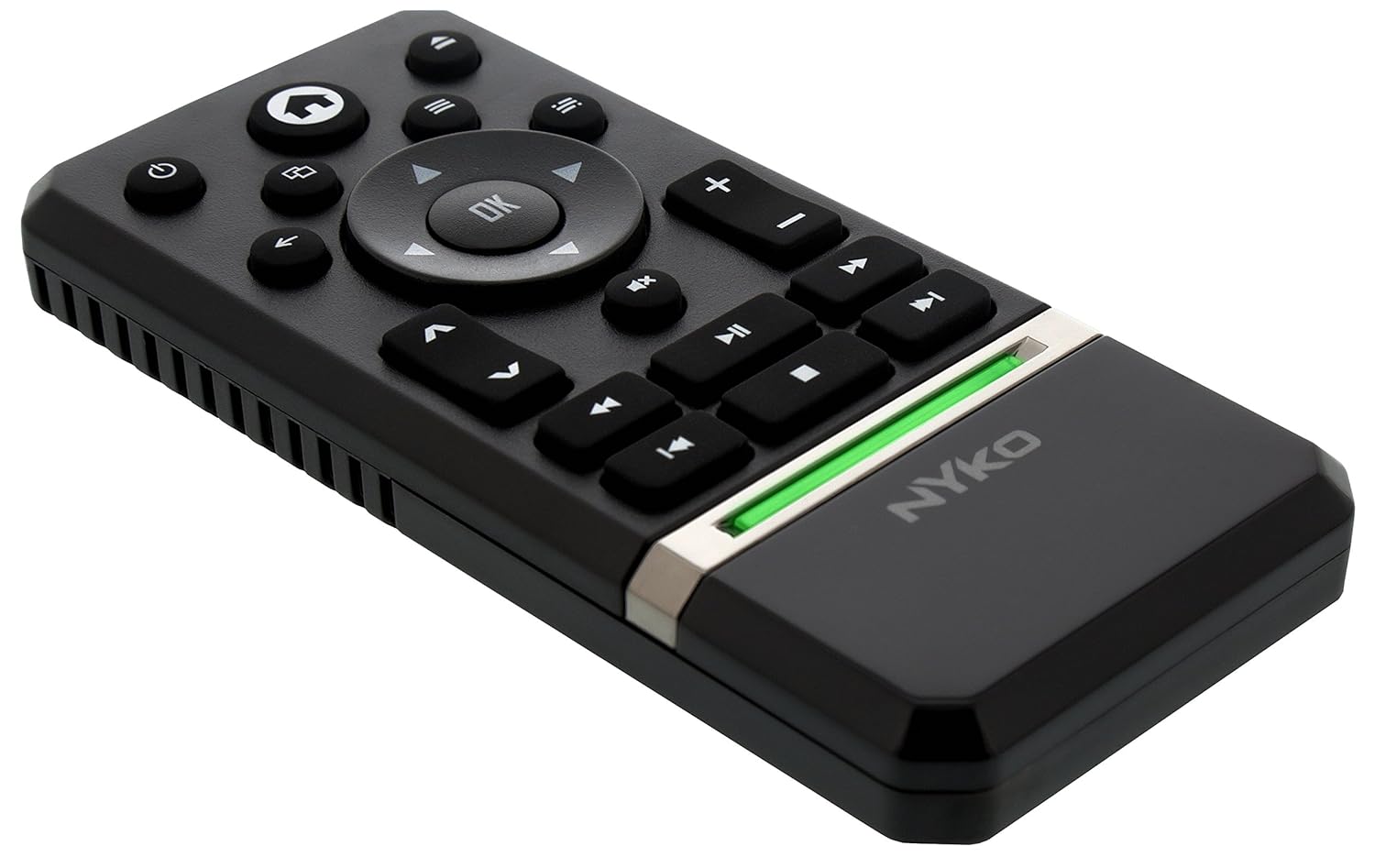
The Nyko Media Remote for Xbox One provides convenient control over your Xbox One console and various media applications. This remote simplifies navigation and playback of streaming content and physical media, offering dedicated buttons for common functions. It also features the ability to power your Xbox One on and off, and control basic functions of your television.

Image: Nyko Media Remote for Xbox One, front view.
پیکیج کے مشمولات
- Nyko Media Remote for Xbox One (Model: 86116)
- نوٹ: AAA بیٹریاں شامل نہیں ہیں اور انہیں الگ سے خریدنا ضروری ہے۔

Image: Nyko Media Remote for Xbox One in its retail packaging.
سیٹ اپ
1. بیٹری کی تنصیب
- ریموٹ کے پچھلے حصے میں بیٹری کا ٹوکری تلاش کریں۔
- کھولنے کے لیے بیٹری کور کو نیچے کی طرف سلائیڈ کریں۔
- دو (2) AAA بیٹریاں ڈالیں، درست قطبیت (+/-) کو یقینی بناتے ہوئے جیسا کہ کمپارٹمنٹ کے اندر اشارہ کیا گیا ہے۔
- بیٹری کے کور کو اوپر کی طرف سلائیڈ کرکے اس وقت تک تبدیل کریں جب تک کہ یہ جگہ پر نہ آجائے۔
تصویر: پیچھے view of the remote with the battery cover removed, illustrating the AAA battery placement.
2. ابتدائی کنکشن
The Nyko Media Remote uses infrared (IR) technology. No manual pairing is required for the Xbox One. Simply ensure a clear line of sight between the remote's IR emitter and the Xbox One's IR receiver.
For TV control functions (volume, channels, power), your TV must be configured to respond to the Xbox One's IR signals, typically through the Xbox One's OneGuide settings. The remote sends commands to the Xbox One, which then relays them to your TV via its IR blaster (if configured) or Kinect sensor.
آپریٹنگ ہدایات
The Nyko Media Remote provides comprehensive control for your Xbox One and various media applications. Refer to the diagram below for button identification and their primary functions.

تصویر: سامنے view of the Nyko Media Remote, displaying all control buttons.
بٹن کے افعال:
| بٹن | فنکشن |
|---|---|
| پاور بٹن (⏻) | Powers the Xbox One console on or off. |
| ہوم بٹن (⌂) | Returns to the Xbox One Home screen. |
| View بٹن (🗀) | Accesses additional information or options within an app or game. |
| مینو بٹن (☰) | Opens context-sensitive menus or options. |
| دشاتمک پیڈ (D-Pad) | مینو اور مواد کے ذریعے نیویگیٹ کرتا ہے۔ |
| اوکے بٹن | Confirms selections. Can also function as Play/Pause in some apps. |
| بیک بٹن (←) | پچھلی اسکرین یا مینو پر واپس چلا جاتا ہے۔ |
| OneGuide Button (📱) | Launches the Xbox OneGuide for live TV and media. |
| والیوم اوپر/نیچے (⏸ / ⏷) | Adjusts the television volume (requires TV setup via Xbox One). |
| خاموش بٹن (🔇) | Mutes or unmutes television audio. |
| چینل اوپر/نیچے (▲ / ▼) | Changes television channels (requires TV setup via Xbox One). |
| فاسٹ ریونڈ (⏪) | میڈیا پلے بیک کو ریوائنڈ کرتا ہے۔ |
| چلائیں/روکیں۔ (⏯) | Plays or pauses media playback. |
| فاسٹ فارورڈ (⏩) | فاسٹ فارورڈز میڈیا پلے بیک۔ |
| پچھلا ٹریک (⏮) | موجودہ ٹریک کے آغاز یا پچھلے ٹریک پر چلا جاتا ہے۔ |
| رک جاؤ (⏹) | Stops media playback. |
| اگلا ٹریک (⏭) | Skips to the next track or chapter. |
Media and App Control:
The remote is designed for seamless control of various Xbox One applications, including:
- OneGuide
- نیٹ فلکس
- Hulu Plus
- ایمیزون فوری ویڈیو
- Other streaming services and Blu-ray/DVD playback
Dedicated playback buttons (Play, Pause, Fast Forward, Rewind, Stop, Skip) provide intuitive control for movies, music, and other media.
دیکھ بھال
بیٹری کی تبدیلی:
When the remote's performance diminishes or it stops responding, it is likely time to replace the batteries. Follow the "Battery Installation" steps in the Setup section to replace the two AAA batteries.
صفائی:
To clean the remote, gently wipe it with a soft, dry cloth. Avoid using harsh chemicals, abrasive cleaners, or excessive moisture, as these can damage the remote's finish or internal components.
خرابی کا سراغ لگانا
- ریموٹ جواب نہیں دے رہا ہے:
- یقینی بنائیں کہ تازہ AAA بیٹریاں درست طریقے سے نصب ہیں۔
- Verify there is a clear line of sight between the remote and the Xbox One console. Obstructions can block the infrared signal.
- Move closer to the Xbox One console. The remote has a maximum effective range of approximately 9 meters (25 feet).
- TV Control (Volume, Channel, Power) Not Working:
- Confirm that your Xbox One's OneGuide settings are properly configured for your television. The remote sends commands to the Xbox One, which then controls the TV.
- Ensure any necessary IR blasters or Kinect sensors are correctly set up and positioned.
- Intermittent Response:
- This can sometimes occur due to weak batteries or environmental interference. Replace batteries and ensure a clear line of sight.
وضاحتیں
| فیچر | تفصیل |
|---|---|
| برانڈ | نائکو |
| ماڈل کا نام | میڈیا ریموٹ |
| ماڈل نمبر | 86116 |
| کنیکٹوٹی ٹیکنالوجی | اورکت (IR) |
| ہم آہنگ آلات | Xbox One, Television (via Xbox One IR blaster/Kinect) |
| بیٹری کی قسم | 2 x AAA بیٹریاں (شامل نہیں) |
| زیادہ سے زیادہ رینج | 9 میٹر (25 فٹ) تک |
| شے کا وزن | 0.1 پاؤنڈز (تقریباً 45 گرام) |
| رنگ | گہرا گرے |
| اضافی خصوصیات | Ergonomic design, dedicated media playback controls. |
وارنٹی اور سپورٹ
Nyko products are designed for quality and reliability. For specific warranty details, please refer to the documentation included with your purchase or visit the official Nyko website. The product includes warranty information in multiple languages.
کسٹمر سپورٹ:
- ای میل: customer.support@nyko.com
- فون: +1-888-400-6956
- آن لائن رجسٹریشن: www.nyko.com
- اضافی معلومات: http://uqr.me/nykotechnologies/qr/83215

تصویر: پیچھے view of the product packaging, detailing features and customer support contact information.