
اہم حفاظتی ہدایات
Read all instructions carefully before using the appliance. Keep this manual for future reference. Always follow basic safety precautions to reduce the risk of fire, electric shock, or injury to persons.
- یقینی بنائیں کہ واشنگ مشین صحیح طریقے سے گراؤنڈ ہے۔
- مشین کو خراب شدہ پاور کورڈ یا پلگ سے نہ چلائیں۔
- آپریشن کے دوران بچوں اور پالتو جانوروں کو آلات سے دور رکھیں۔
- آتش گیر مادوں سے آلودہ اشیاء کو نہ دھوئے۔
- صفائی یا دیکھ بھال کرنے سے پہلے آلے کو ان پلگ کریں۔
1. سیٹ اپ اور انسٹالیشن
1.1 پیک کھولنا
Carefully remove all packaging materials, including the base packaging and any protective foam. Inspect the machine for any damage incurred during transit. Retain packaging for potential future transport.
1.2 تنصیب کا مقام
Place the washing machine on a firm, level surface. Ensure there is adequate space around the machine for ventilation and access. Avoid direct sunlight or areas with high humidity.
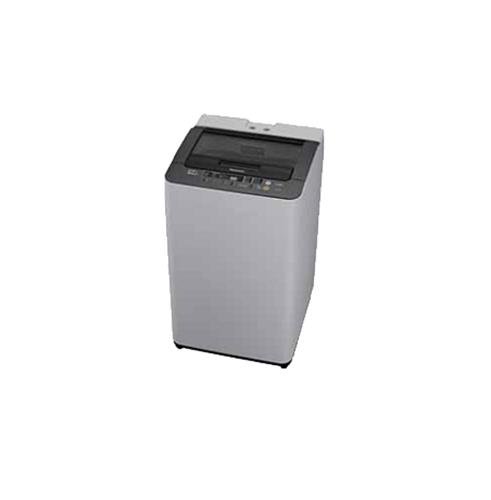
Figure 1: Panasonic NA-F65H3 6.5 Kg Top-loading Washing Machine. This image shows the overall design of the appliance, including the top-loading lid and control panel.
1.3 واٹر سپلائی کنکشن
Connect the inlet hose to a cold water tap with a 3/4-inch thread. Ensure all connections are tight to prevent leaks. Do not overtighten. The water pressure should be between 0.03 MPa and 1 MPa.
1.4 Drainage Hose Setup
Position the drain hose correctly. It should be placed into a standpipe or over the edge of a sink, ensuring it is securely fixed to prevent dislodging during operation. The height of the drain hose should be between 80 cm and 100 cm from the floor.
1.5 مشین کو برابر کرنا
Use a spirit level to ensure the machine is perfectly level. Adjust the leveling feet at the bottom of the machine as needed. A level machine reduces vibration and noise during operation.
1.6 پاور کنکشن
پاور کورڈ کو گراؤنڈڈ برقی آؤٹ لیٹ میں لگائیں۔ والیوم کو یقینی بنائیںtage اور فریکوئنسی مشین کے ریٹنگ لیبل پر درج وضاحتوں سے میل کھاتی ہے۔
2. آپریٹنگ ہدایات
2.1 کنٹرول پینل ختمview
The control panel, located on the top rear of the machine, features various buttons and indicators for selecting wash programs, water levels, and special functions. Familiarize yourself with the layout before first use.
- پاور بٹن: مشین کو آن/آف کرتا ہے۔
- شروع/توقف بٹن: واش سائیکل شروع کرتا ہے یا روکتا ہے۔
- پروگرام سلیکٹر: Dial or buttons to choose from 8 wash programs.
- پانی کی سطح: Adjusts water level (6 settings available).
- تاخیر سے آغاز: واش سائیکل کے لیے تاخیر سے شروع ہونے کا وقت مقرر کرتا ہے۔
2.2 لانڈری لوڈ کرنا
Open the glass lid and load laundry evenly into the Sazanami drum. Do not overload the machine; ensure there is enough space for clothes to move freely. Close the lid securely.
2.3 ڈٹرجنٹ اور سافٹنر شامل کرنا
Add the appropriate amount of detergent to the detergent dispenser, typically located on the top edge of the drum opening. If using fabric softener, add it to the designated softener compartment. Refer to detergent packaging for recommended quantities.
2.4 واش پروگرام کا انتخاب کرنا
Turn on the machine using the Power button. Select one of the 8 available wash programs based on your laundry type and soil level. Adjust the water level using the Water Level button (6 settings available). Available wash technologies include:
- Foam Wash: Creates fine foam for effective dirt removal.
- Aqua Beat Wash: Powerful water flow for thorough cleaning.
- Dancing Water Flow: Dynamic water movement to prevent tangling.
- ایکوا اسپن رینس: Efficient rinsing with minimal water.
- Power Soak: Pre-soak function for heavily soiled items (90/120/150 min options).
2.5 واش سائیکل شروع کرنا
Once the program and settings are selected, press the Start/Pause button to begin the wash cycle. The machine will automatically proceed through the wash, rinse, and spin phases. The new auto re-start feature (with LED indicator) will resume operation after a power outage.
3. دیکھ بھال اور دیکھ بھال
3.1 لنٹ فلٹر کی صفائی
The big lint filter, typically located inside the drum near the top rim, should be cleaned regularly, ideally after every few washes, to maintain optimal performance. Remove the filter, clean out accumulated lint under running water, and reinsert it securely.
3.2 واشنگ مشین کی صفائی
مشین کے بیرونی حصے کو نرم سے صاف کریں، ڈیamp cloth. Clean the detergent dispenser periodically to prevent residue buildup. For the drum, run a 'Tub Clean' or 'Self Clean' cycle if available, or a hot wash with a washing machine cleaner. The anti-bacterial coating helps maintain hygiene.
3.3 ونٹرائزیشن اور اسٹوریج
If storing the machine in an unheated area or during freezing temperatures, drain all water from the hoses and pump to prevent damage. Disconnect water supply and power, and store in a dry place.
4 خرابیوں کا سراغ لگانا
سروس سے رابطہ کرنے سے پہلے، عام مسائل اور ان کے حل کے لیے درج ذیل جدول کو دیکھیں۔
| مسئلہ | ممکنہ وجہ | حل |
|---|---|---|
| مشین شروع نہیں ہوتی | بجلی کی تار ان پلگ ڑککن بند نہیں؛ طاقت outage. | Check power connection; Ensure lid is fully closed; Wait for power to resume (auto re-start feature). |
| پانی نہیں نکلتا | ڈرین ہوز کنک یا بلاک لنٹ فلٹر بھرا ہوا ہے۔ | Straighten drain hose; Clean the lint filter. |
| ضرورت سے زیادہ کمپن/شور۔ | Machine not level; Laundry unevenly distributed; Transit bolts not removed. | لیولنگ پاؤں کو ایڈجسٹ کریں؛ لانڈری کی دوبارہ تقسیم؛ یقینی بنائیں کہ تنصیب کے دوران تمام ٹرانزٹ بولٹ ہٹا دیے گئے ہیں۔ |
| ناقص دھونے کے نتائج | اوورلوڈنگ ناکافی صابن؛ پروگرام کا غلط انتخاب۔ | Reduce load size; Use correct amount of detergent; Select appropriate wash program. |
5. وضاحتیں
| برانڈ | پیناسونک |
| ماڈل | NA-F65H3 |
| قسم | Fully-automatic Top-loading Washing Machine |
| صلاحیت | 6.5 کلوگرام |
| پروگراموں کو دھونا | 8 |
| Water Level Settings | 6 |
| ڈرم کی قسم | Sazanami Drum |
| خصوصی خصوصیات | Glass Lid, Anti-bacterial Filter, Anti-bacterial Coating, Power Soak (90/120/150 min), Foam Wash, Aqua Beat Wash, Dancing Water Flow, Aqua Spin Rinse, Big Lint Filter, Auto Re-start (with LED indicator) |
| رنگ | سفید اور گرے |
6. وارنٹی اور سپورٹ
6.1 وارنٹی کی معلومات
This Panasonic NA-F65H3 washing machine comes with a پروڈکٹ پر 2 سال کی وارنٹی from the date of purchase. Please retain your purchase receipt as proof of warranty. The warranty covers manufacturing defects under normal use conditions. For detailed terms and conditions, refer to the warranty card provided with your appliance.
6.2 کسٹمر سپورٹ
For technical assistance, service requests, or inquiries regarding your Panasonic washing machine, please contact Panasonic customer support. You can find contact details on the official Panasonic webسائٹ یا وارنٹی دستاویزات میں۔
When contacting support, please have your model number (NA-F65H3) and serial number ready to expedite the service process.