
1. تعارف
The Bogen 1126-BG-UTI1 is a single-zone paging controller designed to integrate a paging system with a telephone system. It provides a reliable interface for making announcements over a public address system from a telephone. This manual provides detailed instructions for the proper installation, operation, and maintenance of your Bogen paging controller.
2. اہم حفاظتی معلومات
براہ کرم اس ڈیوائس کو چلانے سے پہلے تمام حفاظتی ہدایات کو پڑھیں اور سمجھیں۔ مستقبل کے حوالے کے لیے اس دستی کو برقرار رکھیں۔
- طاقت کا منبع: یونٹ کو صرف مخصوص پاور سپلائی والیوم سے جوڑیں۔tage.
- نمی: یونٹ کو بارش یا نمی سے بے نقاب نہ کریں۔
- وینٹیلیشن: مناسب وینٹیلیشن کو یقینی بنائیں۔ وینٹیلیشن کے سوراخوں کو مسدود نہ کریں۔
- سروسنگ: تمام خدمات کا حوالہ اہل سروس اہلکاروں کو دیں۔ اس پروڈکٹ کو خود پیش کرنے کی کوشش نہ کریں۔
- صفائی: صرف خشک کپڑے سے صاف کریں۔
3. پیکیج کے مشمولات
تصدیق کریں کہ تمام اشیاء پیکیج میں موجود ہیں:
- Bogen 1126-BG-UTI1 Single Zone Paging Controller Unit
- پاور اڈاپٹر
- صارف دستی (یہ دستاویز)
- بڑھتے ہوئے ہارڈ ویئر (اگر قابل اطلاق ہو)
4. پروڈکٹ ختمview
The Bogen 1126-BG-UTI1 features various ports and indicators for seamless integration and operation. Familiarize yourself with the unit's components before installation.
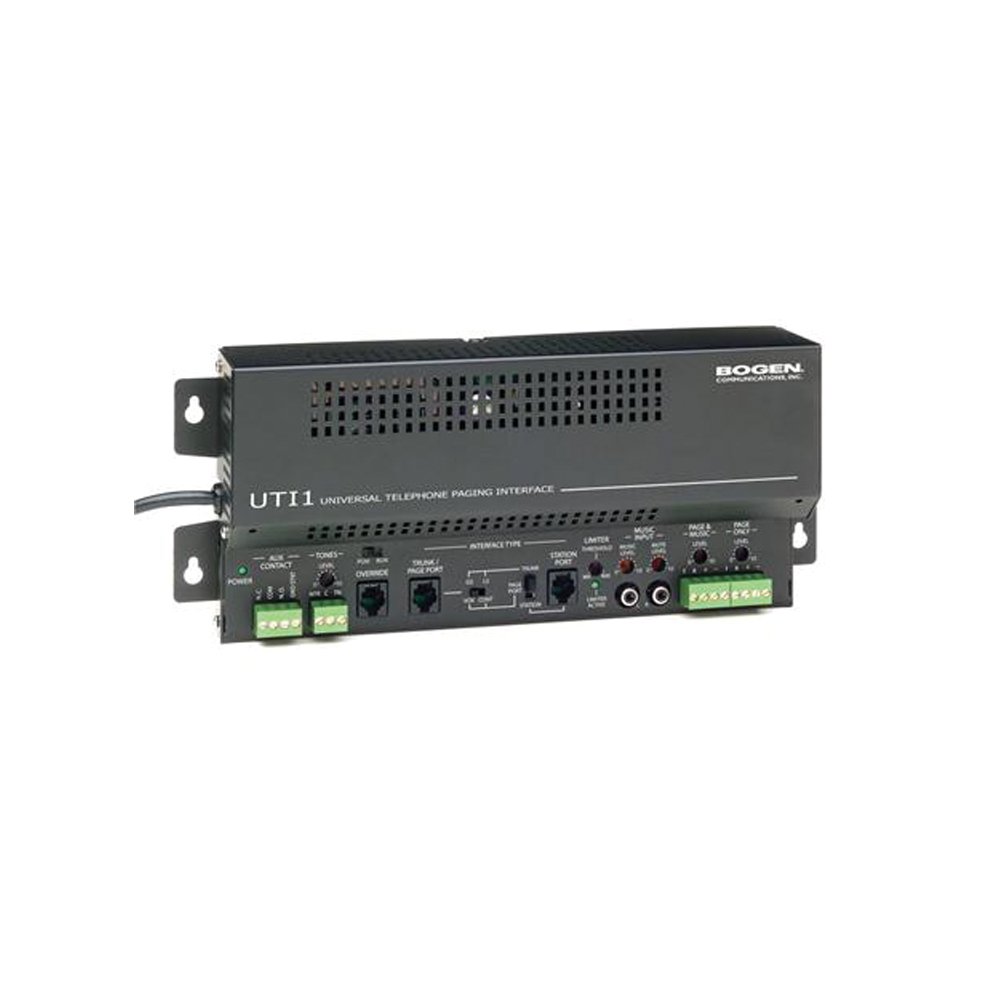
تصویر 1: سامنے والا view of the Bogen Single Zone Paging Controller. This image displays the main unit, highlighting its compact design and essential connection points for audio input and output, as well as power. The various ports and indicators are visible, crucial for understanding the device's functionality and connectivity.
4.1 فرنٹ پینل
- پاور ایل ای ڈی: طاقت کی حیثیت کی نشاندہی کرتا ہے۔
- ان پٹ لیول کنٹرول: Adjusts the audio input sensitivity.
- آؤٹ پٹ لیول کنٹرول: آڈیو آؤٹ پٹ والیوم کو ایڈجسٹ کرتا ہے۔
4.2 پیچھے والا پینل
- Telephone Line Input: RJ-11 jack for connecting to the telephone system.
- آڈیو آؤٹ پٹ: RCA or screw terminal connections for connecting to an ampزندگی
- پاور ان پٹ: Jack for connecting the power adapter.
- MOH Output: Music On Hold output (if applicable).
5. سیٹ اپ اور انسٹالیشن
Follow these steps to properly install your paging controller:
- چڑھنا: Choose a suitable location for the controller, away from excessive heat or moisture. Secure the unit using appropriate mounting hardware if desired.
- Connect to Telephone System: Connect an RJ-11 cable from your telephone system's paging port or a suitable analog extension to the "Telephone Line Input" on the controller. Consult your telephone system's manual for specific paging port details.
- سے جڑیں۔ Ampزندہ: Connect the "Audio Output" of the paging controller to an available input on your paging amplifier. Ensure correct polarity if using screw terminals.
- پاور سے رابطہ کریں: Plug the provided power adapter into the "Power Input" jack on the controller, then plug the adapter into a standard electrical outlet. The Power LED should illuminate.
- Initial Level Adjustment: Start with the Input Level and Output Level controls set to their minimum positions.
6. آپریٹنگ ہدایات
Once installed, the Bogen 1126-BG-UTI1 is ready for operation.
6.1 Making a Page
- From a telephone connected to the system, dial the designated paging access code or extension.
- Wait for the confirmation tone or voice prompt from the paging controller.
- Speak clearly into the telephone handset to make your announcement.
- Hang up the telephone when finished.
6.2 آڈیو لیولز کو ایڈجسٹ کرنا
- ان پٹ کی سطح: Slowly increase the "Input Level Control" until the paging audio is clear and distortion-free. If the audio is too loud or distorted, decrease this level.
- پیداوار کی سطح: Adjust the "Output Level Control" to achieve the desired volume through the paging speakers. This should be done in conjunction with the ampلائفائر کا حجم کنٹرول۔
7 دیکھ بھال
The Bogen 1126-BG-UTI1 is designed for reliable operation with minimal maintenance.
- صفائی: Periodically wipe the unit with a soft, dry cloth. Do not use liquid cleaners or aerosols.
- وینٹیلیشن: Ensure that ventilation openings remain clear of dust and debris.
- رابطے: Occasionally check all cable connections to ensure they are secure.
8 خرابیوں کا سراغ لگانا
اگر آپ کو مسائل کا سامنا ہے، تو درج ذیل ٹربل شوٹنگ گائیڈ سے رجوع کریں:
| مسئلہ | ممکنہ وجہ | حل |
|---|---|---|
| پاور انڈیکیٹر لائٹ نہیں۔ | Power adapter not connected or faulty; no power at outlet. | Check power adapter connection. Verify outlet has power. Test with another adapter if available. |
| No paging audio. | Incorrect telephone system connection; amplifier off or muted; audio levels too low. | Verify telephone line and audio output connections. Ensure amplifier is on and not muted. Adjust Input and Output Level controls. |
| Paging audio is distorted. | Input or output levels set too high. | Reduce Input Level and/or Output Level controls. |
| Cannot access paging from telephone. | Incorrect paging access code; telephone system not configured correctly. | Confirm the correct paging access code with your telephone system administrator. Verify telephone system programming. |
If the problem persists after attempting these solutions, contact Bogen technical support.
9. وضاحتیں
| فیچر | تفصیل |
|---|---|
| ماڈل نمبر | 1126-BG-UTI1 |
| برانڈ | بوگن |
| پیکیج کے طول و عرض | 15 x 9 x 7 انچ |
| شے کا وزن | 6.7 پاؤنڈ |
| ASIN | B00P1AOL2C |
| کارخانہ دار | بوگن |
| Paging Zones | سنگل زون |
| مطابقت | Telephone systems with analog paging port or extension |
10. وارنٹی اور سپورٹ
Bogen products are designed for durability and performance. For specific warranty information, please refer to the warranty card included with your product or visit the official Bogen website. Technical support is available to assist with any questions or issues you may encounter.
- آن لائن مدد: وزٹ کریں۔ www.bogen.com/support for FAQs, documentation, and contact information.
- رابطہ کی معلومات: Refer to the Bogen website for current telephone numbers and email addresses for technical assistance.