
DigiTech TRIO
DigiTech TRIO Band Creator Pedal Instruction Manual
ماڈل: تینوں | برانڈ: DigiTech
تعارف
The DigiTech TRIO is an innovative electric guitar multi-effect pedal designed to be your personal band. It listens to your guitar playing and automatically generates accompanying bass and drum parts. This manual provides comprehensive instructions for setting up, operating, and maintaining your TRIO pedal, ensuring you get the most out of its unique features.
کلیدی خصوصیات
- Seven Music Genres and Twelve Song Styles Per Genre to Choose From
- The TRIO can learn up to three different song parts that can be recalled on-the-fly
- Adjustable Tempo & Alternate Half Time/Double Time Variants Bass & Drum Level Controls
- Hands-Free Control Using a DigiTech FS3X Footswitch (optional)
- Amp & Mixer Outputs Headphone Output w/Level Control Power Supply Included
سیٹ اپ گائیڈ
Follow these steps to set up your DigiTech TRIO pedal:
- شامل 9V DC پاور سپلائی کو منسلک کریں۔ پاور input on the pedal and plug it into a power outlet.
- Connect your electric guitar to the گٹار میں جیک ایک معیاری 1/4 انچ کی انسٹرومنٹ کیبل کا استعمال کرتے ہوئے۔
- مربوط کریں۔ AMP باہر اپنے گٹار کو جیک کریں۔ amplifier's input using another 1/4-inch instrument cable.
- For connecting to a mixer or PA system, use the مکسر آؤٹ جیک
- For private practice, connect headphones to the ہیڈ فون آؤٹ جیک
- Optionally, connect a DigiTech FS3X Footswitch to the کنٹرول میں jack for extended hands-free control.
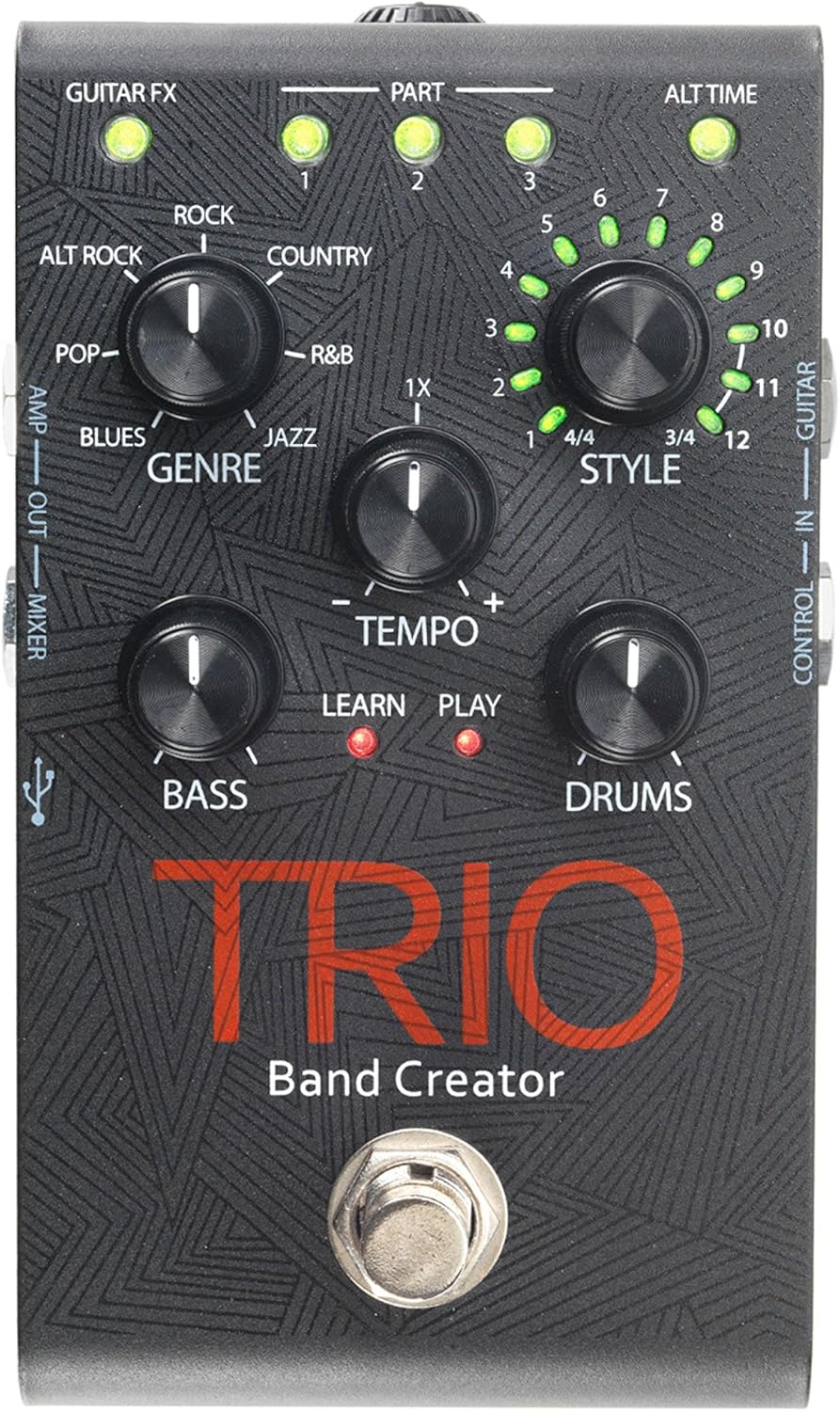
تصویر 1: اوپر view of the DigiTech TRIO pedal, showing the main controls and footswitch.
آپریٹنگ ہدایات
Basic Operation: Teaching the TRIO a Song
- دبائیں بینڈ footswitch once to enter 'Listen' mode. The سیکھیں۔ ایل ای ڈی روشن کرے گا۔
- Play your desired chord progression and rhythm clearly. The TRIO will analyze your playing.
- دبائیں بینڈ footswitch again to stop 'Listen' mode. The کھیلیں LED will illuminate, and the TRIO will immediately begin playing generated bass and drum parts.
- You can now play along with your virtual band.
Genre and Style Selection
- استعمال کریں۔ GENRE knob to select from Blues, Pop, Alternative Rock, Rock, Country, R&B, and Jazz. The genre affects the overall feel of the generated bass and drum parts.
- استعمال کریں۔ اسٹائل knob to choose from twelve different song styles available for each genre. This allows for further customization of the rhythm and feel.
- دی ALT TIME button allows you to switch between 3/4 and 4/4 time signatures.
Looping and Song Parts
- The TRIO can learn up to 3 different song parts. To record a new part, select an empty حصہ slot (1, 2, or 3) using the corresponding buttons.
- Follow the 'Basic Operation' steps to teach the TRIO the new song part.
- During playback, you can switch between learned song parts on-the-fly by pressing the corresponding حصہ بٹن
- دی لوپر footswitch allows you to record and playback your own guitar loops. Press once to start recording, press again to stop recording and start playback, and press and hold to clear the loop.
Adjusting Levels and Tempo
- دی ٹیمپو knob adjusts the playback speed of the band and loops.
- دی BASS knob controls the volume level of the generated bass line.
- دی ڈرم knob controls the volume level of the generated drum track.
- دی لوپ knob controls the volume level of your recorded guitar loop.

شکل 2: زاویہ دار view of the DigiTech TRIO pedal, highlighting the control knobs and input/output jacks.
کنٹرولز اور کنکشنز
The DigiTech TRIO pedal features a user-friendly layout with clearly labeled controls and versatile connection options:
فرنٹ پینل کنٹرولز:
- GUITAR FX: Activates built-in guitar effects tailored to the selected genre.
- PART 1, 2, 3: Buttons to select and recall different learned song parts.
- ALT TIME: Toggles between 3/4 and 4/4 time signatures.
- TEMPO Knob: Adjusts the overall playback speed.
- GENRE Knob: Selects the musical genre (Blues, Pop, Alt Rock, Rock, Country, R&B, Jazz).
- STYLE Knob: Selects one of twelve styles within the chosen genre.
- LOOP Knob: Controls the volume of your recorded guitar loop.
- باس نوب: تیار کردہ باس لائن کے حجم کو کنٹرول کرتا ہے۔
- DRUMS Knob: تیار کردہ ڈرم ٹریک کے حجم کو کنٹرول کرتا ہے۔
- LOOPER Footswitch: Records/plays/clears guitar loops.
- BAND Footswitch: Enters 'Listen' mode to learn chords/rhythm, or starts/stops band playback.
Side and Rear Panel Connections:
- گٹار میں: 1/4-inch input for your electric guitar.
- AMP باہر: 1/4-inch output to your guitar ampزندگی
- MIXER OUT: 1/4-inch output for connecting to a mixer or PA system.
- ہیڈ فون آؤٹ: 1/8-inch stereo output for headphones.
- کنٹرول میں: 1/4-inch input for optional DigiTech FS3X Footswitch.
- طاقت: 9V DC input for the included power supply.
- USB: Mini-USB port for firmware updates.

شکل 3: پیچھے view of the DigiTech TRIO pedal, showing the power input and headphone jack.
وضاحتیں
| فیچر | تفصیل |
|---|---|
| شے کا وزن | 10.6 اونس (0.3 کلوگرام) |
| مصنوعات کے طول و عرض | 4.63 x 3.19 x 2.13 انچ (11.76 x 8.10 x 5.41 سینٹی میٹر) |
| آئٹم ماڈل نمبر | تینوں |
| بیٹریاں | 1 9V battery required (for internal use, not primary power) |
| ہارڈ ویئر انٹرفیس | 1/4 انچ آڈیو |
| سگنل کی شکل | اینالاگ |
| طاقت کا منبع | Corded Electric (9V DC adapter included) |
| والیومtage | 9 وولٹ |
| Ampایجری | 300 ملی۔amps |
دیکھ بھال
- Keep the pedal clean by wiping it with a soft, dry cloth. Avoid using abrasive cleaners or solvents.
- پیڈل کو کسی ٹھنڈی، خشک جگہ پر براہ راست سورج کی روشنی اور انتہائی درجہ حرارت سے دور رکھیں۔
- اس بات کو یقینی بنائیں کہ سگنل کے نقصان یا نقصان کو روکنے کے لیے تمام کیبلز محفوظ طریقے سے منسلک ہیں۔
- Avoid dropping the pedal or subjecting it to strong impacts.
خرابی کا سراغ لگانا
- کوئی آواز نہیں: تمام کیبل کنکشن چیک کریں (گٹار، amp, power). Ensure the pedal is powered on and the volume knobs are not set to zero.
- خراب آواز کا معیار: Verify that your instrument and amplifier are functioning correctly. Check for damaged cables.
- Band Not Generating Correctly: Ensure you are playing clear, distinct chords during the 'Listen' phase. Try different genres and styles to see if a different setting better interprets your playing.
- Footswitch Unresponsive: Disconnect and reconnect the power supply. If using an optional FS3X footswitch, ensure it is properly connected.
وارنٹی اور سپورٹ
وارنٹی معلومات اور تکنیکی مدد کے لیے، براہ کرم آفیشل DigiTech سے رجوع کریں۔ webسائٹ یا ان کی کسٹمر سروس سے رابطہ کریں۔ وارنٹی کے دعووں کے لیے اپنی خریداری کا ثبوت رکھیں۔
Ask a question about this manual
Ask about setup, troubleshooting, compatibility, parts, safety, or missing instructions. Manuals+ will review the question and use this page’s manual context to help answer it.