
1. سیٹ اپ
1.1 پیکنگ اور مشمولات
ٹی وی اور تمام لوازمات کو احتیاط سے پیکیجنگ سے ہٹا دیں۔ یقینی بنائیں کہ تمام اجزاء موجود ہیں:
- Sharp LC-40LE653U 40-Inch Smart LED TV
- ریموٹ کنٹرول
- 2 اے اے بیٹریاں
1.2 اسٹینڈ تنصیب
If placing the TV on a table, attach the included stand. Refer to the diagram below for proper assembly. Ensure all screws are securely fastened.
1.3 بیرونی آلات کو جوڑنا
Connect your external devices such as cable boxes, Blu-ray players, or gaming consoles to the TV's input ports. The TV features multiple connectivity options.


Available ports include:
- HDMI: 2 ports for high-definition audio and video. One HDMI port supports MHL (Mobile High-Definition Link).
- USB: 1 port for media playback or connecting a USB device.
- ایتھرنیٹ: وائرڈ نیٹ ورک کنکشن کے لیے۔
- Component/Video: For older video devices.
- DTV/TV (Antenna): اینٹینا یا کیبل ٹی وی فیڈ کو جوڑنے کے لیے۔
- آڈیو آؤٹ: Optical for digital audio, and RCA for analog audio.
1.4 پاور کنکشن
After connecting all necessary devices, plug the TV's power cord into a wall outlet.
1.5 ابتدائی سیٹ اپ
Upon first power-on, the TV will guide you through an initial setup process. This includes language selection, time zone, and network configuration. For Wi-Fi setup, select your network and enter the password.
2. آپریٹنگ ہدایات
2.1 ریموٹ کنٹرول کے افعال
The remote control allows you to access all TV functions. Insert the two AA batteries into the remote control, ensuring correct polarity.

- پاور (سرخ بٹن): ٹی وی کو آن یا آف کرتا ہے۔
- ان پٹ: Selects the input source (HDMI, TV, USB, etc.).
- VOL +/-: حجم کی سطح کو ایڈجسٹ کرتا ہے۔
- CH +/-: ٹی وی چینلز بدلتے ہیں۔
- Navigation Buttons (Up/Down/Left/Right/Enter): مینو کو نیویگیٹ کرنے اور اختیارات کو منتخب کرنے کے لیے استعمال کیا جاتا ہے۔
- اسمارٹ: Accesses the Smart Central Apps menu.
- مینو: Opens the main TV menu for settings adjustments.
- نیٹ فلکس: Direct access button for the Netflix application.
2.2 Smart TV Features (Smart Central Apps)
The Sharp LC-40LE653U features Smart Central Apps, providing access to various online services and a web browser. Ensure your TV is connected to the internet via Wi-Fi or Ethernet.

- ایپس تک رسائی: Press the 'SMART' button on your remote to open the Smart Central Apps menu.
- معاون خدمات: Includes Hulu Plus, Netflix, Pandora, Vudu, and YouTube.
- Web براؤزر: بلٹ ان استعمال کریں۔ web browser for general internet browsing. Navigation is done via the remote control.
2.3 Wallpaper Mode
When the TV is turned off, Wallpaper Mode can display virtually any image. To use this feature, connect a USB drive containing your desired images to the TV's USB port. Navigate to the Wallpaper Mode settings in the TV menu to select and configure your images.
3 دیکھ بھال
3.1 ٹی وی کی صفائی
اسکرین کو صاف کرنے کے لیے، نرم، خشک، لنٹ سے پاک کپڑے سے اسے آہستہ سے صاف کریں۔ ضدی نشانات کے لیے، تھوڑا سا ڈیampen the cloth with water or a specialized screen cleaner. Avoid using harsh chemicals, abrasive cleaners, or direct spraying of liquids onto the screen or cabinet.
Clean the TV cabinet with a soft, dry cloth. Ensure the TV is unplugged before cleaning.
3.2 سافٹ ویئر اپ ڈیٹس
Periodically check for software updates through the TV's settings menu to ensure optimal performance and access to the latest features. Updates can be performed via the internet connection.
4 خرابیوں کا سراغ لگانا
If you encounter issues with your Sharp LC-40LE653U TV, refer to the following common solutions:
- کوئی طاقت نہیں: Ensure the power cord is securely plugged into both the TV and a working wall outlet. Check if the power indicator light on the TV is on.
- کوئی تصویر/آواز نہیں: Verify the correct input source is selected using the 'Input' button on the remote. Check all cable connections (HDMI, component, etc.) are secure.
- ناقص تصویر کا معیار: TV مینو میں تصویر کی ترتیبات (چمک، کنٹراسٹ، نفاست) کو ایڈجسٹ کریں۔ یقینی بنائیں کہ ان پٹ کا ذریعہ اعلی معیار کا سگنل فراہم کر رہا ہے۔
- کوئی انٹرنیٹ کنکشن نہیں: Check your Wi-Fi router or Ethernet cable connection. Re-enter your Wi-Fi password in the TV's network settings. Restarting your router may resolve connectivity issues.
- ریموٹ کنٹرول کام نہیں کر رہا: ریموٹ کنٹرول میں بیٹریاں تبدیل کریں۔ یقینی بنائیں کہ ریموٹ اور ٹی وی کے IR سینسر کے درمیان کوئی رکاوٹ نہیں ہے۔
For more detailed troubleshooting steps, consult the full online manual or contact customer support.
5. وضاحتیں
Key technical specifications for the Sharp LC-40LE653U 40-Inch Smart LED TV:
| فیچر | تفصیلات |
|---|---|
| ماڈل نمبر | LC-40LE653U |
| اسکرین کا سائز | 39.5 انچ (40 انچ کلاس) |
| ڈسپلے ٹیکنالوجی | LCD |
| قرارداد | 1080p (مکمل HD) |
| ریفریش ریٹ | 60 Hz |
| پہلو کا تناسب | 16:9 |
| کنیکٹوٹی ٹیکنالوجی | وائی فائی |
| ہارڈ ویئر انٹرفیس | ایتھرنیٹ، HDMI، USB |
| HDMI پورٹس کی کل تعداد | 2 (one with MHL support) |
| کل USB پورٹس | 1 |
| آڈیو ان پٹ | HDMI، آپٹیکل، USB |
| اسپیکر زیادہ سے زیادہ آؤٹ پٹ پاور | 20 واٹ |
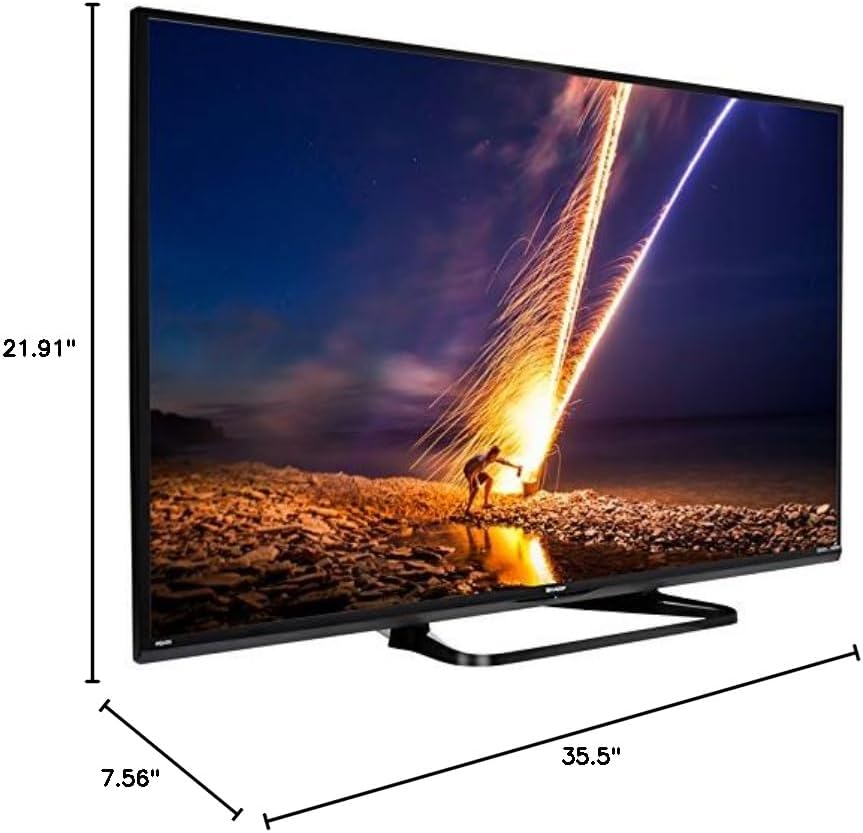
| پروڈکٹ کے طول و عرض (D x W x H) | 7.56" x 35.5" x 21.91" |
| شے کا وزن | 16.3 پاؤنڈز |
| چڑھنے کی قسم | ٹیبل ماؤنٹ |
| تعاون یافتہ انٹرنیٹ سروسز | Hulu Plus, Netflix, Pandora, Vudu, YouTube |
| انرجی اسٹار مصدقہ ہے | جی ہاں |
6. وارنٹی اور سپورٹ
6.1 پروڈکٹ وارنٹی
This Sharp LC-40LE653U TV comes with a 1 سال کی محدود وارنٹی. وارنٹی کے دعووں کے لیے براہ کرم اپنی خریداری کا ثبوت اپنے پاس رکھیں۔ وارنٹی عام استعمال کے حالات میں مینوفیکچرنگ کے نقائص کا احاطہ کرتی ہے۔
6.2 کسٹمر سپورٹ
For technical assistance, troubleshooting beyond this manual, or warranty service, please contact Sharp customer support. Refer to the official Sharp webموجودہ رابطے کی معلومات کے لیے سائٹ یا آپ کا پروڈکٹ رجسٹریشن کارڈ۔