
تعارف
خریداری کے لیے آپ کا شکریہasing the STOGA Ubox STV040 Dual Lens Car DVR Camera. This manual provides detailed instructions for the proper installation, operation, and maintenance of your device. Please read this manual thoroughly before using the product to ensure optimal performance and safety.
پیکیج کے مشمولات
براہ کرم کھولنے پر پیکیج کے مواد کو چیک کریں۔ اگر کوئی چیز غائب یا خراب ہو تو اپنے خوردہ فروش سے رابطہ کریں۔
- 1 x STOGA Ubox STV040 Car DVR Camera
- 1 ایکس کار چارجر
- 1 x Car Mount
- 1 x External GPS Module
- 1 ایکس صارف دستی
پروڈکٹ ختمview
Familiarize yourself with the components and features of your STOGA Ubox STV040 Car DVR Camera.

تصویر 1: سامنے والا view of the DVR camera with the display screen active.

تصویر 2: سامنے والا view detailing the dual wide-angle lenses and surrounding controls.
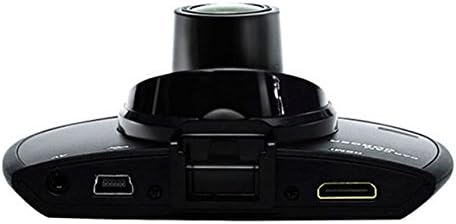
تصویر 3: اوپر view illustrating the connectivity ports (HDMI, USB, AV).
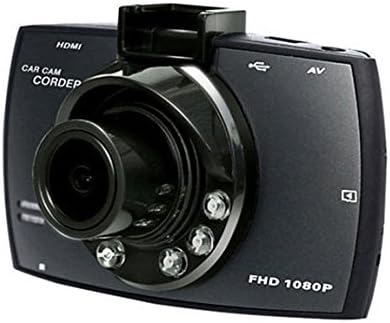
تصویر 4: Angled perspective of the DVR camera, showing its compact design.
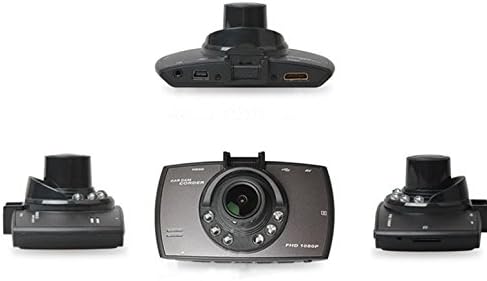
تصویر 5: جامع view of the DVR camera from various angles.
سیٹ اپ
1 مائیکرو ایس ڈی کارڈ انسٹال کرنا
Insert a Micro SD card (Class 6 or higher, 4GB-32GB) into the designated slot on the DVR camera. Ensure the card is inserted correctly until it clicks into place. The device supports continuous loop recording and emergency event recording.
2. کیمرہ لگانا
- Attach the car mount to the windshield in a position that does not obstruct your view.
- Securely attach the DVR camera to the car mount.
- Adjust the camera angle to ensure both lenses capture the desired view (front and interior/side). The dual lenses are 180-degree rotatable.
3. پاور کنکشن
Connect the car charger to the DVR camera's power input and plug the other end into your vehicle's 12V power outlet (cigarette lighter socket). The camera will typically power on automatically when the vehicle starts and power off when the vehicle is turned off.
4. GPS Module Connection (Optional)
Connect the external GPS module to the designated GPS port on the DVR camera. This enables GPS logging, recording location data along with video footage.
آپریٹنگ ہدایات
پاور آن/آف
- خودکار: The camera powers on and starts recording automatically when the car engine starts. It powers off automatically when the engine is turned off.
- دستی: Press and hold the power button to manually turn the device on or off.
ریکارڈنگ کے طریقوں
- لوپ ریکارڈنگ: The camera continuously records video in segments. When the memory card is full, it automatically overwrites the oldest unlocked footage.
- ایمرجنسی ریکارڈنگ (G-Sensor): The built-in G-Sensor detects sudden impacts or collisions. In such an event, the current video segment is automatically locked and protected from being overwritten.
مینو نیویگیشن
Use the control buttons located on the device to navigate through the menu options on the 2.0" TFT LCD screen. Adjust settings such as video resolution, date/time stamp, language (English, Chinese, Japanese, Russian), and G-Sensor sensitivity.
پلے بیک
- اگر فی الحال فعال ہے تو ریکارڈنگ بند کریں۔
- Enter playback mode via the menu.
- مطلوبہ ویڈیو منتخب کریں۔ file for playback on the device screen.
- Alternatively, remove the Micro SD card and insert it into a computer to view files.
پاس ورڈ کا تحفظ
The device supports password protection to prevent unauthorized access to recordings. Refer to the on-screen menu for setting up and managing this feature.
دیکھ بھال
- صفائی: Use a soft, dry cloth to clean the camera lenses and screen. Avoid abrasive cleaners or solvents.
- مائیکرو ایسڈی کارڈ: Format the Micro SD card regularly (e.g., once a month) to ensure optimal performance and prevent data corruption. Back up important fileفارمیٹنگ سے پہلے s۔
- درجہ حرارت: ڈیوائس کو انتہائی درجہ حرارت، طویل عرصے تک براہ راست سورج کی روشنی، یا زیادہ نمی کے سامنے آنے سے گریز کریں۔
- فرم ویئر اپ ڈیٹس: مینوفیکچررز کو چیک کریں۔ webکارکردگی کو بہتر بنانے اور خصوصیات شامل کرنے کے لیے کسی بھی دستیاب فرم ویئر اپ ڈیٹ کے لیے وقتاً فوقتاً سائٹ۔
خرابی کا سراغ لگانا
| مسئلہ | ممکنہ وجہ/حل |
|---|---|
| کیمرہ آن نہیں ہوتا ہے۔ |
|
| ریکارڈنگ غیر متوقع طور پر رک جاتی ہے۔ |
|
| ناقص ویڈیو کا معیار۔ |
|
| GPS کام نہیں کر رہا ہے۔ |
|
| بیٹری چارج نہیں رکھتی۔ |
|
وضاحتیں
| فیچر | تفصیل |
|---|---|
| ماڈل نمبر | Ubox STV040 |
| ڈسپلے | 2.0" TFT LCD (960 x 240 pixels) |
| لینس | Dual 140-degree A+ wide-angle, 180-degree rotatable |
| سینسر | CMOS |
| ویڈیو ریزولوشن | 1280 x 480 @ 30 fps, 640 x 480 @ 30 fps |
| ویڈیو فارمیٹ | AVI |
| تصویری شکل | M-JPG |
| نائٹ ویژن | اورکت نائٹ ویژن فنکشن |
| ذخیرہ | Micro TF (SD HC) card, 4GB-32GB, Class 6 and above |
| جی پی ایس | Supports external GPS module |
| جی سینسر | Integrated, supports emergency event recording lock |
| مائیکروفون/اسپیکر | مربوط |
| آؤٹ پٹ | CVBS (Video Output) |
| بیٹری | 3.7V 700mA Lithium-Polymer battery |
| آپریٹنگ سسٹم کی مطابقت | ونڈوز 2000/XP/Vista/Windows 7 |
| تائید شدہ زبانیں | English, Chinese, Japanese, Russian |
وارنٹی اور سپورٹ
For warranty information and technical support, please refer to the documentation provided with your purchase or contact your retailer. Keep your purchase receipt as proof of purchase for warranty claims.
For further assistance, you may also visit the official STOGA website (if available) or contact their customer service department.