
1. تعارف
This manual provides essential information for the safe and effective use of your Profoto ProHead Plus UV 250W Flash Head with Zoom Reflector. Please read these instructions carefully before operating the unit to ensure optimal performance and longevity. This flash head is designed for professional photographic applications, offering superior performance and reliability.
2. حفاظتی معلومات
Observe the following safety precautions to prevent injury or damage to the equipment:
- برقی حفاظت: Always connect the flash head to a compatible Profoto power pack. Ensure the power pack is switched off before connecting or disconnecting the flash head. Do not operate the unit with wet hands or in damp حالات
- حرارت: فلیش ٹیوب اور ماڈلنگ ایلamp generate significant heat during operation. Allow the unit to cool down before handling or changing accessories. The integrated fan helps manage temperature, but caution is still required.
- فلیش ٹیوب: The flash tube contains high-voltage components. Do not attempt to replace the flash tube without first disconnecting the unit from the power source and allowing sufficient discharge time. Use only genuine Profoto replacement tubes.
- UV تابکاری: The flash head includes a UV-reducing glass cover for safety. Do not operate the unit without this cover or with a damaged cover.
- آنکھوں کی حفاظت: Avoid looking directly into the flash tube when it fires, as the intense light can cause temporary vision impairment.
- وینٹیلیشن: Ensure adequate ventilation around the flash head to prevent overheating. Do not obstruct the fan vents.
3. پیکیج کے مشمولات
تصدیق کریں کہ تمام اشیاء پیکیج میں موجود ہیں:
- Profoto ProHead Plus UV 250W Flash Head
- Profoto Zoom Reflector
- Protective Glass Cover (UV reducing)
4. پروڈکٹ ختمview
The Profoto ProHead Plus is a robust and versatile flash head designed for demanding studio and location work. It features a heavy-duty quartz flash tube, a UV-reducing glass cover, and a temperature-controlled fan for consistent performance.

تصویر 4.1: Profoto ProHead Plus UV 250W Flash Head. This image shows the flash head from the side, highlighting its compact design and the adjustment handle.
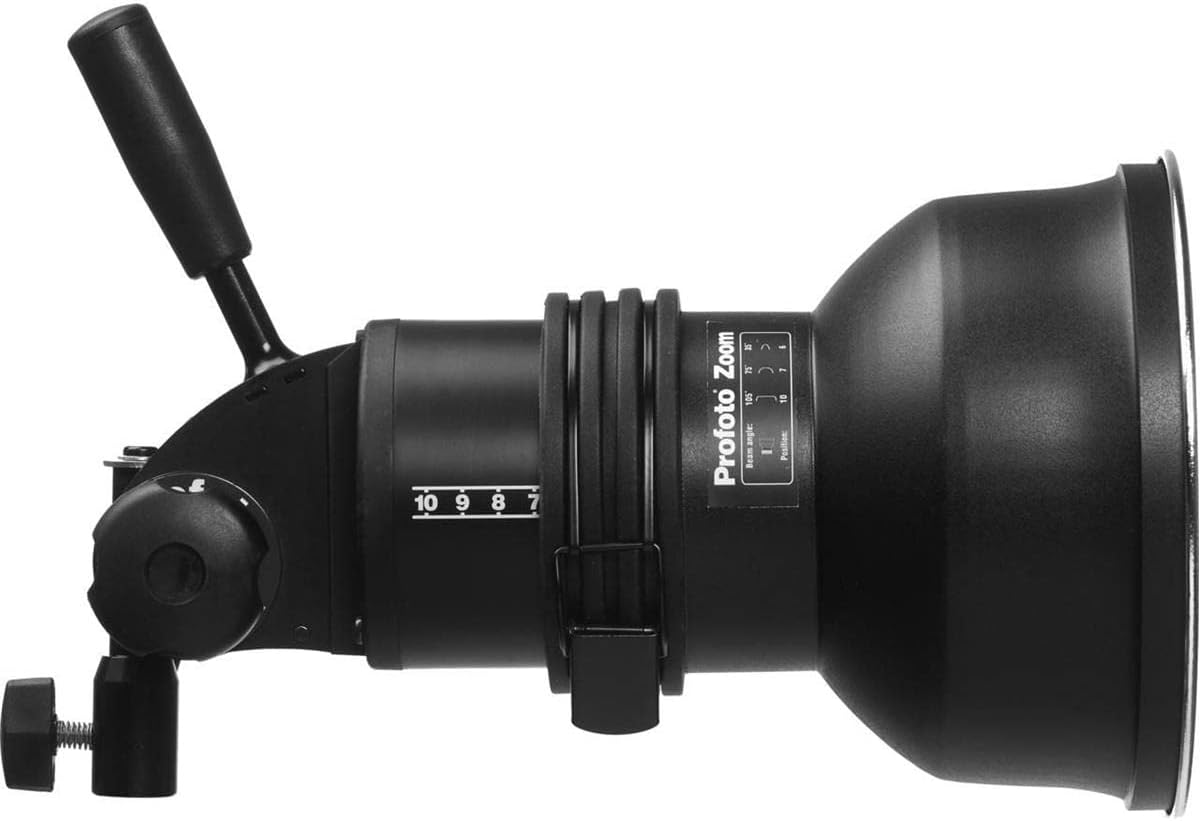
تصویر 4.2: Profoto ProHead Plus with Zoom Reflector attached. The zoom reflector is mounted on the flash head, demonstrating how light shaping tools integrate with the unit.

تصویر 4.3: سامنے والا view of the Profoto ProHead Plus flash tube. This image provides a clear view of the flash tube and the surrounding mounting mechanism for accessories.
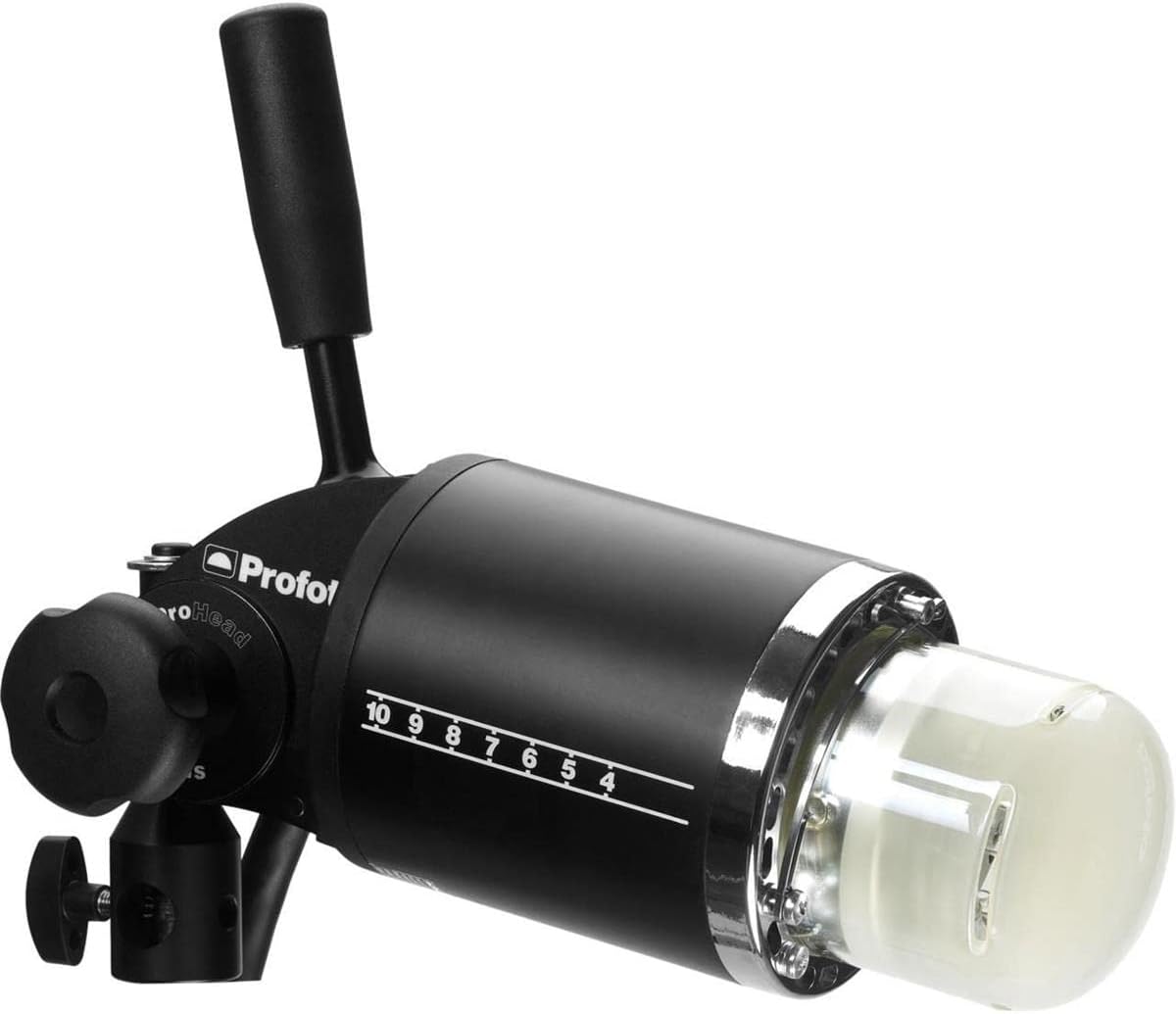
تصویر 4.4: Profoto ProHead Plus with UV reducing glass cover. The protective glass cover is shown installed, emphasizing its role in safety and light quality.
اہم خصوصیات:
- پائیدار تعمیر: Superior performance housed in a tough and compact casing.
- Heavy-Duty Flash Tube: Features a quartz flash tube for perfect light output and extended lifetime.
- بہتر حفاظت: Equipped with an extra thick UV reducing glass cover and a sealed arc-proof connector.
- درجہ حرارت کنٹرول: A temperature-controlled fan keeps the head and accessories cool, even during intensive use.
- ورسٹائل مطابقت: Compatible with over 120 Profoto light shaping tools.
5. سیٹ اپ
Follow these steps to set up your Profoto ProHead Plus:
- Mounting the Flash Head: Securely attach the flash head to a light stand using the integrated stand adapter. Ensure the locking knob is tightened to prevent accidental movement.
- Attaching the Zoom Reflector: Align the Profoto Zoom Reflector with the front of the flash head. Gently push and twist the reflector clockwise until it locks into place. Ensure it is firmly seated.
- Connecting to a Power Pack: With the power pack switched OFF, connect the flash head cable to the appropriate output socket on your Profoto power pack. Ensure the connection is secure.
- پاور آن: Once all connections are secure, switch on your Profoto power pack. The modeling lamp should illuminate, and the flash head will be ready for operation.
6. آپریٹنگ ہدایات
The Profoto ProHead Plus operates in conjunction with a Profoto power pack, which controls flash duration, power output, and other settings.
6.1. Adjusting Light Output
Light output is primarily controlled via the connected Profoto power pack. The markings on the flash head (e.g., 10, 9, 8, 7, 6, 5, 4) typically correspond to the zoom position of the flash tube relative to the reflector, allowing for beam angle adjustment when using compatible light shaping tools like the Zoom Reflector.
- Zoom Reflector Adjustment: To adjust the beam angle, slide the Zoom Reflector forward or backward on the flash head. The numerical scale on the flash head indicates the relative position, influencing the spread of light.
6.2. ماڈلنگ ایلamp
ماڈلنگ ایلamp provides continuous light for previewing lighting effects. Its intensity is controlled by the power pack. Refer to your power pack's manual for specific modeling lamp ترتیبات
6.3 فین آپریشن
The integrated fan automatically activates to maintain optimal operating temperature, especially during rapid firing or extended use of the modeling lamp. Ensure the fan vents are clear of obstructions.
6.4. Using Light Shaping Tools
The Profoto ProHead Plus is compatible with a wide range of Profoto light shaping tools. To attach a light shaping tool, align it with the front of the flash head and secure it according to the tool's specific instructions. Always ensure the unit is cool before changing accessories.
7 دیکھ بھال
Regular maintenance ensures the longevity and optimal performance of your flash head.
- صفائی: Disconnect the flash head from the power pack before cleaning. Use a soft, dry cloth to wipe the exterior. For the glass cover and flash tube, use a lens cleaning solution and a microfiber cloth. Avoid abrasive cleaners.
- فلیش ٹیوب کی تبدیلی: The heavy-duty quartz flash tube has a long lifespan, but eventually requires replacement. This procedure should only be performed by qualified personnel or a Profoto service center. If you must replace it yourself, ensure the power pack is off and unplugged, and allow ample time for capacitors to discharge. Carefully remove the old tube and install the new one, ensuring proper alignment and connection.
- ذخیرہ: Store the flash head in a dry, dust-free environment when not in use. Use protective caps and covers to prevent damage.
8 خرابیوں کا سراغ لگانا
If you encounter issues with your Profoto ProHead Plus, refer to the following common problems and solutions:
| مسئلہ | ممکنہ وجہ | حل |
|---|---|---|
| Flash head does not fire. | Not properly connected to power pack; power pack off; flash tube faulty; sync cable issue. | Ensure secure connection to power pack. Turn power pack on. Check flash tube for visible damage. Verify sync cable connection to camera/trigger. |
| ماڈلنگ ایل۔amp روشن نہیں کرتا. | ماڈلنگ ایل۔amp faulty; power pack setting. | Check modeling lamp bulb. Refer to power pack manual for modeling lamp ترتیبات |
| Unit overheats or fan runs continuously. | Obstructed ventilation; excessive use. | Ensure fan vents are clear. Reduce firing rate or modeling lamp usage. Allow unit to cool. |
| متضاد روشنی کی پیداوار۔ | Flash tube nearing end of life; power pack issue. | Consider flash tube replacement. Consult power pack manual or Profoto support. |
If the problem persists after attempting these solutions, contact Profoto customer support or an authorized service center.
9. وضاحتیں
| فیچر | تفصیل |
|---|---|
| ماڈل نمبر | 900752 |
| فلیش آؤٹ پٹ | 250W (UV) |
| Flash Tube Type | Heavy-duty quartz, arc-proof |
| کولنگ | درجہ حرارت پر قابو پانے والا پنکھا۔ |
| شیشے کا احاطہ | Extra thick UV reducing |
| ابعاد (پروڈکٹ) | 5 x 5 x 11 انچ |
| وزن (آئٹم) | 7.37 پاؤنڈ |
| ہم آہنگ mountings | Canon, Canon E-TTL, Canon E-TTL II, Nikon, Nikon SB-900, Nikon SB-910, Sony, Sony A7R, Sony A7RII, Sony A7RIII, Sony Alpha (via compatible Profoto AirTTL remotes/transmitters) |
| فلیش مطابقت پذیری کی رفتار | Up to 1/250 (dependent on power pack and camera) |
| شامل اجزاء | Profoto Zoom Reflector, Fan Cooled |
10. وارنٹی اور سپورٹ
Specific warranty details for the Profoto ProHead Plus UV 250W Flash Head are not provided in this document. For warranty information, please refer to the documentation included with your purchase or visit the official Profoto website. For technical support, service, or spare parts, please contact Profoto customer service or an authorized Profoto dealer.