
1. تعارف
This manual provides detailed instructions for the installation, operation, and maintenance of your Zmodo ZM-KW1001-O4-1TB HD Camera System. Please read this manual thoroughly before using the product to ensure proper setup and functionality. Keep this manual for future reference.
2. پروڈکٹ ختمview
2.1 کلیدی خصوصیات
- 720p HD video for clear and sharp images.
- Smartlink wireless configuration for quick setup.
- Motion detection alerts to notify you of activity.
- IP66 rated outdoor cameras for weather resistance.
- Infrared night vision for surveillance in low-light conditions.
- Integrated 1TB hard drive for local video storage.
2.2 سسٹم کے اجزاء
The Zmodo ZM-KW1001-O4-1TB system typically includes the following components:
- Wireless Network Video Recorder (NVR) with 1TB HDD
- HD Wireless Cameras (quantity may vary, typically 4)
- NVR اور کیمروں کے لیے پاور اڈاپٹر
- ایتھرنیٹ کیبل
- بڑھتے ہوئے پیچ اور اینکرز
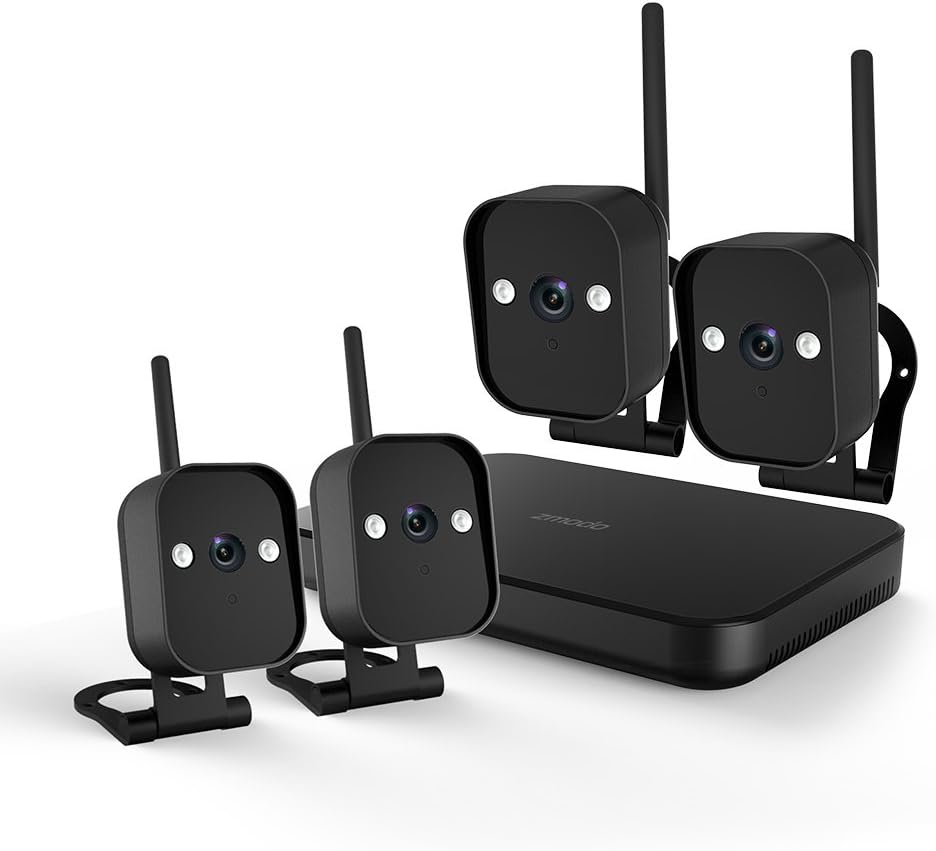
تصویر 1: ختمview of the Zmodo ZM-KW1001-O4-1TB HD Camera System, showing the NVR unit and four wireless cameras.
3. سیٹ اپ ہدایات
3.1 ان باکسنگ اور ابتدائی معائنہ
Carefully unpack all components and verify that all items listed in Section 2.2 are present and undamaged. If any items are missing or damaged, contact customer support.
3.2 NVR کنکشن
- فراہم کردہ پاور اڈاپٹر کا استعمال کرتے ہوئے NVR کو پاور آؤٹ لیٹ سے جوڑیں۔
- For initial setup and optimal performance, connect the NVR to your router using the supplied Ethernet cable.
- Connect the NVR to a monitor via HDMI or VGA cable (not included) if local viewing مطلوب ہے.

تصویر 2: The Zmodo Network Video Recorder (NVR) unit, which stores recordings and manages camera connections.
3.3 Camera Installation and Pairing
The cameras are designed for both indoor and outdoor use with an IP66 weather-resistant rating. Ensure cameras are placed within range of the NVR's wireless signal.
- پاور آن کیمرے: ہر کیمرے کو اس کے متعلقہ پاور اڈاپٹر سے جوڑیں اور پاور آؤٹ لیٹ میں لگائیں۔
- Smartlink Pairing: The cameras should automatically attempt to pair with the NVR. Follow the on-screen prompts on the connected monitor or use the Zmodo app for Smartlink setup. If pairing fails, refer to the troubleshooting section.
- چڑھنا: Choose suitable locations for your cameras. Use the provided screws and anchors to securely mount the cameras. Ensure a clear line of sight and optimal viewING زاویہ

تصویر 3: A Zmodo wireless camera shown with its wall-mounting bracket, suitable for outdoor installation.

تصویر 4: A Zmodo wireless camera shown with its stand mount, ideal for indoor placement on flat surfaces.
3.4 Mobile App Configuration
- Download the Zmodo app from the App Store (iOS) or Google Play Store (Android).
- Create a new account or log in to an existing one.
- Follow the in-app instructions to add your Zmodo NVR system. This typically involves scanning a QR code on the NVR or manually entering device details.
- ایک بار شامل کرنے کے بعد، آپ کو قابل ہونا چاہئے view آپ کے کیمروں سے لائیو فیڈز۔
4. آپریٹنگ ہدایات
4.1 لائیو View
Access the Zmodo app or the NVR's local interface to view live video streams from your cameras. You can typically select individual cameras or view multiple feeds simultaneously.
4.2 حرکت کا پتہ لگانا اور الرٹس
The system is equipped with motion detection capabilities. When motion is detected, the system can record footage and send alerts to your mobile device.
- ترتیب: In the Zmodo app or NVR settings, navigate to the motion detection section. You can customize detection zones, sensitivity levels, and alert schedules.
- الرٹس: Ensure push notifications are enabled for the Zmodo app on your mobile device to receive timely alerts.
4.3 ریکارڈنگ اور پلے بیک
The NVR includes a 1TB hard drive for continuous or motion-activated recording.
- ریکارڈنگ کی ترتیبات: Configure recording modes (continuous, scheduled, motion-activated) via the NVR's local interface or the Zmodo app.
- پلے بیک: دوبارہ کرنا۔view ریکارڈ شدہ footage, access the playback feature in the Zmodo app or directly on the NVR. Select the desired date and time to view واقعات
4.4 نائٹ ویژن
The cameras feature infrared night vision, allowing them to capture clear video in low-light or complete darkness. The system automatically switches to night vision mode when ambient light levels are insufficient.
5 دیکھ بھال
- کیمرے کی صفائی: وقتاً فوقتاً کیمرے کے لینز کو نرم سے صاف کریں، ڈیamp واضح تصویر کے معیار کو یقینی بنانے کے لیے کپڑا۔ کھرچنے والے کلینر سے پرہیز کریں۔
- فرم ویئر اپ ڈیٹس: Check the Zmodo app or website regularly for firmware updates. Keeping your system updated ensures optimal performance and security.
- ہارڈ ڈرائیو مینجمنٹ: The 1TB hard drive will automatically overwrite the oldest footage when full. If you need to preserve specific recordings, back them up to an external device before they are overwritten.
- بجلی کی فراہمی: یقینی بنائیں کہ تمام پاور اڈاپٹر محفوظ طریقے سے جڑے ہوئے ہیں اور نقصان سے پاک ہیں۔
6 خرابیوں کا سراغ لگانا
- کوئی ویڈیو فیڈ نہیں:
- Check if the NVR and cameras are powered on.
- Verify network connectivity for the NVR.
- Ensure cameras are within wireless range of the NVR.
- Re-pair cameras if they have lost connection.
- Motion Alerts Not Received:
- Confirm motion detection is enabled in the app settings.
- Check motion detection zones and sensitivity.
- Ensure push notifications are enabled for the Zmodo app on your mobile device.
- خراب تصویری معیار:
- کیمرے کے لینس کو صاف کریں۔
- یقینی بنائیں کہ کیمرے کے فیلڈ میں کوئی رکاوٹ نہیں ہے۔ view.
- Check for strong interference if using wireless connection.
- Cameras Not Connecting to Wi-Fi:
- Ensure the NVR's Wi-Fi is enabled and functioning.
- Move cameras closer to the NVR to improve signal strength.
- Reset cameras and attempt Smartlink pairing again.
7. وضاحتیں
| فیچر | تفصیلات |
|---|---|
| ماڈل نمبر | ZM-KW1001-O4-1TB |
| ویڈیو ریزولوشن | 720p HD |
| کنیکٹوٹی ٹیکنالوجی | وائرلیس |
| چینلز کی تعداد | 4 |
| ذخیرہ کرنے کی صلاحیت | 1 ٹی بی (ٹیرابائٹ) |
| خصوصی خصوصیات | Wireless, Motion Detection, Night Vision, IP66 Weatherproof |
| آپریٹنگ سسٹم کی مطابقت | اینڈرائیڈ، آئی او ایس |
| طاقت کا منبع | Wireless (Power Adapters for components) |
| رنگ | سیاہ |
| پیکیج کے طول و عرض | 26.8 x 20 x 16 سینٹی میٹر |
| شے کا وزن | 1.5 کلوگرام |
8. وارنٹی اور سپورٹ
For warranty information and technical support, please refer to the official Zmodo website or contact Zmodo customer service directly. Details regarding warranty periods and service procedures are typically available on the manufacturer's support pages.
آن لائن مدد: Visit the Zmodo official webFAQs، ٹربل شوٹنگ گائیڈز، اور رابطہ کی معلومات کے لیے سائٹ۔
سپورٹ سے رابطہ کریں: If you require further assistance, please have your product model number (ZM-KW1001-O4-1TB) and purchase details ready when contacting support.