
تعارف
This manual provides detailed instructions for the setup, operation, and maintenance of your A4tech Bloody Light Strike B314 Gaming Keyboard. Please read this manual thoroughly before using the product to ensure optimal performance and longevity.
کلیدی خصوصیات
- Bloody 4 Light Strike Mechanical Switches: Experience ultra-fast response times of 0.2ms with infrared optic switches, providing a competitive edge in gaming.
- بہتر پائیداری: Designed for intensive use, featuring A,S,D,W silicon keys with a convex shape for improved control and longevity.
- Neon Glare System LED Backlighting: Customize your gaming environment with vibrant LED backlighting, making keys easy to locate in low-light conditions.
- 9 قابل پروگرام کلیدیں: Personalize your gaming experience by assigning custom functions to 9 individually programmable keys.
- Double Secure Water-Resistance: The keyboard is electronically sealed with a water drain hole, protecting it from accidental spills and extending its lifespan.
پیکیج کے مشمولات
تصدیق کریں کہ تمام اشیاء پیکیج میں موجود ہیں:
- Bloody Light Strike B314 Gaming Keyboard
- صارف دستی (یہ دستاویز)

Image: The retail packaging for the Bloody Light Strike B314 Gaming Keyboard, showing the keyboard with LED backlighting and key features highlighted.
سیٹ اپ گائیڈ
- کی بورڈ کو جوڑیں: کی بورڈ کے USB کنیکٹر کو اپنے کمپیوٹر پر دستیاب USB پورٹ میں لگائیں۔
- ڈرائیور کی تنصیب: The keyboard is typically plug-and-play. Your operating system should automatically detect and install the necessary drivers. If prompted, follow the on-screen instructions.
- سافٹ ویئر کی تنصیب (اختیاری): For advanced customization, including programming keys and managing backlighting, download and install the official Bloody software from the A4tech webسائٹ
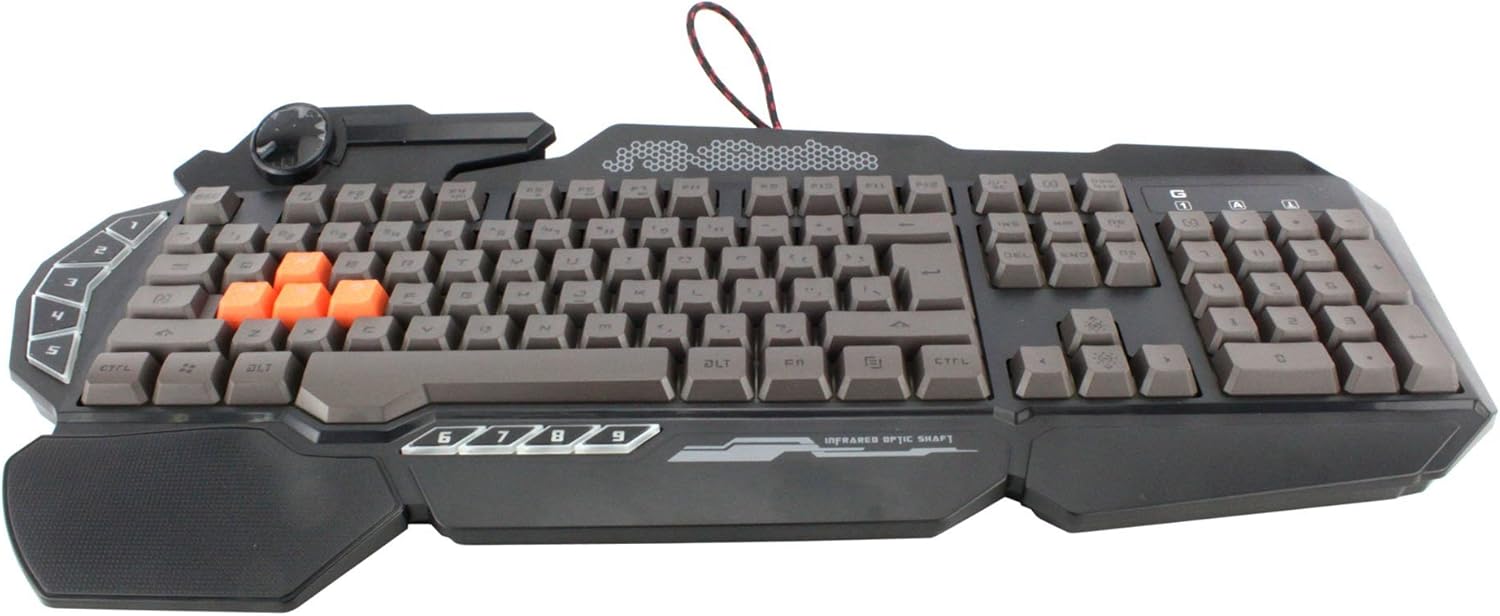
تصویر: اوپر سے نیچے view of the Bloody Light Strike B314 Gaming Keyboard, showcasing the full QWERTY layout with orange WASD keys and dedicated macro keys on the left.
آپریٹنگ ہدایات
بنیادی استعمال
The Bloody B314 functions as a standard QWERTY keyboard for everyday typing and gaming. Its infrared mechanical switches provide a fast and responsive typing experience.
قابل پروگرام چابیاں
The keyboard features 9 programmable keys, typically located on the left side. To customize these keys:
- Install the official Bloody software from the A4tech webسائٹ
- Launch the software and navigate to the key customization section.
- Select the desired programmable key (e.g., G1-G9 or similar).
- Assign macros, key functions, or multimedia controls as needed.
- اپنے پیشہ کو محفوظ کریں۔file تبدیلیوں کو لاگو کرنے کے لئے.
ایل ای ڈی بیک لائٹنگ کنٹرول
The Neon Glare System LED backlighting can be adjusted using function key combinations:
- Fn+F12: Cycle through different backlighting modes (e.g., static, breathing, off).
- Fn + Up/Down Arrow: بیک لائٹ کی چمک کو ایڈجسٹ کریں۔
- Fn + Left/Right Arrow: Adjust backlight speed or direction (if applicable to the mode).
گیم موڈ
Activate Game Mode to disable the Windows key and prevent accidental interruptions during gameplay.
- Fn+F8: گیم موڈ آن/آف ٹوگل کریں۔

تصویر: ایک زاویہ view of the Bloody Light Strike B314 Gaming Keyboard, highlighting the ergonomic wrist rest and the distinct orange WASD keys.
دیکھ بھال
صفائی
- صاف کرنے سے پہلے کی بورڈ کو اپنے کمپیوٹر سے منقطع کریں۔
- ایک نرم استعمال کریں، ڈیamp cloth to wipe the surface of the keyboard. Avoid harsh chemicals or abrasive materials.
- چابیاں کے درمیان دھول اور ملبے کے لیے، کمپریسڈ ہوا استعمال کریں۔
- The water-resistant design helps protect against spills, but it is still recommended to clean up liquids promptly.
ذخیرہ
کی بورڈ کو کسی ٹھنڈی، خشک جگہ پر براہ راست سورج کی روشنی اور انتہائی درجہ حرارت سے دور رکھیں جب طویل مدت تک استعمال نہ ہو۔
خرابی کا سراغ لگانا
کی بورڈ جواب نہیں دے رہا ہے۔
- یقینی بنائیں کہ USB کیبل کی بورڈ اور کمپیوٹر دونوں میں محفوظ طریقے سے لگائی گئی ہے۔
- کی بورڈ کو ایک مختلف USB پورٹ میں لگانے کی کوشش کریں۔
- اپنے کمپیوٹر کو دوبارہ شروع کریں۔
- Check if the keyboard is recognized in your computer's Device Manager (Windows) or System Information (macOS).
Backlighting Not Working
- Ensure the backlighting is not turned off using the Fn + F12 combination.
- Adjust brightness using Fn + Up Arrow.
- اگر کسٹم پرو استعمال کر رہے ہیں۔files, ensure the backlighting settings are correctly configured in the Bloody software.
Programmable Keys Not Working
- Verify that the Bloody software is installed and running.
- Ensure your custom profiles are loaded and active within the software.
- Check for any software updates for the Bloody keyboard utility.
وضاحتیں
| فیچر | تفصیل |
|---|---|
| برانڈ | A4tech |
| ماڈل نمبر | A4TKLA45173 |
| کنیکٹوٹی ٹیکنالوجی | اورکت |
| کی بورڈ کی تفصیل | مکینیکل |
| سوئچ کی قسم | Mechanical (Light Strike Optic) |
| خصوصی خصوصیت | Backlit, Programmable Keys, Water Resistant |
| رنگ | سیاہ |
| کی بورڈ بیک لائٹنگ کلر سپورٹ | RGB (Neon Glare System) |
| چابیاں کی تعداد | 104 |
| قابل پروگرام بٹن | 9 |
| پانی کی مزاحمت کی سطح | پانی مزاحم |
| شے کا وزن | 2.9 پاؤنڈز |
وارنٹی اور سپورٹ
For warranty information and technical support, please refer to the official A4tech webسائٹ یا ان کی کسٹمر سروس سے براہ راست رابطہ کریں۔ وارنٹی دعووں کے لیے خریداری کے ثبوت کے طور پر اپنی خریداری کی رسید رکھیں۔
Official A4tech Webسائٹ: www.a4tech.com