
1. تعارف
This manual provides detailed instructions for the assembly, installation, operation, and maintenance of your BONTEC Table Top Desk Pedestal TV Stand Mount. Please read this manual thoroughly before installation to ensure correct setup and safe operation. Keep this manual for future reference.
2. حفاظتی معلومات
- وزن کی صلاحیت: Do not exceed the maximum weight capacity of 50kg (110 lbs). This stand is designed for TVs between 32 and 60 inches.
- VESA مطابقت: Ensure your TV's VESA mounting pattern is compatible with this stand (refer to specifications).
- محفوظ تنصیب: Always ensure all screws and bolts are securely tightened before placing the TV on the stand.
- سطح کا استحکام: Place the stand on a stable, level, and sturdy surface that can support the combined weight of the stand and your television.
- بچے اور پالتو جانور: بچوں اور پالتو جانوروں کو اسمبلی ایریا سے دور رکھیں۔ چھوٹے حصے دم گھٹنے کا خطرہ ہو سکتے ہیں۔
- پیشہ ورانہ مدد: اگر آپ کو انسٹالیشن کے عمل کے کسی بھی حصے کے بارے میں یقین نہیں ہے، تو کسی مستند پیشہ ور سے مشورہ کریں۔
3. پیکیج کے مشمولات
Please verify that all components are present and undamaged before assembly. If any parts are missing or damaged, contact BONTEC customer support.
- بیس پلیٹ
- Upright Support Column
- ٹی وی ماؤنٹنگ بریکٹ (2 ٹکڑے)
- Hardware Kit (various screws, washers, spacers, Allen wrench, spanner)
- اینٹی پرچی پیڈ
4. سیٹ اپ اور اسمبلی
اپنے TV اسٹینڈ کو جمع کرنے کے لیے احتیاط سے ان اقدامات پر عمل کریں۔
Step 4.1: Attach Anti-slip Pads to the Base
Peel and stick the provided anti-slip pads to the bottom of the base plate. This prevents scratching your furniture and provides stability.
Step 4.2: Assemble the Upright Support Column to the Base
Secure the upright support column to the base plate using the designated screws and tools from the hardware kit. Ensure it is firmly attached and stable.
Step 4.3: Attach TV Mounting Brackets to Your TV
Identify the VESA mounting holes on the back of your television. Select the appropriate screws, washers, and spacers from the hardware kit that fit your TV's specific VESA pattern. Attach the two TV mounting brackets to the back of your TV. Ensure they are level and securely fastened.

تصویر 4.3.1: This image illustrates the VESA compatibility (50x50mm to 800x400mm) and screen size range (22-65 inches) supported by the stand, with a maximum capacity of 50kg. It helps in selecting the correct mounting hardware for your TV.

تصویر 4.3.2: This image displays two installation options for the TV mounting brackets: one for larger TVs (Max VESA: 800x400mm) and another for smaller TVs (Max VESA: 400x200mm). It also provides detailed dimensions of the stand, including height and width, to aid in proper setup.
مرحلہ 4.4: ٹی وی کو اسٹینڈ پر لگائیں۔
Carefully lift your TV with the attached brackets and hook them onto the upright support column. Ensure the brackets are properly seated and secured. The stand offers multiple height adjustment levels.

تصویر 4.4.1: This image demonstrates the three adjustable height levels of the TV stand: Maximum (700mm), Mid (640mm), and Minimum (580mm). This allows users to customize the TV's viewاونچائی.
تصویر 4.4.2: This image compares the stability of the BONTEC stand, showing a TV securely upright, against another stand that appears unstable. It highlights the design's focus on keeping your TV safely in position.

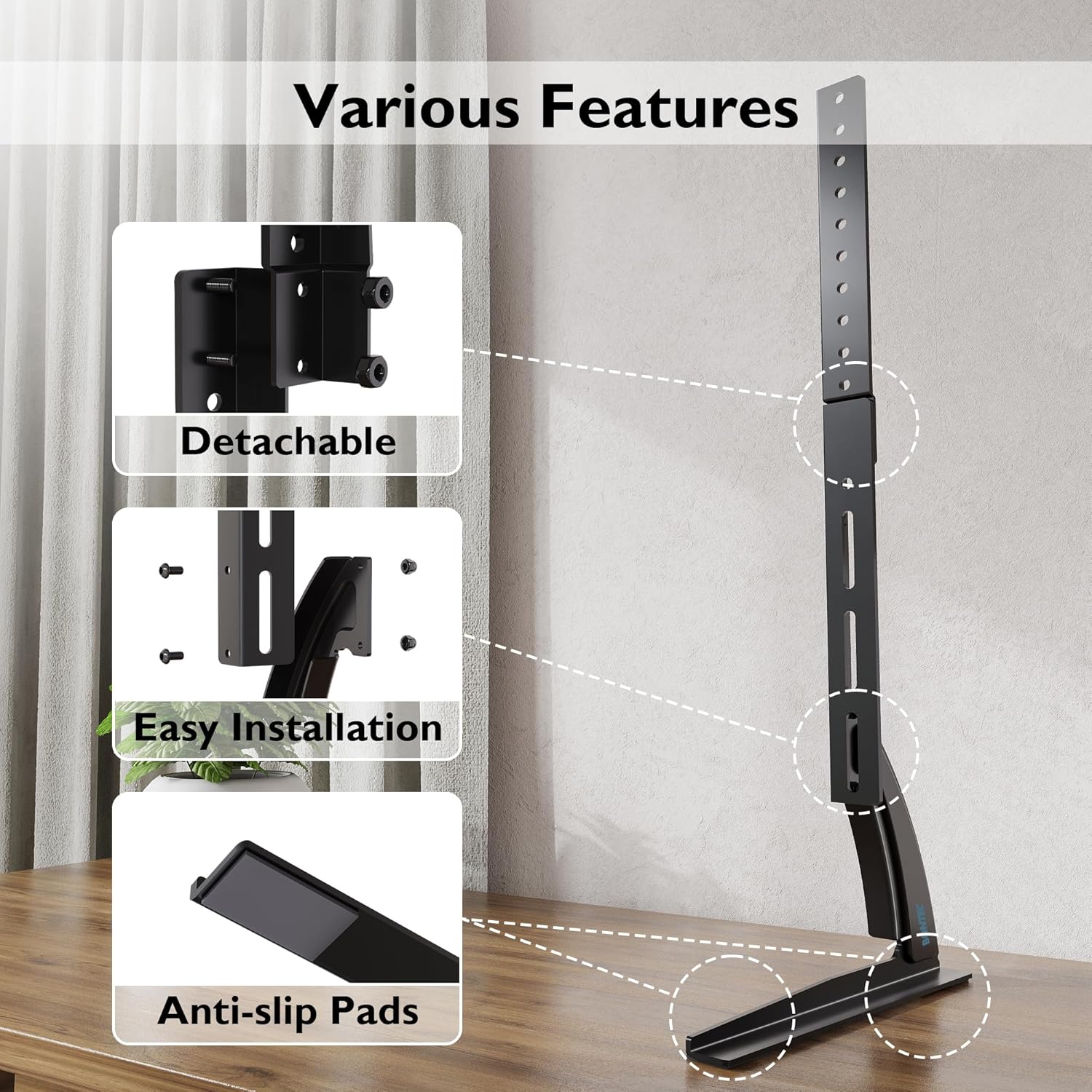
تصویر 4.4.3: This image details key features of the stand, including its detachable components for easier assembly, the straightforward installation process, and the inclusion of anti-slip pads on the base for enhanced stability and surface protection.
5. آپریٹنگ ہدایات
Once assembled, the BONTEC TV stand is designed for fixed placement. The primary operation involves adjusting the TV's height during initial setup.
5.1 اونچائی کی ایڈجسٹمنٹ
The stand offers three distinct height levels. To adjust the height:
- Carefully remove the TV from the mounting brackets.
- Adjust the position of the mounting brackets on the upright support column to your desired height level (Max, Mid, or Min).
- Re-mount the TV onto the adjusted brackets, ensuring it is securely locked in place.
Always ensure the TV is balanced and stable after any height adjustment.
6 دیکھ بھال
Regular maintenance ensures the longevity and safety of your TV stand.
- صفائی: اسٹینڈ کو نرم، خشک کپڑے سے صاف کریں۔ کھرچنے والے کلینر یا سالوینٹس سے پرہیز کریں جو ختم کو نقصان پہنچا سکتے ہیں۔
- کنکشن چیک کریں: وقتاً فوقتاً تمام پیچ اور بولٹ چیک کریں تاکہ یہ یقینی بنایا جا سکے کہ وہ سخت ہیں۔ اگر ضروری ہو تو دوبارہ سخت کریں۔
- نقصان کا معائنہ کریں: Regularly inspect the stand for any signs of wear, damage, or instability. If damage is found, discontinue use and contact customer support.
7 خرابیوں کا سراغ لگانا
If you encounter issues with your TV stand, refer to the following common problems and solutions:
| مسئلہ | ممکنہ وجہ | حل |
|---|---|---|
| TV is unstable or wobbles | Loose screws; uneven surface; TV too heavy; incorrect assembly | Ensure all screws are tightened. Place stand on a level surface. Verify TV weight is within limits. Review اسمبلی کے اقدامات |
| ٹی وی اسٹینڈ میں فٹ نہیں ہے۔ | Incorrect VESA pattern; TV size outside range | Check your TV's VESA pattern against the stand's specifications. Confirm TV size is between 32-60 inches. |
| غائب حصے | پیکیجنگ کی خرابی۔ | Contact BONTEC customer support with your purchase details. |
8. وضاحتیں
- برانڈ: BONTEC
- ماڈل: B01ESPNXJW
- چڑھنے کی قسم: ٹیبلٹاپ ماؤنٹ
- تحریک کی قسم: Fixed (Height adjustable during assembly)
- ہم آہنگ آلات: ٹیلی ویژن
- Minimum Supported Screen Size: 32 انچ
- Maximum Supported Screen Size: 60 Inches (Note: Some users report compatibility with up to 65 inches, but official specification is 60 inches)
- زیادہ سے زیادہ وزن کی صلاحیت: 50 کلوگرام (110 پونڈ)
- آئٹم کا وزن: 1.9 کلوگرام
- VESA مطابقت: 50x50mm, 75x75mm, 100x100mm, 200x100mm, 200x200mm, 300x200mm, 300x300mm, 400x200mm, 400x300mm, 400x400mm, 600x400mm, 800x400mm
- سایڈست اونچائی کی سطح: 3 levels (Max 700mm, Mid 640mm, Min 580mm from base to top of bracket)
9. وارنٹی اور سپورٹ
BONTEC products are manufactured to high-quality standards. For warranty information, technical support, or to report missing/damaged parts, please contact BONTEC customer service through the retailer where the product was purchased or visit the official BONTEC website. Please have your model number (B01ESPNXJW) and purchase date ready.