
Showtec Q4
Showtec Compact Par 7 Q4 7 x 3W RGBW LED Floor PAR Spot User Manual
ماڈل: Q4
1. تعارف
This user manual provides comprehensive instructions for the safe and efficient operation of the Showtec Compact Par 7 Q4 7 x 3W RGBW LED Floor PAR Spot. Please read this manual thoroughly before installation, operation, or maintenance to ensure proper use and to prevent damage to the unit or injury to personnel.
The Showtec Compact Par 7 Q4 is a compact RGBW PAR can designed for various lighting applications, offering versatile color mixing and robust performance.
2. حفاظتی ہدایات
بجلی کے جھٹکے، آگ یا چوٹ کے خطرے کو کم کرنے کے لیے ہمیشہ درج ذیل حفاظتی احتیاطی تدابیر پر عمل کریں:
- بجلی کی فراہمی والیوم کو یقینی بنائیںtage والیوم سے میل کھاتا ہے۔tage یونٹ پر بیان کیا گیا ہے۔
- یونٹ کو ہمیشہ گراؤنڈ پاور آؤٹ لیٹ سے جوڑیں۔
- اگر بجلی کی ہڈی خراب ہو جائے تو یونٹ کو نہ چلائیں۔
- صفائی یا سرونگ سے پہلے مینز پاور سے منقطع کریں۔
- یونٹ کو بارش یا نمی سے بے نقاب نہ کریں۔
- زیادہ گرمی سے بچنے کے لیے یونٹ کے ارد گرد مناسب وینٹیلیشن کو برقرار رکھیں۔
- روشنی کے منبع سے براہ راست آنکھ کی نمائش سے گریز کریں۔
- یہ یونٹ صرف اندرونی استعمال کے لیے ہے۔
3. پروڈکٹ ختمview
The Showtec Compact Par 7 Q4 features seven 3W RGBW LEDs, providing a wide spectrum of colors. Its compact design makes it suitable for floor standing or truss mounting.

شکل 3.1: سامنے view of the Showtec Compact Par 7 Q4 with red light output, showcasing its seven powerful RGBW LEDs.

Figure 3.2: The PAR spot emitting a bright white light, demonstrating its full spectrum capabilities.

Figure 3.3: The PAR spot displaying a vibrant blue light, highlighting its color mixing versatility.

تصویر 3.4: کلوز اپ view of the LED array when the unit is off, showing the individual lenses.
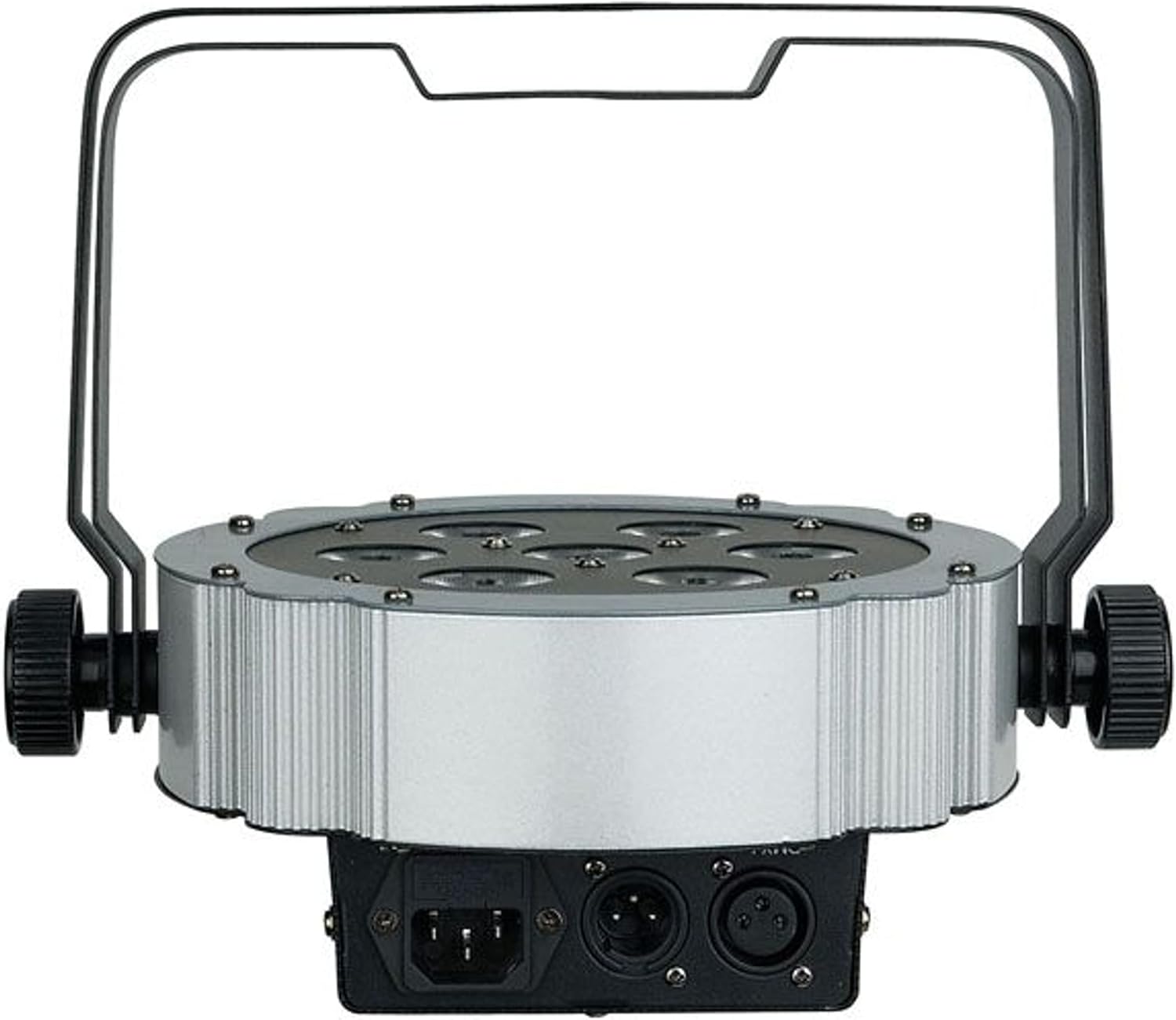
شکل 3.5: پیچھے view of the unit, showing the power input and DMX connections (XLR 3-pin).

شکل 3.6: زاویہ دار view of the PAR spot, demonstrating the adjustable mounting bracket for floor or truss applications.
4. سیٹ اپ
4.1 پیک کھولنا
Carefully unpack the unit and check for any damage during transit. Retain the packaging material for future transport or storage.
4.2 چڑھنا
The Compact Par 7 Q4 can be used as a floor spot or mounted to a truss using the integrated bracket. Ensure the mounting surface or truss can support the weight of the fixture. Use appropriate clamps and safety cables when mounting overhead.
4.3 پاور کنکشن
Connect the power cable to the unit's power input and then to a grounded electrical outlet. Verify that the local voltage یونٹ کی ضروریات (240 وولٹ) سے میل کھاتا ہے۔
4.4 DMX کنکشن (اختیاری)
For DMX control, connect a DMX cable from your DMX controller to the DMX IN port of the fixture. If connecting multiple units, daisy-chain them by connecting the DMX OUT of the first unit to the DMX IN of the next.
5. آپریٹنگ
5.1 کنٹرول پینل
The unit features a digital display and control buttons (Menu, Up, Down, Enter) on the rear for setting modes and DMX addresses.
5.2 آپریٹنگ موڈز
The Showtec Compact Par 7 Q4 typically offers several operating modes:
- DMX موڈ: Allows control via an external DMX controller. Set the DMX address using the control panel.
- آٹو موڈ: Pre-programmed light shows that run automatically.
- ساؤنڈ ایکٹو موڈ: The light reacts to sound via a built-in microphone.
- ماسٹر/غلام موڈ: Link multiple units where one acts as the master and others as slaves, synchronizing their operation.
- جامد رنگ موڈ: Select and display a single static color.
5.3 DMX چینل چارٹ
Refer to the specific DMX channel chart in the full product manual for detailed information on controlling each function via DMX. Common channels include Dimmer, Red, Green, Blue, White, Strobe, and Program selection.
6 دیکھ بھال
6.1 صفائی
Regular cleaning of the lenses and housing is recommended to maintain optimal light output and extend the unit's lifespan. Use a soft, lint-free cloth and a mild glass cleaner. Do not use abrasive materials.
6.2 فیوز کی تبدیلی
If the unit does not power on, check the fuse located near the power input. Replace it with a fuse of the same type and rating only.
6.3 اسٹوریج
When not in use, store the unit in its original packaging or a suitable flight case in a dry, dust-free environment.
7 خرابیوں کا سراغ لگانا
| مسئلہ | ممکنہ وجہ | حل |
|---|---|---|
| یونٹ پاور آن نہیں ہے۔ | No power supply; Blown fuse; Damaged power cable | Check power connection; Replace fuse; Replace cable |
| کوئی DMX کنٹرول نہیں۔ | Incorrect DMX address; Faulty DMX cable; DMX controller issue | Verify DMX address; Check/replace DMX cable; Test controller |
| Lights flicker or behave erratically | Poor DMX signal; Overheating; Internal fault | Check DMX connections; Ensure proper ventilation; Contact support |
| رنگ غلط ہیں۔ | Incorrect DMX channel values; Internal calibration issue | Adjust DMX values; Perform factory reset if available; Contact support |
8. وضاحتیں
| فیچر | تفصیل |
|---|---|
| برانڈ | شوٹیک |
| ماڈل | Q4 |
| حوالہ نمبر | LIG0013729-000 |
| روشنی کا ذریعہ | 7 x 3W RGBW LEDs |
| طاقت | 3 واٹ (فی ایل ای ڈی) |
| والیومtage | 240 وولٹ |
| طاقت کا منبع | الیکٹرک کیبل |
| طول و عرض (L x W x H) | 31.5 x 31 x 15.5 سینٹی میٹر |
| وزن | 2.73 کلوگرام |
| ASIN | B01F04U758 |
9. وارنٹی اور سپورٹ
Information regarding specific warranty terms and conditions for the Showtec Compact Par 7 Q4 is not available in the provided product details. Please refer to the retailer or manufacturer's official webتازہ ترین وارنٹی معلومات کے لیے سائٹ۔
For technical support, service, or spare parts inquiries, please contact your authorized Showtec dealer or the manufacturer directly. Always provide the model number (Q4) and reference number (LIG0013729-000) when seeking support.
Ask a question about this manual
Ask about setup, troubleshooting, compatibility, parts, safety, or missing instructions. Manuals+ will review the question and use this page’s manual context to help answer it.