
1. پروڈکٹ ختمview
This manual provides essential instructions for the safe and efficient installation, operation, and maintenance of your ZOTAC GeForce GTX 1080 AMP Extreme graphics card. Please read this manual thoroughly before proceeding with installation.
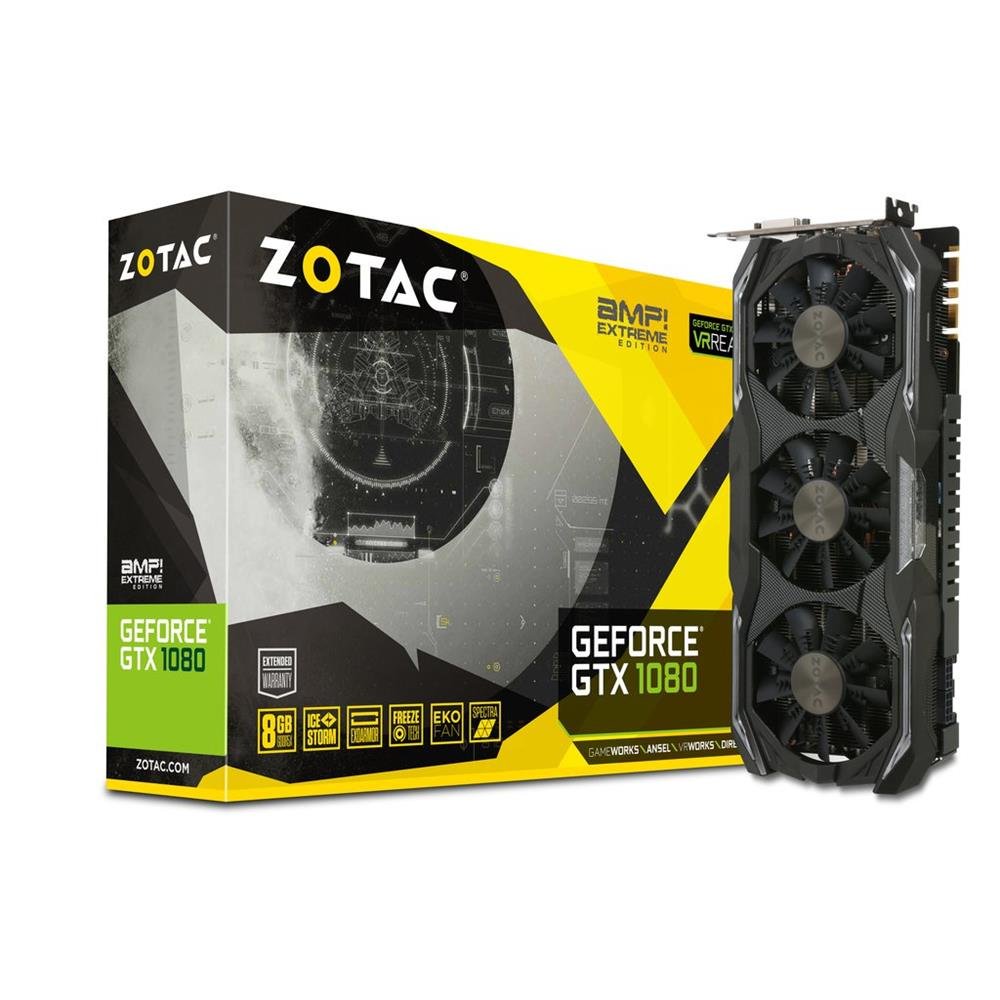
Image 1.1: ZOTAC GeForce GTX 1080 AMP Extreme Graphics Card. This image displays the front view of the graphics card, highlighting its triple-fan cooling system and overall design.
2. پیکیج کے مشمولات
تصدیق کریں کہ نیچے دی گئی تمام اشیاء آپ کے پروڈکٹ پیکج میں موجود ہیں:
- ZOTAC GeForce GTX 1080 AMP Extreme Graphics Card
- DVI-VGA اڈاپٹر
- Dual 6-pin to 4 x 2-pin Power Cable
- ڈرائیور سی ڈی
- ہدایات دستی (یہ دستاویز)
3. سیٹ اپ اور انسٹالیشن
3.1. سسٹم کے تقاضے
- PCI Express x16 slot on a compatible motherboard.
- Minimum 500W power supply with two 8-pin (or 6+2 pin) PCIe power connectors.
- Compatible operating system (e.g., Windows 7/8/10/11).
- At least 4GB of system memory (8GB recommended).
3.2. جسمانی تنصیب
- بجلی بند: اپنے کمپیوٹر کو مکمل طور پر بند کریں اور وال آؤٹ لیٹ سے پاور کورڈ کو ان پلگ کریں۔
- اوپن کیس: Open your computer case to access the motherboard and expansion slots.
- PCIe سلاٹ تلاش کریں: اپنے مدر بورڈ پر دستیاب PCI ایکسپریس x16 سلاٹ کی شناخت کریں۔
- سلاٹ کور کو ہٹا دیں: منتخب کردہ PCIe سلاٹ کے مطابق کمپیوٹر کیس کے پچھلے حصے سے دھاتی سلاٹ کور کو ہٹا دیں۔
- گرافکس کارڈ داخل کریں: Carefully align the graphics card with the PCIe slot and press it firmly until it is fully seated. Ensure the retention clip on the slot locks into place.
- محفوظ کارڈ: Secure the graphics card to the computer case with a screw or retention mechanism.
- پاور سے رابطہ کریں: Connect the required PCIe power cables from your power supply to the graphics card. The ZOTAC GeForce GTX 1080 AMP Extreme typically requires two 8-pin (or 6+2 pin) power connectors. Use the provided dual 6-pin to 4 x 2-pin power cable if your power supply only has 6-pin connectors.
- بند کیس: اپنے کمپیوٹر کیس کو بند کریں اور پاور کارڈ کو دوبارہ جوڑیں۔
3.3 ڈرائیور کی تنصیب
- بوٹ سسٹم: Power on your computer. The system may boot into a basic display mode.
- ڈرائیورز انسٹال کریں: Insert the provided Driver CD into your optical drive and follow the on-screen instructions to install the NVIDIA graphics drivers. Alternatively, download the latest drivers directly from the official ZOTAC or NVIDIA webبہترین کارکردگی اور مطابقت کے لیے سائٹ۔
- دوبارہ شروع کریں: ڈرائیور کی تنصیب مکمل ہونے کے بعد اپنے کمپیوٹر کو دوبارہ شروع کریں۔
3.4. کنیکٹنگ ڈسپلے
Connect your monitor(s) to the appropriate output ports on the graphics card. This model supports HDMI, DisplayPort, and DVI connections. Use the DVI-VGA adapter if your monitor only supports VGA input.
4. آپریٹنگ ہدایات
4.1. بنیادی آپریشن
Once the drivers are installed, your graphics card will automatically manage display output and graphics processing. You can adjust display settings, resolution, and refresh rates through your operating system's display settings or the NVIDIA Control Panel.
4.2 ملٹی مانیٹر سیٹ اپ
The ZOTAC GeForce GTX 1080 AMP Extreme supports multiple displays. Connect additional monitors to the available video output ports. Use the NVIDIA Control Panel to configure display modes such as extended desktop, duplicate displays, or NVIDIA Surround for an immersive gaming experience.
5 دیکھ بھال
Regular maintenance helps ensure optimal performance and longevity of your graphics card.
- صفائی: Periodically clean the fans and heatsink to prevent dust buildup, which can impede airflow and lead to overheating. Use compressed air to gently remove dust from the cooling fins and fan blades. Ensure the system is powered off and unplugged before cleaning.
- ہوا کا بہاؤ: Ensure your computer case has adequate airflow to dissipate heat generated by the graphics card. Keep the area around your PC clear of obstructions.
- ڈرائیور اپڈیٹس: Keep your graphics drivers updated by regularly checking the ZOTAC or NVIDIA webتازہ ترین ورژن کے لیے سائٹ۔
6 خرابیوں کا سراغ لگانا
اگر آپ کو اپنے گرافکس کارڈ کے ساتھ مسائل درپیش ہیں، تو درج ذیل عام ٹربل شوٹنگ کے اقدامات سے رجوع کریں:
- کوئی ڈسپلے آؤٹ پٹ نہیں:
- Ensure the monitor is correctly connected and powered on.
- تصدیق کریں کہ گرافکس کارڈ مکمل طور پر PCIe سلاٹ میں بیٹھا ہوا ہے۔
- Check that all PCIe power cables are securely connected to the graphics card.
- Try connecting the monitor to a different video output port on the card or to the motherboard's integrated graphics (if available) to isolate the issue.
- ڈرائیور کے مسائل:
- If you experience crashes, artifacts, or poor performance, try reinstalling the graphics drivers. Use a driver uninstaller utility to completely remove old drivers before installing new ones.
- Ensure you are installing the correct drivers for your operating system and graphics card model.
- کارکردگی کے مسائل:
- Check system temperatures using monitoring software. Overheating can lead to performance throttling.
- یقینی بنائیں کہ آپ کی بجلی کی فراہمی کم از کم واٹ کو پورا کرتی ہے۔tage requirements for the graphics card and other system components.
- Verify that your system's BIOS/UEFI settings are configured correctly for a discrete graphics card.
7. وضاحتیں
| فیچر | تفصیل |
|---|---|
| برانڈ | ZOTAC |
| ماڈل کا نام | جی ٹی ایکس 1080 |
| ماڈل نمبر | ZT-P10800B-10P |
| گرافکس کا پروسیسر | NVIDIA GeForce GTX 1080 |
| گرافکس رام سائز | 8 GB GDDR5X |
| میموری گھڑی کی رفتار | 10800 میگاہرٹز |
| Engine Clock Speed | 1771 MHz (Base), 1911 MHz (Boost) |
| ویڈیو آؤٹ پٹ انٹرفیس | HDMI, DisplayPort, DVI |
| ویڈیو انٹرفیس | پی سی آئی ایکسپریس |
| زیادہ سے زیادہ سکرین ریزولوشن | 7680x4320 |
| مداحوں کی تعداد | 3 |
| تجویز کردہ استعمال | گیمنگ |
| شے کا وزن | 1.6 کلوگرام |
| یو پی سی | 816264016721 |
8. وارنٹی اور سپورٹ
8.1. مصنوعات کی وارنٹی
This ZOTAC graphics card comes with a 24 ماہ کی وارنٹی from the date of purchase. Please retain your proof of purchase for warranty claims. The warranty covers manufacturing defects and malfunctions under normal use. It does not cover damage caused by misuse, accidents, unauthorized modifications, or improper installation.
8.2. تکنیکی معاونت
For technical assistance, driver downloads, or further information, please visit the official ZOTAC webسائٹ:
You may also refer to the FAQ section on the ZOTAC website for solutions to common issues.