
1. تعارف
The COTEC SP-4000-148 is a high-frequency pure sine wave inverter designed to convert 48VDC battery power into 120VAC household electricity. This inverter delivers a continuous output of 4000W, making it suitable for various applications requiring stable and clean AC power. Its robust design and advanced features ensure reliable performance and protection for your connected devices.
اہم خصوصیات:
- حساس الیکٹرانکس کے لیے خالص سائن ویو آؤٹ پٹ۔
- Power ON / OFF remote control capability (Green Terminal).
- Input & output fully isolated for enhanced safety.
- Temperature & load controlled cooling fan.
- 3-رنگ ایل ای ڈی اسٹیٹس انڈیکیٹرز کے ساتھ صارف دوست انٹرفیس۔
- Output frequency (50/60 Hz) selectable via DIP switch.
- آؤٹ پٹ جلدtagڈی آئی پی سوئچ کے ذریعے قابل انتخاب۔
- Power saving mode adjustable via variable resistor.
- Comprehensive input protections: Reverse Polarity (Fuse), Under Voltagای ، اوور والیم۔tage.
- Extensive output protections: Short Circuit, Overload, Over Temperature.
- Type 1 Indoor Aluminum Enclosure.
- E13 / UL / CE / FCC approved.
2. حفاظتی معلومات
Read all instructions and warnings carefully before installing or operating the inverter. Failure to follow these instructions may result in electric shock, fire, serious injury, or death.
عام حفاظتی احتیاطی تدابیر:
- برقی خطرہ: یہ انورٹر ہائی والیوم پیدا کرتا ہے۔tage AC power. Treat the output terminals with the same respect as any utility AC outlet.
- قابل عملہ: تنصیب اور سروسنگ صرف اہل اہلکاروں کے ذریعہ انجام دی جانی چاہئے۔
- وینٹیلیشن: Ensure adequate ventilation around the inverter. Do not block ventilation openings. Overheating can cause damage or fire.
- ماحولیات: Do not expose the inverter to rain, snow, spray, or any liquids. Do not operate in areas with flammable fumes or gases.
- گراؤنڈنگ: The inverter must be properly grounded. Refer to the installation section for grounding instructions.
- بیٹری کی حفاظت: Work near lead-acid batteries is dangerous. Batteries can generate explosive gases. Ensure proper ventilation and wear eye protection.
- ڈی سی ان پٹ: Connect the DC input cables with correct polarity. Reverse polarity will blow the internal fuse and void the warranty.
- اوورلوڈ: Do not exceed the inverter's rated output power. Overloading can damage the inverter and connected appliances.
- دیکھ بھال: Before performing any maintenance or cleaning, disconnect all power sources (DC and AC).
3. پروڈکٹ ختمview
The COTEC SP-4000-148 inverter features a robust aluminum enclosure and clearly labeled connection points for ease of installation and operation. Familiarize yourself with the components before proceeding with installation.

شکل 3.1: مجموعی طور پر view of the COTEC SP-4000-148 Pure Sine Wave Inverter. This image shows the blue aluminum casing and the grey end caps with ventilation slots.
Front Panel (AC Output Side):
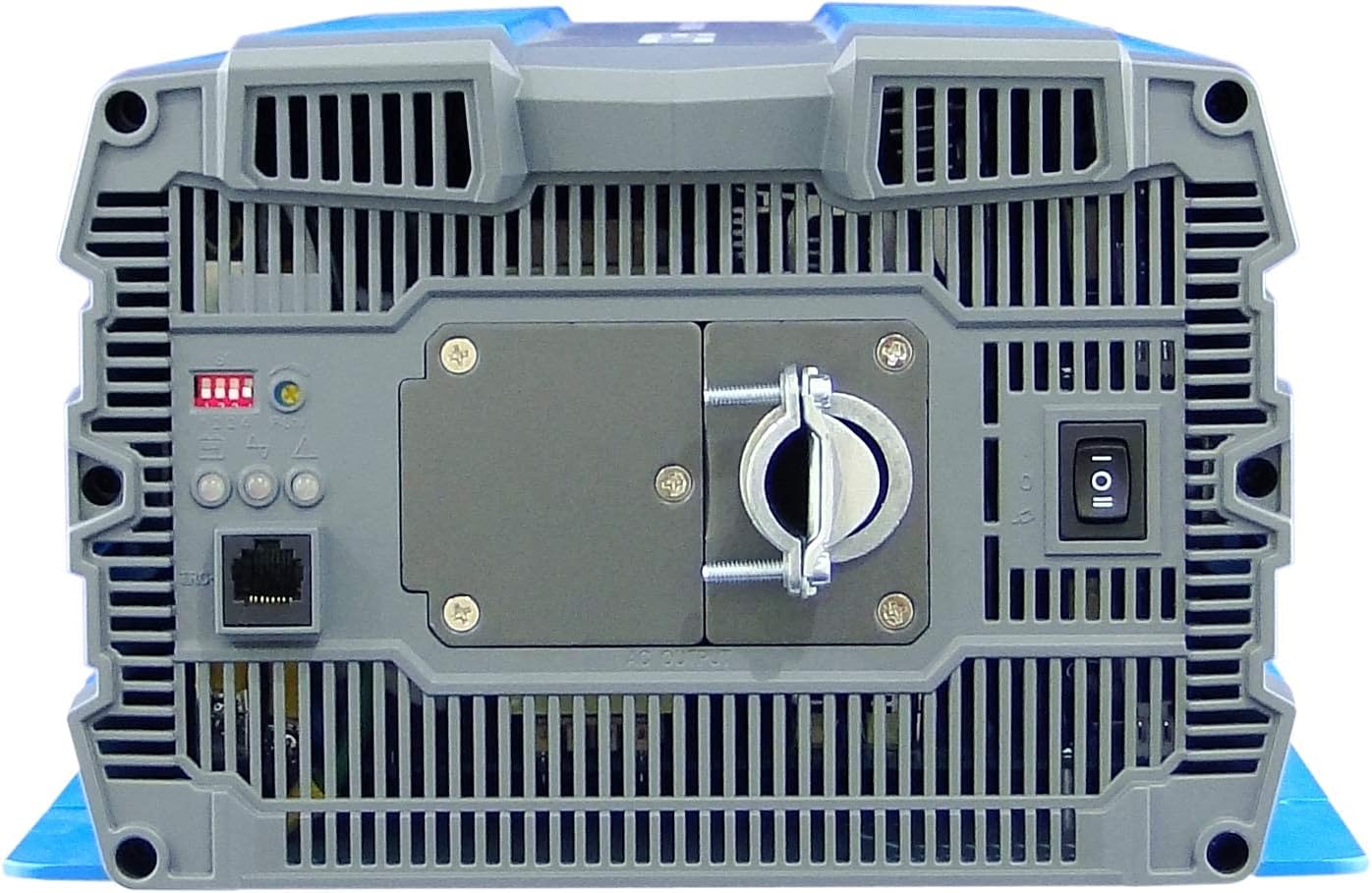
Figure 3.2: Front panel of the inverter. This view highlights the AC output terminal, the remote control terminal (green), LED status indicators, DIP switches, and the main power switch.
- AC آؤٹ پٹ ٹرمینل: Hardwire connection for 120VAC output.
- Remote Control Terminal (Green): For connecting an optional remote ON/OFF switch.
- ایل ای ڈی کی حیثیت کے اشارے: Provide visual feedback on inverter status (Power, Fault, Overload).
- ڈی آئی پی سوئچز: Used to select output frequency (50/60 Hz) and output voltage.
- Power Saving Mode Resistor: Adjustable resistor for fine-tuning power saving mode.
- مین پاور سوئچ: Controls the inverter's power.
Rear Panel (DC Input Side):

Figure 3.3: Rear panel of the inverter. This view shows the DC input terminals (red for positive, black for negative) and the chassis ground connection point.
- ڈی سی ان پٹ ٹرمینلز: Heavy-duty terminals for connecting to the 48VDC battery bank. Ensure correct polarity (Red for Positive, Black for Negative).
- Chassis Ground Terminal: انورٹر کو زمین کی زمین سے جوڑنے کے لیے۔
- Cooling Fan Vents: Ensure these vents are not obstructed for proper heat dissipation.
4. تنصیب
آپ کے انورٹر کے محفوظ اور موثر آپریشن کے لیے مناسب تنصیب بہت ضروری ہے۔ ان اقدامات پر احتیاط سے عمل کریں۔
4.1 انورٹر لگانا
- براہ راست سورج کی روشنی، گرمی کے ذرائع اور نمی سے دور ایک خشک، اچھی ہوادار جگہ کا انتخاب کریں۔
- Mount the inverter on a non-combustible surface.
- Ensure there is at least 6 inches (15 cm) of clear space around all sides of the inverter for proper airflow.
- Use appropriate fasteners to secure the inverter firmly to the mounting surface.
4.2 DC ان پٹ کنکشن
انتباہ: Ensure the battery bank is disconnected or isolated before making any connections. Use appropriately sized cables and fuses/breakers.
- Connect the positive (+) DC cable (typically red) from your 48VDC battery bank to the red positive (+) terminal on the inverter's rear panel.
- Connect the negative (-) DC cable (typically black) from your 48VDC battery bank to the black negative (-) terminal on the inverter's rear panel.
- Ensure all DC connections are tight and secure to prevent loose connections and arcing.
- Install an external DC fuse or circuit breaker between the battery bank and the inverter's positive terminal, as close to the battery as possible. Consult the specifications for appropriate fuse sizing.
4.3 AC آؤٹ پٹ کنکشن
The SP-4000-148 uses a hardwire AC output connection.
- Ensure the inverter is OFF and all DC power is disconnected.
- Connect your AC load wiring to the designated AC output terminal block on the front panel.
- Follow all local electrical codes for AC wiring.
- Ensure all AC connections are secure.
4.4 گراؤنڈ کرنا
The inverter chassis must be properly grounded.
- Connect a ground wire from the chassis ground terminal on the inverter's rear panel to a reliable earth ground point.
- Ensure the ground connection is secure and meets all local electrical codes.
4.5 Remote Control Connection (Optional)
If using an optional remote control, connect it to the green terminal block on the front panel according to the remote control's instructions.
5. آپریشن
Once the inverter is properly installed and all connections are secure, you can begin operation.
5.1 پاور آن/آف۔
- Ensure all DC and AC connections are correct and secure.
- If an external DC breaker is installed, ensure it is closed (ON).
- Flip the main power switch on the inverter's front panel to the 'ON' position.
- The LED indicators will illuminate, and the cooling fan may briefly activate.
- To power off, flip the main power switch to the 'OFF' position.
5.2 ایل ای ڈی کی حیثیت کے اشارے
The inverter features 3-color LED indicators to display its operational status:
- گرین ایل ای ڈی: عام آپریشن کی نشاندہی کرتا ہے۔
- پیلا ایل ای ڈی: Indicates a warning or abnormal condition (e.g., low battery, minor overload). Refer to troubleshooting.
- ریڈ یلئڈی: Indicates a fault or critical error (e.g., severe overload, over-temperature, short circuit). The inverter will typically shut down. Refer to troubleshooting.
5.3 DIP سوئچ کی ترتیبات
The DIP switches on the front panel allow configuration of output frequency and voltage. Refer to the detailed specifications or the label on the inverter for specific switch positions for desired settings.
- آؤٹ پٹ فریکوئنسی: Select between 50 Hz or 60 Hz.
- آؤٹ پٹ والیمtage: Select desired AC output voltage (e.g., 100V, 110V, 115V, 120V).
نوٹ: Always power off the inverter before changing DIP switch settings.
5.4 بجلی کی بچت کا موڈ
The power saving mode can be adjusted via the variable resistor on the front panel. This mode reduces standby power consumption when no load or a very light load is detected. Adjust the resistor to set the threshold for entering/exiting power saving mode.
6 دیکھ بھال
باقاعدگی سے دیکھ بھال آپ کے انورٹر کی لمبی عمر اور بہترین کارکردگی کو یقینی بناتی ہے۔
- صفائی: وقتاً فوقتاً انورٹر کے بیرونی حصے کو خشک، نرم کپڑے سے صاف کریں۔ اس بات کو یقینی بنائیں کہ وینٹیلیشن کے سوراخ دھول اور ملبے سے پاک ہوں۔ مائع کلینر استعمال نہ کریں۔
- کنکشن چیکس: Annually inspect all DC and AC connections for tightness. Loose connections can cause overheating and damage.
- بیٹری کی بحالی: Follow the battery manufacturer's recommendations for maintenance, including checking electrolyte levels (for flooded batteries) and terminal cleanliness.
- ماحولیات: یقینی بنائیں کہ آپریٹنگ ماحول مخصوص درجہ حرارت اور نمی کی حدود کے اندر رہتا ہے۔
7 خرابیوں کا سراغ لگانا
This section provides solutions to common issues you might encounter with your inverter.
| مسئلہ | ممکنہ وجہ | حل |
|---|---|---|
| Inverter does not turn on (No LEDs) | No DC input power; Blown DC fuse/breaker; Loose DC connections; Reverse polarity. | بیٹری والیوم چیک کریں۔tage; Check external DC fuse/breaker; Verify DC connections are tight and correct polarity. |
| Red LED illuminates, inverter shuts down | Overload; Short circuit on AC output; Over-temperature; Input over/under voltage. | Reduce AC load; Check AC wiring for short circuits; Allow inverter to cool down; Verify battery voltage is within operating range. |
| Yellow LED illuminates, intermittent operation | Minor overload; Low battery voltage warning; High temperature warning. | Reduce AC load; Recharge batteries; Ensure adequate ventilation. |
| No AC output, Green LED is on | AC output wiring issue; Faulty AC appliance. | Check AC output connections; Test with a different AC appliance. |
| Cooling fan runs constantly or loudly | High ambient temperature; Heavy load; Obstructed vents. | Ensure proper ventilation; Reduce load if possible; Clean vents. |
8. وضاحتیں
The following table details the technical specifications for the COTEC SP-4000-148 Pure Sine Wave Inverter.

Figure 8.1: Detailed technical specifications for the COTEC SP-4000 series, including input, output, protection, and environmental parameters.
| تفصیلات | قدر |
|---|---|
| برانڈ | کوٹیک |
| ماڈل کا نام | ایس پی سیریز |
| واٹtage | 4000 واٹ |
| ان پٹ جلدtage | 48 وولٹ ڈی سی |
| آؤٹ پٹ پاور | 4000 واٹ |
| آؤٹ پٹ فریکوئنسی | 60 Hz (Selectable) |
| کل پاور آؤٹ لیٹس | 1 (Hardwire) |
| Standby Power Shutoff | High Efficiency (Adjustable) |
| انکلوژر کی قسم | Type 1 Indoor Aluminum Enclosure |
| منظوری | E13 / UL / CE / FCC |
| یو پی سی | 648152674771 |
| ایم ایف آر پارٹ نمبر | ایس پی-4000-148 |
مکینیکل ڈرائنگ:

Figure 8.2: Mechanical drawings providing dimensions for the COTEC SP-4000 series inverter, useful for installation planning.
9. وارنٹی اور سپورٹ
COTEK products are manufactured to high-quality standards. This product is covered by a manufacturer's warranty against defects in materials and workmanship. Please refer to the warranty card included with your product or visit the official COTEC webتفصیلی وارنٹی شرائط و ضوابط کے لیے سائٹ۔
کسٹمر سپورٹ:
For technical assistance, troubleshooting, or warranty claims, please contact COTEC customer support through their official channels. Have your product model number (SP-4000-148) and purchase information ready when contacting support.
- Webسائٹ: www.cotek.com.tw (سابقample, please verify official webسائٹ)
- ای میل: support@cotek.com (Exampلی)
- فون: +1-XXX-XXX-XXXX (Exampلی)