
تعارف
The Movo Photo MTP-11 is a motorized panoramic tripod head designed for creating smooth time-lapse videos and panoramic photographs. This device offers variable speed, time, and direction controls, making it suitable for use with DSLR cameras, GoPro cameras, and smartphones. It features a built-in rechargeable battery for portable operation.
کیا شامل ہے۔
Upon unboxing your Movo Photo MTP-11, please ensure all the following items are present:
- Movo Photo MTP-11 Motorized Panoramic Time Lapse Tripod Head
- GoPro tripod mount adapter
- USB چارجنگ کیبل
- Smartphone / iPhone mount
- لے جانے والا کیس
پروڈکٹ ختمview
The MTP-11 features a compact, cylindrical design with intuitive controls for setting rotation parameters. The top surface includes a 1/4-inch mounting screw for attaching cameras or adapters. The base includes a 1/4-inch mounting thread for attachment to tripods.

تصویر: سامنے view of the Movo MTP-11 showing the power switch, duration, start/stop, and direction buttons, along with LED indicators for settings.
Key controls and indicators:
- بجلی کے سوئچ: سائیڈ پر واقع، ڈیوائس کو آن یا آف کرنے کے لیے استعمال کیا جاتا ہے۔
- Duration/Angle Indicators: A series of LEDs indicating the total rotation angle (e.g., 15°, 30°, 45°, 60°, 90°, 180°, 360°).
- Time Interval Indicators: A series of LEDs indicating the time duration for the rotation (e.g., 5 minutes, 15 minutes, 30 minutes, 60 minutes).
- DIR (Direction) Button: Used to select the rotation direction (clockwise or counter-clockwise).
- اسٹارٹ/اسٹاپ بٹن: Initiates or pauses the rotation sequence.
- R.T. (Real Time) Button: Activates continuous rotation mode.

Image: The MTP-11 shown with a Sony mirrorless camera, another mirrorless camera, and a smartphone mounted, demonstrating its versatility.
سیٹ اپ
- ڈیوائس کو چارج کریں: Before first use, fully charge the MTP-11 using the provided USB cable. Refer to the 'Charging the Battery' section for details.
- Mount to a Tripod (Optional): If using a tripod, screw the MTP-11 onto your tripod's 1/4-inch screw mount located on the bottom of the device. Ensure it is securely fastened.

Image: Underside of the MTP-11, highlighting the 1/4-inch tripod mounting thread.
- Attach Your Camera/Device:
- For DSLR/Mirrorless Cameras: Screw your camera directly onto the 1/4-inch mounting screw on the top of the MTP-11. Ensure the camera is stable and centered.

Image: A Canon DSLR camera securely mounted on the MTP-11.
- For GoPro Cameras: Attach the provided GoPro tripod mount adapter to the MTP-11's top screw, then secure your GoPro to the adapter.
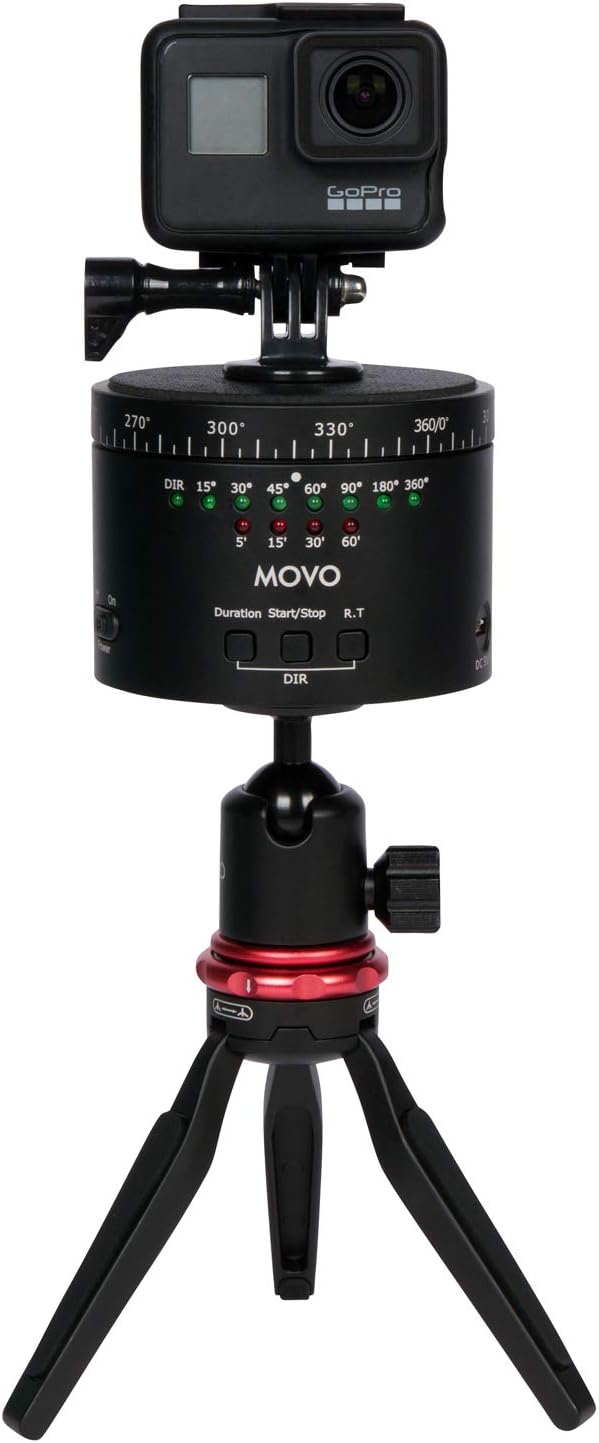
Image: A GoPro camera mounted on the MTP-11, which is then attached to a mini tripod.
- اسمارٹ فونز کے لیے: Attach the provided smartphone mount to the MTP-11's top screw, then secure your smartphone within the mount.
- For DSLR/Mirrorless Cameras: Screw your camera directly onto the 1/4-inch mounting screw on the top of the MTP-11. Ensure the camera is stable and centered.
- پاور آن: Slide the 'Power' switch to the 'On' position. The indicator LEDs will illuminate.
آپریٹنگ ہدایات
The MTP-11 allows for precise control over rotation angle, duration, and direction for time-lapse photography and continuous panning.
- Select Rotation Angle/Duration: Press the 'Duration' button repeatedly to cycle through the available rotation angles (e.g., 15°, 30°, 45°, 60°, 90°, 180°, 360°) and corresponding time intervals (e.g., 5 min, 15 min, 30 min, 60 min). The active setting will be indicated by an illuminated LED.
- گردش کی سمت منتخب کریں: Press the 'DIR' button to toggle between clockwise and counter-clockwise rotation. An LED indicator will show the selected direction.
- Start Time-Lapse: Once your desired angle, duration, and direction are set, press the 'Start/Stop' button to begin the motorized rotation. The device will rotate smoothly over the selected duration.
- Stop Time-Lapse: To pause or stop the rotation before completion, press the 'Start/Stop' button again.
- Real-Time Panning: For continuous, non-timed rotation, press the 'R.T.' button. The device will rotate continuously until the 'Start/Stop' button is pressed.
نوٹ: The MTP-11 is designed for smooth panning. Ensure your camera setup does not exceed the maximum weight recommendation of 2 kg (4.4 lbs) to maintain stability and smooth operation.
بیٹری چارج ہو رہی ہے۔
The MTP-11 features a built-in rechargeable battery with an average life of 6 hours on a single charge.
- Locate the USB charging port on the side of the MTP-11.
- Connect the provided USB charging cable to the MTP-11's charging port.
- USB کیبل کے دوسرے سرے کو معیاری USB پاور اڈاپٹر (شامل نہیں) یا کمپیوٹر کے USB پورٹ سے جوڑیں۔
- A charging indicator light (if present) will show the charging status. The light typically changes color or turns off when fully charged.
- چارجنگ مکمل ہونے کے بعد کیبل کو منقطع کریں۔
دیکھ بھال
- آلے کو نرم، خشک کپڑے سے صاف کرکے صاف رکھیں۔ سخت کیمیکلز یا کھرچنے والے مواد کے استعمال سے پرہیز کریں۔
- Store the MTP-11 in its carrying case when not in use to protect it from dust and physical damage.
- Avoid exposing the device to extreme temperatures, moisture, or direct sunlight for prolonged periods.
- خود ڈیوائس کو الگ کرنے یا مرمت کرنے کی کوشش نہ کریں، کیونکہ اس سے وارنٹی ختم ہو جائے گی۔
خرابی کا سراغ لگانا
| مسئلہ | ممکنہ وجہ | حل |
|---|---|---|
| ڈیوائس آن نہیں ہوتی ہے۔ | بیٹری ختم ہو گئی ہے۔ | Charge the MTP-11 using the USB cable. |
| Rotation is not smooth or device shakes. | Camera/device weight exceeds maximum capacity (2 kg / 4.4 lbs). | Ensure the total weight of the mounted equipment is within the specified limit. |
| Device stops unexpectedly during operation. | Low battery or obstruction. | Recharge the battery. Check for any physical obstructions preventing rotation. |
| LED indicators are difficult to see. | روشن محیطی روشنی کے حالات۔ | Operate in a shaded area or use your hand to shield the indicators for better visibility. |
وضاحتیں
| فیچر | تفصیل |
|---|---|
| ماڈل نمبر | MTP-11 |
| رنگ | سیاہ |
| زیادہ سے زیادہ وزن کی سفارش | 2 کلوگرام (4.4 پونڈ) |
| شے کا وزن | 500 گرام |
| فولڈ سائز | 3.5 x 3.5 x 2.5 انچ (تقریباً 8.9 x 8.9 x 6.35 سینٹی میٹر) |
| پارسل کے طول و عرض | 15.09 x 11.2 x 9.19 سینٹی میٹر |
| بیٹری کی قسم | Product Specific (Rechargeable) |
| بیٹری کی اوسط زندگی | 6 گھنٹے |
| ہم آہنگ آلات | Cameras (DSLR, Mirrorless), Cellphones (Smartphones), GoPro |
| بڑھتے ہوئے دھاگے | 1/4-inch (top and bottom) |
وارنٹی
The Movo Photo MTP-11 comes with a 1 سال کی وارنٹی from the date of purchase. This warranty covers manufacturing defects and ensures the product functions as intended under normal use. Please retain your proof of purchase for warranty claims. The warranty does not cover damage caused by misuse, unauthorized modifications, accidents, or normal wear and tear.
حمایت
For technical assistance, troubleshooting beyond this manual, or warranty inquiries, please contact Movo customer support. Refer to the official Movo webتازہ ترین رابطے کی معلومات کے لیے سائٹ۔
When contacting support, please have your product model (MTP-11) and proof of purchase readily available.