
تعارف
خریداری کے لیے آپ کا شکریہasing the QUMOX L165U 2.4GHz Wireless Gamepad. This high-quality game controller is designed for use with PC and Android devices, offering a reliable 2.4GHz wireless connection for an enhanced gaming experience. Please read this manual carefully to ensure proper setup and operation of your new gamepad.

Figure 1: QUMOX L165U Gamepad with included USB adapter and OTG connection kit.
پیکیج کے مشمولات
یقینی بنائیں کہ تمام اشیاء آپ کے پیکیج میں موجود ہیں:
- 1x QUMOX L165U Gamepad
- 1x 2.4GHz USB Wireless Adapter
- 1x OTG Connection Kit (Micro USB to USB-A adapter)
سیٹ اپ
1. بیٹری کی تنصیب
The QUMOX L165U Gamepad is powered by 2 AAA batteries (not included). To install the batteries:
- Locate the battery compartment on the back of the gamepad.
- سلائیڈ کرکے بیٹری کور کھولیں۔
- درست قطبیت (+/-) کو یقینی بناتے ہوئے 2 AAA بیٹریاں داخل کریں۔
- بیٹری کور کو محفوظ طریقے سے بند کریں۔

Figure 2: Open battery compartment for AAA battery installation.
2 پی سی سے جڑ رہا ہے۔
- Plug the 2.4GHz USB Wireless Adapter into an available USB port on your PC.
- Turn on the gamepad by pressing the 'START' button. The gamepad will automatically attempt to connect.
- The PC should recognize the gamepad and install necessary drivers automatically.
- If the gamepad does not connect, press the 'MODE' button on the gamepad to cycle through connection modes until it is recognized by your PC.
3. Connecting to an Android Device (with OTG support)
- Connect the OTG Connection Kit to your Android device's Micro USB port.
- Plug the 2.4GHz USB Wireless Adapter into the USB-A end of the OTG Connection Kit.
- Turn on the gamepad by pressing the 'START' button. The gamepad will automatically attempt to connect.
- Your Android device should recognize the gamepad.
- If the gamepad does not connect, press the 'MODE' button on the gamepad to cycle through connection modes until it is recognized by your Android device.
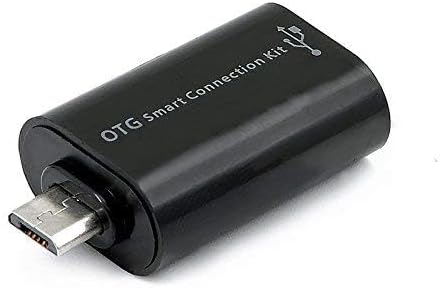
Figure 3: OTG Connection Kit for Android device connectivity.
آپریٹنگ ہدایات
Once connected, your QUMOX L165U Gamepad is ready for use. The layout is standard for most game controllers.
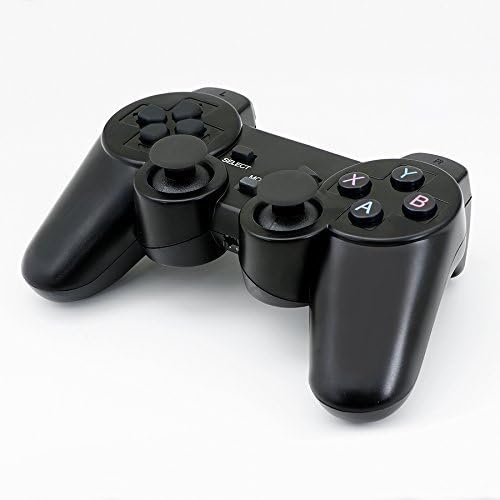
تصویر 4: اوپر view of the QUMOX L165U Gamepad, highlighting button layout.
- دشاتمک پیڈ (D-Pad): عین مطابق دشاتمک ان پٹ کے لیے۔
- اینالاگ جوائس اسٹکس: Two analog sticks for 360-degree movement and camera control.
- ایکشن بٹن (A, B, X, Y): درون گیم کمانڈز کے لیے معیاری ایکشن بٹن۔
- کندھے کے بٹن (L1, R1) اور محرکات (L2, R2): Located on the top of the gamepad for additional actions.
- منتخب کریں/بیک بٹن: Typically used for menu navigation or specific in-game functions.
- اسٹارٹ بٹن: Used to pause games or confirm selections.
- موڈ بٹن: Cycles through different operating modes (e.g., Android, PC) if automatic detection fails.
ویڈیو مظاہرہ
ویڈیو 1: بیچنے والے کی طرف سے فراہم کردہ ختمview of a 2-pack wireless controller, demonstrating its features and compatibility. While showing a similar product, it illustrates general wireless controller usage and setup.
دیکھ بھال
- صفائی: Use a soft, dry cloth to clean the gamepad. Avoid using harsh chemicals or abrasive materials.
- ذخیرہ: گیم پیڈ کو براہ راست سورج کی روشنی اور انتہائی درجہ حرارت سے دور ٹھنڈی، خشک جگہ پر اسٹور کریں۔
- بیٹری کی دیکھ بھال: Remove batteries if the gamepad will not be used for an extended period to prevent leakage.
خرابی کا سراغ لگانا
| مسئلہ | ممکنہ وجہ | حل |
|---|---|---|
| Gamepad does not connect. | Low batteries, incorrect mode, adapter not properly inserted. | Replace batteries. Press the 'MODE' button to cycle through modes. Ensure USB adapter is fully inserted into PC or OTG adapter. |
| بٹن یا جوائس اسٹک غیر جوابی ہیں۔ | Connection issue, game incompatibility, physical damage. | Reconnect the gamepad. Check game settings for controller support. If issue persists, contact support. |
| Android device does not recognize gamepad. | Android device lacks OTG support, OTG adapter issue. | Verify your Android device supports OTG. Ensure OTG adapter is functioning correctly. |
وضاحتیں
| فیچر | تفصیل |
|---|---|
| ماڈل نمبر | L165U |
| کنیکٹوٹی ٹیکنالوجی | 2.4GHz Wireless (via USB Adapter) |
| ہم آہنگ آلات | PC, Android (with OTG support) |
| طاقت کا منبع | 2x AAA بیٹریاں |
| شے کا وزن | 5.3 اونس |
| پیکیج کے طول و عرض | 8.07 x 5.63 x 2.95 انچ |
| رنگ | سیاہ |
وارنٹی اور سپورٹ
For warranty information or technical support, please refer to the contact details provided with your purchase or visit the official QUMOX webسائٹ کسی بھی وارنٹی دعووں کے لیے اپنی خریداری کا ثبوت رکھیں۔