
تعارف
This manual provides detailed instructions for the safe operation and maintenance of your Contixo F3 RC Drone. Please read this manual thoroughly before operating the drone to ensure proper use and to prevent damage or injury. The Contixo F3 features an integrated 720p WiFi FPV camera, Altitude Hold, 2.4GHz control, 6-Axis Gyro, and One-Key Landing/Take-Off functions.
حفاظتی رہنما خطوط
- ڈرون کو ہمیشہ کھلے علاقوں میں چلائیں، لوگوں، جانوروں اور رکاوٹوں سے دور رہیں۔
- Do not fly near airports, power lines, or restricted airspace.
- Ensure the drone battery is fully charged before each flight.
- انگلیوں اور بالوں کو گھومنے والے پروپیلرز سے دور رکھیں۔
- 14 سال سے کم عمر کے صارفین کے لیے بالغوں کی نگرانی کی سفارش کی جاتی ہے۔
- تیز ہواؤں یا خراب موسمی حالات میں کام نہ کریں۔
- Turn off the drone and remote control when not in use.
پیکیج کے مشمولات
تصدیق کریں کہ آپ کے پیکیج میں تمام اجزاء موجود ہیں:
- Contixo F3 RC Drone
- ریموٹ کنٹرول ٹرانسمیٹر
- USB چارجنگ کیبل
- اسپیئر پروپیلرز۔
- پروپیلر گارڈز
- لینڈنگ گیئر
- سکریو ڈرایور
- صارف دستی

Image: Contixo F3 Drone, remote control, and packaging. This image shows the drone, its remote, and the retail box, indicating the main components included.
سیٹ اپ
1. Drone Battery Installation & Charging
- ڈرون کے نیچے بیٹری کے ٹوکرے کو تلاش کریں۔
- Insert the drone battery, ensuring correct polarity.
- بیٹری کے ڈبے کو محفوظ طریقے سے بند کریں۔
- Connect the USB charging cable to the drone battery and a USB power source (e.g., computer, USB adapter).
- پہلے استعمال سے پہلے بیٹری کو مکمل چارج ہونے دیں۔ چارج کرنے کا وقت مختلف ہو سکتا ہے۔
2. ریموٹ کنٹرول بیٹری کی تنصیب
- ریموٹ کنٹرول کی پشت پر بیٹری کور کھولیں۔
- قطبی نشانات کے مطابق 3 AAA بیٹریاں (شامل نہیں) داخل کریں۔
- بیٹری کور بند کریں۔
3. Propeller Guard and Landing Gear Installation
- Attach the propeller guards to each motor arm for protection.
- Securely attach the landing gear to the drone's underside.

Image: Contixo F3 Drone with propeller guards and landing gear installed. This image displays the drone fully assembled with its protective propeller guards and landing gear.
4. ڈرون اور ریموٹ کنٹرول کا جوڑا بنانا
- ڈرون کو فلیٹ ، سطح کی سطح پر رکھیں۔
- Turn on the drone. The indicator lights will flash.
- ریموٹ کنٹرول آن کریں۔
- Push the left joystick (throttle) all the way up, then all the way down. The drone lights will become solid, indicating successful pairing.
5. App Download and FPV Setup
- Download the Contixo FPV app from your smartphone's app store (iOS or Android).
- Turn on the drone and connect your smartphone to the drone's Wi-Fi network (usually named "Contixo-F3-XXXX").
- Open the Contixo FPV app to view the live camera feed and access advanced controls.

Image: Contixo F3 Drone, remote control, and a smartphone showing the FPV app interface. This image illustrates the complete setup for FPV flight.
آپریٹنگ ہدایات
Basic Controls (Remote Control)
- بائیں جوائس اسٹک (تھروٹل): اونچائی کے لیے اوپر/نیچے، یاؤ (گھومنے) کے لیے بائیں/دائیں
- دائیں جوائس اسٹک: Up/Down for forward/backward flight, Left/Right for left/right sideward flight.
- ایک کلیدی ٹیک آف/لینڈنگ بٹن: Press once to automatically take off or land.
- ٹرم بٹن: Adjust for stable hovering if the drone drifts.
- Speed Mode Button: Cycle through different flight speeds (beginner, intermediate, advanced).
- 360° Flip Button: Press and then move the right joystick in the desired direction to perform a flip.

Image: Contixo F3 Drone remote control. This image shows the layout of the remote control with its various buttons and joysticks.
اعلی درجے کی خصوصیات
- اونچائی ہولڈ: The drone maintains its current altitude automatically, allowing for easier control and stable video recording.
- FPV (پہلا شخص View) Camera: Stream live 720p video to your smartphone via the Contixo FPV app. Record videos and capture photos directly to your device.
- G-Sensor Control (via App): Use your smartphone's accelerometer to control the drone's flight direction by tilting your phone.
- Track-Controlled Flight (via App): Draw a flight path on your smartphone screen, and the drone will follow the designated route automatically.
دیکھ بھال
- صفائی: ڈرون کی باڈی اور کیمرے کے لینس کو صاف کرنے کے لیے نرم، خشک کپڑا استعمال کریں۔ مائعات کے استعمال سے پرہیز کریں۔
- پروپیلر کی تبدیلی: If a propeller is damaged, carefully remove it and replace it with a new one, ensuring the correct propeller type (A or B) is installed in the corresponding position.
- بیٹری کی دیکھ بھال: بیٹریوں کو ٹھنڈی، خشک جگہ پر اسٹور کریں۔ زیادہ چارج یا زیادہ خارج نہ کریں۔
- ذخیرہ: When not in use for extended periods, remove batteries from both the drone and remote control.
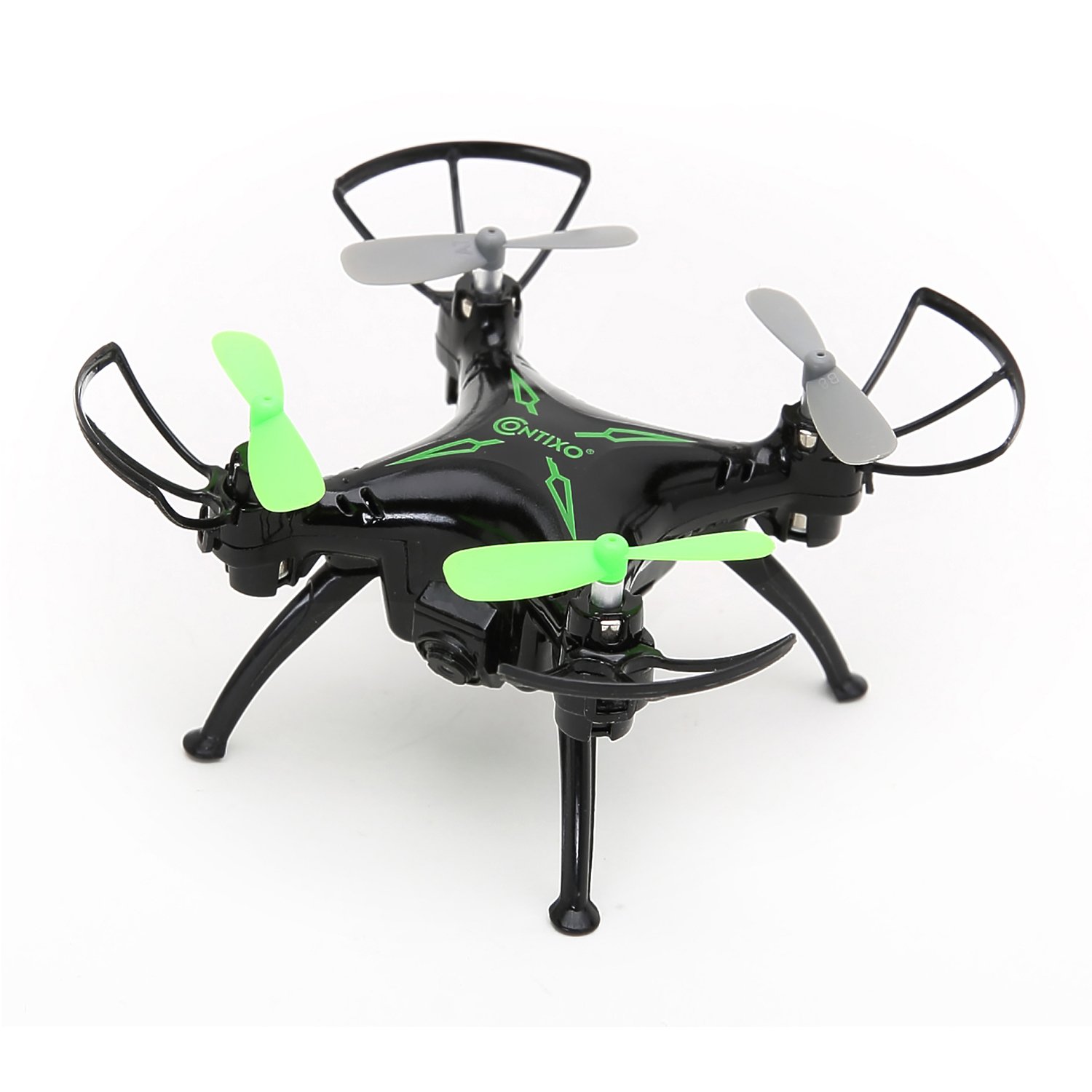
تصویر: اوپر view of the Contixo F3 Drone. This image provides a clear view of the drone's propellers and body for maintenance reference.
خرابی کا سراغ لگانا
| مسئلہ | ممکنہ وجہ | حل |
|---|---|---|
| ڈرون ریموٹ کا جواب نہیں دیتا۔ | جوڑا نہیں ہے؛ کم بیٹری؛ مداخلت | Re-pair the drone and remote; charge batteries; move to an open area. |
| ڈرون پرواز کے دوران اڑتا ہے۔ | Not calibrated; trim settings incorrect. | Calibrate the drone on a flat surface; use trim buttons to adjust. |
| FPV video is choppy or disconnected. | Weak Wi-Fi signal; too far from drone; app issue. | Ensure strong Wi-Fi connection; fly closer to the drone; restart app/drone. |
| ڈرون ٹیک آف نہیں کرتا۔ | Low battery; propellers blocked; not paired. | Charge battery; check for obstructions; re-pair drone. |
وضاحتیں
- برانڈ: کونٹیکسو
- ماڈل: F3
- رنگ: سیاہ
- مہارت کی سطح: Beginner, Professional
- آئٹم کا وزن: 3.52 اونس (تقریباً 100 گرام)
- بیٹری کی صلاحیت: 220 ملی۔amp گھنٹے (لتیم پولیمر)
- کنٹرول کی قسم: ریموٹ کنٹرول
- ویڈیو آؤٹ پٹ ریزولوشن: 1280x720 Pixels (720p HD FPV)
- کنیکٹوٹی: 2.4GHz (Remote Control), Wi-Fi (FPV)
- جیروسکوپ: 6-ایکسس گائرو
- خصوصی خصوصیات: Altitude Hold, One-Key Landing/Take-Off, FPV Camera, G-Sensor Control, Track-Controlled Flight
وارنٹی اور سپورٹ
For warranty information, technical support, or replacement parts, please visit the official Contixo webسائٹ یا ان کی کسٹمر سروس سے رابطہ کریں۔ خریداری کے ثبوت کے طور پر اپنی خریداری کی رسید اپنے پاس رکھیں۔
Contixo Official Webسائٹ: www.contixo.com
نوٹ: مخصوص وارنٹی شرائط علاقے اور خوردہ فروش کے لحاظ سے مختلف ہو سکتی ہیں۔