
تعارف
This manual provides comprehensive instructions for the setup, operation, and maintenance of your GPX Digital AM/FM Clock Radio, model C224B. Please read this manual thoroughly before using the device to ensure proper functionality and to maximize your user experience. Keep this manual for future reference.
پروڈکٹ ختمview
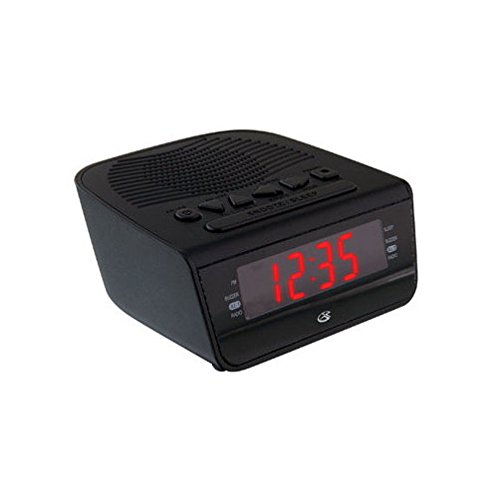
تصویر 1: سامنے والا view of the GPX Digital AM/FM Clock Radio. This image shows the compact black unit with its digital display and control buttons.
The GPX Digital AM/FM Clock Radio (C224B) is designed for reliable timekeeping and audio entertainment. Key features include a clear multi-display clock, AM/FM radio tuner, dual alarm functionality, and a battery backup option to ensure continuous operation during power interruptions. Its compact and modern design makes it suitable for various indoor settings.
سیٹ اپ
1 پیک کھولنا
Carefully remove the clock radio from its packaging. Ensure all components are present: the clock radio unit and the power adapter.
2. پاور کنکشن
- Plug the power adapter into the DC input jack located on the back of the clock radio.
- Plug the other end of the power adapter into a standard wall outlet (AC 120V, 60Hz).
- ڈسپلے روشن ہو جائے گا، اس بات کی نشاندہی کرتا ہے کہ یونٹ پاور حاصل کر رہا ہے۔
3. بیٹری بیک اپ کی تنصیب (اختیاری)
آپ کے دوران بیک اپ پاور کے لیےtages, install batteries (not included).
- یونٹ کے نچلے حصے میں بیٹری کے ٹوکری کو تلاش کریں۔
- بیٹری کے ٹوکری کا احاطہ کھولیں۔
- Insert the required batteries (e.g., 2 x AAA, check unit for specific type) according to the polarity markings (+ and -).
- بیٹری کے کمپارٹمنٹ کور کو محفوظ طریقے سے بند کریں۔
نوٹ: Batteries are for backup only and will not power the display or radio functions continuously. They preserve time and alarm settings during a power interruption.
آپریٹنگ ہدایات
1. وقت مقرر کرنا
- دبائیں اور تھامیں۔ وقت طے بٹن جب تک ڈسپلے چمکتا ہے.
- استعمال کریں۔ گھنٹہ اور منٹ وقت کو ایڈجسٹ کرنے کے لئے بٹن.
- دبائیں وقت طے دوبارہ تصدیق کرنے اور ٹائم سیٹنگ موڈ سے باہر نکلیں۔
2. الارم سیٹ کرنا (الارم 1 اور الارم 2)
This unit features dual alarms, allowing you to set two independent wake-up times.
- دبائیں اور تھامیں۔ الارم 1 سیٹ (یا الارم 2 سیٹ) button until the alarm time flashes.
- استعمال کریں۔ گھنٹہ اور منٹ buttons to adjust the desired alarm time.
- دبائیں الارم 1 سیٹ (یا الارم 2 سیٹ) again to confirm the time.
- Immediately after confirming the time, use the الارم موڈ button to select the alarm source: بزر or ریڈیو.
- The alarm icon (e.g., AL1 or AL2) will appear on the display, indicating the alarm is active.
To turn off an alarm, press the corresponding الارم 1 آن/آف (یا الارم 2 آن/آف) button. The alarm icon will disappear.
3. AM/FM ریڈیو آپریشن
- دبائیں ریڈیو آن/آف ریڈیو آن کرنے کے لیے بٹن۔
- دبائیں بینڈ AM اور FM بینڈ کے درمیان سوئچ کرنے کے لیے بٹن۔
- استعمال کریں۔ ٹیون + or ٹیون - مطلوبہ اسٹیشن پر دستی طور پر ٹیون کرنے کے لیے بٹن۔
- To automatically scan for the next available station, press and hold ٹیون + or ٹیون - چند سیکنڈ کے لیے
- کا استعمال کرتے ہوئے حجم کو ایڈجسٹ کریں حجم +۔ or حجم - بٹن
- ریڈیو کو بند کرنے کے لیے دبائیں ریڈیو آن/آف دوبارہ بٹن.
4 اسنوز فنکشن
جب الارم بجتا ہے تو دبائیں اسنوز کریں تقریباً 9 منٹ کے لیے الارم کو عارضی طور پر خاموش کرنے کے لیے بٹن۔ اسنوز کی مدت کے بعد الارم دوبارہ بج جائے گا۔
5. نیند کی تقریب
The sleep function allows the radio to play for a set duration before automatically turning off.
- جب ریڈیو چل رہا ہو، دبائیں۔ سونا دستیاب نیند کے اوقات (مثلاً 90، 60، 30، 15 منٹ، آف) کے ذریعے چکر لگانے کے لیے بار بار بٹن۔
- ریڈیو منتخب وقت کے بعد خود بخود بند ہو جائے گا۔
دیکھ بھال
1. صفائی
To clean the unit, wipe the exterior with a soft, slightly damp cloth. Do not use abrasive cleaners or solvents, as these may damage the finish. Ensure the unit is unplugged before cleaning.
2 بیٹری کی تبدیلی
If the battery backup function is not working, or if the unit loses time during a power outage, the backup batteries may need replacement. Follow the "Battery Backup Installation" steps in the Setup section to replace them.
خرابی کا سراغ لگانا
| مسئلہ | ممکنہ وجہ | حل |
|---|---|---|
| یونٹ آن نہیں ہوتا۔ | پاور اڈاپٹر منسلک نہیں یا ناقص آؤٹ لیٹ۔ | یقینی بنائیں کہ پاور اڈاپٹر محفوظ طریقے سے یونٹ اور ایک ورکنگ وال آؤٹ لیٹ میں لگا ہوا ہے۔ ایک مختلف آؤٹ لیٹ آزمائیں۔ |
| الارم نہیں بجتا ہے۔ | Alarm not set, alarm volume too low, or alarm turned off. | Verify alarm time and source (buzzer/radio) are set correctly. Ensure alarm is activated (icon visible). Increase radio volume if alarm source is radio. |
| ریڈیو کا ناقص استقبال۔ | کمزور سگنل یا مداخلت۔ | Adjust the position of the unit or the antenna (if external). Move away from other electronic devices that may cause interference. |
| پاور OU کے بعد ضائع ہونے والا وقت/ترتیباتtage. | بیک اپ بیٹریاں مر چکی ہیں یا انسٹال نہیں ہیں۔ | Install fresh backup batteries or replace existing ones. |
وضاحتیں
- ماڈل: C224B
- طاقت کا منبع: AC 120V, 60Hz (main); Battery Powered (backup)
- ڈسپلے کی قسم: ایل ای ڈی ڈیجیٹل ڈسپلے
- ریڈیو بینڈز: AM/FM
- طول و عرض (تقریباً): 5.12" W x 5.12" H
- وزن (لگ بھگ): 3 پاؤنڈز
- رنگ: سیاہ
- مواد: پلاسٹک
وارنٹی اور سپورٹ
For warranty information or technical support, please refer to the warranty card included with your product or visit the official GPX website. Do not attempt to repair this unit yourself, as this may void your warranty.
GPX Official Webسائٹ: www.gpx.com