
1. تعارف
The Amkette Trubeats S50 is a versatile smart wireless Bluetooth speaker designed to enhance your audio experience. It features multiple connectivity options including Bluetooth, USB, Micro SD card, and AUX input, along with an integrated FM radio. The speaker also includes a digital clock with alarm functions and can be controlled via a dedicated smartphone application. Additionally, it can function as a power bank to charge your mobile devices.
2. پیکیج کے مشمولات
براہ کرم درج ذیل آئٹمز کے لیے باکس کو چیک کریں:
- Amkette Trubeats S50 Smart Wireless Bluetooth Speaker
- USB چارجنگ کیبل
- AUX کیبل
- صارف دستی (یہ دستاویز)
3. پروڈکٹ ختمview
Familiarize yourself with the various parts and controls of your Amkette Trubeats S50 speaker.
3.1 محاذ View

شکل 1: سامنے view of the Amkette Trubeats S50 speaker, showing the speaker grille and LED display.
3.2 ٹاپ کنٹرول پینل

Figure 2: Labeled diagram of the Amkette Trubeats S50 speaker's top control buttons: Mode, Volume Down/Previous, Play/Pause/Answer Call, Volume Up/Next, Clock, and Microphone.
- موڈ بٹن: Press to switch between Bluetooth, FM, AUX, USB, and Micro SD modes.
- K-/ Button: Press to decrease volume; long press for previous track/station.
- Play/Pause/Answer Call Button: Press to play/pause audio; press to answer/end calls.
- +/N Button: Press to increase volume; long press for next track/station.
- گھڑی کا بٹن: Press to set time and alarms.
- مائیکروفون: ہینڈز فری کالنگ کے لیے۔
3.3 Rear Ports and Switch

Figure 3: Labeled diagram of the Amkette Trubeats S50 speaker's rear ports: AUX, Micro SD, USB Host, USB DC, and On/Off switch.
- AUX ان پٹ: Connect external audio devices using the 3.5mm AUX cable.
- مائیکرو ایسڈی کارڈ سلاٹ: آڈیو پلے بیک کے لیے مائیکرو ایس ڈی کارڈ داخل کریں۔
- USB ہوسٹ پورٹ: Insert a USB drive for audio playback or use as a power bank.
- USB DC ان پٹ: Connect the USB charging cable to power the speaker.
- آن/آف سوئچ: Power the speaker on or off.
4. سیٹ اپ
4.1 اسپیکر کو چارج کرنا
- Connect the small end of the USB charging cable to the USB DC Input port on the rear of the speaker.
- USB چارجنگ کیبل کے بڑے سرے کو USB پاور اڈاپٹر (شامل نہیں) یا کمپیوٹر کے USB پورٹ سے جوڑیں۔
- ایل ای ڈی انڈیکیٹر چارجنگ سٹیٹس دکھائے گا۔ مکمل چارج ہونے میں عام طور پر تقریباً 4 گھنٹے لگتے ہیں۔
نوٹ: The speaker does not have a visible battery level indicator. It is recommended to charge fully before first use and when the battery is low.
4.2 پاور آن/آف۔
- پاور آن کرنے کے لیے، سلائیڈ کریں۔ آن/آف سوئچ on the rear of the speaker to the 'ON' position.
- پاور آف کرنے کے لیے، سلائیڈ کریں۔ آن/آف سوئچ 'آف' پوزیشن پر۔
5. آپریٹنگ ہدایات
5.1 بلوٹوتھ جوڑی

Figure 4: Speaker in Bluetooth pairing mode, indicated by 'BT' on the display.
- Power on the speaker. It will automatically enter Bluetooth pairing mode, indicated by 'BT' flashing on the LED display.
- اپنے اسمارٹ فون یا دوسرے ڈیوائس پر بلوٹوتھ کو فعال کریں۔
- تلاش کریں۔ available devices and select "Amkette S50" from the list.
- Once paired, the speaker will emit a confirmation tone, and 'BT' will stop flashing.
- اب آپ اسپیکر کے ذریعے اپنے آلے سے آڈیو چلا سکتے ہیں۔
5.2 AUX ان پٹ کا استعمال

Figure 5: Speaker connected to a smartphone via AUX cable for wired audio playback.
- Connect one end of the 3.5mm AUX cable to the وکس ان پٹ port on the rear of the speaker.
- Connect the other end of the AUX cable to the audio output jack of your external device (e.g., smartphone, MP3 player, laptop).
- دبائیں موڈ بٹن repeatedly until the speaker enters AUX mode.
- اپنے منسلک آلے سے آڈیو چلائیں۔
5.3 Using USB/Micro SD Card
- میں ایک USB ڈرائیو داخل کریں۔ USB ہوسٹ پورٹ یا مائیکرو ایس ڈی کارڈ میں مائیکرو ایس ڈی کارڈ سلاٹ اسپیکر کے عقبی حصے پر۔
- اپنے آڈیو کو یقینی بنائیں files (MP3 format recommended) are stored on the drive/card.
- دبائیں موڈ بٹن repeatedly until the speaker enters USB or Micro SD mode. Playback will begin automatically.
- استعمال کریں۔ K-/ اور +/N buttons for track navigation and volume control.
5.4 ایف ایم ریڈیو آپریشن

Figure 6: Speaker displaying FM frequency, with app control for station selection.
- دبائیں موڈ بٹن repeatedly until the speaker enters FM radio mode.
- آٹو اسکین: In FM mode, long press the چلائیں/روکیں۔ دستیاب ایف ایم اسٹیشنوں کے لیے خودکار اسکین شروع کرنے کے لیے بٹن۔ اسپیکر پتہ چلنے والے اسٹیشنوں کو محفوظ کرے گا۔
- دستی ٹیوننگ: استعمال کریں۔ K-/ اور +/N محفوظ کردہ اسٹیشنوں کے ذریعہ نیویگیٹ کرنے کیلئے بٹن۔
- For precise tuning and station management, use the Amkette Trubeats Smart Speaker App (see section 5.7).
5.5 Digital Clock and Alarm Setup

Figure 7: Speaker displaying the current time on its LED screen.
- وقت کی ترتیب: دبائیں اور تھامیں۔ کلاک بٹن. The hour display will flash. Use the K-/ اور +/N گھنٹے کو ایڈجسٹ کرنے کے لیے بٹن۔ دبائیں کلاک بٹن again to set minutes, and adjust with K-/ اور +/N. دبائیں کلاک بٹن تصدیق کرنے کے لیے ایک بار پھر۔
- الارم ترتیب دینا: مختصراً دبائیں۔ کلاک بٹن to cycle through Alarm 1 and Alarm 2 settings. When an alarm time is displayed, long press the کلاک بٹن to enter alarm setting mode. Adjust hour and minute using K-/ اور +/N, confirming each with a short press of the کلاک بٹن. You can also set the alarm source (FM/SD Card/USB) via the app.
5.6 پاور بینک کے طور پر استعمال کرنا
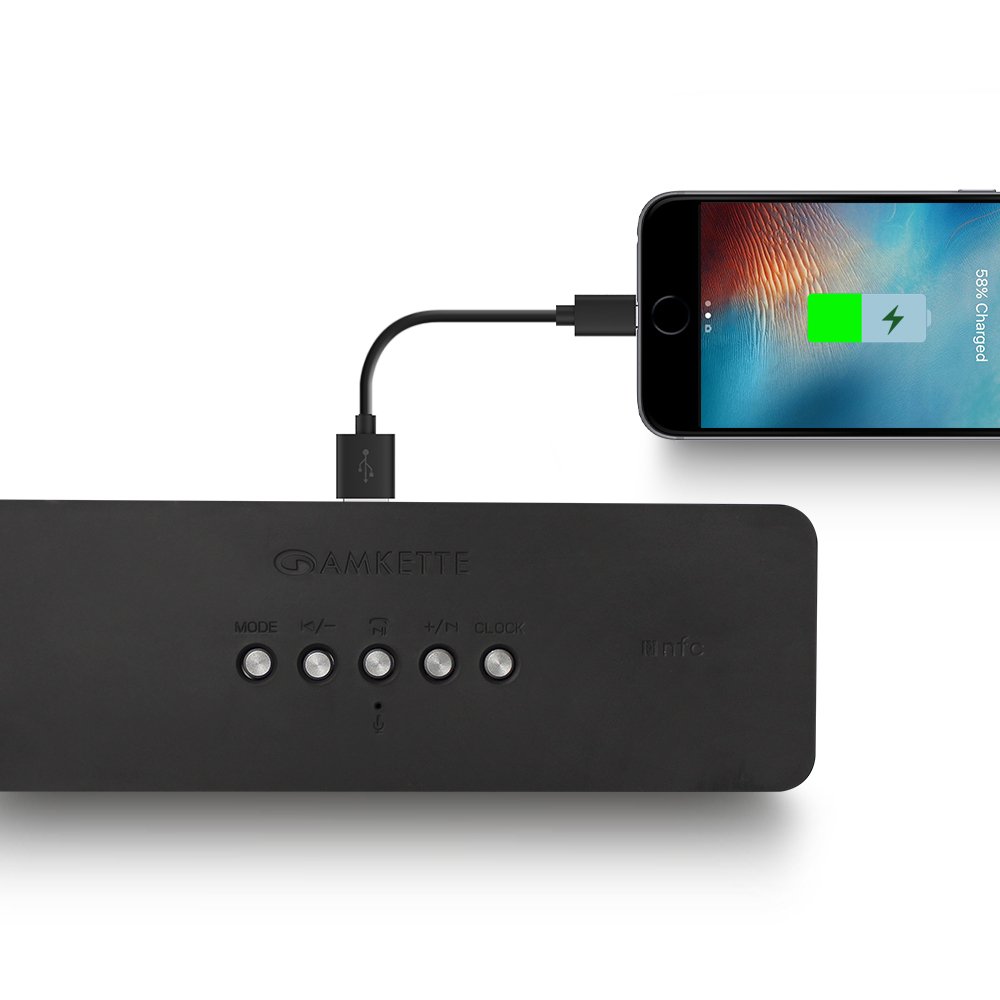
Figure 8: Speaker providing power to a smartphone through its USB Host port.
The Amkette Trubeats S50 can charge your smartphone or other USB-powered devices. Connect your device's charging cable to the USB ہوسٹ پورٹ on the rear of the speaker. The speaker's internal battery will then supply power to your device.
5.7 App Control (Android Only)

Figure 9: Smartphone displaying the Amkette Trubeats Smart Speaker App interface.
For enhanced control, download the Amkette Trubeats Smart Speaker App from the Google Play Store (for Android phones). The app allows you to:
- مختلف آڈیو موڈز کے درمیان سوئچ کریں۔
- Control volume and track playback.
- Manage FM radio stations and perform precise tuning.
- Set and customize alarms, including alarm source.
Ensure your speaker is connected via Bluetooth to your smartphone for app functionality.
5.8 کال ہینڈلنگ
When connected via Bluetooth to a smartphone, the speaker can be used for hands-free calling:
- کال کا جواب دیں: دبائیں Play/Pause/Answer Call Button ایک بار
- کال ختم کریں: دبائیں Play/Pause/Answer Call Button ایک بار کال کے دوران۔
- کال مسترد کریں: دیر تک دبائیں Play/Pause/Answer Call Button.
6 دیکھ بھال
- اسپیکر کو انتہائی درجہ حرارت، براہ راست سورج کی روشنی اور نمی سے دور رکھیں۔
- اسپیکر کو نرم، خشک کپڑے سے صاف کریں۔ کھرچنے والے کلینر یا سالوینٹس کا استعمال نہ کریں۔
- اسپیکر کو گرانے یا اسے سخت اثرات سے مشروط کرنے سے گریز کریں۔
- جب لمبے عرصے تک استعمال نہ ہو، تو اسپیکر کو ٹھنڈی، خشک جگہ پر اسٹور کریں اور بیٹری کی صحت کو برقرار رکھنے کے لیے اسے وقتاً فوقتاً چارج کریں۔
7 خرابیوں کا سراغ لگانا
| مسئلہ | ممکنہ وجہ | حل |
|---|---|---|
| سپیکر پاور آن نہیں کرتا۔ | بیٹری ختم ہو گئی ہے۔ | اسپیکر کو پوری طرح سے چارج کریں۔ |
| سپیکر سے آواز نہیں آتی۔ | حجم بہت کم ہے؛ غلط موڈ منتخب؛ آلہ صحیح طریقے سے منسلک نہیں ہے. | Increase speaker and source device volume. Ensure correct mode (Bluetooth, AUX, etc.) is selected. Reconnect the device. |
| بلوٹوتھ جوڑی ناکام ہوجاتی ہے۔ | اسپیکر جوڑا بنانے کے موڈ میں نہیں ہے۔ آلہ بہت دور؛ مداخلت | Ensure speaker is in pairing mode ('BT' flashing). Move device closer to speaker. Turn off other Bluetooth devices. |
| ناقص ایف ایم ریڈیو کا استقبال۔ | کمزور سگنل؛ ماحولیاتی مداخلت | اسپیکر کو کسی ایسے علاقے میں منتقل کریں جہاں بہتر استقبال ہو۔ دوبارہ آٹو اسکین کریں۔ |
| App not connecting to speaker. | Bluetooth not connected; app issue. | Ensure speaker is paired via Bluetooth to your phone. Restart the app and try again. |
8. وضاحتیں
- ماڈل: S50
- برانڈ: ایمکیٹی
- اسپیکر کی قسم: Portable Bluetooth Speaker (Outdoor)
- کنیکٹوٹی: بلوٹوتھ، یو ایس بی، مائیکرو ایس ڈی، اے ایکس، ایف ایم ریڈیو
- وائرلیس کمیونیکیشن ٹیکنالوجی: بلوٹوتھ
- کنٹرول کا طریقہ: Buttons, App (Android)
- آڈیو آؤٹ پٹ موڈ: سٹیریو
- آڈیو واٹtage: 10 واٹ
- طاقت کا منبع: بیٹری سے چلنے والا
- بیٹری کی زندگی: 12 گھنٹے تک (اوسط)
- چارج کرنے کا وقت: تقریباً 4 گھنٹے
- ہم آہنگ آلات: Laptop, Mobile, Tablet
- طول و عرض (LxWxH): 26.7 x 10.9 x 7.9 سینٹی میٹر
- آئٹم کا وزن: 703 گرام
- پنروک: جی ہاں
- چڑھنے کی قسم: ٹیبلٹاپ ماؤنٹ
9. وارنٹی اور سپورٹ
The Amkette Trubeats S50 Smart Wireless Bluetooth Speaker comes with a 1 سال کی وارنٹی خریداری کی تاریخ سے. یہ وارنٹی عام استعمال کے تحت مینوفیکچرنگ نقائص کا احاطہ کرتی ہے۔
For warranty claims, technical assistance, or any other support inquiries, please contact Amkette customer support through their official webسائٹ یا آپ کی خریداری کی دستاویزات کے ساتھ فراہم کردہ رابطے کی معلومات۔
براہ کرم وارنٹی مقاصد کے لیے خریداری کے ثبوت کے طور پر اپنی خریداری کی رسید اپنے پاس رکھیں۔