
تعارف
This manual provides essential instructions for the installation, operation, and maintenance of your RISCO RPKEL0WT000A Elegant Touch Keypad. This device features an ultra-flat design with a 7-inch touchscreen, adjustable contrast and backlight, and adjustable buzzer volume. It is compatible with all versions of ProSYS systems.
پروڈکٹ ختمview
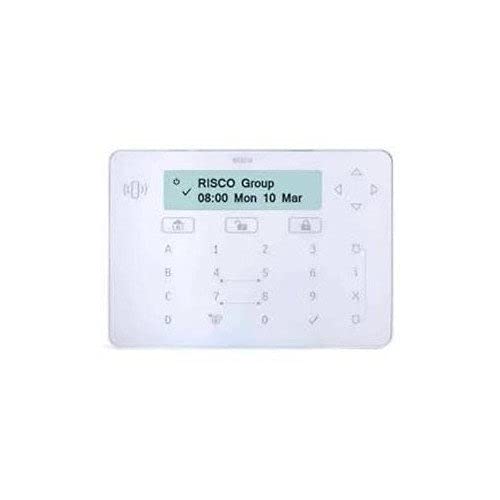
شکل 1: سامنے view of the RISCO RPKEL0WT000A Elegant Touch Keypad, showcasing its sleek design and touchscreen interface.
سیٹ اپ
1. ان باکسنگ اور پیکیج کے مشمولات
Carefully open the product packaging and ensure all components are present. The package should contain:
- RISCO RPKEL0WT000A Elegant Touch Keypad (Plastic material)
- USB کیبل
- یہ صارف دستی
2. جسمانی تنصیب
The keypad is designed for indoor use. Choose a suitable location for installation, ensuring it is easily accessible and protected from extreme temperatures or moisture. Mount the keypad securely using appropriate hardware (not included, unless specified in packaging). Connect the USB cable to the keypad and to your ProSYS system or designated connection point.
3 ابتدائی پاور آن
Connect the power cable to the keypad and a suitable power source. The keypad will initiate its startup sequence. Follow any on-screen prompts for initial configuration or system pairing with your ProSYS system.
آپریٹنگ ہدایات
1. بنیادی افعال
- ٹچ اسکرین انٹرفیس: Navigate through menus and input commands using the 7-inch touchscreen.
- سایڈست بیک لائٹ: The keypad features a backlight. Adjust its intensity via the system settings for optimal visibility in various lighting conditions.
- Adjustable Buzzer Volume: The integrated buzzer provides audible feedback. Adjust its volume through the system settings to suit your preference.
2. سسٹم کی مطابقت
This keypad is compatible with all versions of RISCO ProSYS security systems. Ensure your ProSYS system is updated to the latest firmware for optimal performance and feature compatibility.
3. Keypad Layout and Input
The virtual keypad features a QWERTY layout with 104 keys, providing a familiar input experience for text and numerical entries. Use the touchscreen to select characters and functions.
دیکھ بھال
1. Cleaning the Keypad
To clean the touchscreen and plastic casing, use a soft, lint-free cloth slightly dampened with water or a mild, non-abrasive cleaning solution. Do not spray cleaners directly onto the keypad. Avoid using harsh chemicals, solvents, or abrasive materials, as these can damage the surface.
2. سافٹ ویئر اپڈیٹس
Information regarding guaranteed software updates for this product is not available. Please refer to the official RISCO website or your system integrator for any available firmware updates for your ProSYS system, which may include updates relevant to the keypad's functionality.
خرابی کا سراغ لگانا
If you encounter issues with your RISCO RPKEL0WT000A keypad, please refer to the following common troubleshooting steps:
- کی پیڈ جواب نہیں دے رہا ہے: Ensure the USB cable is securely connected and the keypad is receiving power. Try restarting the ProSYS system.
- ڈسپلے کے مسائل: Check the backlight settings in the system menu. If the screen remains blank, verify power connection.
- Buzzer Not Working: Check the buzzer volume settings in the system menu.
- کنیکٹیویٹی کے مسائل: Ensure the keypad is properly paired or connected to your ProSYS system according to the system's installation guide.
For persistent issues, consult the comprehensive ProSYS system manual or contact RISCO technical support.
وضاحتیں
| فیچر | تفصیل |
|---|---|
| ماڈل نمبر | RPKEL0WT000A |
| برانڈ | Risco |
| کارخانہ دار | رسکو |
| ASIN | B01MTO9ECQ |
| GTIN/UPC | 712073720180 |
| ڈسپلے | 7 انچ ٹچ اسکرین |
| خصوصی خصوصیات | Backlit, Adjustable Buzzer Volume |
| کنیکٹوٹی ٹیکنالوجی | یو ایس بی |
| ہم آہنگ آلات | ProSYS Systems |
| کیپیڈ کی تفصیل۔ | Gaming (Note: This description might be a misclassification from the source data, as it's a security keypad.) |
| کیپیڈ لے آؤٹ | QWERTY |
| چابیاں کی تعداد | 104 (virtual) |
| مواد | پلاسٹک |
| طاقت کا منبع | Cable Electric |
| شامل اجزاء | USB کیبل |
وارنٹی کی معلومات
Specific warranty details for the RISCO RPKEL0WT000A Elegant Touch Keypad are not provided in this manual. For comprehensive warranty information, please refer to the official RISCO website or contact your authorized RISCO dealer or installer.
حمایت
For technical assistance, product inquiries, or further support, please visit the official RISCO website or contact your local RISCO support representative. Contact information can typically be found on the RISCO webسائٹ یا آپ کے پروڈکٹ سپلائر کے ذریعے۔