
Xprinter XP-Q200
Xprinter XP-Q200 Thermal Printer User Manual
Model: XP-Q200
برانڈ: ایکس پرنٹر
1. تعارف اور اوورview
This manual provides detailed instructions for the setup, operation, and maintenance of your Xprinter XP-Q200 80mm Thermal Printer. The XP-Q200 is a high-speed thermal receipt printer designed for various operating systems including Windows, Android, and iOS. It offers versatile connectivity options such as USB, Bluetooth, and Ethernet, making it suitable for a wide range of business environments.

شکل 1.1: سامنے view of the Xprinter XP-Q200 Thermal Printer.
2. حفاظتی معلومات
Please read the following safety precautions carefully before using the printer to ensure safe and proper operation:
- Do not touch the thermal print head immediately after printing, as it may be hot.
- Use only the power adapter supplied with the printer. Using an incorrect adapter may damage the printer or cause fire.
- Do not disassemble or modify the printer. Refer all servicing to qualified personnel.
- Keep the printer away from water, moisture, and direct sunlight.
- یقینی بنائیں کہ پرنٹر ایک مستحکم، سطحی سطح پر رکھا گیا ہے۔
3. پیکیج کے مشمولات
تصدیق کریں کہ نیچے دی گئی تمام اشیاء آپ کے پرنٹر پیکج میں شامل ہیں:
- Xprinter XP-Q200 Thermal Printer Unit
- پاور اڈاپٹر
- USB کیبل
- Thermal Paper Roll (initial)
- صارف دستی
4. مصنوعات کی خصوصیات
The Xprinter XP-Q200 offers a range of features designed for efficient and reliable thermal printing:
- تیز رفتار پرنٹنگ: Achieves print speeds of up to 260mm/sec with an integrated auto cutter.
- متعدد انٹرفیس: Equipped with USB, Bluetooth, and Ethernet connectivity for flexible integration.
- وسیع مطابقت: Supports Windows, Linux, and Android operating systems.
- Logo and Barcode Support: Allows for downloading and printing of store logos (BMP file format) and various barcode types on thermal paper.
- کاغذ ہینڈلنگ: Designed to handle thermal paper rolls up to 80x80mm.
- International Language Support: Supports a variety of international languages and scripts.
- خرابی کے الارم: Features print job tips and error alarm functions for operational awareness.
- Black Mark Detection: Includes a black mark detection function for specific printing applications.
- Missing Orders Function: Incorporates a feature to help avoid "missing orders."
- Monitoring Capabilities: Supports Ethernet and Serial port monitoring functions.
- NV Logo Storage: Provides 256K Bytes of NV Logo download storage.
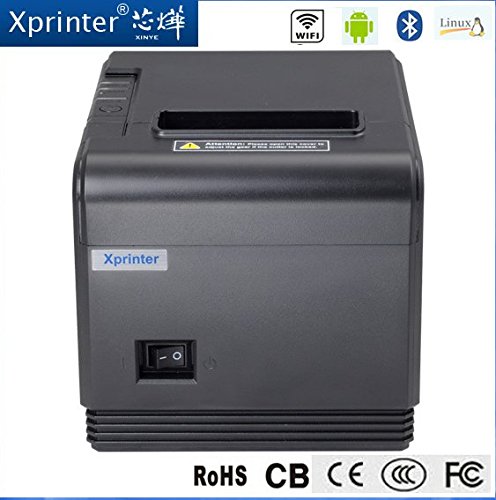
شکل 4.1: سامنے view highlighting connectivity options.
5. سیٹ اپ
5.1 فزیکل سیٹ اپ
- Unpack the printer and remove all protective packaging materials.
- Place the printer on a stable, flat surface near a power outlet and your host device.
- Connect the power adapter to the printer's power port and then plug it into a wall outlet.
5.2 تھرمل پیپر لوڈ ہو رہا ہے۔
- Press the cover open button (usually located on the side or front) to open the printer's top cover.
- Insert the thermal paper roll into the paper compartment with the printing side facing the thermal print head. Ensure the roll unwinds from the bottom.
- کٹر کے پاس سے تھوڑی مقدار میں کاغذ نکالیں۔
- Close the top cover firmly until it clicks into place. The printer will automatically feed the paper to the correct position.
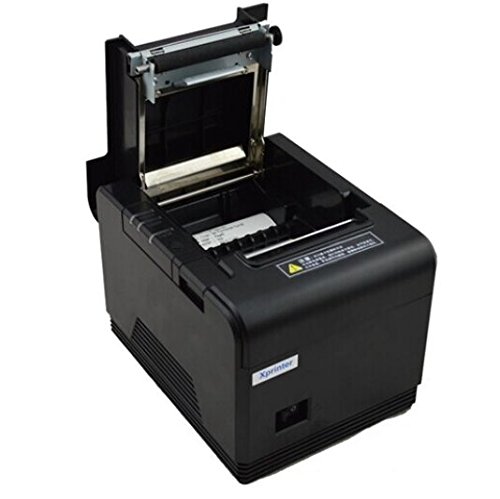
Figure 5.1: Loading thermal paper into the printer.
5.3 ڈیوائس سے جڑنا
The XP-Q200 supports USB, Bluetooth, and Ethernet connections.

شکل 5.2: پیچھے view of the printer with connectivity ports.
5.3.1 USB کنکشن
- Connect one end of the USB cable to the printer's USB port and the other end to your computer's USB port.
- The computer should detect the printer automatically.
5.3.2 Bluetooth Connection (for Android/iOS)
- یقینی بنائیں کہ پرنٹر آن ہے۔
- On your Android or iOS device, go to Bluetooth settings and enable Bluetooth.
- تلاش کریں۔ available devices. The printer should appear as "XP-Q200" or similar.
- Select the printer to pair. The default PIN is usually "0000" or "1234".
- Once paired, you can select the printer from your application's print settings.
5.3.3 ایتھرنیٹ کنکشن
- پرنٹر کے ایتھرنیٹ پورٹ سے ایتھرنیٹ کیبل کو اپنے نیٹ ورک روٹر یا سوئچ سے جوڑیں۔
- The printer will obtain an IP address automatically via DHCP. For static IP configuration, refer to the advanced settings utility provided with the printer drivers.
5.4 ڈرائیور کی تنصیب
For Windows and Linux systems, you will need to install the appropriate printer drivers. Drivers are typically available on the Xprinter official website or on a CD included with the printer. Follow the on-screen instructions during installation.
6. آپریٹنگ ہدایات
6.1 بنیادی پرنٹنگ
Once the printer is connected and drivers are installed (if applicable), you can send print jobs from your application. Ensure the printer is powered on and has paper loaded.
- From your application (e.g., POS software, web browser), select the print option.
- Choose "Xprinter XP-Q200" from the list of available printers.
- Adjust any print settings as needed (e.g., paper size, copies).
- پرنٹر کو جاب بھیجنے کے لیے "پرنٹ کریں" پر کلک کریں۔
6.2 Logo and Barcode Printing
The XP-Q200 supports custom logo and barcode printing. Refer to the printer's utility software (usually provided with drivers) for instructions on how to upload logos (BMP format) to the printer's NV memory and configure barcode printing settings.
7 دیکھ بھال
7.1 پرنٹر کی صفائی
باقاعدگی سے صفائی پرنٹ کے معیار کو برقرار رکھنے میں مدد کرتی ہے اور پرنٹر کی عمر کو بڑھاتی ہے۔
- پرنٹ ہیڈ: روئی کی جھاڑی کو ہلکے سے استعمال کریں۔ampened with isopropyl alcohol to gently wipe the thermal print head. Allow it to dry completely before closing the cover. Clean the print head regularly, especially if print quality degrades.
- پلیٹین رولر: Clean the rubber platen roller with a soft cloth dampisopropyl الکحل کے ساتھ ختم.
- بیرونی: Wipe the exterior of the printer with a soft, dry cloth. Do not use abrasive cleaners or solvents.
7.2 کاغذ کے جام کو صاف کرنا
اگر کاغذ کا جام ہوتا ہے:
- پرنٹر بند کر دیں۔
- اوپر کا احاطہ کھولیں۔
- Carefully remove any jammed paper. Ensure no small pieces of paper remain inside.
- Close the top cover firmly.
- Turn the printer back on.
8 خرابیوں کا سراغ لگانا
This section addresses common issues you might encounter with your XP-Q200 printer.
| مسئلہ | ممکنہ وجہ | حل |
|---|---|---|
| پرنٹر آن نہیں ہوتا ہے۔ | Power cable loose; Power outlet faulty; Power adapter faulty | Check power connections; Try a different outlet; Contact support if adapter is faulty. |
| کوئی پرنٹ آؤٹ پٹ نہیں۔ | No paper; Paper loaded incorrectly; Printer offline; Driver issue | Load paper correctly; Check printer status; Reinstall drivers. |
| ناقص پرنٹ کوالٹی | Print head dirty; Low quality paper; Print head worn out | Clean print head; Use recommended thermal paper; Contact support for service. |
| کاغذ کا جام | Paper loaded incorrectly; Foreign object inside | Refer to Section 7.2 for clearing jams. |
| Bluetooth/Ethernet connection fails | Incorrect pairing; Network issue; IP address conflict | Re-pair device; Check network cables/settings; Verify IP address. |
9. وضاحتیں
| فیچر | تفصیلات |
|---|---|
| ماڈل کا نام | XP-Q200 |
| پرنٹنگ ٹیکنالوجی | تھرمل |
| پرنٹ کی رفتار | 260 ملی میٹر/سیکنڈ |
| پرنٹر آؤٹ پٹ | مونوکروم |
| کنیکٹوٹی ٹیکنالوجی | بلوٹوتھ، یو ایس بی، ایتھرنیٹ |
| شیٹ کا سائز | Thermal (80mm) |
| دو طرفہ پرنٹنگ | جی ہاں |
| رنگ | سیاہ |
| کنٹرولر کی قسم | iOS، Android |
| شامل اجزاء | کاغذ |
| خصوصی خصوصیت | یو ایس بی |
| سکینر کی قسم | پورٹیبل |
Ask a question about this manual
Ask about setup, troubleshooting, compatibility, parts, safety, or missing instructions. Manuals+ will review the question and use this page’s manual context to help answer it.