
تعارف
This manual provides detailed instructions for the setup, operation, and maintenance of your Hyperkin Knight Premium Controller. Designed for use with PlayStation 3 (PS3), PC, and Mac systems, this controller offers a versatile gaming experience with its ergonomic design and responsive controls. Please read this manual thoroughly before using the product to ensure optimal performance and longevity.
مصنوعات کی خصوصیات
- Dual Analog Joysticks: Two wide-spectrum analog joysticks for precise control.
- Pressure-Sensitive D-Pad: An eight-way directional pad with pressure sensitivity.
- Pressure-Sensitive Buttons: Four shoulder buttons and four face buttons with pressure sensitivity for nuanced input.
- زبردستی تاثرات: Integrated force feedback for immersive gaming experiences.
- ہوم بٹن: Dedicated button for system menu access.
- لمبی کیبل: A 6-foot (1.8 meter) cable for flexible positioning.
- ملٹی پلیٹ فارم مطابقت: Compatible with all PS3 models, as well as PC and Mac via USB.
پیکیج کے مشمولات
- Hyperkin Knight Premium Controller (White)
- Integrated USB Cable (6 ft.)
سیٹ اپ کی ہدایات
Connecting to PlayStation 3 (PS3)
- یقینی بنائیں کہ آپ کا PS3 کنسول بند ہے یا اسٹینڈ بائی موڈ میں ہے۔
- اپنے PS3 کنسول پر دستیاب USB پورٹ تلاش کریں۔
- Plug the USB connector of the Hyperkin Knight Controller into the USB port on your PS3.
- Power on your PS3 console. The controller should be automatically recognized and assigned a player number.
- If the controller does not respond, try a different USB port or restart the console.
PC/Mac سے منسلک ہو رہا ہے۔
- Locate an available USB port on your PC or Mac computer.
- Plug the USB connector of the Hyperkin Knight Controller into the USB port.
- Your operating system (Windows, macOS) should automatically detect and install the necessary drivers. This process may take a few moments.
- Once installed, the controller will be ready for use with compatible games and applications. You may need to configure controller settings within individual games or system preferences.
- نوٹ: Functionality may vary depending on the operating system and specific game titles.
آپریٹنگ ہدایات
The Hyperkin Knight Premium Controller features a standard layout for intuitive gameplay.
کنٹرولر لے آؤٹ

تصویر: اوپر view of the Hyperkin Knight Premium Controller, showing the D-pad, analog sticks, face buttons, and central buttons.
- ڈی پیڈ (دشاتمک پیڈ): Located on the left, used for directional input.
- بائیں اینالاگ اسٹک: Below the D-Pad, for precise movement and camera control.
- دائیں اینالاگ اسٹک: On the right side, typically for camera control or aiming.
- Face Buttons (Triangle, Circle, Cross, Square): On the right, used for actions within games.
- Shoulder Buttons (L1, L2, R1, R2): Located on the top edge of the controller, used for various in-game functions.
- منتخب بٹن: Typically used for menu access or specific game functions.
- اسٹارٹ بٹن: Typically used for pausing games or confirming selections.
- ہوم بٹن: Central button to access the PS3 XMB (CrossMediaBar) or system menus on PC/Mac.
زبردستی فیڈ بیک
The controller features force feedback (rumble) functionality, which provides tactile sensations during gameplay, enhancing immersion. This feature is automatically enabled when supported by the game and system. If you wish to disable it, check your game's or system's controller settings.
دیکھ بھال
- صفائی: کنٹرولر کو صاف کرنے کے لیے نرم، خشک کپڑا استعمال کریں۔ ضدی گندگی کے لیے، قدرے ڈیampپانی کے ساتھ کپڑے. سخت کیمیکلز یا کھرچنے والے کلینر کے استعمال سے پرہیز کریں۔
- ذخیرہ: Store the controller in a cool, dry place away from direct sunlight and extreme temperatures. Avoid wrapping the cable too tightly to prevent damage.
- کیبل کی دیکھ بھال: Do not pull the controller by its cable. Always grasp the USB connector when plugging or unplugging.
خرابی کا سراغ لگانا
کنٹرولر جواب نہیں دے رہا ہے۔
- کنکشن چیک کریں: Ensure the USB cable is securely plugged into both the controller and the console/computer.
- مختلف USB پورٹ آزمائیں: Connect the controller to another USB port on your system.
- سسٹم کو دوبارہ شروع کریں: Power cycle your PS3, PC, or Mac.
- Driver Check (PC/Mac): On PC, check Device Manager to see if the controller is recognized and if there are any driver issues. On Mac, check System Information > USB.
Incorrect Button Mapping or Limited Functionality
- گیم کی ترتیبات: Many games allow for custom controller mapping. Check the in-game settings for controller configuration.
- System Settings (PC/Mac): For PC, some games or emulators may require specific controller configurations or third-party software. For Mac, check System Preferences > Game Controllers (if available) or specific application settings.
- PS3 مطابقت: While compatible with all PS3 models, some older games or specific PS3 system software versions might have unique controller handling. Ensure your PS3 system software is up to date.
Force Feedback Not Working
- گیم سپورٹ: Verify that the game you are playing supports force feedback.
- In-Game Settings: Check the game's options menu to ensure force feedback (rumble) is enabled.
- سسٹم کی ترتیبات: On PC, ensure rumble is enabled in your controller settings.
وضاحتیں
| ماڈل نمبر | M07213-WH |
| مطابقت | PlayStation 3, PC, Mac (via USB) |
| کیبل کی لمبائی | 6 فٹ (تقریباً 1.8 میٹر) |
| ان پٹ کی قسم | Pressure-sensitive buttons and D-pad, dual analog joysticks |
| تاثرات | Force Feedback (Rumble) |
| طول و عرض | 2.99 x 7.99 x 7.01 انچ (تقریباً 7.6 x 20.3 x 17.8 سینٹی میٹر) |
| وزن | 12.5 اونس (تقریباً 354 گرام) |
| کارخانہ دار | Hyperkin Inc |
وارنٹی اور سپورٹ
For warranty information and technical support, please refer to the official Hyperkin webسائٹ یا ان کی کسٹمر سروس سے براہ راست رابطہ کریں۔ کسی بھی وارنٹی دعووں کے لیے خریداری کے ثبوت کے طور پر اپنی خریداری کی رسید رکھیں۔
مینوفیکچرر: Hyperkin Inc
Webسائٹ: www.hyperkin.com (براہ کرم آفیشل کا دورہ کریں۔ website for the most current support information.)
پروڈکٹ ختمview امیجز
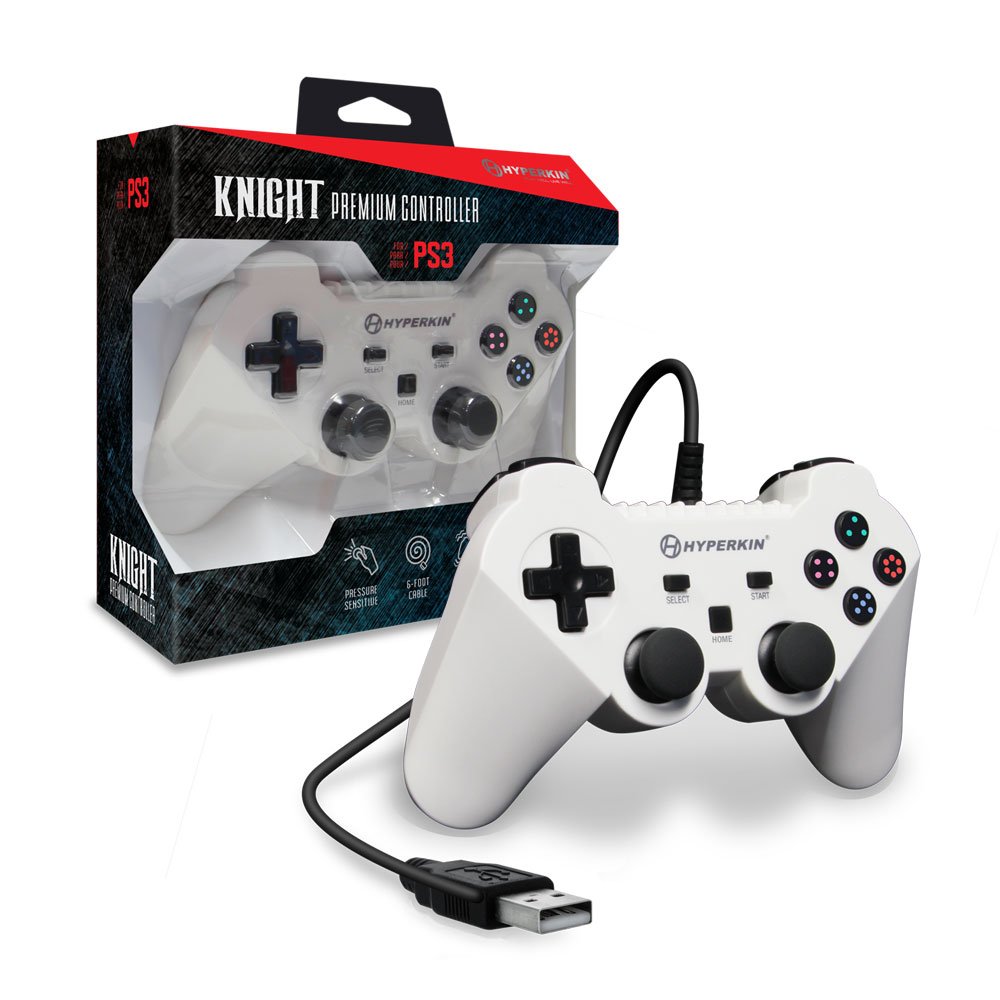
Image: The Hyperkin Knight Premium Controller displayed alongside its retail packaging, highlighting the product's design and branding.

تصویر: ایک قریبی اپ view of the Hyperkin Knight Premium Controller's retail box, showcasing key features and design elements.

تصویر: ایک زاویہ view of the Hyperkin Knight Premium Controller, emphasizing its ergonomic shape and button placement.