
1. تعارف
دی ViewHD VHD-UHAE is an advanced Ultra HD 4K HDMI Audio Extractor designed to separate audio signals from an HDMI source. This device supports HDMI 2.0b, 18Gbps bandwidth, and HDCP 2.2, making it compatible with 4K@60Hz video, HDR, and Dolby Vision content. It provides one HDMI input to one HDMI output, along with Toslink optical audio output and a 3.5mm stereo headphone jack output.
This manual provides detailed instructions for setting up, operating, and maintaining your VHD-UHAE unit, ensuring optimal performance and longevity.
2. پیکیج کے مشمولات
براہ کرم تصدیق کریں کہ تمام اشیاء آپ کے پیکیج میں موجود ہیں:
- 1x VHD-UHAE HDMI Audio Extractor Unit
- 1x صارف دستی
- 1x 100V-240V AC to 5V DC Power Adapter
3. پروڈکٹ ختمview
The VHD-UHAE features clearly labeled ports and controls for easy setup and operation.

تصویر 3.1: ViewHD VHD-UHAE HDMI Audio Extractor
فرنٹ پینل
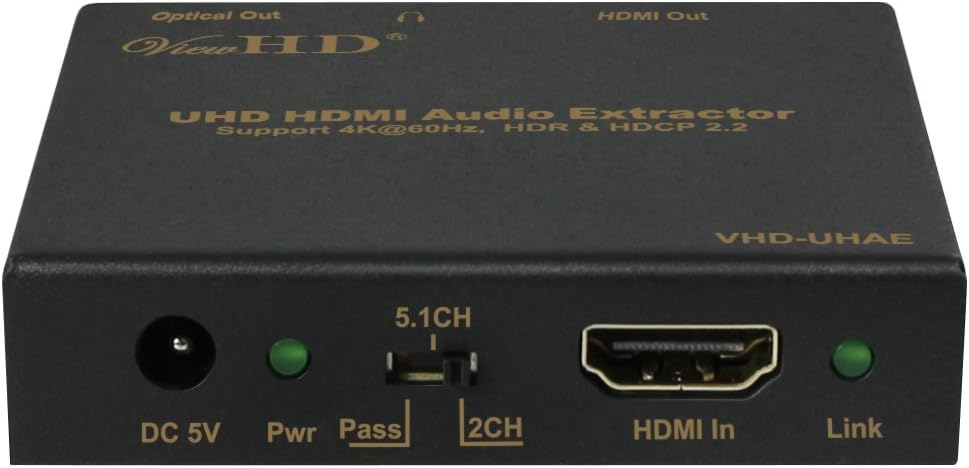
شکل 3.2: فرنٹ پینل لے آؤٹ۔
- ڈی سی 5 وی: پاور ان پٹ پورٹ۔
- Pwr LED: پاور انڈیکیٹر لائٹ۔
- Audio EDID Switch (5.1CH / Pass / 2CH): Selects the desired audio output mode.
- HDMI میں: Connects to your HDMI source device.
- لنک ایل ای ڈی: HDMI signal link indicator.
پیچھے والا پینل

شکل 3.3: ریئر پینل لے آؤٹ۔
- HDMI آؤٹ: آپ کے ڈسپلے ڈیوائس (ٹی وی، مانیٹر، پروجیکٹر) سے جڑتا ہے۔
- 3.5mm Headphone Stereo Output: Analog audio output for headphones or stereo speakers.
- Optical Out (Toslink): Digital optical audio output for soundbars or AV receivers.
4. سیٹ اپ
Follow these steps to connect your VHD-UHAE HDMI Audio Extractor:
- Connect your HDMI source device (e.g., DVD player, game console, streaming box) to the HDMI میں port on the VHD-UHAE using a certified 18Gbps HDMI cable.
- Connect your display device (e.g., UHDTV) to the HDMI آؤٹ port on the VHD-UHAE using a certified 18Gbps HDMI cable.
- For optical audio output, connect a Toslink cable from the آپٹیکل آؤٹ port on the VHD-UHAE to your soundbar or AV receiver.
- For stereo analog audio output, connect a 3.5mm audio cable from the 3.5mm Headphone Stereo Output port on the VHD-UHAE to your headphones or active speakers.
- Connect the provided 5V DC power adapter to the ڈی سی 5V port on the VHD-UHAE, then plug the adapter into a power outlet. The Pwr LED will illuminate.
- Ensure all devices are powered on. The Link LED on the VHD-UHAE should illuminate when an active HDMI signal is detected.

Figure 4.1: Typical Connection Diagram
5. آپریٹنگ ہدایات
The VHD-UHAE features an Audio EDID switch to control the audio format output:
- 2CH Setting: Use this setting for stereo 3.5mm headphone output. This extracts 2-channel PCM/LPCM audio.
- 5.1CH Setting: Use this setting for optical audio output to a 5.1-channel surround sound receiver. This extracts Bitstream DTS & Dolby Digital 5.1Ch, and Dolby Digital Plus.
- Pass Setting: Use this setting for HDMI TV speaker audio. In this mode, the audio signal passes through to the HDMI output, and the extractor will attempt to output the highest audio format supported by the connected display.
All higher HDMI audio signals (e.g., Dolby TrueHD, DTS-HD Master Audio, Dolby Atmos) will only be available from the HDMI output / pass-through to your display or an HDMI-compatible AV receiver.
6 دیکھ بھال
To ensure the longevity and proper functioning of your VHD-UHAE unit, follow these maintenance guidelines:
- آلے کو ٹھنڈی، خشک جگہ پر رکھیں، براہ راست سورج کی روشنی، گرمی کے ذرائع اور نمی سے دور رہیں۔
- Clean the unit with a soft, dry cloth. Do not use liquid or aerosol cleaners.
- زیادہ گرمی سے بچنے کے لیے وینٹیلیشن کے سوراخوں کو روکنے سے گریز کریں۔
- خود یونٹ کو کھولنے یا خدمت کرنے کی کوشش نہ کریں۔ تمام خدمات کو اہل اہلکاروں سے رجوع کریں۔
7 خرابیوں کا سراغ لگانا
If you encounter issues with your VHD-UHAE, please refer to the following common problems and solutions:
- کوئی ویڈیو آؤٹ پٹ نہیں:
- یقینی بنائیں کہ تمام HDMI کیبلز محفوظ طریقے سے منسلک ہیں۔
- Verify that the power adapter is connected and the Pwr LED is on.
- Try a different HDMI cable, especially a certified 18Gbps cable under 15ft.
- Ensure your display supports the resolution and refresh rate from your source.
- کوئی آڈیو آؤٹ پٹ نہیں:
- Check the Audio EDID switch setting. For stereo output, set to 2CH. For optical surround, set to 5.1CH. For HDMI pass-through, set to Pass.
- Verify that your audio receiver or headphones are properly connected and powered on.
- Ensure the audio format from your source is compatible with the selected EDID setting and your audio device.
- Note that higher audio formats like Dolby TrueHD or DTS-HD Master Audio are only available via the HDMI output.
- 4K HDR/Dolby Vision Issues:
- Ensure all HDMI cables are certified 18Gbps and are not excessively long (under 15ft recommended).
- Verify that your source and display devices both support 4K@60Hz, HDR, and Dolby Vision.
- The VHD-UHAE supports HDMI 2.0b and HDCP 2.2. Older HDMI 1.4 products may not support 4K@60Hz with HDR.
- No ARC (Audio Return Channel) Support:
- The VHD-UHAE does not support ARC. If ARC functionality is required, please consider models designed for ARC applications.
- No VRR/ALLM Support:
- This model is HDMI 2.0b and does not support HDMI 2.1 features such as Variable Refresh Rate (VRR) or Auto Low Latency Mode (ALLM).

Figure 7.1: Attention: Two Different Kinds of 4K Specification
8. وضاحتیں
Technical specifications for the ViewHD VHD-UHAE HDMI Audio Extractor:
| زمرہ | تفصیلات |
|---|---|
| HDMI تعمیل | HDMI 2.0b |
| HDCP تعمیل | HDCP 2.2 اور HDCP 1.4 |
| ویڈیو بینڈوتھ۔ | 18 جی بی پی ایس |
| ویڈیو ریزولوشنز | Up to 4Kx2K@60Hz (YUV4:4:4), 4Kx2K@30Hz, 1080P@120Hz, and 1080P3D@60Hz |
| رنگین جگہ | آر جی بی ، وائی سی بی سی آر 4: 4: 4 ، وائی سی بی سی آر 4: 2: 2۔ |
| رنگ کی گہرائی | 10 بٹ، 12 بٹ |
| HDMI Audio Formats (Passthrough) | LPCM 2.1/7.1CH, Dolby Digital, DTS 5.1, Dolby Digital+, Dolby TrueHD, DTS-HD Master Audio, Dolby Atmos, DTS:X |
| آپٹیکل آڈیو فارمیٹس | LPCM 2CH, LPCM 5.1, Dolby Digital 2/5.1CH, DTS2/5.1CH |
| L/R آڈیو فارمیٹس | اینالاگ سٹیریو 2CH |
| ESD تحفظ | Human body model — ±8kV (airgap discharge) & ±4kV (contact discharge) |
| ان پٹ | 1x HDMI ٹائپ اے [19 پن خاتون] |
| آؤٹ پٹس | 1x HDMI Type A [19-pin female], 1x L/R Audio Out [3.5mm Stereo Mini-jack], 1x Optical Out [S/PDIF] |
| ہاؤسنگ | دھاتی دیوار |
| رنگ | سیاہ |
| طول و عرض | 73.5 ملی میٹر [ڈبلیو] x 60.7 ملی میٹر [ڈی] ایکس 17 ملی میٹر [ایچ] |
| وزن | 130 گرام |
| بجلی کی فراہمی | Input: AC100-240V 50/60Hz, Output: DC 5V/1A (US/EU standards, CE/FCC/UL certified) |
| بجلی کی کھپت | 1W (زیادہ سے زیادہ) |
| آپریشن کا درجہ حرارت | 32 - 104°F / 0 - 40°C |
| اسٹوریج کا درجہ حرارت | -4 - 140°F / -20 - 60°C |
| رشتہ دار نمی | 20 - 90% RH (no condensation) |
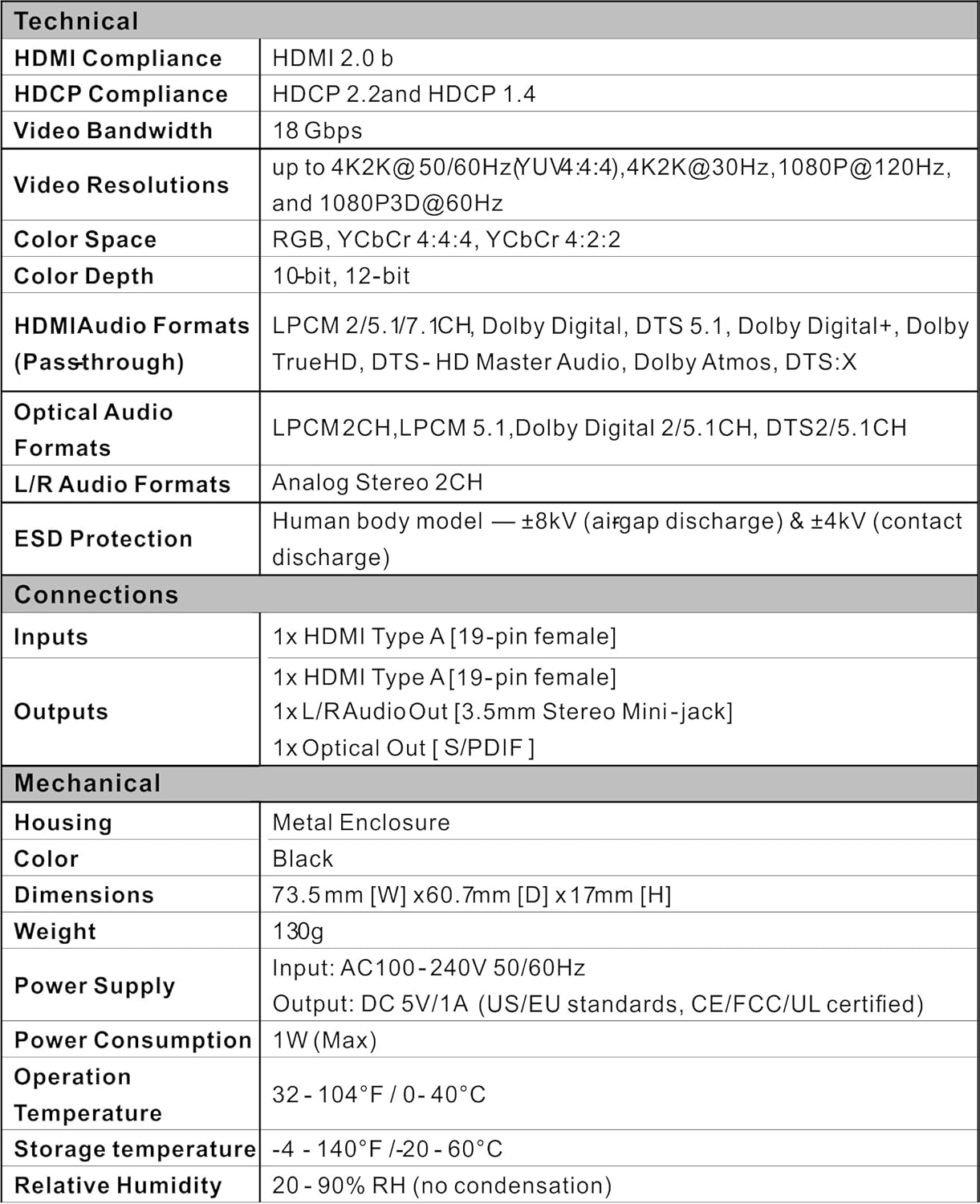
شکل 8.1: تکنیکی تفصیلات
9. وارنٹی اور سپورٹ
دی ViewHD VHD-UHAE HDMI Audio Extractor comes with a one-year replacement warranty. For any technical assistance or support, please contact u9ltd. Lifetime free technical support is provided.