
1. پروڈکٹ ختمview
The GeoVision GV-EFD4700-0F is an indoor, fixed, mini-sized network camera designed for day and night surveillance. It features an automatic IR-cut filter and integrated IR LEDs to ensure clear imaging in various lighting conditions. This model offers an entry-level surveillance solution with essential features and high image quality.
اہم خصوصیات میں شامل ہیں:
- 1/3" progressive scan super low lux CMOS sensor for minimal illumination at 0.02 lux.
- Dual streams supporting H.265, H.264, and MJPEG codecs.
- Video resolutions up to 20 fps at 2592 x 1520, 25 fps at 2560 x 1440, and 30 fps at 2048 x 1520.
- Intelligent IR with a distance of up to 15 meters (50 ft).
- Wide Dynamic Range Pro (WDR Pro) for clear images in high-contrast scenes.
- 3D noise reduction for improved image clarity.
- Built-in microphone for audio monitoring.
- 2-axis mechanism (pan / tilt) for flexible positioning.
- Power options: DC 12V or Power over Ethernet (PoE IEEE 802.3af).
2. پیکیج کے مشمولات
براہ کرم تصدیق کریں کہ پیکیج کھولنے پر تمام اشیاء موجود ہیں اور اچھی حالت میں ہیں:
- GeoVision GV-EFD4700-0F Mini Fixed IP Dome Camera
- بڑھتے ہوئے سکرو کٹ۔
- تنصیب کا سانچہ۔
- Quick Start Guide / Instruction Manual (this document)
3. حفاظتی معلومات
Read these instructions carefully before installation and operation. Keep this manual for future reference.
- طاقت کا منبع: Use only the specified power adapter (DC 12V) or a compliant PoE (IEEE 802.3af) switch. Incorrect voltage آلہ کو نقصان پہنچا سکتا ہے۔
- تنصیب: Ensure the camera is securely mounted to prevent it from falling. Installation should be performed by qualified personnel if necessary.
- ماحولیات: This camera is designed for indoor use. Do not expose it to water, moisture, or extreme temperatures.
- صفائی: صفائی سے پہلے بجلی منقطع کریں۔ نرم، خشک کپڑا استعمال کریں۔ مائع یا ایروسول کلینر استعمال نہ کریں۔
- سروسنگ: اس پروڈکٹ کو خود پیش کرنے کی کوشش نہ کریں۔ تمام سروسز کو اہل سروس اہلکاروں کے حوالے کریں۔
4. سیٹ اپ اور انسٹالیشن
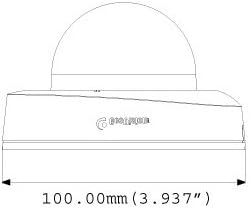
4.1 جسمانی طول و عرض
Understand the camera's dimensions for proper placement and mounting.

4.2 بڑھتے ہوئے اختیارات
The GV-EFD4700-0F supports both ceiling and wall-surface mounting.


4.3 تنصیب کے مراحل
- مقام منتخب کریں: Choose a suitable indoor location for optimal surveillance coverage.
- سطح تیار کریں: Use the provided installation template to mark drilling points on the ceiling or wall.
- سوراخ ڈرل: Drill pilot holes according to the template. Insert wall anchors if necessary.
- محفوظ کیمرہ: Attach the camera base to the mounting surface using the supplied screws.
- کیبلز کو جوڑیں: Connect the Ethernet cable for network and PoE, or a DC 12V power adapter and a separate Ethernet cable.
- زاویہ کو ایڈجسٹ کریں: Loosen the adjustment screws to pan and tilt the camera lens to the desired viewing angle. Tighten screws once adjusted.
4.4 ابتدائی کنفیگریشن
جسمانی تنصیب اور پاور کنکشن کے بعد، کیمرے تک رسائی حاصل کریں۔ web ابتدائی سیٹ اپ کے لیے انٹرفیس:
- نیٹ ورک کنکشن: Ensure the camera is connected to your network. It will typically obtain an IP address via DHCP.
- کیمرہ دریافت کریں: Use GeoVision's IP Device Utility software or a network scanner to find the camera's IP address.
- رسائی Web انٹرفیس: کھولنا a web براؤزر اور کیمرے کا IP ایڈریس درج کریں۔
- لاگ ان: Enter the default username and password (refer to the Quick Start Guide or GeoVision documentation for default credentials). Change these immediately for security.
- بنیادی ترتیبات: Configure network settings, date/time, video resolution, and recording preferences.
5. کیمرہ چلانا
5.1 لائیو View اور ریکارڈنگ
Once configured, you can access the live video feed through the web interface or compatible NVR/VMS software. The camera supports continuous recording, scheduled recording, and event-triggered recording (e.g., motion detection).
- H.265 کمپریشن: Utilizes H.265 video codec for efficient storage and reduced network bandwidth while maintaining high image quality.
- WDR پرو: Wide Dynamic Range Pro enhances image visibility in scenes with both very bright and very dark areas.
- IR فعالیت: The built-in IR LEDs automatically activate in low-light conditions, providing clear black and white images up to 15 meters.
5.2 حرکت کا پتہ لگانا اور الرٹس
Configure motion detection zones and sensitivity within the camera's web interface. The camera can be set to trigger recordings, send email alerts, or notify your VMS upon detecting motion.
5.3 آڈیو مانیٹرنگ
The integrated microphone allows for audio monitoring of the surveillance area. Audio settings can be adjusted via the web انٹرفیس
6 دیکھ بھال
6.1 صفائی
Regularly clean the camera lens and housing to ensure optimal image quality. Use a soft, lint-free cloth. For stubborn dirt, a slightly damp ہلکے صابن کے ساتھ کپڑا استعمال کیا جا سکتا ہے، اس کے بعد خشک کپڑا۔ کھرچنے والے کلینر یا سالوینٹس سے پرہیز کریں۔
6.2 فرم ویئر اپڈیٹس
Periodically check the GeoVision website for firmware updates. Firmware updates can provide new features, performance improvements, and security enhancements. Follow the instructions provided with the firmware update package carefully to avoid damaging the device.
7 خرابیوں کا سراغ لگانا
If you encounter issues with your GV-EFD4700-0F camera, refer to the following common problems and solutions:
- کوئی طاقت نہیں:
- Check if the power adapter is securely connected and providing 12V DC.
- If using PoE, ensure the Ethernet cable is connected to a PoE-enabled switch or injector and that the switch port is active.
- کوئی ویڈیو فیڈ نہیں:
- Verify network connectivity. Ping the camera's IP address.
- Ensure the camera's IP address, subnet mask, and gateway settings are correct.
- Check if the video stream settings (e.g., resolution, frame rate) are compatible with your viewing software or NVR.
- Restart the camera by disconnecting and reconnecting power.
- خراب تصویری معیار:
- کیمرے کے لینس کو صاف کریں۔
- کیمرے کے فیلڈ میں رکاوٹوں کی جانچ کریں۔ view.
- Adjust WDR Pro settings in the web interface for high-contrast scenes.
- Ensure sufficient lighting for optimal color images; IR will provide black and white in low light.
- رسائی نہیں ہو سکتی Web انٹرفیس:
- Confirm the camera's IP address is correct.
- Ensure your computer is on the same network segment as the camera.
- ایک مختلف کوشش کریں۔ web براؤزر
- Temporarily disable any firewall software on your computer.
If problems persist, contact GeoVision technical support.
8. وضاحتیں
| فیچر | تفصیل |
|---|---|
| ماڈل کا نام | GV-EFD4700-0F |
| تصویری سینسر | 1/3" progressive scan super low lux CMOS |
| موثر پھر بھی قرارداد | 4 MP |
| کم سے کم روشنی | 0.02 لکس |
| ویڈیو کمپریشن | H.265 ، H.264 ، MJPEG |
| زیادہ سے زیادہ فریم کی شرح | 30 fps at 2048 x 1520 |
| IR فاصلہ | 15 میٹر (50 فٹ) تک |
| لینس | 2.8 ملی میٹر (مقررہ) |
| متحرک رینج | ڈبلیو ڈی آر پرو |
| شور کی کمی | 3D شور میں کمی |
| آڈیو | بلٹ ان مائکروفون |
| Pan/Tilt Mechanism | 2 محور |
| پاور ان پٹ | DC 12V / PoE (IEEE 802.3af) |
| کنیکٹوٹی ٹیکنالوجی | Wired (Ethernet), Wi-Fi (for certain functions/protocols) |
| انڈور / آؤٹ ڈور استعمال | انڈور |
| طول و عرض (آئٹم) | 3.9 x 3.9 x 2.4 انچ (100 x 100 x 60.8 ملی میٹر) |
| وزن (آئٹم) | 5.28 اونس |
| رنگ | سفید |
| کارخانہ دار | USA Vision Systems |
9. وارنٹی کی معلومات
GeoVision products typically come with a limited manufacturer's warranty. Specific warranty terms, conditions, and duration may vary by region and retailer. Please refer to the warranty card included with your purchase or visit the official GeoVision webتفصیلی وارنٹی معلومات اور رجسٹریشن کے طریقہ کار کے لیے سائٹ۔ وارنٹی کے دعووں کے لیے اپنی خریداری کا ثبوت رکھیں۔
10. سپورٹ
For technical assistance, product inquiries, or further support, please utilize the following resources:
- GeoVision Official Webسائٹ: وزٹ کریں۔ www.geovision.com.tw for product documentation, FAQs, software downloads, and support contact information.
- تکنیکی معاونت: Contact GeoVision's technical support team through their website or the contact details provided in your product's packaging.
- آن لائن وسائل: Explore online forums and communities for user-generated tips and solutions.