
تعارف
This manual provides instructions for the proper use and care of your Helios 77M-4 50mm F1.8 vintage lens. Designed for Sony E-mount cameras, this manual focus lens offers a classic photographic experience with its distinct optical characteristics. Please read this manual thoroughly before using the lens to ensure optimal performance and longevity.
لینس کے اجزاء
Familiarize yourself with the main components of your Helios 77M-4 lens.
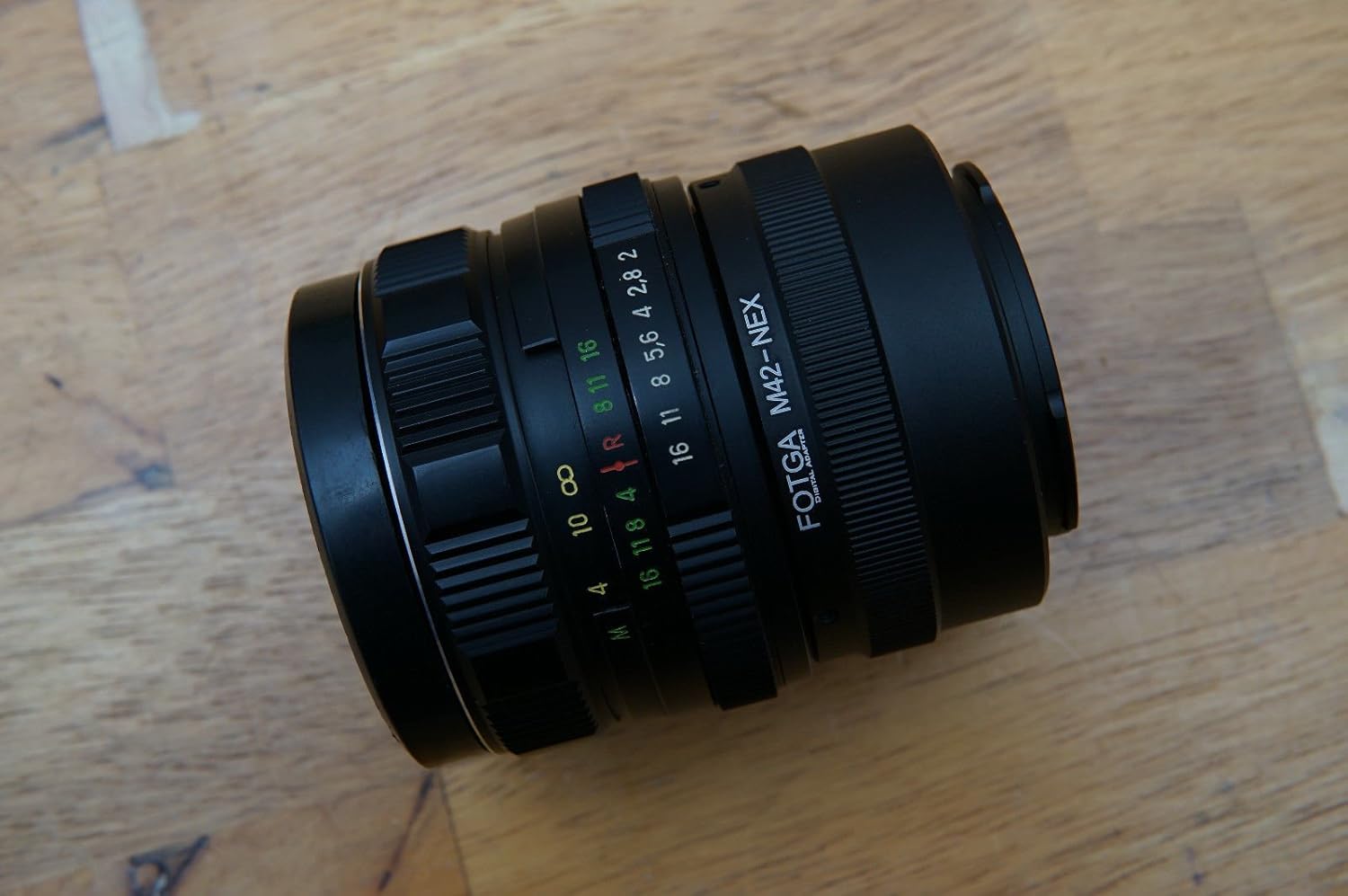
Image: The Helios 77M-4 50mm F1.8 lens, displaying its manual focus ring, aperture ring, and depth of field scale. This view highlights the robust construction and clear markings essential for manual operation.
- فوکس رنگ: Used to adjust the focus manually.
- یپرچر رنگ: Used to set the desired aperture (f-stop).
- Depth of Field Scale: Provides an indication of the depth of field at various apertures.
- بڑھتے ہوئے رنگ: Connects the lens to the camera body.
سیٹ اپ
عینک لگانا
- یقینی بنائیں کہ آپ کا کیمرہ آف ہے۔
- Remove the rear lens cap from the Helios 77M-4 lens and the body cap from your Sony E-mount camera.
- Align the white index mark on the lens barrel with the corresponding white index mark on the camera body.
- لینز کو کیمرہ ماؤنٹ میں داخل کریں اور اسے گھڑی کی سمت گھمائیں جب تک کہ یہ جگہ پر کلک نہ کرے۔ عینک کو زبردستی نہ لگائیں۔
- Once mounted, remove the front lens cap.

Image: The Helios 77M-4 lens securely attached to a Sony E-mount camera body. This illustrates the correct mounting position, ready for use.
کیمرے کی ترتیبات
Since this is a manual lens, you will need to adjust your camera settings:
- اپنا کیمرہ سیٹ کریں۔ دستی (M) or Aperture Priority (A) موڈ
- فعال کریں۔ "Release without lens" or "Shoot without lens" in your camera's menu, as the camera will not detect an electronic connection to the lens.
- Consider using "Focus Peaking" اور "Magnified View" features on your camera for easier manual focusing. Refer to your camera's manual for specific instructions on these features.
لینس کو آپریٹ کرنا
یپرچر ایڈجسٹ کرنا۔
The aperture is controlled directly on the lens using the aperture ring. Rotate the ring to select your desired f-stop. A wider aperture (smaller f-number like F1.8) allows more light and creates a shallower depth of field, ideal for portraits. A narrower aperture (larger f-number) allows less light and creates a deeper depth of field, suitable for landscapes.
دستی فوکسنگ
To focus, rotate the focus ring on the lens barrel until your subject appears sharp in the viewfinder or on the LCD screen. Utilize your camera's focus peaking and magnification features for precise focusing, especially at wider apertures.
- فوکس پیکنگ: Highlights in-focus areas with a colored outline.
- بڑھا ہوا View: Zooms in on a portion of the image for critical focus assessment.
دیکھ بھال
لینز کی صفائی
- Use a soft, lint-free microfiber cloth specifically designed for optical surfaces to clean the front and rear elements.
- For stubborn smudges, apply a small amount of lens cleaning solution to the cloth, not directly to the lens.
- Use a blower brush to remove dust particles before wiping to prevent scratching.
- کھرچنے والے مواد یا سخت کیمیکلز کا استعمال نہ کریں۔
ذخیرہ
- جب لینس استعمال میں نہ ہو تو ہمیشہ سامنے اور پیچھے لینس کیپس کو جوڑیں۔
- عینک کو کسی ٹھنڈی، خشک جگہ پر، براہ راست سورج کی روشنی اور انتہائی درجہ حرارت سے دور رکھیں۔
- If storing for extended periods, consider using a dehumidifying agent to prevent fungus growth.
خرابی کا سراغ لگانا
| مسئلہ | ممکنہ وجہ | حل |
|---|---|---|
| Camera does not recognize lens / Cannot take photos | Manual lens, no electronic contacts. | Enable "Release without lens" or "Shoot without lens" in camera settings. |
| تصاویر دھندلی ہیں۔ | Incorrect focus or camera shake. | Ensure proper manual focus using focus peaking/magnification. Use a faster shutter speed or tripod to prevent camera shake. |
| Images are too dark/bright | Incorrect exposure settings (aperture, shutter speed, ISO). | Adjust aperture on the lens. Adjust shutter speed and ISO on the camera to achieve desired exposure. |
| Dust or smudges on images | Dirty lens elements. | Clean lens elements carefully using a blower brush and microfiber cloth. |
وضاحتیں
| فیچر | تفصیل |
|---|---|
| ماڈل | Helios 77M-4 |
| فوکل کی لمبائی | 50 ملی میٹر |
| زیادہ سے زیادہ یپرچر | F1.8 |
| لینس کی قسم | معیاری پرائم لینس |
| ہم آہنگ mountings | Sony E-Mount (NEX, A7 series, 6500, a6300, a6000, a5100, a5000, a3000) |
| فوکس کی قسم | دستی فوکس |
| کارخانہ دار | 77M-4 (as per product data) |
وارنٹی اور سپورٹ
This product is a vintage lens. Specific warranty information may vary depending on the seller and purchase conditions. Please refer to your purchase documentation for details regarding any applicable warranty.
For technical support or inquiries, please contact the retailer or the original manufacturer if contact information is available. As a vintage item, direct manufacturer support may be limited.