
تعارف
The TiVo BOLT VOX is an innovative Unified Entertainment System designed to enhance your viewing experience. This 4K Ultra HD compatible device features a voice remote for improved search across live TV, DVR recordings, and streaming content. It includes fan-favorite TiVo features such as SkipMode™, OnePass™, and OneSearch™. The system supports Home Networking via WiFi 802.11ac 4x4 DBS and operates on 12V power.
باکس میں کیا ہے۔
Your TiVo BOLT VOX package includes the following items:
- DVR box
- ریموٹ کنٹرول
- بیٹریاں
- بجلی کی فراہمی
- HDMI کیبل

Image: The TiVo BOLT VOX product box, showcasing the device and remote.
سیٹ اپ
Follow these steps to set up your TiVo BOLT VOX:
- پاور سے رابطہ کریں: Plug the power supply into the TiVo BOLT VOX and then into a wall outlet.
- TV سے جڑیں: Use the provided HDMI cable to connect the TiVo BOLT VOX to an HDMI input on your television.
- Connect to Cable/Antenna:
- For Cable TV: Insert and pair a CableCARD™ with your TiVo BOLT VOX. Connect the coaxial cable from your wall to the TiVo. (Call your cable provider to order and pair the CableCARD.)
- For HD Antenna: Connect an HD antenna to the TiVo BOLT VOX.
- نیٹ ورک سے جڑیں: Connect an Ethernet cable from your router to the Ethernet port on the TiVo BOLT VOX for a wired connection. The device also supports WiFi 802.11ac 4x4 DBS for wireless networking.
- ابتدائی ڈھانچہ: Turn on your TV and select the correct HDMI input. Use the TiVo remote to follow the on-screen guided setup instructions.

Image: Visual guide for connecting the TiVo BOLT VOX for both cable TV and HD antenna setups, detailing cable and power connections.
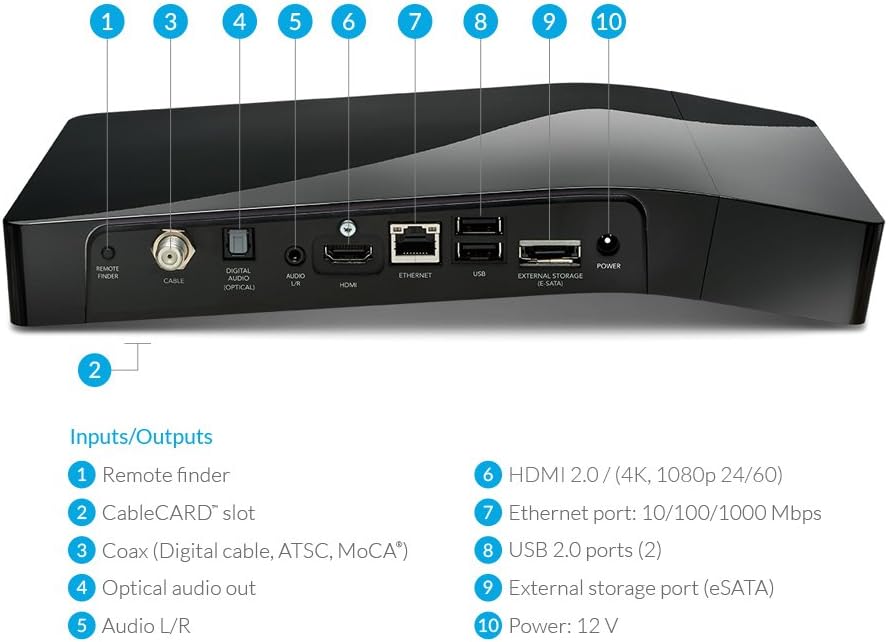
تصویر: پیچھے view of the TiVo BOLT VOX unit, highlighting various input and output ports including Remote Finder, CableCARD slot, Coax, Optical Audio Out, Audio L/R, HDMI 2.0, Ethernet, USB 2.0, External Storage (eSATA), and Power (12V).
پروڈکٹ ختمview ویڈیو
ویڈیو: ایک مختصر ختمview of the TiVo BOLT VOX, demonstrating its compact design and key features. This video is provided by the seller.
Operating Your TiVo BOLT VOX
The TiVo BOLT VOX is designed for intuitive operation, primarily through its voice-enabled remote control and integrated user interface.
Voice Remote Features
The TiVo Voice Remote allows you to quickly find content across live TV, DVR recordings, and streaming services. Simply press the voice button and speak your command.
- Instant Search: تلاش کریں۔ shows, movies, actors, or genres across all your available content.
- فوری رسائی کے بٹن: Dedicated buttons for popular streaming apps like Netflix, along with standard controls for volume, channel, guide, and playback.

Image: The TiVo BOLT VOX voice remote, featuring a microphone button for voice commands and dedicated buttons for various functions and streaming services.

Image: A couple comfortably seated on a couch, using the TiVo BOLT VOX voice remote to control their entertainment.
Integrated Entertainment System
The TiVo BOLT VOX integrates your favorite streaming apps directly into its interface, eliminating the need to switch inputs or devices.
- سٹریمنگ ایپس: Access Netflix, Prime Video, HBO Go, Hulu, Pandora, and more from a single, unified experience.
- TiVo Features: Enjoy unique features like SkipMode™ to bypass commercials, OnePass™ to gather all episodes of a series, and OneSearch™ for universal content discovery.
- 4K UHD Compatibility: Experience crisp color, clarity, and detail with full 4K/Ultra High-Definition support.

Image: A television screen displaying the TiVo apps interface, showing various streaming services like Netflix, Amazon, HBO Go, Hulu, and YouTube.
دیکھ بھال
To ensure optimal performance and longevity of your TiVo BOLT VOX, keep the device clean and ensure proper ventilation. Avoid placing objects on top of the unit that could obstruct airflow. Use a soft, dry cloth for cleaning; do not use liquid or aerosol cleaners.
خرابی کا سراغ لگانا
If you encounter issues with your TiVo BOLT VOX, consider the following common solutions:
- کوئی تصویر/آواز نہیں: Ensure all cables (HDMI, power) are securely connected. Verify your TV is on the correct HDMI input.
- ریموٹ جواب نہیں دے رہا ہے: Check the batteries in your remote control. Ensure there are no obstructions between the remote and the TiVo box.
- نیٹ ورک کنیکٹیویٹی کے مسائل: Verify your Ethernet cable is connected properly or that your WiFi network is active and the TiVo is connected. Restart your router and the TiVo box.
- ریکارڈنگ کے مسائل: Ensure your TiVo service subscription is active. Check that your CableCARD is properly installed and paired with your cable provider.
- Weak Antenna Signal: If using an HD antenna, adjust its position for better reception. Obstructions like hills or buildings can interfere with signals.
Troubleshooting TV Antenna Reception
Video: This video provides tips for troubleshooting TV antenna reception issues, which can be helpful if you are experiencing problems with over-the-air channels on your TiVo BOLT VOX. This video is provided by the seller.
وضاحتیں
| فیچر | تفصیل |
|---|---|
| برانڈ | TiVo |
| ماڈل نمبر | TCD849500V |
| میموری ذخیرہ کرنے کی صلاحیت | 500 جی بی |
| ویڈیو آؤٹ پٹ قرارداد | 4K |
| کنیکٹوٹی ٹیکنالوجی | وائی فائی |
| کنیکٹر کی قسم | HDMI |
| تعاون یافتہ انٹرنیٹ سروسز | Hulu Plus, Netflix, Vudu, YouTube |
| کنٹرولر کی قسم | ایمیزون الیکسا، ویرا |
| خصوصی خصوصیت | Digital Cable, Over The Air Tuner |
| شے کا وزن | 1.9 پاؤنڈز |
| رنگ | سیاہ |
وارنٹی اور سپورٹ
The TiVo BOLT VOX (Model TCD849500V) comes with a warranty covering 91 days for labor and 1 year for parts. For further support or warranty claims, please refer to the contact information provided in your product packaging or visit the official TiVo support webسائٹ