
JFA K1200MTBK
JFA K1200 لانگ ڈسٹنس ریموٹ کنٹرول صارف دستی
برانڈ: JFA | ماڈل: K1200MTBK
1. تعارف اور اوورview
The JFA K1200 Long Distance Remote Control is designed for managing car sound systems over extended distances. It features a slim panel, ultra-sensitive receiver, and highly resistant silicone keys for durability and ease of use. This manual provides detailed instructions for setting up and operating your K1200 remote control.
2. کلیدی خصوصیات
- توسیعی رینج: Operates effectively up to 1,200 meters in open areas, minimizing interference.
- پائیدار ڈیزائن: Equipped with highly resistant silicone keys, featuring engraved low-relief markings for tactile feedback and longevity.
- Ergonomic and Slim: Designed for comfortable handling and a sleek profile.
- Ultra-Sensitive Receiver: Ensures reliable signal reception for consistent performance.
- دوہری آپریٹنگ موڈز: Supports both Memory Mode for pre-configured devices and Learn Mode for custom programming.
3. سیٹ اپ
3.1. ریموٹ کنٹرول بیٹری کی تنصیب
The handheld remote control requires a 3V CR2032 Lithium Battery. To install or replace the battery:
- ریموٹ کنٹرول کے پیچھے بیٹری کے ٹوکرے کو تلاش کریں۔
- کمپارٹمنٹ کور کو احتیاط سے کھولیں۔
- Insert the 3V CR2032 battery with the positive (+) side facing up.
- بیٹری کے کمپارٹمنٹ کور کو محفوظ طریقے سے بند کریں۔
3.2. Transmitter Unit Power Supply
The separate transmitter unit, which works in conjunction with the remote control, requires a 12V - 23A battery. Ensure this battery is installed and properly connected to the transmitter unit as per its specific instructions.
3.3. Receiver Unit Power Supply Connection
The receiver unit requires a power supply ranging from 9Vdc to 16Vdc. Connect the receiver to your vehicle's power system according to the specific instructions provided with your car audio setup. Ensure proper polarity to prevent damage.
3.4. Initial Pairing/Configuration
Before first use, the remote control, transmitter unit, and receiver may need to be paired or configured. Refer to the "Operating Modes" section for details on Memory Mode and Learn Mode to set up your device with your car audio system.
4۔ آپریٹنگ موڈ
The JFA K1200 offers two distinct operating modes to ensure compatibility and flexibility with various car audio systems:
4.1. میموری موڈ
Memory Mode contains pre-registered configurations for a wide range of popular sound and video devices available on the market. This mode allows for quick setup with compatible systems without the need for manual programming. To activate Memory Mode, follow the instructions provided with your specific car audio device for remote control integration.
4.2. Learn Mode
Learn Mode enables the K1200 to copy and encode functions directly from your original infrared (IR) remote control. This is useful for devices not covered by Memory Mode or for customizing button functions. To use Learn Mode:
- Ensure both the K1200 remote and your original IR remote have fresh batteries.
- Place the K1200 and the original remote facing each other, typically within 1-3 cm (0.4-1.2 inches).
- Activate Learn Mode on the K1200 (refer to the specific button sequence in your device's supplementary guide, if applicable).
- Press the desired button on the K1200, then immediately press the corresponding button on your original IR remote. The K1200 will typically provide a visual or audible confirmation once the function is learned.
- Repeat for all desired functions.
- Exit Learn Mode to save the configurations.
5 دیکھ بھال
5.1. صفائی
To clean the remote control, use a soft, dry cloth. For stubborn dirt, a slightly damp cloth with mild soap can be used, followed by immediate drying. Avoid using abrasive cleaners, solvents, or harsh chemicals, as these can damage the silicone keys and casing.
5.2 بیٹری کی تبدیلی
Replace the 3V CR2032 Lithium Battery in the remote control when its performance diminishes or the indicator light (if present) signals low power. Refer to section 3.1 for battery installation instructions. Dispose of used batteries responsibly according to local regulations.
5.3. ذخیرہ
Store the remote control in a cool, dry place away from direct sunlight and extreme temperatures. Avoid placing heavy objects on the remote to prevent damage to the keys or internal components.
6 خرابیوں کا سراغ لگانا
- ریموٹ جواب نہیں دے رہا ہے: چیک کریں کہ آیا بیٹری صحیح طریقے سے انسٹال ہے اور کافی چارج ہے۔ اگر ضروری ہو تو بیٹری کو تبدیل کریں۔
- Limited range or intermittent control: Ensure there are no obstructions between the remote and the receiver. Verify the receiver is properly powered and connected.
- مخصوص افعال کام نہیں کررہے ہیں: If using Learn Mode, re-program the specific function. If using Memory Mode, ensure your device is compatible and correctly selected.
- مداخلت: While designed for minimal interference, ensure other wireless devices operating on similar frequencies are not too close.
7. تکنیکی تفصیلات
| ماڈل نمبر | K1200MTBK |
| مصنوعات کے طول و عرض | 6 x 6 x 5 انچ |
| شے کا وزن | 3.24 اونس |
| ریموٹ کنٹرول بیٹری | 3V CR2032 لتیم بیٹری |
| Transmitter Unit Power Supply | 12V - 23A Battery |
| وصول کنندہ بجلی کی فراہمی | 9 وی ڈی سی سے 16 وی ڈی سی |
| آپریشن کی فریکوئنسی | 433.92 میگاہرٹز |
| ماڈیولیشن | پوچھیں۔ |
| خصوصی خصوصیت | ایرگونومک ڈیزائن |
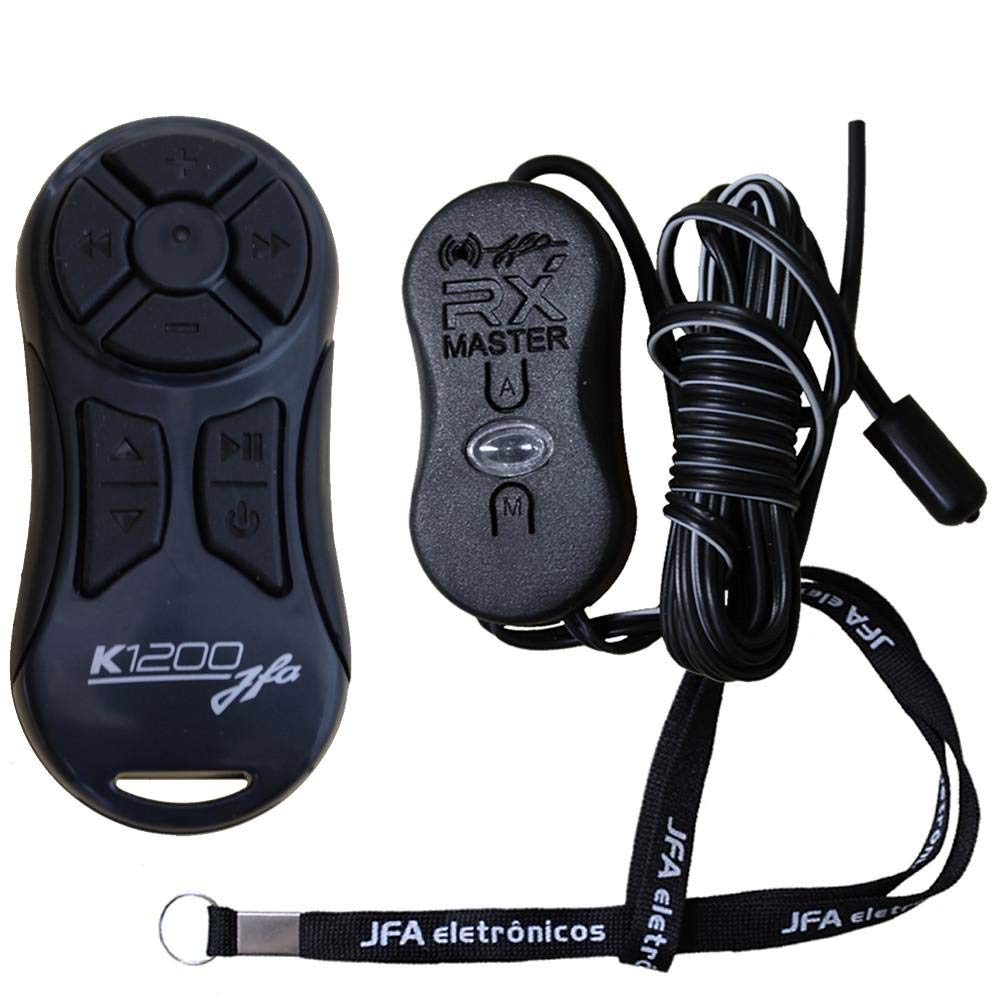
8. مصنوعات کی تصاویر


9. وارنٹی اور سپورٹ
For warranty information, technical support, or service inquiries, please refer to the documentation included with your purchase or contact JFA customer service directly. Keep your proof of purchase for warranty claims.
Ask a question about this manual
Ask about setup, troubleshooting, compatibility, parts, safety, or missing instructions. Manuals+ will review the question and use this page’s manual context to help answer it.