
تعارف
خریداری کے لیے آپ کا شکریہasing the SAMVIX BT Box BASS X65 Wireless Bluetooth Speaker System. This manual provides essential information for setting up, operating, and maintaining your speaker. Please read it carefully to ensure optimal performance and longevity of your device.
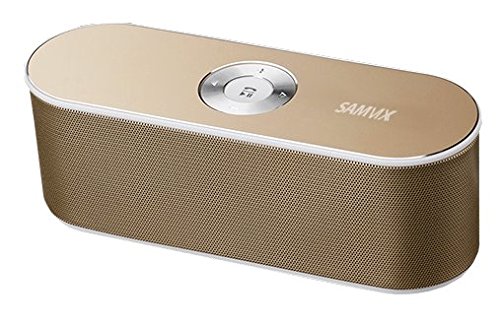
Image: The SAMVIX BT Box BASS X65 speaker in gold, positioned next to a laptop and a smartphone, demonstrating its portable design and connectivity.
پروڈکٹ ختمview: کنٹرولز اور پورٹس
Familiarize yourself with the speaker's controls and connection ports for proper operation.

Image: A detailed diagram illustrating the top and rear panels of the SAMVIX BT Box BASS X65 speaker, labeling the 3.5mm audio port, Line In/On/Off switch, USB port, Micro SD port, Micro USB input, and the central control buttons for volume, track navigation, and play/pause/answer.
- Central Control Buttons:
- چلائیں/توقف/جواب: Press to play or pause music. Press to answer or end a call.
- آگے: اگلے ٹریک پر جانے کے لیے دبائیں۔
- پچھلا: پچھلے ٹریک پر جانے کے لیے دبائیں۔
- حجم میں اضافہ: حجم بڑھانے کے لئے دبائیں۔
- حجم میں کمی: حجم کم کرنے کے لیے دبائیں۔
- 3.5 mm Audio Port (AUX-IN): آڈیو آلات سے وائرڈ کنکشن کے لیے۔
- Line In / On / Off Switch: Power switch for the speaker.
- USB پورٹ: USB فلیش ڈرائیو سے موسیقی چلانے کے لیے۔
- Micro SD Port (TF Card): مائیکرو ایس ڈی کارڈ سے موسیقی چلانے کے لیے۔
- Micro USB Input (DC IN): اسپیکر چارج کرنے کے لیے۔
سیٹ اپ
1. اسپیکر کو چارج کرنا
Before first use, fully charge the speaker. Connect the provided Micro USB cable to the speaker's Micro USB Input port and the other end to a USB power source (e.g., computer USB port, USB wall adapter). The charging indicator will illuminate during charging and turn off when fully charged. A full charge provides approximately 8 hours of playback at 50% volume.
2. پر / آف پاور
Locate the Line In / On / Off switch on the rear panel. Slide the switch to the 'On' position to power on the speaker. Slide it to 'Off' to power off.
آپریٹنگ ہدایات
1. بلوٹوت جوڑی بنانا
To connect your speaker wirelessly via Bluetooth:
- Ensure the speaker is powered on. It will automatically enter Bluetooth pairing mode, indicated by a flashing LED light.
- اپنے اسمارٹ فون، ٹیبلیٹ، یا بلوٹوتھ سے چلنے والے دوسرے آلے پر، بلوٹوتھ سیٹنگز پر جائیں۔
- تلاش کریں۔ available devices and select "SAMVIX X65" (or similar) from the list.
- Once connected, the speaker will emit a confirmation tone, and the LED light will stop flashing.

Image: A silver SAMVIX BT Box BASS X65 speaker next to a smartphone, illustrating the wireless Bluetooth connection process.
The speaker has a wireless Bluetooth range of up to 100 unobstructed feet.
2 AUX-IN کنکشن
For devices without Bluetooth, use the 3.5mm audio port:
- Connect one end of a 3.5mm audio cable (not included) to the speaker's 3.5 mm Audio Port.
- Connect the other end to the headphone jack or audio output of your device.
- اسپیکر خود بخود AUX موڈ میں بدل جائے گا۔
3. USB Flash Drive Playback
USB فلیش ڈرائیو سے موسیقی چلانے کے لیے:
- آڈیو پر مشتمل USB فلیش ڈرائیو داخل کریں۔ files into the USB Port.
- The speaker will automatically detect the drive and begin playing music.
4 مائیکرو ایس ڈی کارڈ پلے بیک
To play music from a Micro SD (TF) card:
- آڈیو پر مشتمل مائیکرو ایس ڈی کارڈ داخل کریں۔ files into the Micro SD Port.
- اسپیکر خود بخود کارڈ کا پتہ لگائے گا اور موسیقی بجانا شروع کردے گا۔

Image: A blue SAMVIX speaker in a living room, with graphics indicating its multi-function music capabilities including USB Flash, TF Micro Card, Audio AUX, and Wireless BT inputs.
5. سپیکر فون فنکشن
When connected via Bluetooth, the speaker can be used as a speakerphone:
- کال کا جواب دینا: Press the central Play/Pause/Answer button once.
- کال ختم کرنا: Press the central Play/Pause/Answer button once during a call.
- کال مسترد کرنا: Press and hold the central Play/Pause/Answer button.
دیکھ بھال
- اسپیکر کو پانی، نمی اور انتہائی درجہ حرارت سے دور رکھیں۔
- اسپیکر کو نرم، خشک کپڑے سے صاف کریں۔ کھرچنے والے کلینر یا سالوینٹس کا استعمال نہ کریں۔
- اسپیکر کو گرانے یا اسے سخت اثرات سے مشروط کرنے سے گریز کریں۔
- جب لمبے عرصے تک استعمال نہ ہو، تو اسپیکر کو ٹھنڈی، خشک جگہ پر اسٹور کریں اور بیٹری کی صحت کو برقرار رکھنے کے لیے اسے وقتاً فوقتاً چارج کریں۔
خرابی کا سراغ لگانا
| مسئلہ | ممکنہ وجہ | حل |
|---|---|---|
| سپیکر پاور آن نہیں کرتا۔ | بیٹری ختم ہو گئی ہے۔ | اسپیکر کو کم از کم 2-3 گھنٹے تک چارج کریں۔ |
| بلوٹوتھ کے ذریعے جوڑا نہیں بنایا جا سکتا۔ | اسپیکر جوڑا بنانے کے موڈ میں نہیں ہے یا آلہ سے بہت دور ہے۔ | Ensure speaker is on and in pairing mode. Move speaker closer to the device (within 10m/33ft). Restart both devices. |
| کوئی آواز نہیں۔ | والیوم بہت کم، غلط ان پٹ موڈ، یا ڈیوائس نہیں چل رہی ہے۔ | Increase speaker and device volume. Ensure correct input mode (Bluetooth, AUX, USB, SD) is selected. Check if the source device is playing audio. |
| خراب آڈیو کوالٹی۔ | Device too far, interference, or low battery. | Move device closer to speaker. Avoid obstacles. Charge the speaker. |
وضاحتیں
| فیچر | تفصیل |
|---|---|
| ماڈل کا نام | BT Box BASS X65 |
| برانڈ | سموکس |
| کنیکٹوٹی ٹیکنالوجی | بلوٹوتھ، معاون، USB |
| بلوٹوتھ ورژن | 4.0 |
| وائرلیس رینج | Up to 100 feet (unobstructed) |
| اسپیکر آؤٹ پٹ پاور | 6 Watts (3W + 3W) |
| بیٹری کی قسم | 1500mAh Lithium-ion (rechargeable) |
| بیٹری کی زندگی | 8 گھنٹے تک (50% والیوم پر) |
| ان پٹ | Micro USB (charging), USB (playback), Micro SD (playback), 3.5mm AUX-IN |
| طول و عرض | تقریباً 20 سینٹی میٹر (لمبائی) x 7.5 سینٹی میٹر (چوڑائی) x 6 سینٹی میٹر (اونچائی) |
| وزن | 128 گرام |
| اسپیکر کی قسم | Outdoor/Indoor Portable |
| خصوصی خصوصیات | Built-in Microphone (Speakerphone) |
وارنٹی اور سپورٹ
SAMVIX offers a full warranty on its Bluetooth speaker range. If you encounter any issues or are not completely satisfied with your purchase, please contact SAMVIX customer support for assistance. Refer to your purchase documentation for specific warranty terms and contact information.