
1. تعارف
This manual provides instructions for the installation, operation, and maintenance of the Nexxt Solutions Naxos800 8-Port Fast Ethernet Network Switch. The Naxos800 is an unmanaged compact desktop switch designed for small office/home office (SOHO) environments, student dormitories, and small enterprises, offering reliable network connectivity.
2. کلیدی خصوصیات
- 8 Fast Ethernet Ports: Provides 8 UTP/STP 10/100Mbps ports with auto MDI/MDIX.
- پلگ اینڈ پلے: Simple setup requiring no software configuration.
- غیر منظم سوئچ: Operates without requiring complex management interfaces.
- Store-and-Forward Technology: Ensures efficient packet transmission.
- میک ایڈریس سیکھنا: Supports auto-learning and aging with a built-in 1000 MAC address table.
- کومپیکٹ ڈیزائن: Suitable for desktop or wall mounting.
- توانائی کی بچت: کم بجلی کی کھپت ڈیزائن.
- بہاؤ کنٹرول: Full duplex and half duplex back pressure flow control.
- استحکام: Integrated lightning protection and a sturdy metal case.
- خاموش آپریشن: Fanless design for silent performance.
3. پیکیج کے مشمولات
تصدیق کریں کہ آپ کے پیکیج میں درج ذیل آئٹمز ہیں:
- One (1) Nexxt Solutions Naxos800 8-Port Fast Ethernet Switch
- ایک (1) پاور اڈاپٹر

Image: The Nexxt Solutions Naxos800 switch, its power adapter, and product packaging.
4. پروڈکٹ ختمview

تصویر: سامنے view of the Naxos800 switch, showing the Nexxt logo and eight green LED indicators for port activity.
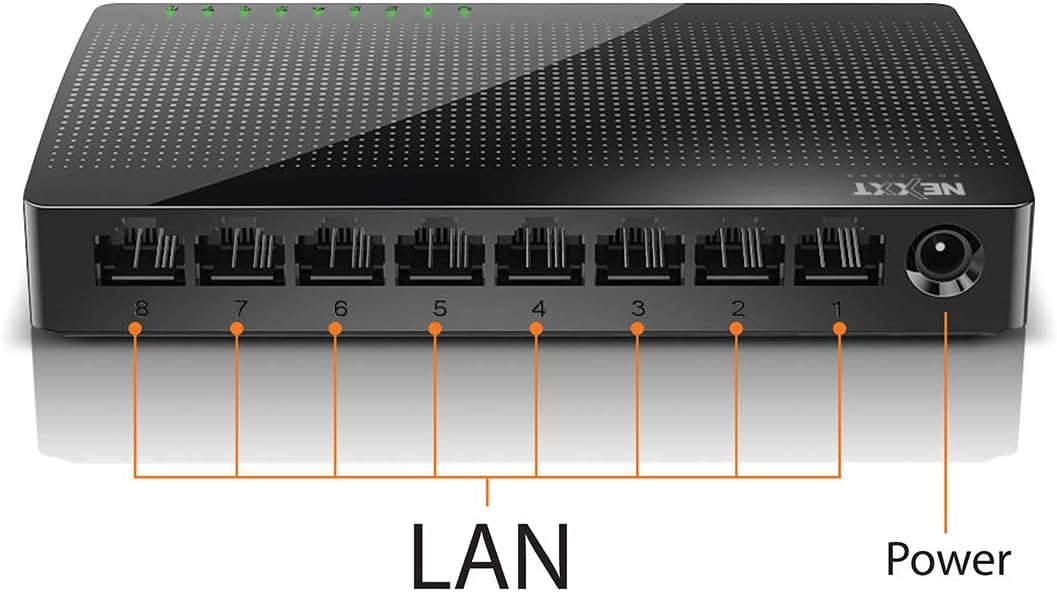
تصویر: پیچھے view of the Naxos800 switch, highlighting the eight LAN ports (numbered 1-8) and the power input port.
ایل ای ڈی اشارے
The front panel features LED indicators for each port, providing visual status:
- سبز ایل ای ڈی (ٹھوس): Indicates a stable link connection.
- سبز ایل ای ڈی (چمکتی): Indicates data activity on the corresponding port.
- ایل ای ڈی بند: No link or connection detected.
5. سیٹ اپ اور انسٹالیشن
The Naxos800 switch is designed for simple plug-and-play installation. No software or complex configuration is required.
- جگہ کا تعین: Place the switch on a stable, flat surface or mount it on a wall using appropriate hardware (not included). Ensure adequate ventilation around the device.
- پاور سے جڑیں: Connect the provided power adapter to the power input port on the switch and then plug the adapter into a standard electrical outlet. The power LED (if present, or the port LEDs will light up) should illuminate.
- نیٹ ورک سے جڑیں:
- Connect your router or modem to any of the 8 LAN ports on the Naxos800 switch using an Ethernet cable.
- Connect your network devices (e.g., computers, gaming consoles, IP cameras, Smart TVs, printers) to the remaining LAN ports on the Naxos800 switch using an Ethernet cable.
- کنکشن کی تصدیق کریں: Once devices are connected, the corresponding LED indicators on the switch's front panel should light up green (solid for link, flashing for activity).

Image: Diagram illustrating a typical network setup. An ADSL or Cable Modem connects to a Router, which then connects to the Naxos800 switch. Various devices like laptops, media players, game consoles, IP cameras, Smart TVs, and IP phones are connected to the Naxos800 switch.
6. سوئچ کو چلانا
The Naxos800 is an unmanaged switch, meaning it operates automatically without user intervention once connected. It functions as an internet splitter, expanding the number of wired network connections available from your router or modem.
- Automatic Speed Detection: Each port automatically detects the speed of the connected device (10Mbps or 100Mbps) and adjusts accordingly.
- آٹو MDI/MDIX: Eliminates the need for crossover cables; the switch automatically detects and corrects for straight-through or crossover cable types.
- ڈیٹا ٹرانسمیشن: Data packets are forwarded between connected devices at Fast Ethernet speeds. The store-and-forward architecture ensures data integrity.
7 دیکھ بھال
The Naxos800 switch requires minimal maintenance.
- صفائی: سوئچ کے بیرونی حصے کو صاف کرنے کے لیے نرم، خشک کپڑا استعمال کریں۔ مائع یا ایروسول کلینر استعمال نہ کریں۔
- وینٹیلیشن: اس بات کو یقینی بنائیں کہ زیادہ گرمی سے بچنے کے لیے وینٹیلیشن کے سوراخوں کو مسدود نہیں کیا گیا ہے۔
- پاور سائیکل: If the device experiences issues, a simple power cycle (unplugging and replugging the power adapter) can often resolve minor problems.
8 خرابیوں کا سراغ لگانا
If you encounter issues with your Naxos800 switch, refer to the following common problems and solutions:
| مسئلہ | ممکنہ وجہ | حل |
|---|---|---|
| No power / Device not turning on. | پاور اڈاپٹر منسلک نہیں یا ناقص؛ پاور آؤٹ لیٹ کام نہیں کر رہا ہے۔ | یقینی بنائیں کہ پاور اڈاپٹر محفوظ طریقے سے سوئچ اور کام کرنے والے برقی آؤٹ لیٹ سے جڑا ہوا ہے۔ ایک مختلف آؤٹ لیٹ آزمائیں۔ |
| No link light for a connected device. | Ethernet cable faulty or improperly connected; device not powered on or faulty; incorrect port. |
|
| سست نیٹ ورک کی رفتار۔ | Network congestion; faulty cable; device limitations. |
|
9. وضاحتیں
| وصف | قدر |
|---|---|
| ماڈل نمبر | ASIDT084U3 |
| بندرگاہیں | 8 x 10/100Mbps Fast Ethernet (UTP/STP) |
| بیکپلین بینڈوتھ | 1.6 جی بی پی ایس |
| میک ایڈریس ٹیبل | 1000 اندراجات |
| رسائی کنٹرول | سی ڈی ایم اے |
| بہاؤ کنٹرول | Full duplex and half duplex back pressure |
| طول و عرض (L x W x H) | 12.4 x 5.9 x 2.3 سینٹی میٹر |
| وزن | 140 گرام |
| پاور ان پٹ | بیرونی پاور اڈاپٹر (شامل) |
نوٹ: وضاحتیں پیشگی اطلاع کے بغیر تبدیل کی جاسکتی ہیں۔
10. وارنٹی اور سپورٹ
The Nexxt Solutions Naxos800 8-Port Fast Ethernet Network Switch comes with a 5 سال کی محدود وارنٹی. For warranty claims or technical support, please contact Nexxt Solutions customer service. Refer to the official Nexxt Solutions webتازہ ترین معاون معلومات اور رابطے کی تفصیلات کے لیے سائٹ۔
Nexxt Solutions is a US company committed to quality and customer service.