
BenQ EX3501R
BenQ EX3501R Ultrawide Curved Gaming Monitor User Manual
Model: EX3501R
1. سیٹ اپ
1.1 مانیٹر کا پیک کھولنا
پیکیجنگ سے تمام اجزاء کو احتیاط سے ہٹا دیں۔ یقینی بنائیں کہ ذیل میں درج تمام اشیاء موجود ہیں:
- BenQ EX3501R Monitor
- مانیٹر اسٹینڈ (بیس اور گردن)
- پاور اڈاپٹر
- پاور کی ہڈی
- HDMI کیبل
- ڈسپلے پورٹ کیبل
- USB-C کیبل
- صارف دستی (یہ دستاویز)
1.2 اسٹینڈ کو جمع کرنا
اسٹینڈ کو اپنے مانیٹر سے منسلک کرنے کے لیے ان اقدامات پر عمل کریں:
- خروںچ کو روکنے کے لیے مانیٹر کا چہرہ نرم، صاف کپڑے پر رکھیں۔
- Attach the stand neck to the back of the monitor. Ensure it clicks securely into place.
- Connect the stand base to the neck, tightening any screws as indicated in the quick start guide.

شکل 1: سامنے view of the BenQ EX3501R monitor with its stand.
1.3 کنیکٹنگ کیبلز
Connect the necessary cables to the monitor and your computer. The monitor supports various input options:
- طاقت: پاور اڈاپٹر کو مانیٹر سے اور پھر پاور آؤٹ لیٹ سے جوڑیں۔
- ویڈیو ان پٹ: Use either the HDMI, DisplayPort, or USB-C cable to connect your computer to the monitor.
- USB-C: The USB-C port supports video, data transfer, and power delivery, allowing for a single-cable connection with compatible devices.
- USB 3.0 پورٹس: Utilize the integrated USB 3.0 ports for connecting peripherals.
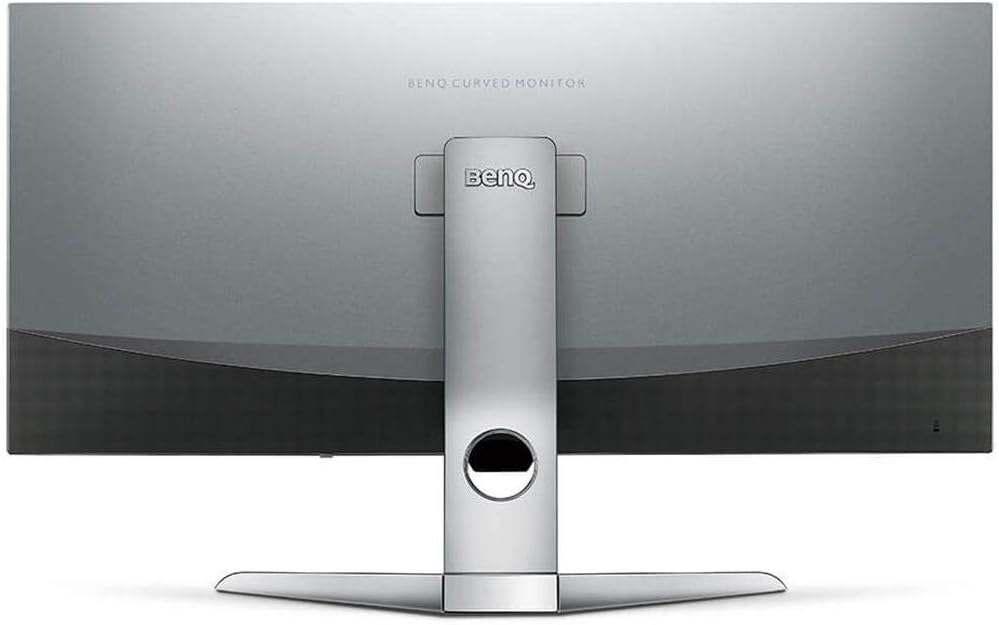
شکل 2: پیچھے view of the monitor displaying the connectivity ports.
2. مانیٹر کو چلانا
2.1 پاور آن/آف
پاور بٹن کو دبائیں، جو عام طور پر مانیٹر کے نیچے دائیں جانب واقع ہوتا ہے، اسے آن یا آف کرنے کے لیے۔ مانیٹر کے فعال ہونے پر پاور انڈیکیٹر لائٹ روشن ہو جائے گی۔
2.2 آن اسکرین ڈسپلے (OSD) نیویگیشن
Use the joystick or buttons located on the monitor's underside to navigate the On-Screen Display (OSD) menu. This menu allows you to adjust various settings such as brightness, contrast, color modes, and input sources.
2.3 Display Features and Eye-Care Technology
The BenQ EX3501R incorporates several technologies designed to enhance viewing experience and reduce eye strain:
- برائٹنس انٹیلی جنس پلس (BI+): This patented technology automatically senses ambient lighting conditions and adjusts the screen's brightness and color temperature to provide optimal viewing comfort and protect your eyes during extended use.
- کم نیلی روشنی: Filters out harmful blue light emissions to reduce eye fatigue. Multiple levels of blue light reduction are available.
- ZeroFlicker™: Eliminates screen flickering at all brightness levels, further reducing eye strain and discomfort.
- HDR (ہائی ڈائنامک رینج): Offers enhanced brightness and contrast, bringing greater detail and vibrancy to HDR video content.
ویڈیو 1: ایک اوورview of BenQ's Eye-Care technology, including Low Blue Light, ZeroFlicker, and Brightness Intelligence Plus, demonstrating how these features work to reduce eye strain and adjust screen settings automatically based on ambient light.
2.4 ریزولوشن اور ریفریش ریٹ
The monitor features a QHD (3440x1440) resolution and a 100Hz refresh rate, providing a smooth and detailed visual experience. The 21:9 ultrawide aspect ratio offers ample screen space for multitasking, such as viewing multiple documents side-by-side without needing a second monitor.
2.5 AMD FreeSync
For a fluid gaming experience, the monitor supports AMD FreeSync technology, which synchronizes the monitor's refresh rate with your graphics card's frame rate to eliminate screen tearing and stuttering.
3 دیکھ بھال
3.1 مانیٹر کی صفائی
To maintain optimal performance and appearance, regularly clean your monitor:
- سکرین: Gently wipe the screen with a soft, lint-free cloth. For stubborn smudges, use a monitor-specific cleaning solution applied to the cloth, not directly to the screen.
- بیرونی: Use a soft, dry cloth to wipe dust and debris from the monitor casinجی اور کھڑے ہو جاؤ.
Avoid using abrasive cleaners, waxes, or solvents as they can damage the monitor's surface.
3.2 نگہداشت کے عمومی نکات
- مانیٹر پر وینٹیلیشن کے سوراخوں کو مسدود نہ کریں۔
- مانیٹر کو براہ راست سورج کی روشنی میں یا گرمی کے ذرائع کے قریب رکھنے سے گریز کریں۔
- جسمانی نقصان کو روکنے کے لیے مانیٹر کو احتیاط سے ہینڈل کریں۔
4 خرابیوں کا سراغ لگانا
If you encounter issues with your BenQ EX3501R monitor, refer to the following common troubleshooting steps:
4.1 کوئی ڈسپلے یا بلیک اسکرین نہیں۔
- یقینی بنائیں کہ پاور کیبل مانیٹر اور پاور آؤٹ لیٹ دونوں سے محفوظ طریقے سے جڑی ہوئی ہے۔
- Verify that the video cable (HDMI, DisplayPort, or USB-C) is firmly connected to both the monitor and your computer.
- چیک کریں کہ آیا مانیٹر کے OSD مینو میں صحیح ان پٹ سورس کا انتخاب کیا گیا ہے۔
- اپنے کمپیوٹر کو دوبارہ شروع کریں۔
4.2 Flickering or Unstable Image
- Ensure the ZeroFlicker™ feature is enabled in the OSD menu.
- ڈھیلا ویڈیو کیبل کنکشن چیک کریں۔
- اپنے گرافکس کارڈ ڈرائیورز کو تازہ ترین ورژن میں اپ ڈیٹ کریں۔
- If using AMD FreeSync, ensure it is properly configured in your graphics card settings.
4.3 Color or Brightness Issues
- OSD مینو کے ذریعے چمک، کنٹراسٹ، اور رنگ کی ترتیبات کو ایڈجسٹ کریں۔
- Enable or disable Brightness Intelligence Plus (B.I.+) to see if it resolves the issue.
- OSD مینو کے ذریعے فیکٹری ری سیٹ کریں۔
5. وضاحتیں
Key technical specifications for the BenQ EX3501R monitor:
| فیچر | تفصیلات |
|---|---|
| اسکرین کا سائز | 35 انچ |
| زیادہ سے زیادہ سکرین ریزولوشن | 3440 x 1440 Pixels (QHD Ultrawide) |
| پہلو کا تناسب | 21:9 |
| ریفریش ریٹ | 100 Hz |
| گھماؤ | 1800R |
| پینل کی قسم | VA (عمودی سیدھ) |
| کنیکٹوٹی | USB-C, HDMI, DisplayPort |
| خصوصی خصوصیات | AMD FreeSync, Brightness Intelligence Plus, Low Blue Light, ZeroFlicker |
| شے کا وزن | 21.3 پاؤنڈ |
| مصنوعات کے طول و عرض | 6.88 x 3.47 x 12.93 انچ |
6. وارنٹی اور سپورٹ
6.1 پروڈکٹ وارنٹی
The BenQ EX3501R monitor typically comes with a 3-year manufacturer's warranty. Please refer to the warranty card included in your product packaging for specific terms and conditions, or visit the official BenQ webتفصیلی وارنٹی معلومات کے لیے سائٹ۔
6.2 کسٹمر سپورٹ
For further assistance, technical support, or warranty claims, please contact BenQ customer service. You can find contact information and support resources on the official BenQ webسائٹ: www.benq.com/en-us/support.html
Ask a question about this manual
Ask about setup, troubleshooting, compatibility, parts, safety, or missing instructions. Manuals+ will review the question and use this page’s manual context to help answer it.