
1. تعارف
This manual provides comprehensive instructions for the installation, operation, and maintenance of the FAAC E600 (D600) Electronic Board Remote Control. Please read this manual carefully before using the product to ensure safe and efficient operation. Keep this manual for future reference.
2. حفاظتی معلومات
مصنوعات کو چوٹ یا نقصان سے بچنے کے لیے ہمیشہ درج ذیل حفاظتی تدابیر پر عمل کریں:
- Ensure the power supply is disconnected before any installation or maintenance procedures.
- صرف اہل افراد کو تنصیب اور مرمت کرنا چاہئے۔
- آلہ کو انتہائی درجہ حرارت، نمی، یا براہ راست سورج کی روشنی کے سامنے نہ رکھیں۔
- آلے کو بچوں اور پالتو جانوروں سے دور رکھیں۔
- Use only original FAAC spare parts and accessories.
3. پیکیج کے مشمولات
تصدیق کریں کہ تمام اشیاء پیکیج میں موجود ہیں:
- FAAC E600 (D600) Electronic Board Remote Control
- صارف دستی (یہ دستاویز)
- بڑھتے ہوئے ہارڈ ویئر (اگر قابل اطلاق ہو)
4. پروڈکٹ ختمview
The FAAC E600 (D600) is an electronic board remote control designed for reliable operation of compatible FAAC systems. It features a robust design and ergonomic handling.
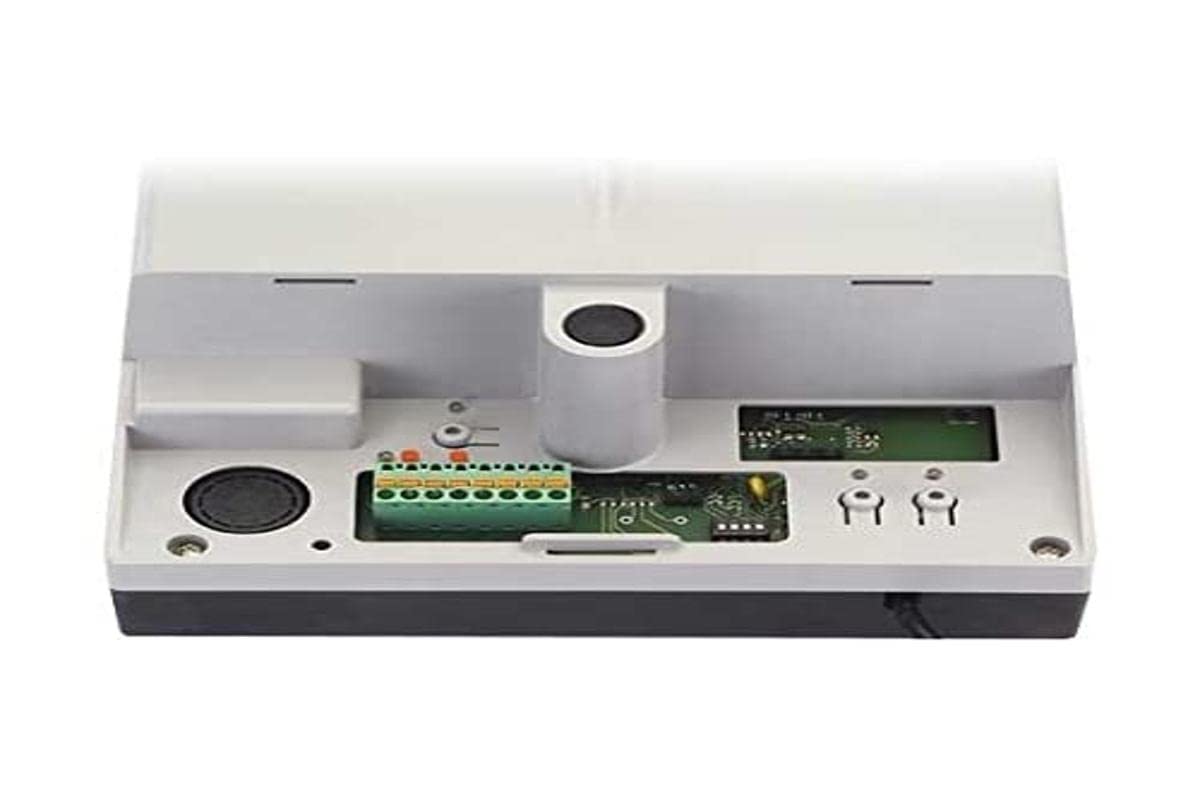
Image 1: FAAC E600 (D600) Electronic Board Remote Control. This image shows the compact design of the remote control unit.
اہم خصوصیات میں شامل ہیں:
- ایرگونومک ڈیزائن: پکڑنے اور استعمال کرنے میں آرام دہ۔
- کنیکٹوٹی: Radio frequency and Infrared technology for versatile control.
- بٹنوں کی تعداد: 1 button for simple operation.
5. سیٹ اپ اور انسٹالیشن
Follow these steps to set up your FAAC E600 (D600) remote control:
- بیٹری کی تنصیب:
Open the battery compartment on the back of the remote control. Insert the required batteries, ensuring correct polarity (+/-). Close the compartment securely.
- وصول کنندہ کے ساتھ جوڑا بنانا:
Refer to the manual of your FAAC receiver unit (e.g., gate opener, barrier system) for specific pairing instructions. Typically, this involves pressing a programming button on the receiver and then pressing the button on the E600 (D600) remote control within a short timeframe.
- جانچ:
After successful pairing, test the remote control's functionality by operating the connected device from a safe distance.
6. آپریٹنگ ہدایات
The FAAC E600 (D600) remote control is designed for simple, single-button operation.
- چالو کرنے کے لئے: Press and hold the single button on the remote control. The connected FAAC device will respond according to its programmed function (e.g., open/close gate, activate barrier).
- حد: Ensure you are within the operational range of the receiver for reliable communication. Obstacles can reduce the effective range.
7 دیکھ بھال
اپنے ریموٹ کنٹرول کی لمبی عمر اور بہترین کارکردگی کو یقینی بنانے کے لیے، دیکھ بھال کے ان رہنما خطوط پر عمل کریں:
- صفائی: ریموٹ کنٹرول کو نرم، خشک کپڑے سے صاف کریں۔ کھرچنے والے کلینر یا سالوینٹس کا استعمال نہ کریں۔
- بیٹری کی تبدیلی: Replace batteries when the operational range decreases or the indicator light (if present) signals low power. Dispose of old batteries responsibly.
- ذخیرہ: Store the remote control in a dry place, away from direct sunlight and extreme temperatures, when not in use for extended periods.
8 خرابیوں کا سراغ لگانا
If you encounter issues with your FAAC E600 (D600) remote control, refer to the following table:
| مسئلہ | ممکنہ وجہ | حل |
|---|---|---|
| ریموٹ کنٹرول کام نہیں کر رہا۔ | مردہ بیٹریاں۔ | بیٹریاں تبدیل کریں۔ |
| Remote control has short range. | Low batteries; Obstruction between remote and receiver. | Replace batteries; Ensure clear line of sight or reduce distance. |
| Device not responding after battery change. | Remote control lost pairing with receiver. | Re-pair the remote control with the receiver (refer to Section 5). |
If the problem persists, contact FAAC customer support or a qualified technician.
9. وضاحتیں
| فیچر | تفصیل |
|---|---|
| برانڈ | ایف اے اے سی |
| ماڈل کا نام | E600 (D600) |
| خصوصی خصوصیت | ایرگونومک |
| ہم آہنگ آلات | FAAC Camera Systems (and other compatible FAAC devices) |
| کنیکٹوٹی ٹیکنالوجی | Radio Frequency, Infrared |
| بٹنوں کی تعداد | 1 |
| کنٹرولر کی قسم | بٹن کنٹرول |
| شے کا وزن | 100 گرام |
| بین الاقوامی آرٹیکل کوڈ (EAN) | 08055195014853 |
10. وارنٹی اور سپورٹ
For warranty information and technical support, please refer to the official FAAC website or contact your authorized FAAC dealer. Keep your proof of purchase for warranty claims.