
Waveshare 7inch HDMI LCD (H)
Waveshare 7-inch HDMI Capacitive Touch Screen LCD User Manual
ماڈل: 7 انچ HDMI LCD (H)
تعارف
This manual provides detailed instructions for setting up, operating, and maintaining your Waveshare 7-inch HDMI Capacitive Touch Screen LCD. This display features a 1024x600 resolution IPS panel, capacitive touch functionality, and broad compatibility with various single-board computers and PCs.
پیکیج کے مشمولات
تصدیق کریں کہ نیچے دی گئی تمام اشیاء آپ کے پیکیج میں شامل ہیں:
- 7 انچ HDMI LCD (H)
- HDMI کیبل
- USB Type-A to Micro-B Cable (for touch and power)
- HDMI to Micro HDMI Adapter (for Raspberry Pi Zero series)
- Screws and standoffs for mounting

Image: Contents of the Waveshare 7-inch HDMI LCD package, including the display, HDMI cable, USB cable, HDMI adapter, and mounting hardware.
مصنوعات کی خصوصیات
- ڈسپلے سائز: 7 انچ آئی پی ایس اسکرین۔
- قرارداد: 1024x600 hardware resolution, software configurable up to 1920x1080.
- ٹچ کی قسم: Capacitive, 5-point touch support.
- Viewزاویہ: 170 ° چوڑا۔ viewING زاویہ
- انٹرفیس ڈسپلے: HDMI / VGA (VGA requires separate cable).
- آڈیو آؤٹ پٹ: 3.5mm audio jack and 4PIN header for speaker connection.
- OSD مینو: Multi-language On-Screen Display menu for power management, brightness, and contrast adjustments.
- مطابقت: Supports Raspberry Pi OS, Ubuntu, Kali, Retropie (driver-free for Raspberry Pi); Windows 11/10/8.1/8/7 (5-point touch, driver-free); Jetson Nano (Ubuntu, single-point touch, driver-free); Game Consoles (Xbox360, PS4, Switch - display only).

تصویر: ختمview of the 7-inch HDMI Touch Display's key specifications including size, resolution, display interface, panel type, viewing angle, touch type, touch points, touch port, OSD menu, and audio outputs.
سیٹ اپ کی ہدایات
1 Raspberry Pi سے منسلک ہو رہا ہے۔
- Connect the HDMI port of the Raspberry Pi to the HDMI port of the display using the provided HDMI cable.
- Connect the USB port of the Raspberry Pi to the Micro-B USB port labeled "Touch" on the display using the provided USB A to Micro-B cable. This provides power to the display and enables touch functionality.
- For Raspberry Pi Zero series, use the included HDMI to Micro HDMI adapter.
- Ensure the Raspberry Pi is powered by a suitable 5V/3A (or higher, depending on Pi model) power supply. The display can draw power from the USB connection, but an external power supply for the Pi is essential.
2. Connecting to PC (Windows)
- Connect the HDMI output of your PC to the HDMI input of the display.
- Connect a USB port on your PC to the Micro-B USB port labeled "Touch" on the display. This provides power and enables 5-point touch functionality.
- The display is driver-free for Windows 11/10/8.1/8/7.
3. Connecting to Jetson Nano
- Connect the HDMI output of the Jetson Nano to the HDMI input of the display.
- Connect a USB port on the Jetson Nano to the Micro-B USB port labeled "Touch" on the display. This provides power and enables single-point touch functionality.
- Ensure the Jetson Nano is powered by a suitable 5V/4A power supply.
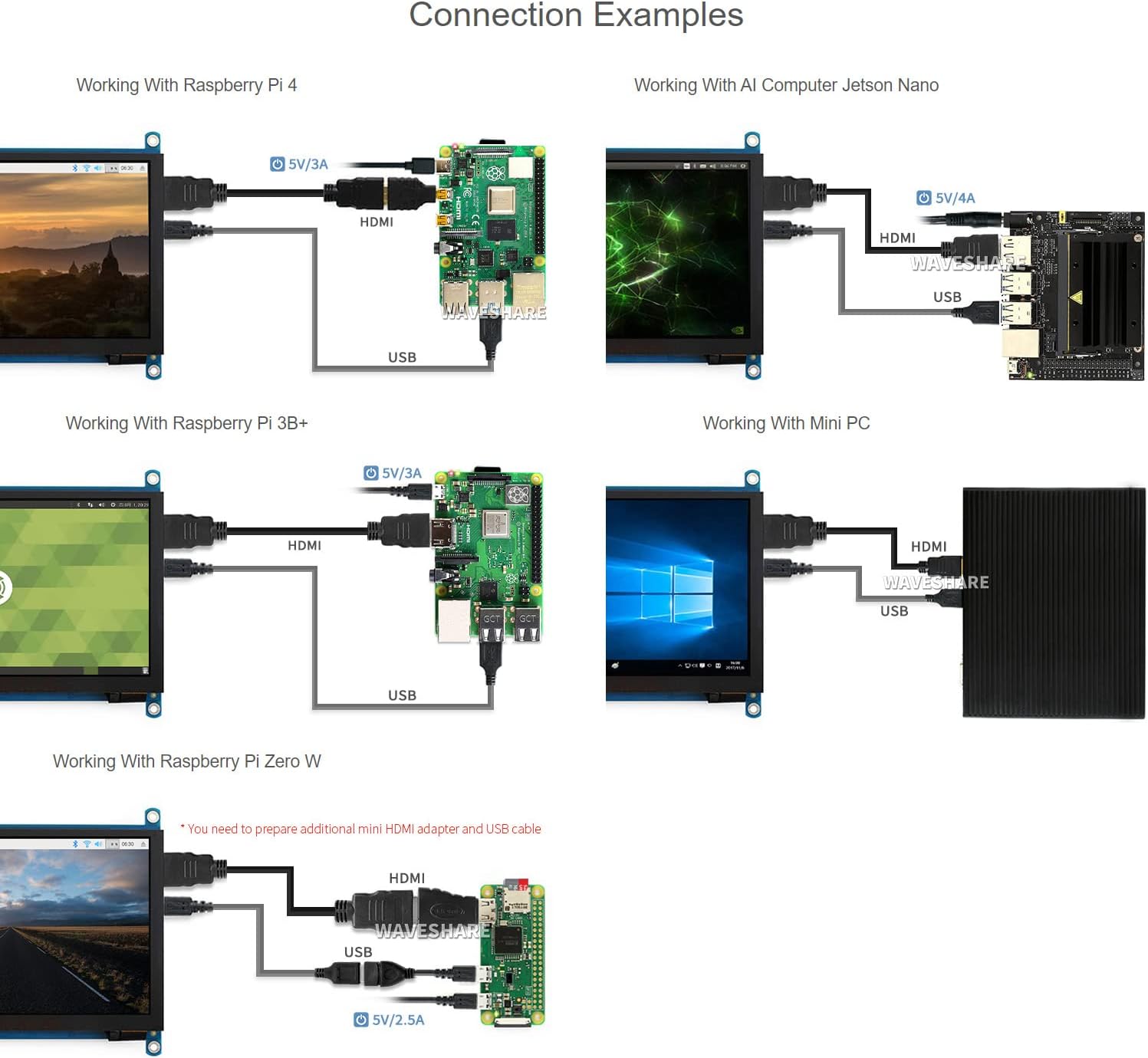
تصویر: مختلف کنکشن کی مثال دینے والے خاکےamples for the 7-inch HDMI LCD with Raspberry Pi 4, Jetson Nano, Raspberry Pi 3B+, Raspberry Pi Zero W, and a Mini PC, showing HDMI and USB cable connections.
آپریٹنگ ہدایات
1. پر / آف پاور
The display powers on automatically when connected to a powered device via HDMI and USB. To power off, disconnect the power source from the connected device or the display's USB power input.
2 OSD مینو نیویگیشن
The display features an On-Screen Display (OSD) menu for various settings. Use the physical buttons on the side of the display to navigate and adjust settings such as brightness, contrast, and power management. Refer to the "Appearance and Dimensions" section for button identification.
3. ٹچ کنٹرول
The display supports capacitive touch input. When connected via USB to a compatible operating system (Raspberry Pi OS, Ubuntu, Kali, Windows), the touch functionality will be recognized automatically without additional drivers. The number of touch points supported depends on the operating system (e.g., 5-point touch on Windows, single-point on Jetson Nano Ubuntu).

Image: Demonstrates the capacitive touch control functionality on the 7-inch HDMI LCD, showing a hand interacting with a web browser interface. Also shows the display connected to a game console, indicating support for gaming display.
4. آڈیو آؤٹ پٹ۔
Audio can be output through the 3.5mm audio jack or the 4PIN header for external speakers. Ensure your connected device is configured to output audio via HDMI.
دیکھ بھال
- صفائی: Use a soft, lint-free cloth to gently wipe the screen surface. Do not use abrasive cleaners or solvents.
- ذخیرہ: Store the display in a cool, dry environment away from direct sunlight and extreme temperatures.
- ہینڈلنگ: اسکرین پر ضرورت سے زیادہ دباؤ لگانے یا ڈیوائس کو گرانے سے گریز کریں۔
خرابی کا سراغ لگانا
- کوئی ڈسپلے/بلیک اسکرین نہیں:
- Ensure all HDMI and USB cables are securely connected.
- Verify the connected device (Raspberry Pi, PC) is powered on and outputting video.
- Check the power supply for the connected device; insufficient power can cause display issues.
- Try a different HDMI cable or port if available.
- ٹچ فنکشن کام نہیں کر رہا ہے:
- Ensure the USB cable for touch is connected from the display's "Touch" port to the host device.
- Verify the operating system on your host device supports touch input and is configured correctly.
- For Raspberry Pi, ensure the OS is up-to-date and configured for the display's resolution.
- A low USB voltage can cause touch failure; ensure adequate power supply.
- ڈسپلے فلکرنگ:
- This can be caused by low USB voltage. Ensure the host device has a stable and sufficient power supply (e.g., 5V/3A for Raspberry Pi).
- ڈھیلے کیبل کنکشن چیک کریں۔
- کوئی آڈیو آؤٹ پٹ نہیں:
- Ensure your host device is configured to output audio via HDMI.
- Check connections to the 3.5mm jack or 4PIN header.
وضاحتیں
| اسکرین کا سائز | 7 انچ |
| قرارداد | 1024 x 600 (Hardware), up to 1920x1080 (Software) |
| پینل کی قسم | آئی پی ایس |
| Viewآئی اینگل | 170° |
| ٹچ کی قسم | Capacitive |
| ٹچ پوائنٹس | 5-point (Windows), Single-point (Jetson Nano), 5-point (Raspberry Pi OS) |
| انٹرفیس ڈسپلے کریں | HDMI, VGA (requires separate cable) |
| آڈیو آؤٹ پٹ | 3.5mm Jack, 4PIN Header |
| پاور ان پٹ | 5V DC (USB کے ذریعے) |
| مصنوعات کے طول و عرض | 7.09 x 5.51 x 1.97 انچ (180 x 140 x 50 ملی میٹر تقریباً) |
| شے کا وزن | 0.352 اونس (10 گرام تقریباً) |
ڈیوائس اور سسٹم سپورٹ
- راسبیری پائی: Supports Raspberry Pi OS, Ubuntu, Kali, Retropie (driver-free). Supports all versions of Raspberry Pi.
- جیٹسن نینو: Supports Ubuntu (single-point touch, driver-free).
- پی سی: Supports Windows 11 / 10 / 8.1 / 8 / 7 (5-point touch, driver-free).
- گیم کنسولز: Xbox360, PS4, Switch (display only).
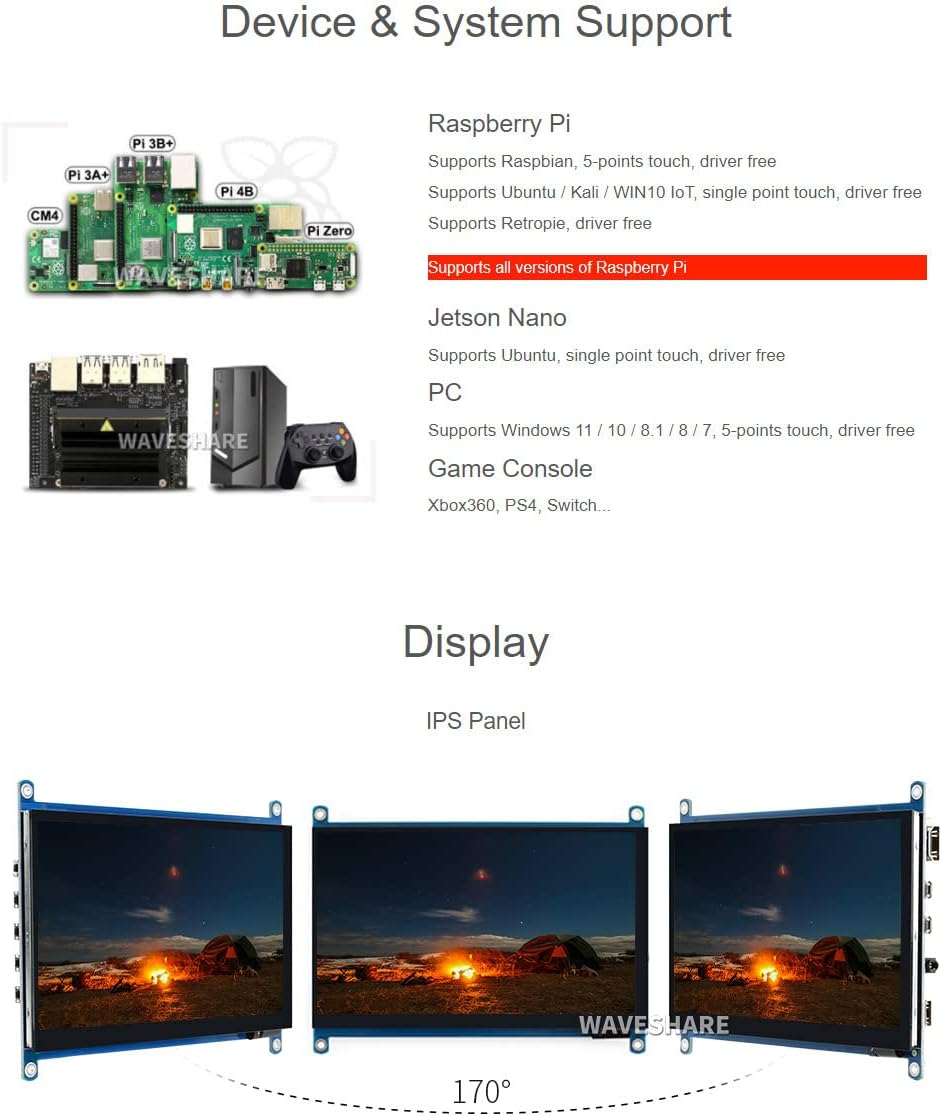
Image: Illustrates various compatible devices including Raspberry Pi models (Pi 3A+, Pi 3B+, Pi 4B, CM4, Pi Zero), Jetson Nano, and a generic PC setup, along with a list of supported operating systems and touch capabilities.
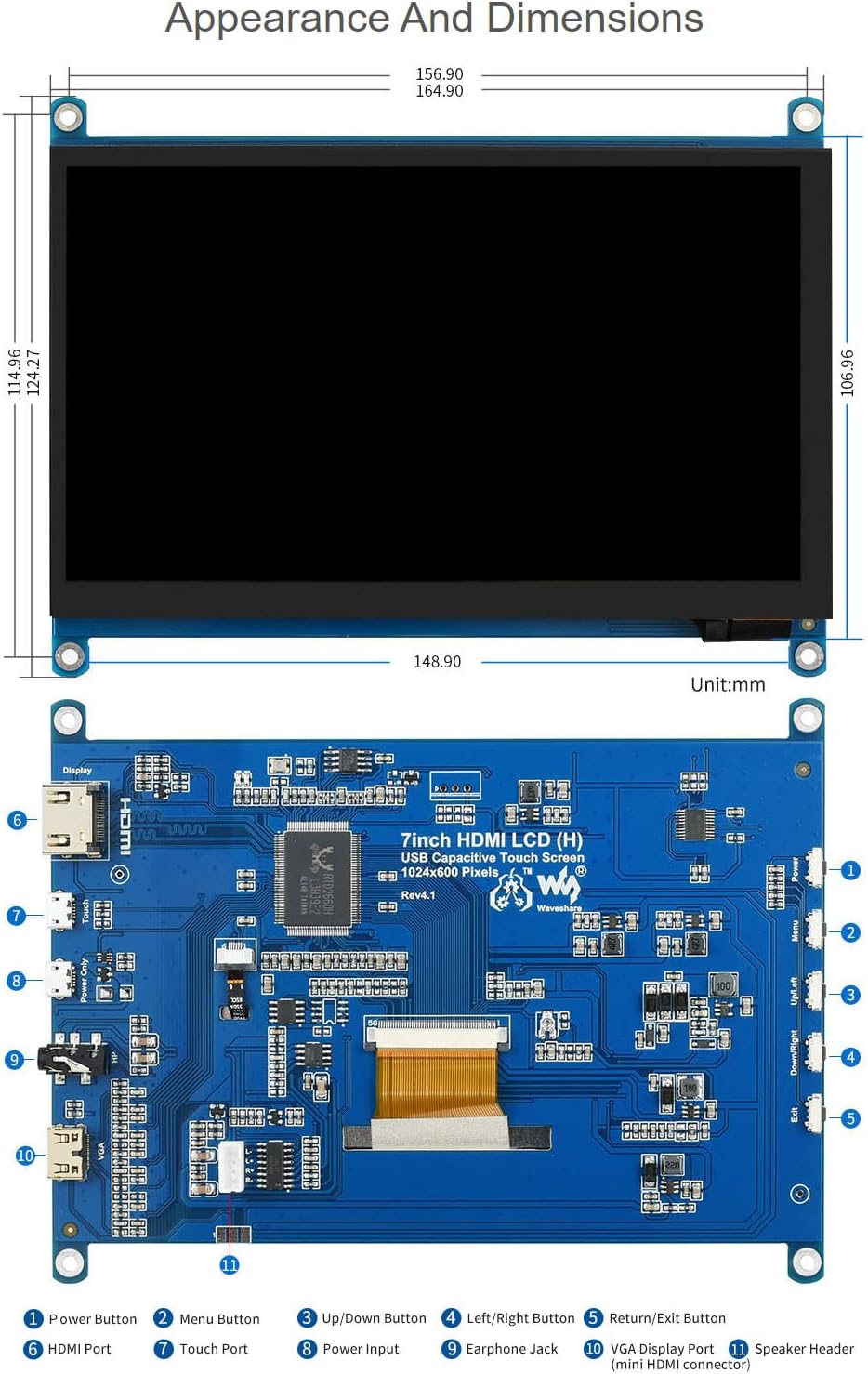
Image: Technical drawing showing the physical dimensions of the 7-inch HDMI LCD in millimeters, along with a detailed diagram identifying various ports and buttons on the display's circuit board, such as HDMI port, touch port, power input, earphone jack, VGA display port, and OSD menu buttons.
وارنٹی اور سپورٹ
Waveshare is committed to providing high-quality products and customer service.
- مفت متبادل: 30 days from purchase date.
- Free Repair: 365 days from purchase date.
- تکنیکی خدمات: زندگی بھر تکنیکی مدد دستیاب ہے۔
For technical assistance or warranty claims, please contact Waveshare customer support through their official channels.

Image: Details Waveshare's commitment to support and service, including rigorous testing, one-to-one technical service, 24-hour response, 30-day free replacement, 365-day free repair, and lifetime technical service.
سرٹیفیکیشنز
This product holds the following certifications:
- HDMI Certified: The display is an officially authorized HDMI adopter, ensuring higher-quality images and stable data transmission. For verification, visit HDMI.org.
- RoHS کے مطابق: Complies with the Restriction of Hazardous Substances Directive.
- عیسوی مصدقہ: Meets European Union safety, health, and environmental protection requirements.
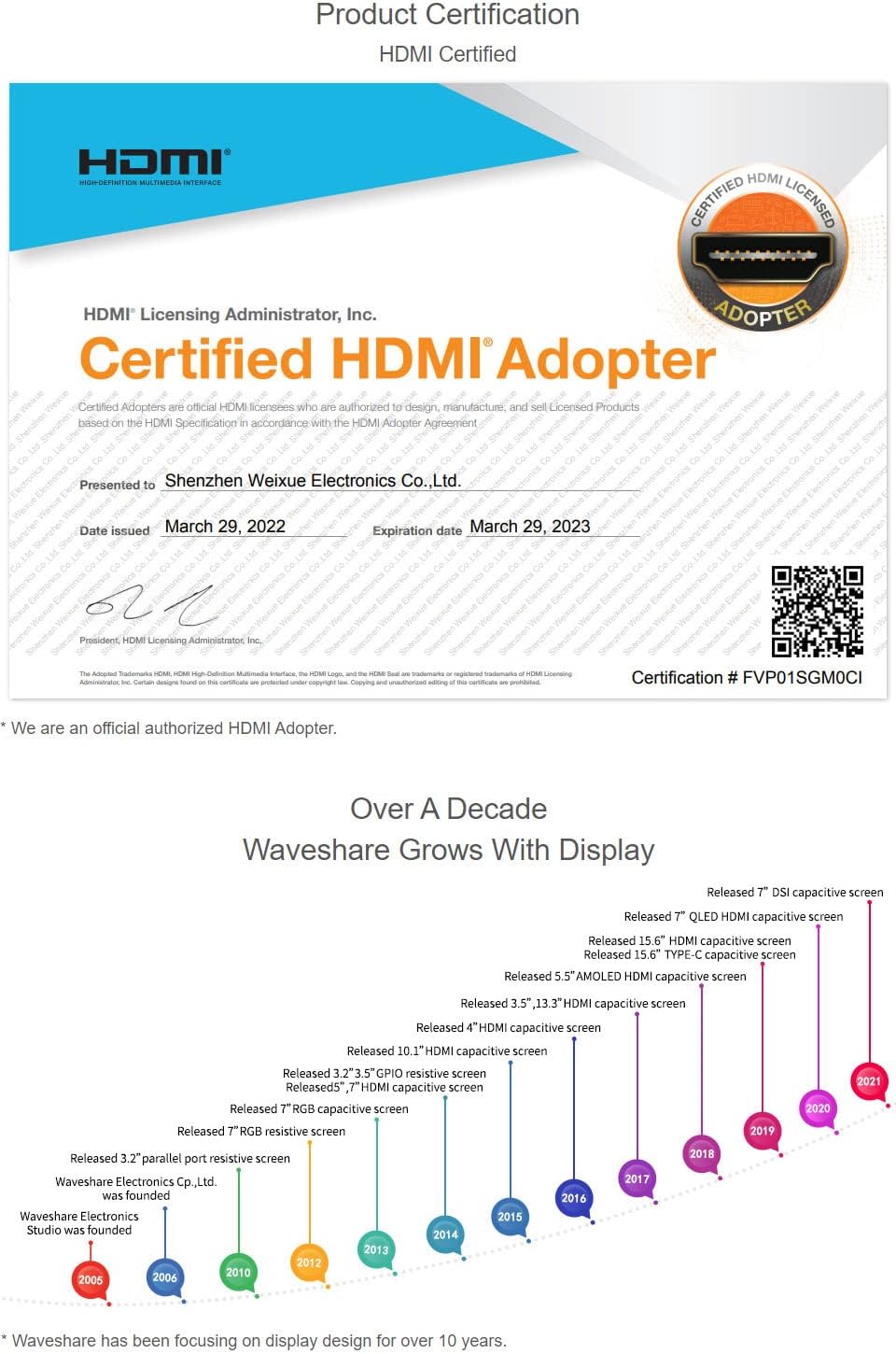
Image: A certificate indicating that Waveshare is an officially authorized HDMI adopter, ensuring compliance with HDMI standards for quality and reliability.

Image: Displays certificates for RoHS compliance and CE marking, indicating the product meets relevant environmental and safety standards.
Ask a question about this manual
Ask about setup, troubleshooting, compatibility, parts, safety, or missing instructions. Manuals+ will review the question and use this page’s manual context to help answer it.