
تعارف
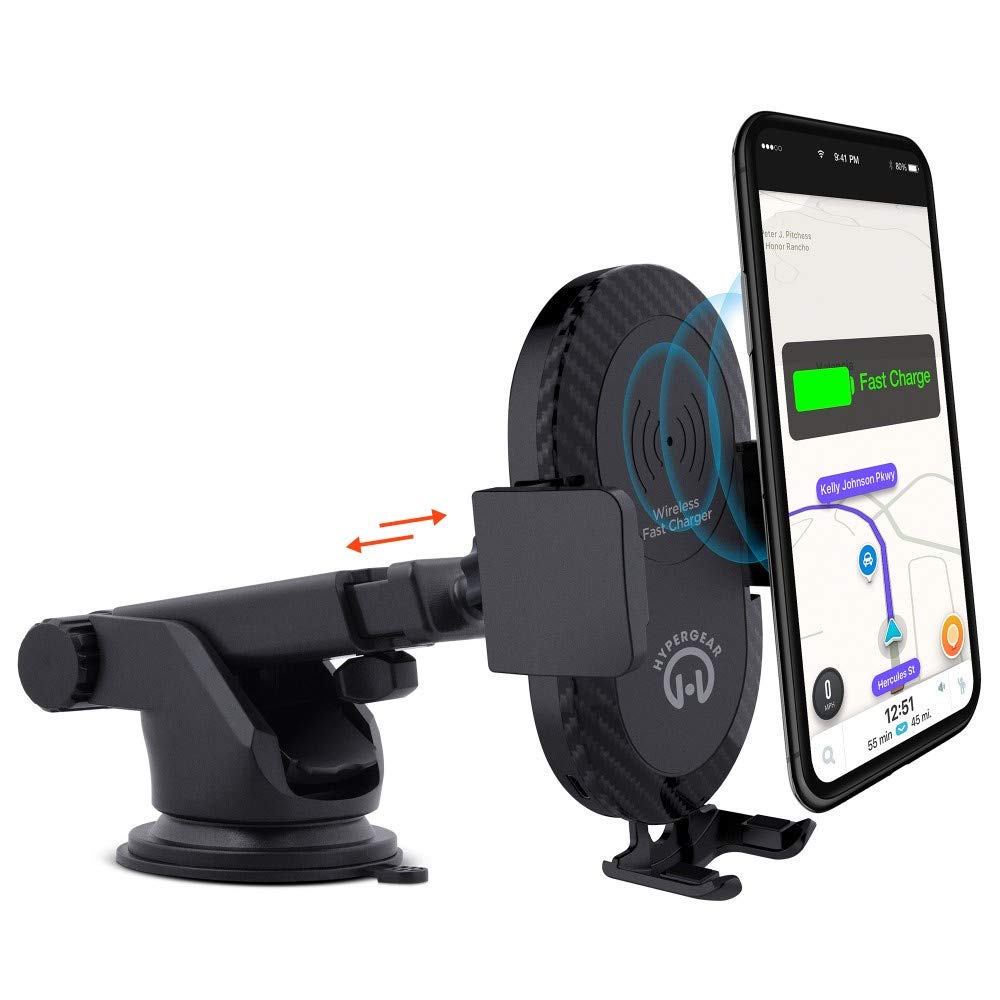
This manual provides instructions for the HyperGear HYG-14590 Wireless Fast Charging Car Dash Mount. This device is designed to securely hold and wirelessly charge Qi-enabled smartphones in your vehicle, offering hands-free navigation and communication.
پیکیج کے مشمولات
تصدیق کریں کہ تمام اشیاء پیکیج میں موجود ہیں:
- Telescopic Mount
- Fast Charge Car Adapter
- مائیکرو USB کیبل
- صارف دستی (یہ دستاویز)
سیٹ اپ کی ہدایات
- بڑھتے ہوئے مقام کا انتخاب کریں: Select a clean, flat surface on your dashboard or windshield. Ensure the location does not obstruct your view یا گاڑی کے کنٹرول میں مداخلت کریں۔
- ماؤنٹ منسلک کریں:
- Clean the chosen surface thoroughly.
- Remove the protective film from the sticky gel suction cup.
- سکشن کپ کو سطح پر مضبوطی سے دبائیں۔
- Engage the 2-step locking lever to secure the mount in place.
- پاور سے رابطہ کریں:
- Insert the Micro USB cable into the charging port on the mount.
- Plug the other end of the Micro USB cable into the Fast Charge Car Adapter.
- Insert the Fast Charge Car Adapter into your vehicle's 12V power outlet (cigarette lighter socket).
- Adjust the Mount:
- Extend the telescopic arm up to 8 inches as needed.
- Pivot the arm up to 230° to achieve the desired angle.
- Rotate the cradle head 360° to switch between portrait and landscape orientation.
آپریٹنگ ہدایات
- Placing Your Device: Gently open the adjustable padded cradle grips and place your Qi-enabled smartphone into the mount. The grips will automatically secure the device.
- وائرلیس چارجنگ: Once your device is placed in the mount and the mount is powered, wireless charging will begin automatically. Ensure your device is centered on the charging pad for optimal performance.
- آپ کے آلے کو ہٹانا: To remove your device, gently open the cradle grips and lift your smartphone out.
- ہینڈز فری استعمال: The mount allows for hands-free use of navigation, calls, and other applications while driving. Always ensure your device is positioned safely and does not obstruct your view سڑک کے.
دیکھ بھال
- صفائی: Use a soft, dry cloth to clean the mount. Do not use abrasive cleaners or solvents.
- سکشن کپ کی دیکھ بھال: If the sticky gel suction cup loses adhesion, rinse it with warm water and let it air dry. This can help restore its stickiness.
- ذخیرہ: جب لمبے عرصے تک استعمال نہ ہو تو، ماؤنٹ کو براہ راست سورج کی روشنی سے دور ٹھنڈی، خشک جگہ پر محفوظ کریں۔
خرابی کا سراغ لگانا
- آلہ وائرلیس چارج نہیں ہو رہا ہے:
- Ensure your smartphone is Qi-enabled or has a Qi-enabled receiver.
- Verify the Micro USB cable is securely connected to both the mount and the car adapter.
- Check that the car adapter is firmly seated in the vehicle's 12V power outlet.
- Ensure your phone is centered on the charging pad of the mount.
- کسی بھی موٹے فون کیس کو ہٹا دیں جو وائرلیس چارجنگ میں مداخلت کر سکتے ہیں۔
- Mount not sticking to surface:
- Clean the dashboard or windshield surface thoroughly before attachment.
- Ensure the 2-step locking lever is fully engaged.
- Rinse the sticky gel suction cup with warm water and air dry to restore adhesion.
- Avoid mounting on textured or porous surfaces.
- Phone not held securely:
- Ensure the adjustable padded cradle grips are properly closed around your device.
- Verify that your phone's size is compatible with the mount's adjustable range.
وضاحتیں
| ماڈل نمبر | HYG-14590 |
| برانڈ | ہائپر گیئر |
| کنیکٹوٹی ٹیکنالوجی | وائرلیس |
| کنیکٹر کی قسم | USB، وائرلیس |
| ہم آہنگ آلات | Cellular Phones (Qi-enabled) |
| ہم آہنگ فون ماڈلز | iPhone X/8/8 Plus, Samsung Galaxy S9/S9+, S8/S8+, Note 8, and other Qi-enabled devices |
| خصوصی خصوصیت | فاسٹ چارجنگ، وائرلیس چارجنگ |
| واٹtage | 10 واٹ |
| طاقت کا منبع | Vehicle 12V Power Outlet |
| مین پاور کنیکٹر کی قسم | USB Type C (for car adapter) |
| شے کا وزن | 11.84 اونس |
| انکلوژر میٹریل | Gel (suction cup) |
| رنگ | سیاہ |
| یو پی سی | 633755145902 |
وارنٹی کی معلومات
This HyperGear product comes with a 30 دن کی وارنٹی from the date of purchase. This warranty covers manufacturing defects. Please retain your proof of purchase for warranty claims. For further details or to initiate a claim, please refer to the HyperGear official webسائٹ یا ان کے کسٹمر سپورٹ سے رابطہ کریں۔
کسٹمر سپورٹ
For technical assistance, product inquiries, or warranty support, please visit the official HyperGear webسائٹ یا ان کے کسٹمر سروس ڈیپارٹمنٹ سے رابطہ کریں۔ رابطے کی معلومات عام طور پر مصنوعات کی پیکیجنگ یا برانڈ کی سرکاری آن لائن موجودگی پر مل سکتی ہے۔